
Stuttering During Fast Motion (1 Viewer)

kiwijunglist

Super Moderator
  • Team MediaPortal
  • June 10, 2008
    6,743
    1,754
    New Zealand
    Home Country
    New Zealand New Zealand
    load CCC

    set refresh rate to 50hz click apply, set overscan = 0% click apply
    set refresh rate to 60hz click apply, set overscan = 0% click apply
    set refresh rate to 24hz click apply, set overscan = 0% click apply

    now change refresh rate to 24/50/60hz in CCC and double check that overscan stays at 0%. Now you are done.
     

    gperkinson

    Portal Pro
    October 28, 2008
    470
    3
    Auckland
    Home Country
    New Zealand New Zealand
    Yep, that's what I thought and did and the overscan is definately set to 0%.

    How did the video clip run on your system? Blurry?

    Since re-installing everything apart from Win7 and runnning SAF4, things seem to be more stable. I'm also using Powerscheduler to manage my S3 sleep along with running the EPGCollector and this also appears to be running OK.

    I'm now thinking of getting into the more exciting stuff such as skins and plugins - anything you would recommend there?? I quite like BleazieWide and see a lot of comments about StreamedMP. Also, any good links for the Weather menu?

    Hey, thanks for all your help so far buddy - I really appreciate it!!
     

    kiwijunglist

    Super Moderator
  • Team MediaPortal
  • June 10, 2008
    6,743
    1,754
    New Zealand
    Home Country
    New Zealand New Zealand
    Watching the xvid blurr.avi recording is pointless because
    1. It's been re-encoded as xvid, so it will look worse than the original h264 .ts file
    2. TV-Server records video to a .ts independent of your mediaportal setup/codecs/video card etc.

    I watched it anyway and it doesn't look as sharp as c4 normally looks but that doesn't mean anything because of above. It is unlikely you will have any faults in the recording process it is the playback process.

    I would confirm you have 1:1 mapping. Your Samsung TV is set to "Just Scan" mode, correct?

    Save this file on your desktop PC connected to a PC LCD monitor running at native resolution
    http://www.tigerdave.com/images/testpatterns/1920x1080_overscan.gif
    Open the picture on your desktop PC (with LCD monitor) and view at 100% zoom
    Observe the way there are tiny fine white / green lines and that the colour is uniform
    Now view this 2nd image on your desktop PC (with LCD monitor) and view at 100% zoom
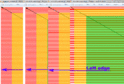
    https://forum.team-mediaportal.com/attachment.php?attachmentid=71650&stc=1&d=1289866416
    Notice there is horizontal striping and the colour is not uniform this is what the test pattern looks like when you don't have 100% zoom

    Now goto your HTPC connected to your TV
    Open this image - http://www.tigerdave.com/images/testpatterns/1920x1080_overscan.gif
    View at 100% zoom in picture viewer
    It should look the same as on your PC, if not then you have scaling issue.

    Note: this test will only work if your PC monitor is running at the correct native resolution, otherwise you can not appreciate what the image is supposed to look like.
     

    Attachments

    • non1to1map.gif
      non1to1map.gif
      71.9 KB

    gperkinson

    Portal Pro
    October 28, 2008
    470
    3
    Auckland
    Home Country
    New Zealand New Zealand
    Sorry for only getting back to you now.

    Watching the xvid blurr.avi recording is pointless because
    1. It's been re-encoded as xvid, so it will look worse than the original h264 .ts file
    2. TV-Server records video to a .ts independent of your mediaportal setup/codecs/video card etc.

    I watched it anyway and it doesn't look as sharp as c4 normally looks but that doesn't mean anything because of above. It is unlikely you will have any faults in the recording process it is the playback process.

    Interesting. I like using Handbrake and found free MMSolveig AVI cutter was great for cutting out single music videos and xvid seemed to work well through this tool. Do you know of any other free method of doing this to come up with a file with quality like the original ts file? The full HD ones come out really nice :)

    I would confirm you have 1:1 mapping. Your Samsung TV is set to "Just Scan" mode, correct?.

    Yep, definately set to Just Scan and definately have 1:1 mapping.

    Save this file on your desktop PC connected to a PC LCD monitor running at native resolution
    http://www.tigerdave.com/images/testpatterns/1920x1080_overscan.gif
    Open the picture on your desktop PC (with LCD monitor) and view at 100% zoom
    Observe the way there are tiny fine white / green lines and that the colour is uniform
    Now view this 2nd image on your desktop PC (with LCD monitor) and view at 100% zoom
    https://forum.team-mediaportal.com/attachment.php?attachmentid=71650&stc=1&d=1289866416
    Notice there is horizontal striping and the colour is not uniform this is what the test pattern looks like when you don't have 100% zoom

    Now goto your HTPC connected to your TV
    Open this image - http://www.tigerdave.com/images/testpatterns/1920x1080_overscan.gif
    View at 100% zoom in picture viewer
    It should look the same as on your PC, if not then you have scaling issue.

    Note: this test will only work if your PC monitor is running at the correct native resolution, otherwise you can not appreciate what the image is supposed to look like.

    Have done the above before and I'm sure I have 1:1 mapping, but thanks for the details - appreciated.

    I have also had issues since moving to MP 1.1.1.0, the latest ForTheRecord and SAF4 where I have had freezes which I think start after the machine has been sleeping and resumed. I notice the panning starts also after a few days but after a reboot all OK again.

    Any help on the above appreciated. I will probably start a forum on this and grab some extensive logging from tonight.

    Cheers

    Graham
     

    kiwijunglist

    Super Moderator
  • Team MediaPortal
  • June 10, 2008
    6,743
    1,754
    New Zealand
    Home Country
    New Zealand New Zealand
    you could format your pc with win7 32bit and have a clean system and use unlocked saf5 instead of 4. other than that i can't really help you anymore.

    Handbrake is really good, another good program is avidemux. If you want to keep the quality you can use handbrake to convert the .ts file into a very long h264 mkv aac file. Then use an h264 mkv cutter to cut up the tracks. This will preserve the most quality. You should keep the audio in it's original AAC stereo format. If you write down the times (HH.MM.SS.NN) in your mediaplayer when you play the mkv file then you can set mkvmerge to split the mkv file. There is probably a better cutter, but last time I looked there are not many programs that lossless cut mkv h264 files. Using mkvmerge to split the file is tedious.
     

    gperkinson

    Portal Pro
    October 28, 2008
    470
    3
    Auckland
    Home Country
    New Zealand New Zealand
    you could format your pc with win7 32bit and have a clean system and use unlocked saf5 instead of 4. other than that i can't really help you anymore..

    So, Win7 A ..... you seem to be pretty convinced that Vista is my issue.

    Why is it that I don't get the panning after a reboot and it progressively gets worse until I reboot again? - does that sound like an operating system related issue?? Also, what's in SAF5 thats not in SAF4??

    Really a new operating system is all I have left. What about log files, could they provide any information?

    I really appreciate your comments. This issue is very frustrating!!

    I should also mention that I use Powerscheduler to put the machine into S3 sleep - could that cause some of my issues?? I might test leaving the machine running and seeing if the panning starts.

    Any comment on the above appreciated.

    Graham
     

    gperkinson

    Portal Pro
    October 28, 2008
    470
    3
    Auckland
    Home Country
    New Zealand New Zealand
    Hi All,

    Still no joy with this issue which has plagued me since I have used MP!!

    Summary as follows:

    This is a "panning" issue or trailing images

    ATI Radeon HD 3850 Card
    SAF4 installed - Unlocked (codecs selected as per instruction)
    Latest CCC V10

    Issue appears to be on recorded or Live TV

    FPS at 50 when <Shift !> selected and no dropped frames

    I'm using a NOVA 500-T card
    Signal quality and strength seems OK - got booster on aerial with combo VHF & UHF split 4 ways
    Have not investiagted whether the TV Tuner card could be the issue
    - any suggestions for testing TV Tuner or experiances appreciated
    - if I'm getting good fps & no dropped frames, could that suggest it's the actul recording that is the issue?

    Are there any log files I could provide to help pinpoint the issue?

    Any help here welcome

    Graham
     

    Users who are viewing this thread

    Top Bottom