Ongoing The Milhouse Media Server (1 Viewer)

milhouse

Portal Pro
November 9, 2006
363
54
51
Raleigh, NC U.S.
Home Country
United States of America United States of America
dubyajah-
No mod needed for this rig - the CM case is already set up to handle two PSUs - top and bottom. It also comes with a cable to connect them both to the motherboard, so when you turn it on/off both PSUs are powered up/down at the same time. Very slick.

One note of caution so far in this project (and with almost all the hardware done, I don't expect many more problems): the fourth SATA backplane was a VERY tight fit. I basically had to use two screwdrivers to carefully pry up the front of the case top, then pound in the last backplane. I hope they are trouble free, because I am not sure they'll even come back out. (I suspect that if I did need to remove them, removing the bottom one first would probably work).

A second item I haven't yet addressed is actually turning this thing on. I removed the panel that had the front usb/1394/mic/headphone connectors, as well as the reset and power buttons. I needed the space for backplanes. But I need a switch to turn it on. Initially.

Ideas to address this:
option 1) since it stays on all the time, I may just set it up, turn it on, unplug the power switch, and throw it in a drawer. I don't really need one except the very rare times when I might power down. Haven't done that for two months.
option 2) get a cheap button from Radio Shack, or use an existing button from my MAME arcade, and drill a hole in the case to mount it. Not a big fan of this because I have to drill a hole in a nice case, and am concerned about it getting accidently pressed. So I'd have to figure out where to mount it.
option 3) leave the front panel power switch hooked up, and just leave it inside the case. If I needed it, two thumbscrews, remove the side panel, press the button, and replace the side panel.

Currently, the panel is still plugged in and the cable snakes out from behind the side panel. the switch just lays on top of the case right now.
 

Gixxer

Retired Team Member
  • Premium Supporter
  • August 18, 2007
    1,383
    41
    41
    Spain
    Home Country
    Spain Spain
    hi milhouse i am following your post just to learn new stuff but i will probably never come to such a big project

    about the power on you could use any other computer to send a magic package through LAN to boot the computer. i do that when i want to boot my htpc and dont want to walk to the room where it is in.

    just another idea in case u hadnt think about it.
     

    milhouse

    Portal Pro
    November 9, 2006
    363
    54
    51
    Raleigh, NC U.S.
    Home Country
    United States of America United States of America
    Gixxer - thanks, I actually HADN'T thought of that. Wake-on-LAN is a really easy way to not need a power switch. Great idea!

    Hopefully it's enabled in the BIOS already. Otherwise I'll have to haul that heavy thing back upstairs to hook it up to a monitor.
     

    Gixxer

    Retired Team Member
  • Premium Supporter
  • August 18, 2007
    1,383
    41
    41
    Spain
    Home Country
    Spain Spain
    Gixxer - thanks, I actually HADN'T thought of that. Wake-on-LAN is a really easy way to not need a power switch. Great idea!

    Hopefully it's enabled in the BIOS already. Otherwise I'll have to haul that heavy thing back upstairs to hook it up to a monitor.

    great !! im glad that helped you. when i was writting it i though that you would have already thought about it as you know way more that me from what i can see.

    what i did was create a little bat file so with just one click i boot the htpc computer.

    you will probably have to enable it, plus you need to get the mac address from the computer so probably the beast will have to be taken upstairs hehe
     

    Dubyahjay

    MP Donator
  • Premium Supporter
  • October 1, 2007
    144
    6
    Atlanta
    Home Country
    United States of America United States of America
    Gixxer - thanks, I actually HADN'T thought of that. Wake-on-LAN is a really easy way to not need a power switch. Great idea!

    Hopefully it's enabled in the BIOS already. Otherwise I'll have to haul that heavy thing back upstairs to hook it up to a monitor.

    Why not just take the monitor to it? :D
     

    milhouse

    Portal Pro
    November 9, 2006
    363
    54
    51
    Raleigh, NC U.S.
    Home Country
    United States of America United States of America
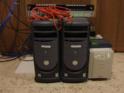
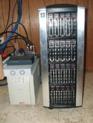
    After having taken the monitor to the server ;) everything is all cleaned up. The pile has gone from two computers to one, and I can now add 10 more hard drives without having to open the case. The power usage seems to have gone up quite a bit (at least according to the load lights on the UPS) so I am looking to underclock a bit at some point. 2.4 GHz Opteron is a lot more horsepower than I need for a fileserver. I may then also slow down the fans a bit to cut the noise some. It's in the basement, so this isn't much of a concern.

    The scariest part in moving the drives:
    So I had a 4 drive RAID-5 set (software) under Windows. Theoretically, I can unplug them, move them to a new computer, then Import Foreign Volume in Disk Management. Well, I did this. It saw it was a RAID set, it saw that I had all 4 drives from the set. However, when I clicked "import", it listed it as Incomplete Data. When I clicked OK, it said something to the effect of "all data will be lost - are you sure". Now, I KNOW this is supposed to work. I did some research and found a couple of postings that said the error message was wrong, and that I can just click OK. Cross my fingers, say a short prayer, and click OK. Whew! All is OK, and the volume starts re-syncing. No data loss. Repeat for second RAID set. Again, no problem.


    Before picture:
    Camera 001.jpg


    After picture:
    Camera 003.jpg

    The top 5 drives are (left to right) RAID set 1 disk 1, disk 2, disk 3, system mirror, system drive. All 5 are connected to the motherboard SATA ports.
    The second 5 drives are (left to right) RAID set 1 disk 4, RAID set 2 disk 1, disk 2, disk 3, disk 4.
    These drives (and the bottom two rows) are all connected to the SATA controller cards.

    Next to the server are the UPS, the patch panel for cat5 in 8 rooms in the house (have a few more rooms to do - eventually), the DSL modem, and a powered 1-to-4 coax splitter. (The coax "in" is from the htpc in the living room, and the "outs" are the rec room, exercise room, family room, and office. The bedroom has it's own htpc.)
     

    Gixxer

    Retired Team Member
  • Premium Supporter
  • August 18, 2007
    1,383
    41
    41
    Spain
    Home Country
    Spain Spain
    Incredible project !!

    how did you finally solve the power on issue?

    oh and what is the power usage of that beast? can you tell in Watts or u can only see another led lighted in the ups?
     

    milhouse

    Portal Pro
    November 9, 2006
    363
    54
    51
    Raleigh, NC U.S.
    Home Country
    United States of America United States of America
    I went with the wake-on-lan option. I had to move a monitor/keyboard down to get to the bios and enable it, then I just needed the Mac Address. Not that I expect to need to turn it off and on anytime soon.

    For the power usage - I really have no idea. The Opteron is listed at 103 watts. The ten drives are listed around 8.5 watts at idle.

    Half-load of the UPS is defined as 335 watts, so I am probably under that. If I had to guess, I'd say about 300W at idle.
     

    Gixxer

    Retired Team Member
  • Premium Supporter
  • August 18, 2007
    1,383
    41
    41
    Spain
    Home Country
    Spain Spain
    wow thats quite a lot to have it running 24/7 !!!

    so is everything working as it should ?
     

    Users who are viewing this thread

    Top Bottom