
You are using an out of date browser. It may not display this or other websites correctly.
You should upgrade or use an alternative browser.
You should upgrade or use an alternative browser.
Timeshift and Server Restart Error from hibo (1 Viewer)
- Thread starter lawofduality
- Start date
- February 14, 2009
- 46
- 0
- Home Country
-
 England
- Thread starter
- #12

- December 17, 2006
- 4,421
- 805
- Home Country
-
South Africa
Hi again
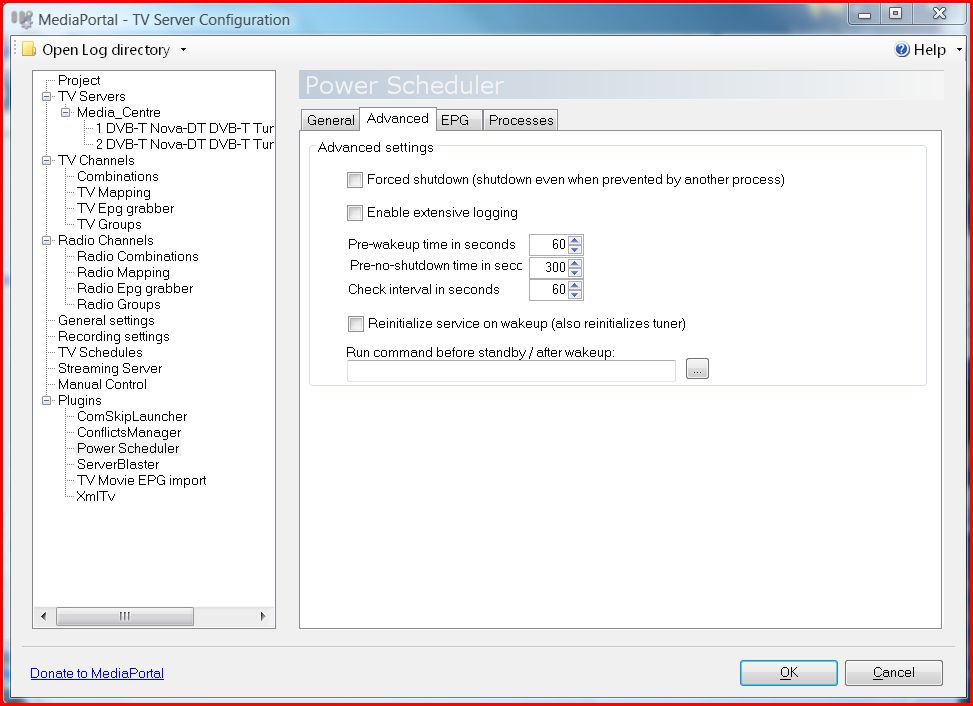
Sorry for repeating, but I just want to confirm my question in post number 9 about "re-initialize" setting.
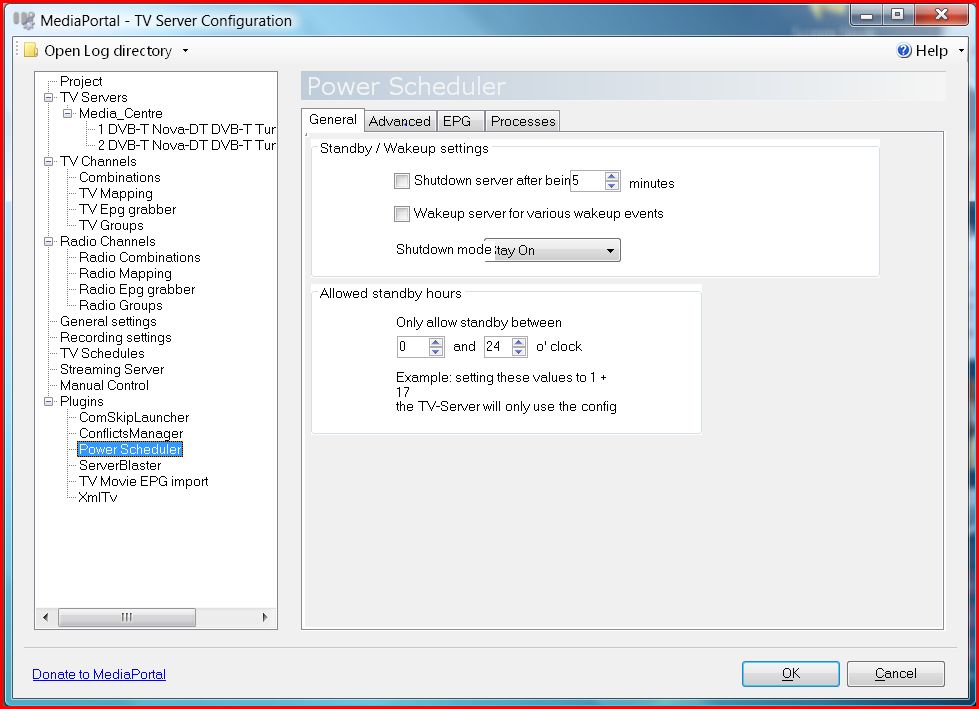
It is on your second screenshot (advanced). Did you definitely try it with that setting enabled?
Sorry for repeating, but I just want to confirm my question in post number 9 about "re-initialize" setting.
It is on your second screenshot (advanced). Did you definitely try it with that setting enabled?
- February 14, 2009
- 46
- 0
- Home Country
-
England
- Thread starter
- #14
Hi, and many thanks for all of this.
I'm sure that I have tried this on a previous install.
I will, however, try that again. Can't at the moment as my lad is watching "Cars" ... more than my life is worth to turn that off - not only from him but also his mother!
I'll probably try that tomorrow.
Many thanks.
I'm sure that I have tried this on a previous install.
I will, however, try that again. Can't at the moment as my lad is watching "Cars" ... more than my life is worth to turn that off - not only from him but also his mother!
I'll probably try that tomorrow.
Many thanks.

- February 14, 2009
- 46
- 0
- Home Country
-
England
- Thread starter
- #16
No luck!
I tried that.
Put the machine into sleep and woke the system again and got the same error:
Script: C:\Program Files (x86)\Team MediaPortal\MediaPortal\restartvbs
Line: 21
Char: 1
Error: The system cannot find the file specified.
Code: 80070002
Source: (null)
Very puzzling indeed. Do you have any more pointers?
Once again - Many thanks.
PS. Here's a copy of my restartvbs (which Must be pretty standard). As follows:
Option Explicit
Dim process
Dim shell
set shell=createobject("WScript.Shell")
' This doesnt work always when resuming from S3
'For Each process in GetObject("winmgmts:").ExecQuery("select * from Win32_Process where name='MediaPortal.exe'")
' process.Terminate(0)
'Next
'WScript.Sleep 1750
' try to find a way to wait until the task is killed. This way we could use the
' taskkill without /F and that would allow MP to save settings as its not forced to terminate
' shell.Run "taskkill /T /F /IM Mediaportal.exe", 0, true
' Using tskill to fix Mantis issue 1529
(LINE 21) shell.Run "tskill Mediaportal", 0, true (LINE 21)
shell.Run "mediaportal"
I tried that.
Put the machine into sleep and woke the system again and got the same error:
Script: C:\Program Files (x86)\Team MediaPortal\MediaPortal\restartvbs
Line: 21
Char: 1
Error: The system cannot find the file specified.
Code: 80070002
Source: (null)
Very puzzling indeed. Do you have any more pointers?
Once again - Many thanks.
PS. Here's a copy of my restartvbs (which Must be pretty standard). As follows:
Option Explicit
Dim process
Dim shell
set shell=createobject("WScript.Shell")
' This doesnt work always when resuming from S3
'For Each process in GetObject("winmgmts:").ExecQuery("select * from Win32_Process where name='MediaPortal.exe'")
' process.Terminate(0)
'Next
'WScript.Sleep 1750
' try to find a way to wait until the task is killed. This way we could use the
' taskkill without /F and that would allow MP to save settings as its not forced to terminate
' shell.Run "taskkill /T /F /IM Mediaportal.exe", 0, true
' Using tskill to fix Mantis issue 1529
(LINE 21) shell.Run "tskill Mediaportal", 0, true (LINE 21)
shell.Run "mediaportal"
- December 17, 2006
- 4,421
- 805
- Home Country
-
South Africa
Can you try replacing your restart.vbs with the version found here.
- February 14, 2009
- 46
- 0
- Home Country
-
England
- Thread starter
- #18
I have tried to change the restartvbs with a different version in the past but not with this version. This looks much larger and more complete.
I’ll give this a go ... It’s half term and “Cars” is on again! So this mission may take me some time.
Thanks so much.
I’ll give this a go ... It’s half term and “Cars” is on again! So this mission may take me some time.
Thanks so much.
- February 14, 2009
- 46
- 0
- Home Country
-
England
- Thread starter
- #19
Hi,
OK tried that.
Renamed original to restart.old.
Copied the suggested new restart over the the same dir.
Started MP
Placed PC into sleep mode.
The first time I woke the PC up it worked.
Tried it again and MP didn't start (no error either)
Shut down PC and restarted again. MP didn't start as it usually does (I set it up that way).
Started MP manually. Pressed sleep on remote control. Woke the system up again. No error but no Media Portal either.
Any ideas?
Thanks.
OK tried that.
Renamed original to restart.old.
Copied the suggested new restart over the the same dir.
Started MP
Placed PC into sleep mode.
The first time I woke the PC up it worked.
Tried it again and MP didn't start (no error either)
Shut down PC and restarted again. MP didn't start as it usually does (I set it up that way).
Started MP manually. Pressed sleep on remote control. Woke the system up again. No error but no Media Portal either.
Any ideas?
Thanks.
- December 17, 2006
- 4,421
- 805
- Home Country
-
South Africa
I think it is time to clean all log files, simulate the problem again and attach full logs. Also look especially for the restart.log file as well. No sure where, maybe you can read the thread mentioned above for that.
Hopefully someone can pick up something in it.
Hopefully someone can pick up something in it.
Users who are viewing this thread
Online now: 2 (members: 0, guests: 2)