TV Server melt down (1 Viewer)

ben1210

MP Donator
  • Premium Supporter
  • September 2, 2012
    191
    25
    Home Country
    United Kingdom United Kingdom
    Guess its db related, had an issue like this about a month ago. Only fix was full re-install of windows and MP.

    No obvious trigger for error

    Please, surely there is another way to fix other then full re-install?

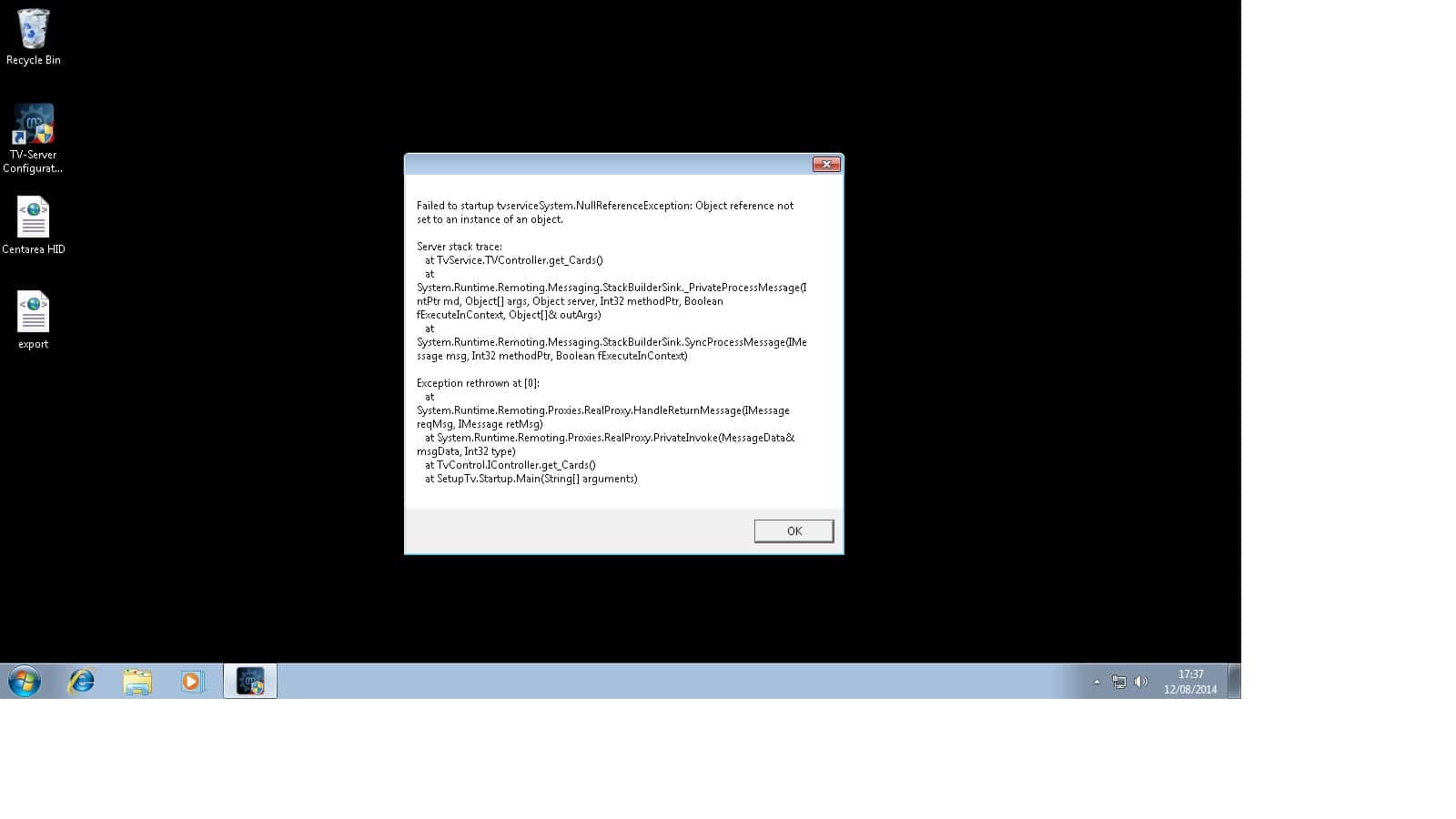
    Jpeg shows message when I try and boot TV Config and I've also got logs
     

    Attachments

    • dgfgdgd.jpg
      dgfgdgd.jpg
      114.2 KB

    ben1210

    MP Donator
  • Premium Supporter
  • September 2, 2012
    191
    25
    Home Country
    United Kingdom United Kingdom
    Any hints guys, missus wants to record TV shortly?

    Looking around the forum I think the error maybe caused by my shitty Talk Talk router changing IP addresses. Any advice greatly appreciated.
     
    Last edited:

    RonD

    Test Group
  • Team MediaPortal
  • December 20, 2011
    911
    278
    SillyValley CA
    Home Country
    United States of America United States of America
    looks like you uploaded a shortcut to your tv server log files, not the actual *.log files

    assuming your problem is IP address changed, a quick google of "win 7 static ip address" shows a number of ways to do this, for example
    http://www.howtogeek.com/howto/19249/how-to-assign-a-static-ip-address-in-xp-vista-or-windows-7/

    I also set fixed IP addresses for all my MePo servers. In my case I went to my dlink router admin webpage and used the routers config settings to set permanent/fixed IP addresses. The windows based approach will also work. I have not tried the exact instructions in the info I linked but it should work.
     

    ben1210

    MP Donator
  • Premium Supporter
  • September 2, 2012
    191
    25
    Home Country
    United Kingdom United Kingdom
    looks like you uploaded a shortcut to your tv server log files, not the actual *.log files

    assuming your problem is IP address changed, a quick google of "win 7 static ip address" shows a number of ways to do this, for example
    http://www.howtogeek.com/howto/19249/how-to-assign-a-static-ip-address-in-xp-vista-or-windows-7/

    I also set fixed IP addresses for all my MePo servers. In my case I went to my dlink router admin webpage and used the routers config settings to set permanent/fixed IP addresses. The windows based approach will also work. I have not tried the exact instructions in the info I linked but it should work.

    Thanks for taking the time to post. Attached the full logs to this post.

    I've looked at this static ip address howto before, but it is relatively complex. I need a few hours alone to fx without missus and kids hassling me.

    Also, that's a preventative measure - do you know of a quick fix now its blown
     

    RonD

    Test Group
  • Team MediaPortal
  • December 20, 2011
    911
    278
    SillyValley CA
    Home Country
    United States of America United States of America
    there is something very strange in your tvservice.log and error files about master/slave mode. I've never had this problems so I don't know what to suggest for next steps. Maybe @mm1352000 can help.

    Code:
    [2014-08-12 19:13:49,155] [Log    ] [TVService] [INFO ] - C:\ProgramData\Team MediaPortal\MediaPortal TV Server\gentle.config
    [2014-08-12 19:13:49,156] [Log    ] [TVService] [INFO ] - Controller: using MySQL database connection: Server=Server-PC;Database=MpTvDb;User ID=root;Password
    [2014-08-12 19:13:49,157] [Log    ] [TVService] [INFO ] - Controller: started at Server-PC
    [2014-08-12 19:13:49,158] [Log    ] [TVService] [INFO ] - Controller: local ip address:192.168.1.2
    [2014-08-12 19:13:49,220] [Log    ] [TVService] [ERROR] - Controller: sorry, master/slave server setups are not supported. Since there is already another server in the db, we exit here.
    [2014-08-12 19:13:49,232] [Log    ] [TVService] [INFO ] - Controller: DeInit.
    [2014-08-12 19:13:49,235] [Log    ] [TVService] [ERROR] - TvController: Deinit failed - Object reference not set to an instance of an object.
     

    ben1210

    MP Donator
  • Premium Supporter
  • September 2, 2012
    191
    25
    Home Country
    United Kingdom United Kingdom
    there is something very strange in your tvservice.log and error files about master/slave mode. I've never had this problems so I don't know what to suggest for next steps. Maybe @mm1352000 can help.

    Code:
    [2014-08-12 19:13:49,155] [Log    ] [TVService] [INFO ] - C:\ProgramData\Team MediaPortal\MediaPortal TV Server\gentle.config
    [2014-08-12 19:13:49,156] [Log    ] [TVService] [INFO ] - Controller: using MySQL database connection: Server=Server-PC;Database=MpTvDb;User ID=root;Password
    [2014-08-12 19:13:49,157] [Log    ] [TVService] [INFO ] - Controller: started at Server-PC
    [2014-08-12 19:13:49,158] [Log    ] [TVService] [INFO ] - Controller: local ip address:192.168.1.2
    [2014-08-12 19:13:49,220] [Log    ] [TVService] [ERROR] - Controller: sorry, master/slave server setups are not supported. Since there is already another server in the db, we exit here.
    [2014-08-12 19:13:49,232] [Log    ] [TVService] [INFO ] - Controller: DeInit.
    [2014-08-12 19:13:49,235] [Log    ] [TVService] [ERROR] - TvController: Deinit failed - Object reference not set to an instance of an object.
    Untitled-1-1.jpg
     

    mm1352000

    Retired Team Member
  • Premium Supporter
  • September 1, 2008
    21,544
    8,236
    Home Country
    New Zealand New Zealand
    RonD is right. Your IP address or computer name has changed post TV Server install. My advice would be exactly the same as his - set up a static IP address for the PC which has TV Server installed on it. Then use MySQL Workbench or similar (any database editor that can talk to a MySQL database would do) to fix the contents of the Servers table to match your actual IP address.
     

    ben1210

    MP Donator
  • Premium Supporter
  • September 2, 2012
    191
    25
    Home Country
    United Kingdom United Kingdom
    Had a buddy of mine remote connect. He looked at the ip address in the DB via workbench. Then looked at the servers IP address. They were different. We changed the Servers ip address to match the one in the DB and hey presto all was fine.

    He then set the servers ip to be static. So shouldn't see this error appear again.

    Thanks all of you for the advice
     

    Users who are viewing this thread

    Top Bottom