TVguide problem (SQL issue) (1 Viewer)

JorisFRST

MP Donator
  • Premium Supporter
  • December 17, 2007
    82
    3
    TV-Server Version: march 01 SVN
    MediaPortal Version: march 01 SVN

    When trying to import tvguide.xml in the xmtlv plugin in TV Server,

    it shows total channels imported, total programs imported, but i cannot see them in the TVGuide.

    After investigating I saw that I get the following error in the tv log :
    (it appears right after the import)

    2008-03-02 19:31:30.875000 [16]: BusinessLayer: InsertSqlServer error - SqlDateTime overflow. Must be between 1/1/1753 12:00:00 AM and 12/31/9999 11:59:59 PM.

    Any idea how to solve this ?
     

    karill

    Portal Member
    October 24, 2007
    38
    1
    Home Country
    Norway Norway
    I have similar problem!

    I have done all that the guide say that i have to do to get the EPG in Mediaportal via WebEPG to work.

    I do get all data into the tvguide.xml for all the channels that i have listed with the tool WebEPG-conf.exe.

    Now to the problem when i go in to the Mediaportal Server configuration tool i can see that it says that 73 channels & xxxx programs where imported but when i start Mediaportal and press EPG i can only see a fraction of all that should be there.

    I'm i doing somthing wrong here. Becase if i try to import the EPG data from tvguide.xml into DVBviewer all works well and i can se all programs for all channels.

    PLEASE help me! I'm trying to start using Mediaportal insted of DVBviewer now that the subtitles works fine.

    Best regards
    Karill
     

    JorisFRST

    MP Donator
  • Premium Supporter
  • December 17, 2007
    82
    3
    fixed, was a grabber problem,

    in the same topic as above you can see they fixed the bug so it doesn't report this as a database error anymore
     

    Tazman

    Portal Pro
    May 15, 2006
    173
    0
    Home Country
    Denmark Denmark
    Hi.. i just installed 17723 snapshot but i only get EPG on my 2 first channels... The import in server setup is fine.. Importing 73 channels...

    What do i do??
     

    ronilse

    Retired Team Member
  • Premium Supporter
  • July 19, 2005
    4,422
    283
    Moss
    Home Country
    Norway Norway
    I have similar problem!

    I have done all that the guide say that i have to do to get the EPG in Mediaportal via WebEPG to work.

    I do get all data into the tvguide.xml for all the channels that i have listed with the tool WebEPG-conf.exe.

    Now to the problem when i go in to the Mediaportal Server configuration tool i can see that it says that 73 channels & xxxx programs where imported but when i start Mediaportal and press EPG i can only see a fraction of all that should be there.

    I'm i doing somthing wrong here. Becase if i try to import the EPG data from tvguide.xml into DVBviewer all works well and i can se all programs for all channels.

    PLEASE help me! I'm trying to start using Mediaportal insted of DVBviewer now that the subtitles works fine.

    Best regards
    Karill
    Hi,
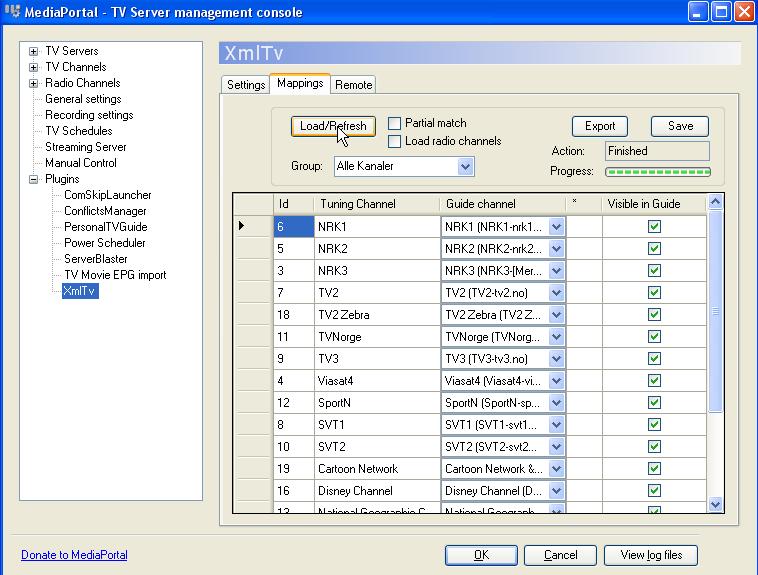
    Did you solve this problem if not, make sure all channels are mapped in "TV Server setup -> Plugins -> xmltv -> Mappings & load + assign to every channel & remember to save...

    Regards
    Roy
     

    Tazman

    Portal Pro
    May 15, 2006
    173
    0
    Home Country
    Denmark Denmark
    Hi

    under tv mapping is all channels mapped to card. Under plugins/xmltv/mappings (there is no load) all channels are marked "visible in guide"
    What else can i do?

    Recieving channels via STB. Grabbing epg data with external grabber. always worked without tvserver.
     

    ronilse

    Retired Team Member
  • Premium Supporter
  • July 19, 2005
    4,422
    283
    Moss
    Home Country
    Norway Norway
    Hi

    under tv mapping is all channels mapped to card. Under plugins/xmltv/mappings (there is no load) all channels are marked "visible in guide"
    What else can i do?

    Recieving channels via STB. Grabbing epg data with external grabber. always worked without tvserver.

    Hi,
    It should look like the picture i have attached to this post(Load/Refresh) when using webepg as source.

    Regards
    Roy
     

    Attachments

    • tvserversetup_plugins_xmltv_mappings.jpg
      tvserversetup_plugins_xmltv_mappings.jpg
      86.2 KB

    Tazman

    Portal Pro
    May 15, 2006
    173
    0
    Home Country
    Denmark Denmark
    Thanks alot...! after selecting "alle kanaler" int the drop down menu, and importing again it worked :)
     

    Users who are viewing this thread

    Top Bottom