
TVserver Config - Run command before standby (1 Viewer)

eetaylog

Portal Pro
March 6, 2007
874
41
45
South London
Home Country
England England
Can someone please tell me if i can run .bat file commands using this facility...?
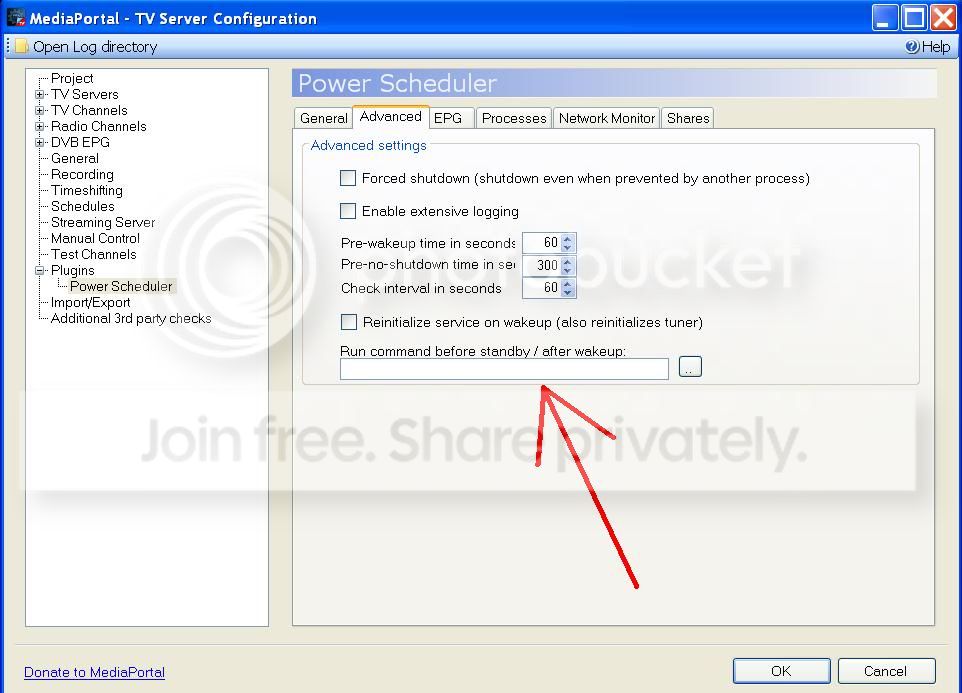
untitled.jpg


...and if so what the dos command would be for closing MP before going into standby? My MP screen is freezing on resume from sleep and i think that if i close it down before sleep it might solve the issue.

TIA :)

MediaPortal Version: MP1.2 RC
MediaPortal Skin: Avalon
Windows Version: Win7 + SP1
CPU Type: AMD AM2 X2 4600+
HDD: 2 x Samsung F1 2Tb
Memory: Corsair 4Gb
Motherboard: Gigabyte nForce 430 Micro ATX
Video Card: ATI Radeon HD 4670
Sound Card: On board 7.1
1. TV Card: Hauppauge Nova-T500
1. TV Card Type: DVB-T
h.264 Video Codec: DivX7
HTPC Case: Antec Fusion
Cooling: Scythe Mini Ninja
Power Supply: Antec 430W
Remote: MCE
TV: Samsung 42" Plasma
TV - HTPC Connection: DVI -> HDMI
 

RicoHTPC

MP Donator
  • Premium Supporter
  • February 4, 2011
    1,441
    172
    Cuxhaven
    Home Country
    Germany Germany
    AW: TVserver Config - Run command before standby

    That's what I call a coincidence - I was just about to start a thread with the same problem! ;)
    Unfortunately I am not having the solution but I think the powerscheduler has a bug in this particular feature.
    I literally tried every possible combination of the path of my program and the correct argument, including this: https://forum.team-mediaportal.com/general-support-51/how-run-command-wakeup-hibernation-74859/
    Since the powerscheduler does not even run my program without any argument (should run at both occasions in this case)
    I come to the conclusion that there is a bug.

    By the way a guy from the German mp community wrote a little program which closes mp.
    There you go: https://forum.team-mediaportal.com/787667-post11.html
    The program "mp basichome beenden" closes mp only when it is in basic home screen whereas the "mp überall beenden"
    closes mp regardless of the present screen.

    No we only have to figure out how to launch this program prior hibernating....
     

    eetaylog

    Portal Pro
    March 6, 2007
    874
    41
    45
    South London
    Home Country
    England England
    Im glad im not alone with this problem, i was beginning to think i was going mad! Have you seen my other threads about my hibernation problems? Are your symptoms the same as mine?

    https://forum.team-mediaportal.com/general-support-51/hibernation-problem-99973/

    https://forum.team-mediaportal.com/general-support-51/mediaportal-freezing-resume-100417/

    Ive been trying to find a solution to this problem for weeks but still no luck. Thanks for the link to the 'close MP' programme, i will definately give that a go (i use classic homescreen unfortunately so ill have to use the 'mp uberall beenden' version).

    Thanks again.
     

    RicoHTPC

    MP Donator
  • Premium Supporter
  • February 4, 2011
    1,441
    172
    Cuxhaven
    Home Country
    Germany Germany
    AW: TVserver Config - Run command before standby

    I'm not having such a severe issue I just want to prevent display issues which come from using a hdmi plasma + a additional usb display.
    Thats why I would like to have mp shut down before hibernating.
    And our problem with the powerscheduler must be a bug I'm pretty sure on that....
     

    netexplorer

    MP Donator
  • Premium Supporter
  • January 21, 2009
    743
    105
    Home Country
    Germany Germany
    AW: TVserver Config - Run command before standby

    You can try to use PowerScheduler++ which supports the same option.
     

    RicoHTPC

    MP Donator
  • Premium Supporter
  • February 4, 2011
    1,441
    172
    Cuxhaven
    Home Country
    Germany Germany
    AW: TVserver Config - Run command before standby

    Nope - I tried but it's not working!

    Has anyone else got that feature running?
    Has that worked in earlier versions?
     

    robbo100

    Retired Team Member
  • Premium Supporter
  • May 5, 2009
    1,290
    309
    UK
    Home Country
    United Kingdom United Kingdom
    The best DOS command would probably be TSKILL
    "TSKILL Mediaportal.exe /f"

    However, there is always the risk that this would cause a corruption if MP is writing to the database. However, I have killed the MP process loads before without problem (I have a remote key mapped to run a batch with the kill command for the very rare occasion that MP freezes).

    Robbo100
     

    RicoHTPC

    MP Donator
  • Premium Supporter
  • February 4, 2011
    1,441
    172
    Cuxhaven
    Home Country
    Germany Germany
    AW: TVserver Config - Run command before standby

    The two programs which I have linked are close mp by the normal Alt F4 shortcut but the problem is that
    the powerscheduler doesn't launch programs like it it supposed to do....
     

    pünktchen

    Portal Pro
    October 26, 2010
    537
    202
    Home Country
    Germany Germany
    AW: TVserver Config - Run command before standby

    The two programs which I have linked are close mp by the normal Alt F4 shortcut but the problem is that
    the powerscheduler doesn't launch programs like it it supposed to do....

    For PowerScheduler++ I can say there's no bug. In general it is working, but only for a few cases where the program
    you want to execute is very fast. The problem is that the TVServer doesn't wait for your task to be finished.

    So here are two programs they work perfect for me:

    Windows XP users View attachment HibernateTrigger _1.5.rar

    Windows 7 users View attachment Windows 7 Suspend.Resume Control _Setup_2.0.0.zip
     

    RicoHTPC

    MP Donator
  • Premium Supporter
  • February 4, 2011
    1,441
    172
    Cuxhaven
    Home Country
    Germany Germany
    AW: TVserver Config - Run command before standby

    It's a pity that this isn't working out of the box or even with another plugin.
    Anyway your advise was the solution. Now it's working like I wanted it to.
    :D
     

    Users who are viewing this thread

    Top Bottom