
UNABLE TO PLAY: STREAM2.0 (1 Viewer)

robbo100

Retired Team Member
  • Premium Supporter
  • May 5, 2009
    1,290
    309
    UK
    Home Country
    United Kingdom United Kingdom
    Hi @jameson_uk and @mm1352000

    Sorry to keep bothering you with my problems.

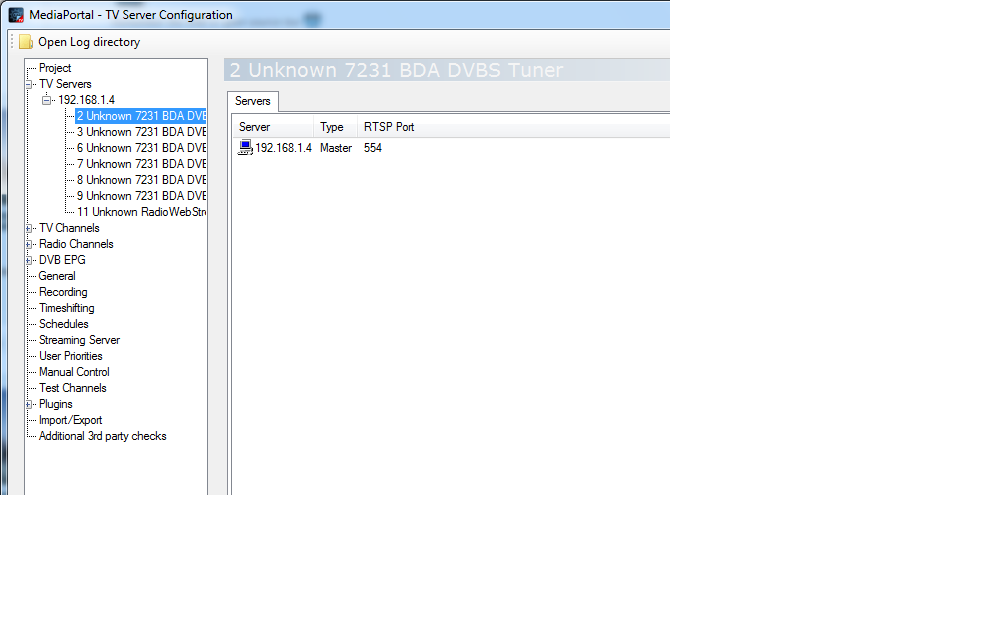
    The problem with the port seems to have been resolved by the repair installation (well, I have not had any more occurances of it since running the repair...), however, I am now being plagued by the problem with the tuners being unavailable after standby. It does not happen every time, but regularly enough (twice per day at the moment). When it happens, if I go into the TV Server Config GUI, and look under "Manual Control", there are no tuners listed. Also, when I look under the TV Server settings at the tuners, they show up as "UNKNOWN" as shown in the attached screenshot.

    If I stop and restart the TV service it fixes things instantly (although I have to close and reopen the TV Server Config GUI to make it show "SVB-T" etc instead of "UNKNOWN". I have tried setting the "Delay in seconds before TVServer detects cards" setting under the General tab as high as 5 seconds, but this does not seem to resolve the problem.

    Can you think of any suggestions?

    Thanks again (again again)

    Rob
     

    Attachments

    • Unknown tuners.png
      Unknown tuners.png
      52 KB
    • No Tuner Found.zip
      58.4 KB

    jameson_uk

    Retired Team Member
  • Premium Supporter
  • January 27, 2005
    7,257
    2,533
    Birmingham
    Home Country
    United Kingdom United Kingdom
    sorry not much of an idea here. I had the same massive issues with my old pinnacle 7010ix card. Replacing it sounded all my issues...

    Is your new card USB on pci express?

    Also does the card show up in device manager after resume?
     

    Jay_UK

    Test Group
  • Team MediaPortal
  • October 6, 2009
    1,780
    283
    Derby
    Home Country
    United Kingdom United Kingdom
    Hi there,

    Try PS++ to reinitialise the TV Tuners....

    If that doesnt work you could try Devcon on resume?

    If not...spend some money and get a decent tuner ya tight git! ;)

    J.
     

    robbo100

    Retired Team Member
  • Premium Supporter
  • May 5, 2009
    1,290
    309
    UK
    Home Country
    United Kingdom United Kingdom
    The tuner is a brand new Blackgold BGT3600 which cost a fortune :-(

    It show up in device manager fine after resume. I wondered if it might be the PCI-e power saving settings in Win 7 making it undetected when the system is on, but being used for permanently stored media (rather than live TV), so I have turned that power saving feature off and will see how I get on (I.e it becomes undetected before standby rather than upon resume). .

    DEVCON might be an option, or maybe a batch file to restart the TVService on resume. I am already using PS++ and have got the tuner re-initialisation option set.

    I will keep kicking the can, but let me knowing you have any other thoughts. Cheers chaps

    Robbo100
     

    mm1352000

    Retired Team Member
  • Premium Supporter
  • September 1, 2008
    21,544
    8,236
    Home Country
    New Zealand New Zealand
    If I stop and restart the TV service it fixes things instantly (although I have to close and reopen the TV Server Config GUI to make it show "SVB-T" etc instead of "UNKNOWN". I have tried setting the "Delay in seconds before TVServer detects cards" setting under the General tab as high as 5 seconds, but this does not seem to resolve the problem.
    I think you're trying the right thing.
    Your result indicates to me that the tuner driver does actually resume fine without intervention, so I don't think devcon is necessary. It is just TV Server that doesn't recognise it. The "unknown" label is a symptom of that.
    I think you just need to bump the time higher than that.
     

    kiwijunglist

    Super Moderator
  • Team MediaPortal
  • June 10, 2008
    6,743
    1,754
    New Zealand
    Home Country
    New Zealand New Zealand
    Yeah I seem to remember some posts + fixes/tools related to tv cards being buggy after resuming from sleep. There is some kinda windows mod to the way it handles the hardware when either going in or coming out of sleep. Unfortunately can't remember enough details to search it out for you.[DOUBLEPOST=1350975402][/DOUBLEPOST]Try

    TV Server -> General -> Delay before TV Server detects cards = 30 seconds
    TV Server -> Powerscheduler -> Advanced -> Reinitialize on resume
     

    robbo100

    Retired Team Member
  • Premium Supporter
  • May 5, 2009
    1,290
    309
    UK
    Home Country
    United Kingdom United Kingdom
    I remembered this morning that I had set the tuners to preload and pause, to speed up zapping. However, on an AVForum thread where I am helping someone with their setup with the BGT3600 they said that these settings made their system crash during zapping (although I have not had such problems).

    It might be that this could be the root cause, so I have put them back to default (with card detection delay back at 0 seconds). I managed one trial before I left for work and it seemed to work (but since it is not 100% repeatable I will need some longer testing before I am confident).

    Fingers crossed!
     

    mm1352000

    Retired Team Member
  • Premium Supporter
  • September 1, 2008
    21,544
    8,236
    Home Country
    New Zealand New Zealand
    Well, preloading effectively means that TV Server will attempt to use the tuners as soon as TV Server starts up. Enabling that setting can accentuate problems with drivers that take a while to load. ;)
     

    jameson_uk

    Retired Team Member
  • Premium Supporter
  • January 27, 2005
    7,257
    2,533
    Birmingham
    Home Country
    United Kingdom United Kingdom
    I am on XP so is probably quite different but I have a BGT3620 which I guess is the same dual DVB-T2 part as the BGT-3600?

    I have no issues at all on resume with the cards being recognised but I do find the second tuner goes walkies sometimes. I have now set the Blackgold card to only be linked to the HD mux so I only use the first tuner and my trusty Peak DVB-T card (which has been the most reliable TV card I have used; and I have a fairly hefty collection :rolleyes:) for SD muxes.

    I have preloading set but the mode set to stop rather than pause.

    I don't use DVB EPG grabbing which I think can make a difference here. Delay for me is set to 0 but it does seem to be working.

    I wondering if there are any BIOS settings to do with what gets turned in S3 or whether the power management options of the card itself can be tweaked ??
     

    robbo100

    Retired Team Member
  • Premium Supporter
  • May 5, 2009
    1,290
    309
    UK
    Home Country
    United Kingdom United Kingdom
    I have disabled DVB-EPG grabbing on all cards, and since getting rid of preload and pause, and returned to stop without preload I have not had a reoccurrence of the "No Tuner Available" message. Well, I say I haven't, but my wife told me "that message thingy came up again, but I can't remember what it said", but when I tried when coming home from work, it worked straight off from standby without any reset needed (so it is unlikely to be the same issue). Hopefully this is the end of the problems! I set up a BGT card for my father a couple of years back (the predecessor to the 3600 with the 2xDVB-T and 2xDFVB-S2 tuners), and I vaguely remember having similar problems with preload (although I only remembered this morning on the way to work).

    I will see how things go over the next couple of days.

    It has been a very unusual thing to experience problems with TV Server, because the last 4 years have been absolutely solid (I genuinely can't remember the last time I had a TV Server crash, or recording failure)! However, as is often the case, it is the hardware interface causing the issues rather than it being because of MP itself.

    Now all I need to do is reconfigure the wife to be more compatible with MP!
     

    Users who are viewing this thread

    Top Bottom