WebMediaPortl x64 with IISExpress 10 (4 Viewers)

BCEly

Portal Member
January 29, 2025
24
21
Home Country
Great Britain (UK) Great Britain (UK)
I've gone from a x86 to a x64 MedialPortal 1.36 system today and so am having to redo my whole MPExtended environment.

I no longer have IISExpress 7.5 download available to me (which I believe is x86) so does IISExpress 10 work and if so, I assume I need to x64 version.

The WebMediaPortal I'm using is the latest 'MPExtended.Installers.WebMediaPortal.x64.msi' but once everything is installed, I'm not getting any response from http://localhost:8080
 

ajs

Development Group
  • Team MediaPortal
  • February 29, 2008
    15,806
    13,142
    Kyiv
    Home Country
    Ukraine Ukraine

    BCEly

    Portal Member
    January 29, 2025
    24
    21
    Home Country
    Great Britain (UK) Great Britain (UK)
    Appreciate your response but I’m still confused!

    I managed to find a copy of IISExpress 7.5 and used the latest x86 builds of MPEx and WMP and I can only get the default skin to work. Previous WMP skins I used before do not work.

    I also tried the x64 builds with IISExpress 10 and whilst MPEx works, WMP does not work. The service starts but there nothing at http://localhost:8080

    I could use the IIS version IF I knew how to configure things but all the docs are out of date.
     

    ajs

    Development Group
  • Team MediaPortal
  • February 29, 2008
    15,806
    13,142
    Kyiv
    Home Country
    Ukraine Ukraine
    I can hardly help here, I have IIS on Windows Server 2016, and I use Bootstrap skin.
    However, I haven't used MPE and WebMediaportal for 5 years.
     

    BCEly

    Portal Member
    January 29, 2025
    24
    21
    Home Country
    Great Britain (UK) Great Britain (UK)
    I’d be happy to use IIS on Windows 10 in place of IISExpress if there were some docs to say how to configure IIS after installing the msi
     

    ajs

    Development Group
  • Team MediaPortal
  • February 29, 2008
    15,806
    13,142
    Kyiv
    Home Country
    Ukraine Ukraine
    I think I installed and configured it according to this instruction
     

    BCEly

    Portal Member
    January 29, 2025
    24
    21
    Home Country
    Great Britain (UK) Great Britain (UK)
    I did try that but it’s out of date and I can’t get anything working with that.

    IIS default site was bind to port 80 and I added the www directory as an Application but no response from http://localhost
     

    ajs

    Development Group
  • Team MediaPortal
  • February 29, 2008
    15,806
    13,142
    Kyiv
    Home Country
    Ukraine Ukraine
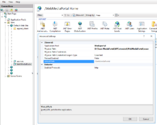
    IIS default site was bind to port 80
    Untitled.png
     

    BCEly

    Portal Member
    January 29, 2025
    24
    21
    Home Country
    Great Britain (UK) Great Britain (UK)
    Thanks - I'll have another go - Maybe I don't have the IIS environment set up correctly.

    I assume you still be MediaPortalExtender Service installed as a middle man.
     

    Users who are viewing this thread

    Top Bottom