WinTv-PVR USB2 / No CaptureCard Deffinitions.xml??? (1 Viewer)

cornfused

Portal Member
December 4, 2011
6
0
Home Country
United States of America United States of America
MediaPortal Version: 1.2.1.0
MediaPortal Skin:
Windows Version: 7
CPU Type: Q6600
HDD: WD750
Memory: 8 GB
Motherboard: Gigabyte GA-EP45-UD3R
Video Card: HD6770
Video Card Driver: 11.1
Sound Card: MB
Sound Card AC3:
Sound Card Driver:
1. TV Card: Hauppauge WinTV-PVR USB2

And therein lies the problem - the Hauppauge WinTV-PVR USB2. MediaPortal 1.2.1.0 sees the card and it gathers all the channels I would expect it to and it will even let me preview them (sometimes!). However, when I go into MediaPortal, after configuring the channels, I can't watch TV. I have read that the CaptureCardDefinittions.xml needs to be changed for the Hauppauge WinTV-PVR USB2 to function properly, but I can't find that file.

I am truly "cornfused"! Can any one offer some help?

Thanks,

cornfused
 

mm1352000

Retired Team Member
  • Premium Supporter
  • September 1, 2008
    21,544
    8,236
    Home Country
    New Zealand New Zealand
    Hi and welcome cornfused (nice handle :D)!

    Okay so straight to the point: CaptureCardDefinittions.xml is an obsolete configuration file from the MP 0.x era (I guess you've been reading some old threads?). MP 1.x is very different. It should automatically detect how to initialise and use your tuner. By the sounds of what you've said about preview sometimes working I'd guess that the tuner is functional and that the problem is something else. Do you think you could post logs for us?

    Log Files - MediaPortal Wiki

    Just follow the instructions for non-reproducible problems. It should be pretty straightforward but don't hesitate to ask if you have problems with that...

    mm
     

    cornfused

    Portal Member
    December 4, 2011
    6
    0
    Home Country
    United States of America United States of America
    First, I would just like to say thank you, mm. :D I am new to forums in general and did not know what to expect.

    I meant to include the logs with my original post - hum - I remembered them after I submitted the post. :oops:

    Okay, mm, I think I have the logs attached.

    You are correct that the Hauppauge WinTV-PVR USB2 is detected and initialized. Oh, and yes, I was looking at older posts, this does not seem to be a problem people are having today. This is an old tuner. I've been slow to replace it because it does work well with the Hauppauge software, and it works in Windows Media Center (WMC). Unfortunately, Microsoft choose to use a proprietary file format when recordings are made. Also, WMC does not allow settings to be easily locked down.

    Anyway, non of that has anything to do with the issue I am currently having.

    cornfused
     

    mm1352000

    Retired Team Member
  • Premium Supporter
  • September 1, 2008
    21,544
    8,236
    Home Country
    New Zealand New Zealand
    Hi again cornfused

    Thanks for the logs. To be honest I'm a little confused now. I can see that you enter the TV section of MP and that you have 16 channels and 2 TV groups set up but I don't see any evidence that you tried to actually start watching TV (no offence intended). Are you able to describe what you did in a little more detail? What I do to start TV is I go to the TV section, click on the "channel" button, and then select a channel...

    mm
     

    cornfused

    Portal Member
    December 4, 2011
    6
    0
    Home Country
    United States of America United States of America
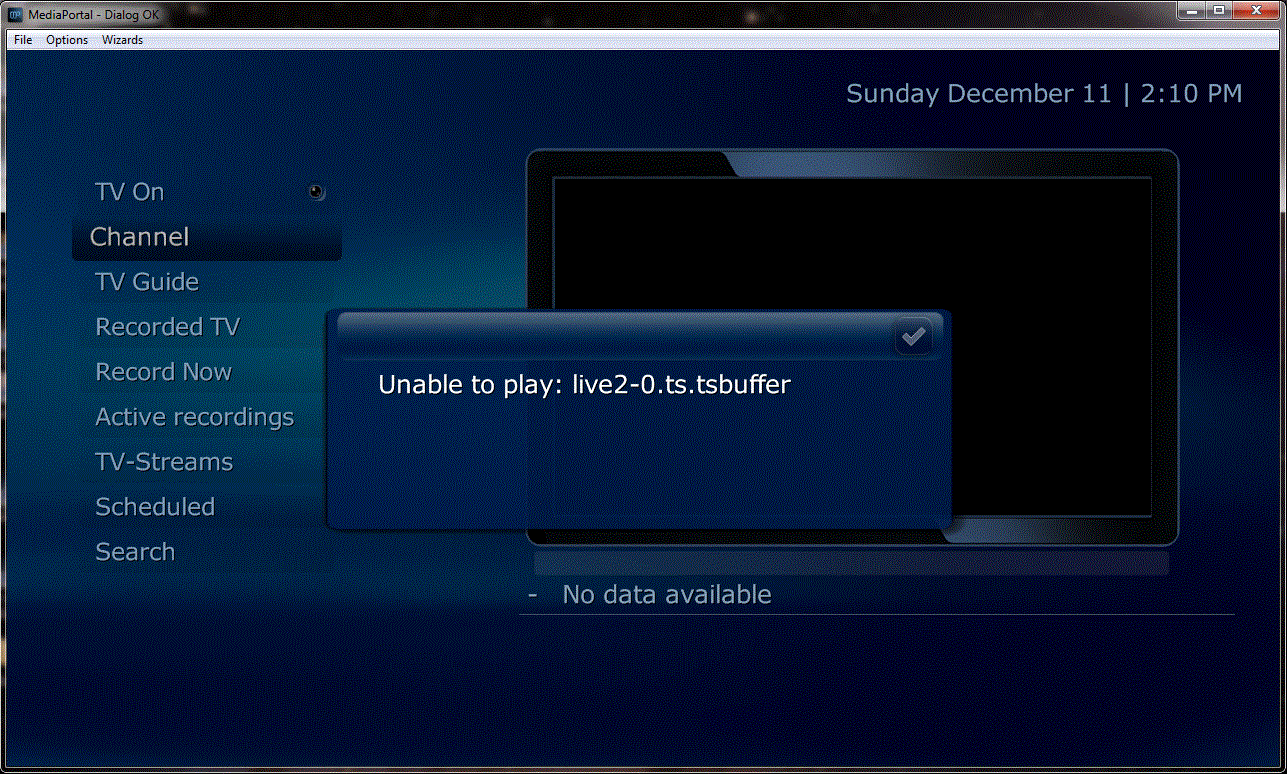
    Spragleknas and mm1352000,

    Progress!!! :D

    Needless to say, I'm not sure where to look in the wiki to move on. Your suggestions will be appreciated.

    Thanks again,

    cornfused
     

    Attachments

    • Progress - Channels.gif
      Progress - Channels.gif
      217.6 KB

    mm1352000

    Retired Team Member
  • Premium Supporter
  • September 1, 2008
    21,544
    8,236
    Home Country
    New Zealand New Zealand
    Hi again cornfused

    Yep, that is progress. Sorry to have to ask you to do this again but do you mind supplying another set of logs - the issue that you see in the screenshot can be caused by a whole raft of things...

    mm
     

    cornfused

    Portal Member
    December 4, 2011
    6
    0
    Home Country
    United States of America United States of America
    mm,

    Maybe one of these days I will catch on. Again, I realized after my last post that I should have included the logs.

    cornfused
     

    mm1352000

    Retired Team Member
  • Premium Supporter
  • September 1, 2008
    21,544
    8,236
    Home Country
    New Zealand New Zealand
    Hi again cornfused

    So from the logs it looks like TV Server is working nicely. I think the problem is codec selection. Codecs are a really important part of MediaPortal configuration as they are responsible for actually decoding and processing the video and audio that you see on the screen. Your settings for TV at present are:

    <entry name="videocodec">Hauppauge WinTV MPEG2 Muxer</entry>

    <entry name="h264videocodec">Microsoft DTV-DVD Video Decoder</entry>

    <entry name="audiocodec">Hauppauge WinTV MPEG2 Muxer</entry>

    <entry name="aacaudiocodec">MONOGRAM AAC Decoder</entry>

    <entry name="audiorenderer">Default DirectSound Device</entry>

    The Hauppauge entries that are selected there are totally not going to work for you. I would recommend the following:

    MPEG video: Microsoft DTV-DVD Video Decoder
    h.264/AVC video: Microsoft DTV-DVD Video Decoder
    MPEG/AC3 audio: MPC - MPA Decoder Filter
    AAC audio: MONOGRAM AAC Decoder
    Audio renderer: Default DirectSound Device

    So it is really only the MPEG video and audio codecs that are problematic. If you're going to be using the machine for playing MKVs or videos with Dolby Digital, DTS, Dolby TruHD or DTS HD MA then you may want to consider installing the LAV codecs which are available from the MediaPortal Extension Installer. If you don't need the aforementioned functionality then the above configuration should hopefully work well for you.

    Best regards,
    mm
     

    cornfused

    Portal Member
    December 4, 2011
    6
    0
    Home Country
    United States of America United States of America
    mm,

    You have been very helpful, of that there is no question. :D

    At this point I'm just wondering if there isn't an easy way to reset the default settings? I tried entering the codec settings recommended when I realized I probably should have never touched those, my card is hardware driven.

    I'm getting a little frustrated. :confused: I hope I don't need to start from scratch on this, but now things (channels for example, will not let me map them) seem worse then ever.

    Is there any possibility of correcting this, can I easily reset things to default, or do I need to re-install the program?

    Thanks again for all your help,

    cornfused
     

    Users who are viewing this thread

    Top Bottom