Wrong refresh rate on two specific HD channels (1 Viewer)

Motionaddict

Portal Member
January 21, 2010
35
1
Home Country
Finland Finland
MediaPortal Version: 1.2.0 beta
MediaPortal Skin: default
Windows Version: Windows 7 Premium 64-bit SP1
CPU Type: Intel Core 2 Duo E8200
HDD: Kingston 96GB SSD V+100, WD Caviar RE2-GP 500GB SATA + 2TB + 1.5 TB
Memory: 4 x Kingston HyperX 1024MB (1GB) 800MHZ DDR2
Motherboard: MSI P45 NEO-F
Video Card: XFC Radeon 5670 HD 1GB passive cooling
Video Card Driver: Catalyst 11.6
Sound Card:
Sound Card AC3:
Sound Card Driver:
1. TV Card: TechnoTrend C1501 + CI
1. TV Card Type: DVB-C
1. TV Card Driver:
2. TV Card: AnySee E30 Combo
2. TV Card Type: DVB-C
2. TV Card Driver:
3. TV Card:
3. TV Card Type:
3. TV Card Driver:
4. TV Card:
4. TV Card Type:
4. TV Card Driver:
MPEG2 Video Codec:
MPEG2 Audio Codec:
h.264 Video Codec:
Satelite/CableTV Provider:
HTPC Case: Thermaltake DH101
Cooling:
Power Supply:
Remote:
TV: SONY BRAVIA KDL46W4000
TV - HTPC Connection: DVI - HDMI

Hi guys!
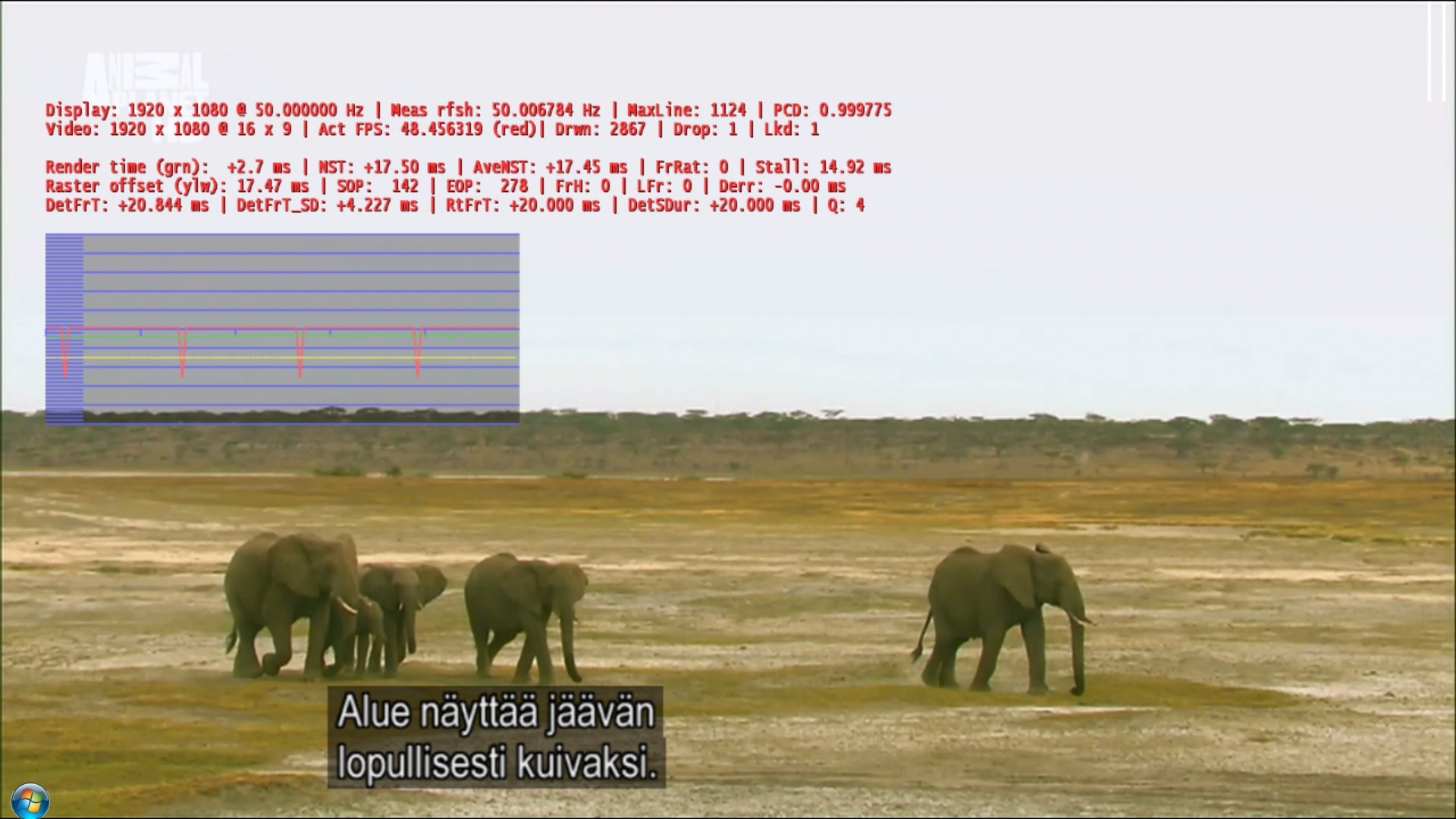
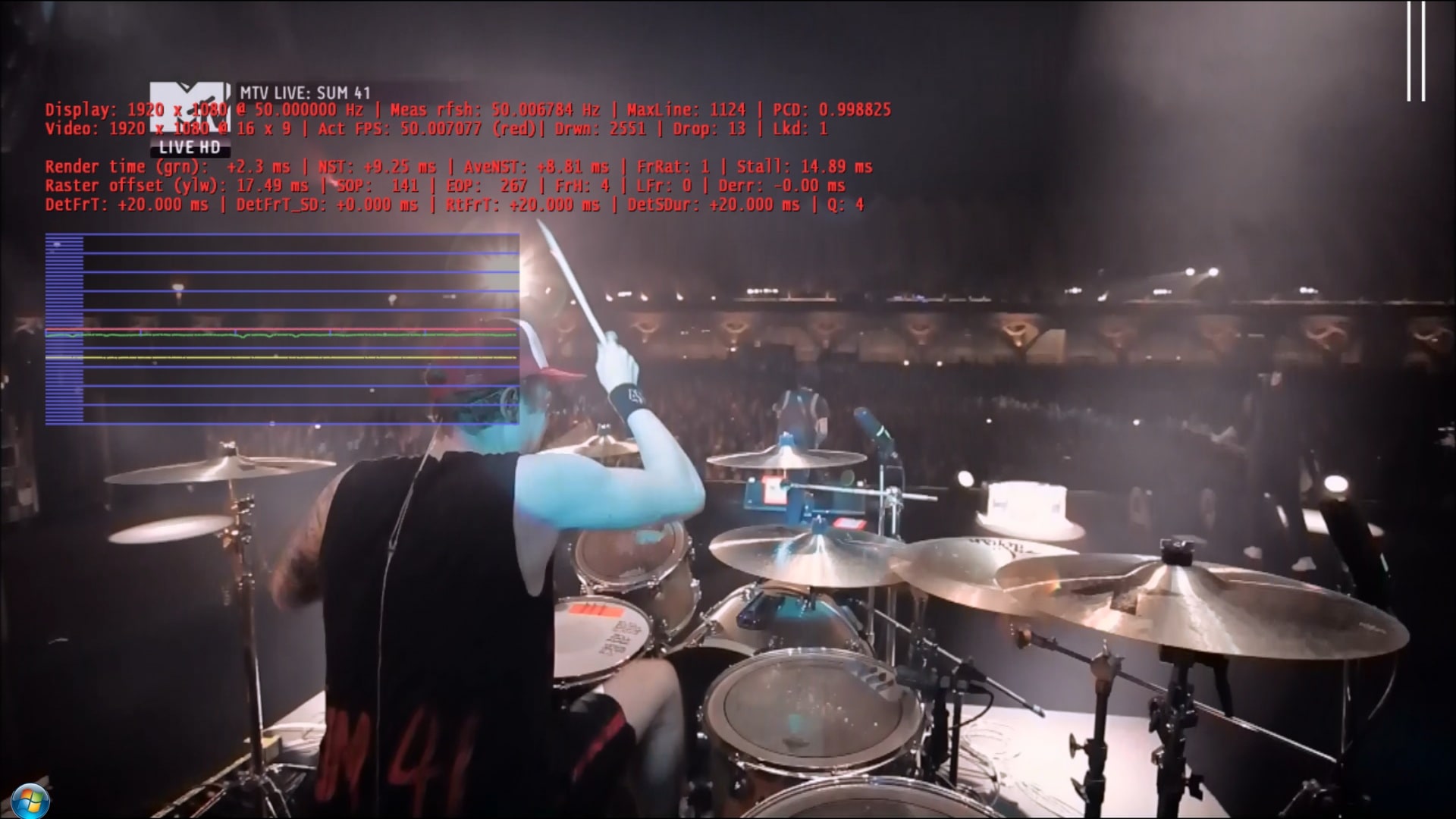
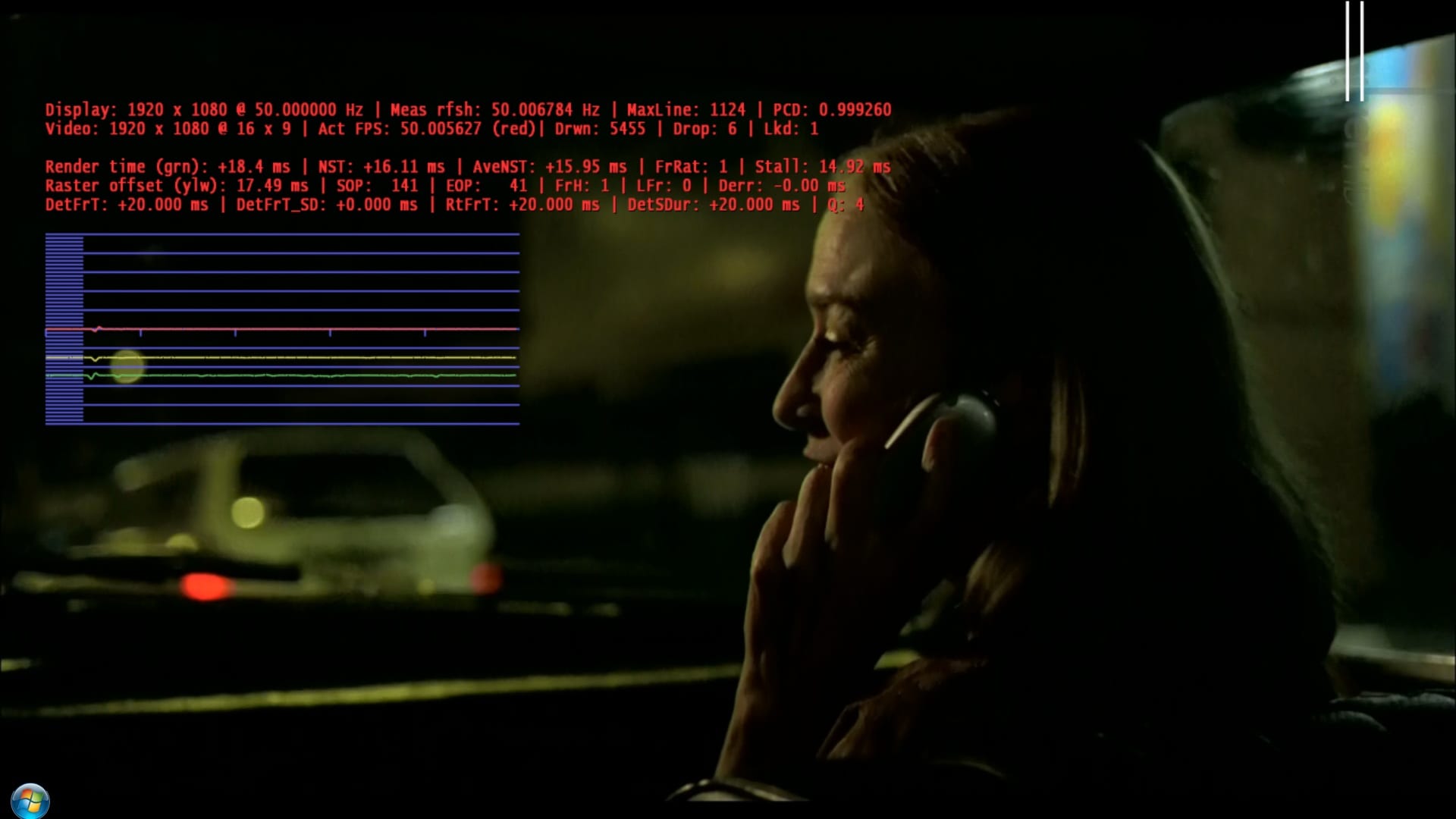
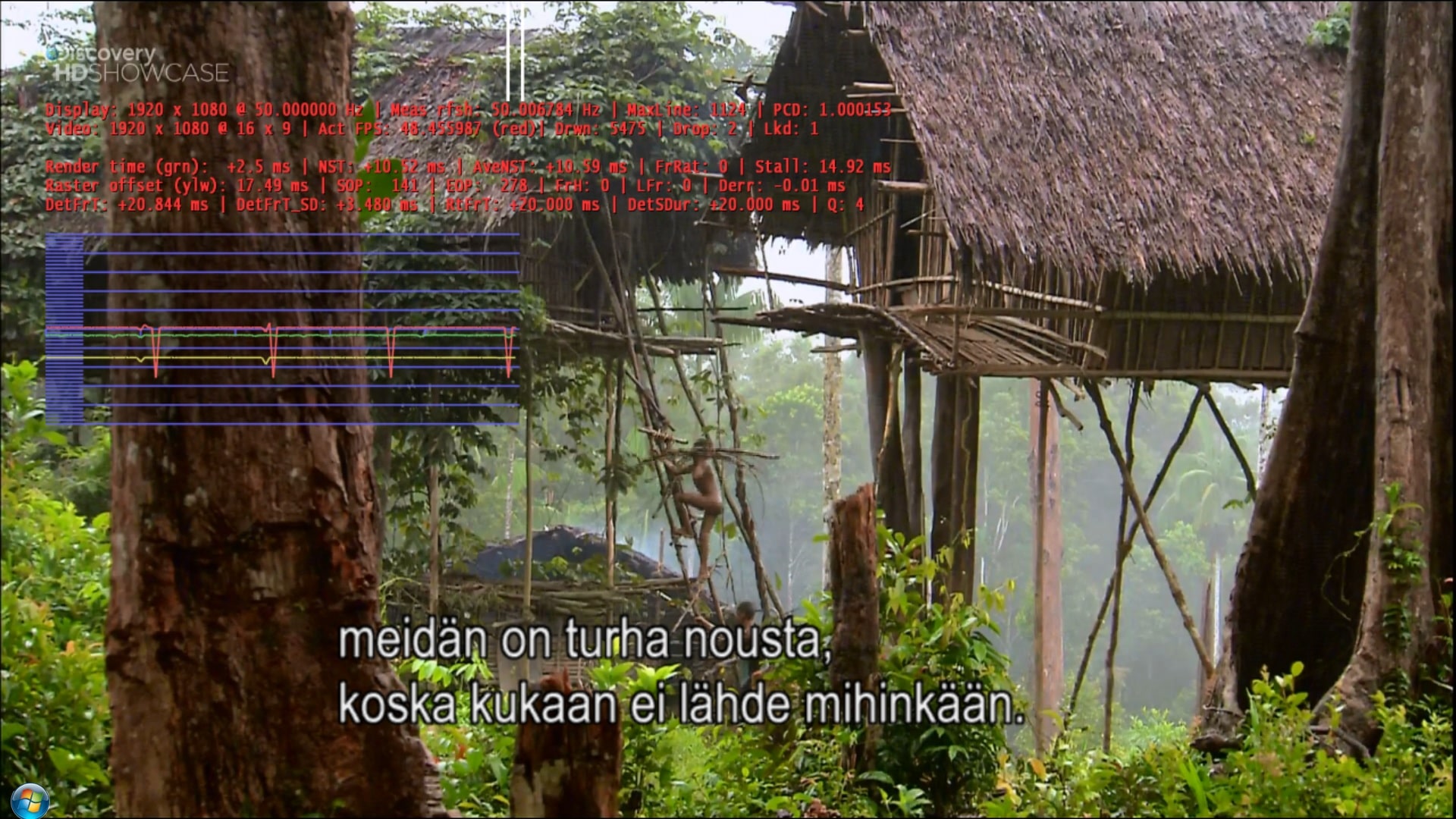
I have an issue with two specific HD channels, where the refresh rate does not go to 50Hz as it should, but to 48.5Hz, resulting in a continuos annoying judder. It happens only on two channels, both live and recorded tv. Here are pics of these two channels (01, 02) and of two properly working ones for reference (03, 04).
I also attached logs where I first tune to two ok channels and then two both juddering ones, just in case it shows the cause for this.
Would you guys have any solution how to fix this kind of issue?
Thanks in advance for any help!
Jake
 

Attachments

  • 01.jpg
    01.jpg
    685.9 KB
  • 02.jpg
    02.jpg
    389.1 KB
  • 03.jpg
    03.jpg
    363 KB
  • 04.jpg
    04.jpg
    258.7 KB

Owlsroost

Retired Team Member
  • Premium Supporter
  • October 28, 2008
    5,539
    5,038
    Cambridge
    Home Country
    United Kingdom United Kingdom
    Looking at the info in the logs and the render stats screens, it looks like a broadcaster problem to me (or *possibly* the video decoder having a problem with the stream).

    From the stats it's possibly 23.976 Hz material being pushed through a 50Hz channel, without being speeded up to 25Hz (as is normal with film in 50Hz land) or properly frame rate converted. Unless the video decoder isn't understanding it correctly - have you tried a different decoder ?

    Tony
     

    Motionaddict

    Portal Member
    January 21, 2010
    35
    1
    Home Country
    Finland Finland
    Looking at the info in the logs and the render stats screens, it looks like a broadcaster problem to me (or *possibly* the video decoder having a problem with the stream).

    From the stats it's possibly 23.976 Hz material being pushed through a 50Hz channel, without being speeded up to 25Hz (as is normal with film in 50Hz land) or properly frame rate converted. Unless the video decoder isn't understanding it correctly - have you tried a different decoder ?

    Tony

    Hi!
    Yes I have tried and actually with the PowerDVD11 codec from the SAF6 package the framerate is 50Hz on these two channels, but unfortunately I get several other problems like occasional pixelations and a massive stutter for the first 15 seconds or so every time I zap to another HD channel, so I was hoping I could stick to the Microsoft DTV-DVD Decoder since it has been the most stable in my setup (except for these two channels!). Also the intgrated receiver on my TV plays these channels just fine, so I would say the broadcast is ok, but the decoder has some issues with these two channels.
    For other HD material the dynamic refresh rate handler changes my TVs refresh rate to 48Hz, but it does not work on TV programs.
    Thanks again!
     

    Holzi

    Super Moderator
  • Team MediaPortal
  • April 21, 2010
    7,934
    2,235
    Ba-Wü
    Home Country
    Germany Germany
    AW: Wrong refresh rate on two specific HD channels

    Hi
    Have you tried the Catalyst 11.6b? Maybe this will help with your pixelations problem..
     

    Motionaddict

    Portal Member
    January 21, 2010
    35
    1
    Home Country
    Finland Finland
    Re: AW: Wrong refresh rate on two specific HD channels

    Hi
    Have you tried the Catalyst 11.6b? Maybe this will help with your pixelations problem..

    Thanks for the tip, I will check this driver today to see if there is any difference.

    Would it be helpful if I upload a short clip from one of these channels to see if the problem is only related to my setup? I could do that this evening when I get home.

    Thanks again!

    The modified TsReader.ax file attached to this post - https://forum.team-mediaportal.com/763316-post106.html - might fix the PDVD11 'stutter after channel change' problem.

    Tony

    I will try this one tonight as well. Thank you!
     

    Motionaddict

    Portal Member
    January 21, 2010
    35
    1
    Home Country
    Finland Finland
    I updated Catalyst to 11.6b and changed the TsReader.ax from the above post and changed the codec to PDVD11, but if I tune to either of these two channels the stuttering at the beginning is worse than ever. It can take approximately one minute before the image settles, audio runs fine. Once the image settles the refresh rate is 50Hz and it runs smoothly from there on. This stuttering happens only on these two problematic channels. I made another clean log with first a tuning to two ok channels and then to one of the problematic ones. Then I recorded a few seconds of it, see the attachment.
    Could you test if this sample runs ok on your setups or is it just on mine... With PDVD11 this sample does not settle at all on my machine, it's just a mess.
    I will test also with the original TsReader.ax and with some other codecs.
    Thanks again for your help!
     

    Holzi

    Super Moderator
  • Team MediaPortal
  • April 21, 2010
    7,934
    2,235
    Ba-Wü
    Home Country
    Germany Germany
    AW: Wrong refresh rate on two specific HD channels

    I tested your sample but not within MediaPortal. In VLC Player it stutters like hell. KMPlayer plays the file fine, only pixelation and stuttering the first 2 seconds. In KMPlayer & MediaPortal I use CoreAVC 2.5.5 for HD playback. (h.264)
     

    Motionaddict

    Portal Member
    January 21, 2010
    35
    1
    Home Country
    Finland Finland
    Re: AW: Wrong refresh rate on two specific HD channels

    I tested your sample but not within MediaPortal. In VLC Player it stutters like hell. KMPlayer plays the file fine, only pixelation and stuttering the first 2 seconds. In KMPlayer & MediaPortal I use CoreAVC 2.5.5 for HD playback. (h.264)

    Thank you for testing the sample! I also tried the CoreAVC 2.5.5 codec, and the refreshrate goes to 25fps so no stuttering there, but I just don't seem to get the interlacing settings correct, there always remain at least some if not all HD channels where the interlacing is not correct. The problem is that I don't have enough knowledge that what affects what, and there are several different interlacing and pulldown detection settings in MediaPortal, in Catalyst and in the CoreAVC, I just don't seem to find the right combination to get it to work properly on all channels. The refreshrate is ok with CoreAVC, though... With the Microsoft DTV-DVD codec the interlacing is ok on all channels, but these two HD channels have the wrong refresh-rate and thus a constant small judder.
    If someone could guide me through the interlacing settings or point me to some guide about the issue I would be deeply grateful!
    Thanks again!
     

    tourettes

    Retired Team Member
  • Premium Supporter
  • January 7, 2005
    17,301
    4,800
    I was not able to find any audio & video codec combination that would work with the TS sample provided (tested in GraphEdit) -> not a MediaPortal related bug. Broadcaster has most likely done something odd with the stream (wouldn't be the first time when a broadcaster fails to provide a correct stream :)).

    I tested with:

    LAV splitter, TsReader
    ffdshow audio decoder, MS audio decoder, MPA
    MS video decoder, LAV CUVID

    There is a slight difference how MS and LAV CUVID video decoders behave - MS has a bit more constant behavior with the dropped frames and LAV CUVID seems to handle the issue in a bit more random fashion.
     

    Users who are viewing this thread

    Top Bottom