Xface Skin Version 1.6 ready for download 09.06.2008 (3 Viewers)

DarkWader

Portal Pro
October 3, 2006
270
6
48
Home Country
Norway Norway
Could someone help me with this question? I use the Myfilms plugin myself, which isn't currently supported by the skin. I used the mesfilms part of the Revision skin, which works fine, but the description text is on top of the white bar (see attached) As both are white/light gray, this doesn't allow for easy reading ;)

Could someone let me know where to start to disable the white bar for these pages just as Darkwader did for the TV Series plugin?
Firstly, I dont really see why you would use MesFilm on this skin, when the default mediaportal moviedatabase gives you just the same.
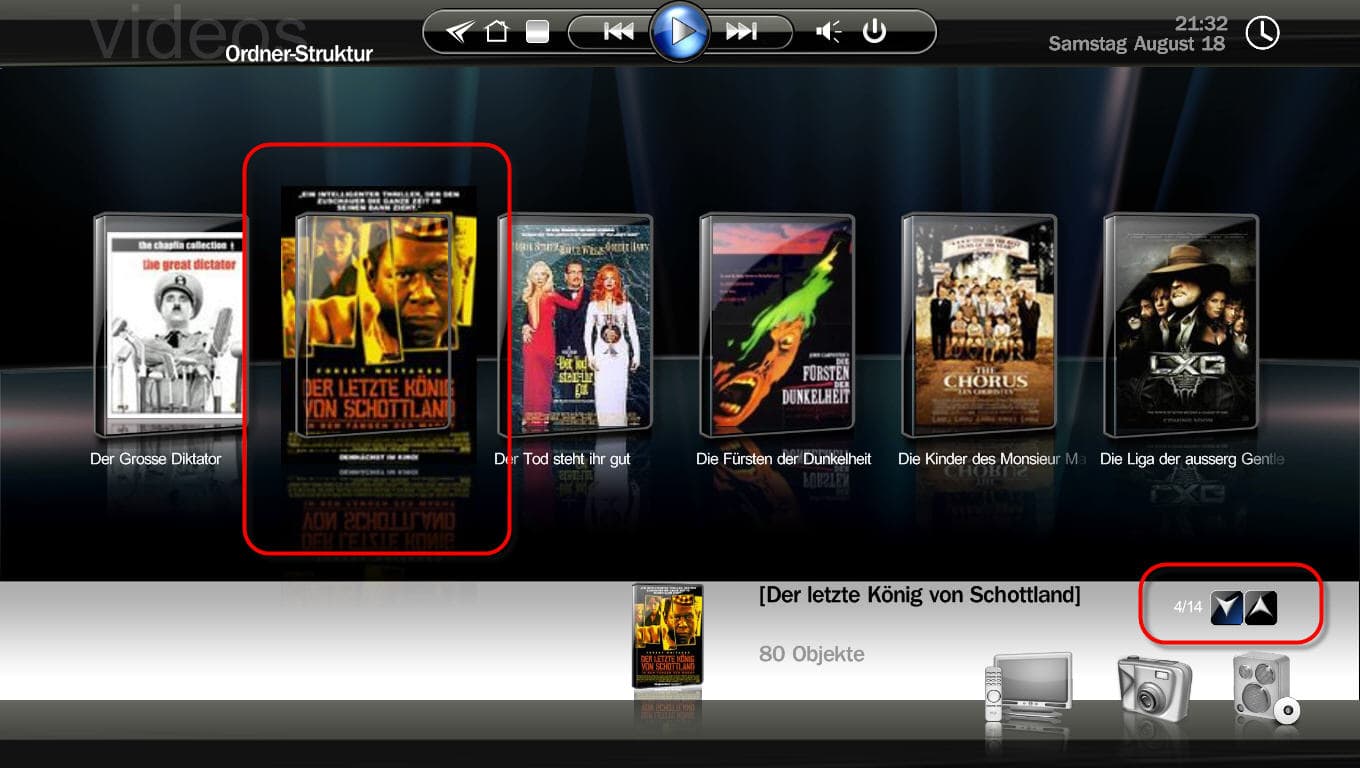
And because it looks astonishing good in filmstrip view in this skin ;)

Anyway, to remove the white stripe you will have to change the background image manually in some editor.
what I did in TVplugins cant be done in this plugin. The reason its gone in TVplugins, its becaue the fanart image is drawn over the background image. (aka the white stripe)
 

mikael

Retired Team Member
  • Premium Supporter
  • April 30, 2005
    558
    94
    41
    Stockholm, Sweden

    psiebe

    Portal Pro
    March 29, 2007
    93
    1
    54
    Home Country
    Netherlands Netherlands
    Thanks Darkwater, that sounds easy enough. I did not even check whether the white line was included in the background after I could not find it in the code.

    I use the mesfilms/mymovies plugin as it works very nice with dutch imdb type sites
     

    mpfrank

    Portal Pro
    November 6, 2006
    186
    0
    Cologne
    Home Country
    Germany Germany
    Sorry, I have not done anything about it - I simply cant understand what's done, and how it works.
    Harley havent included any helpfull descriptions in the .xml. But, I bet he will at some time though ;)

    Anyway, I dont really like spinning menues like this, so I have made my own "static" homescreen.
    I will include it in this post, but it will not work for you unless some doing:

    1) Copy the hover icons wich are used. (look at the screenshot in this post)
    2) Change the color/brightness of these icons to your likings (these are the ones that will be visible when hightlighed)
    3) Rename each one of the changed icons to originalnamefocus.png (add focus to each one)
    Like hover_my musicfocus.png, hover_my videos1focus.png... etc..
    5) Copy your changed icons to the media folder of the skin.
    6) Delete the skins cachefolder, and start madiaportal.

    If harley say I can post the modified icons, I will. But not before :)
    (they are not final anyway :p)

    Hi DarkWader,

    I did everything as you described and its working fine :D
    :D

    Two questions about it:

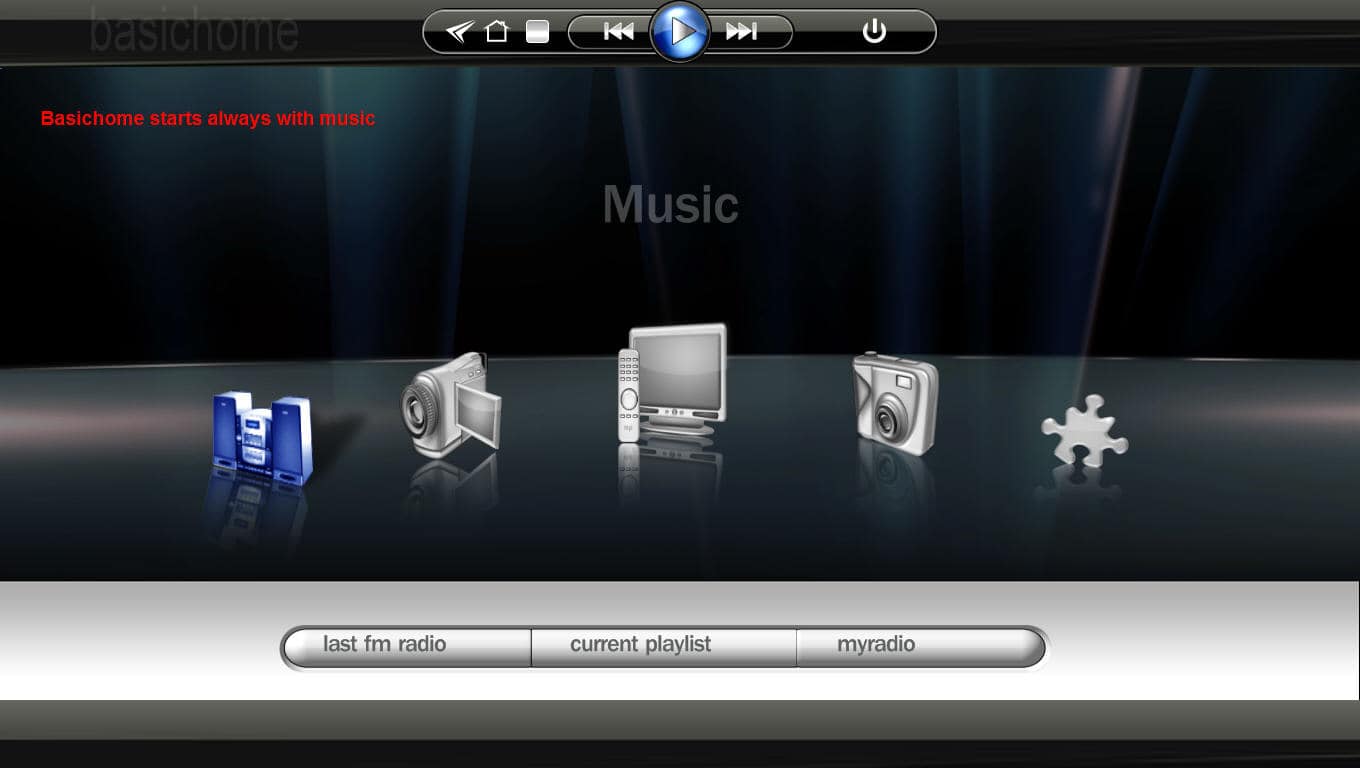
    MP starts in basichome with music selected (see screenshot)
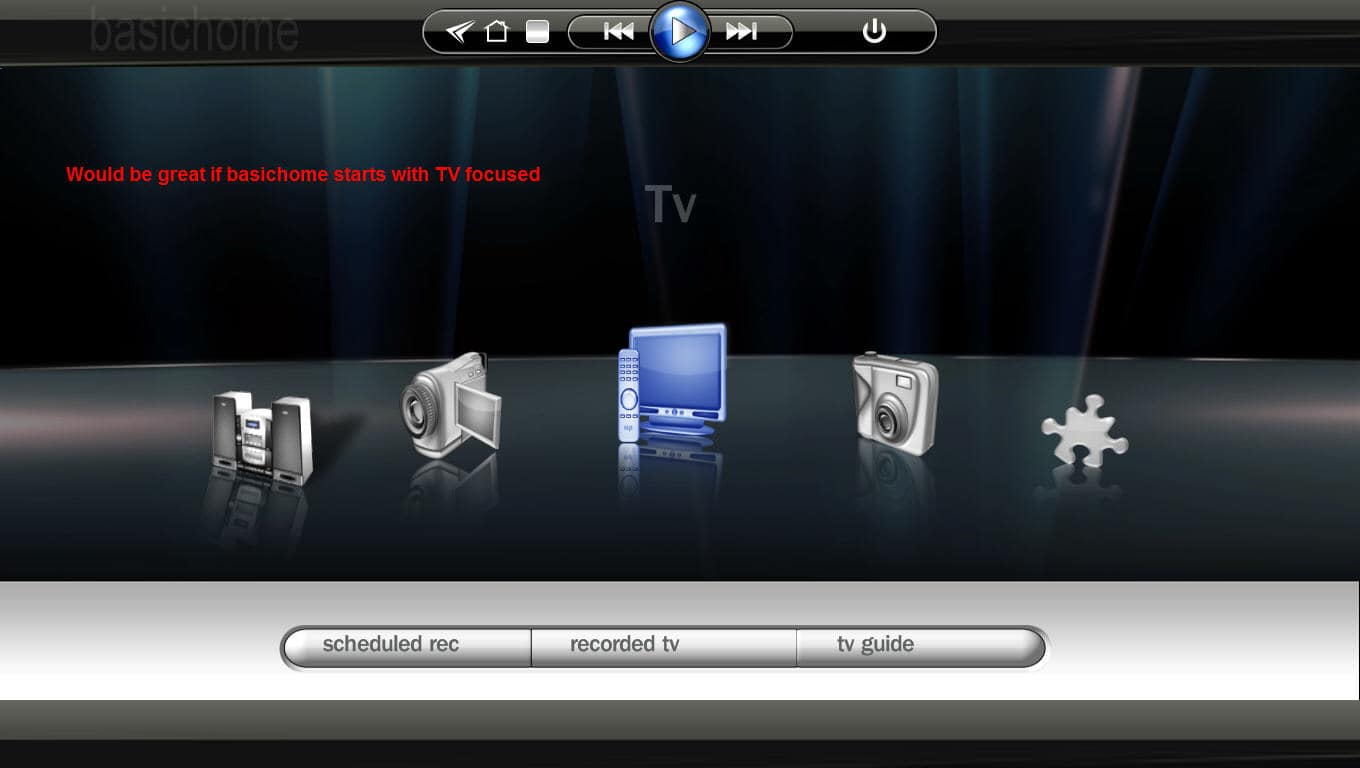
    What do I have to change in basichome.xml to start basichome always with TV selected (see 2nd screenshot)?

    As I am controlling MP with remote control (not keyboard and mouse), how can I get in basichome screen to the top bar. Before it was reachable with the arrow up key. With your static basichome.xml the arrow up key will not jump to the top bar. I use the topbar to quit MP after using. Hibernating my PC with MP open will cause problems with the graphic card :mad: so I have to close it before Powerscheduler is hibernating my PC.

    Hope you'll not get rid of my questions :oops:

    Best regards
    mpFrank
     

    Attachments

    • basichome_startscreen.jpg
      basichome_startscreen.jpg
      81.1 KB
    • basichome_TV.jpg
      basichome_TV.jpg
      82.2 KB

    mpfrank

    Portal Pro
    November 6, 2006
    186
    0
    Cologne
    Home Country
    Germany Germany
    Just a small bug report:

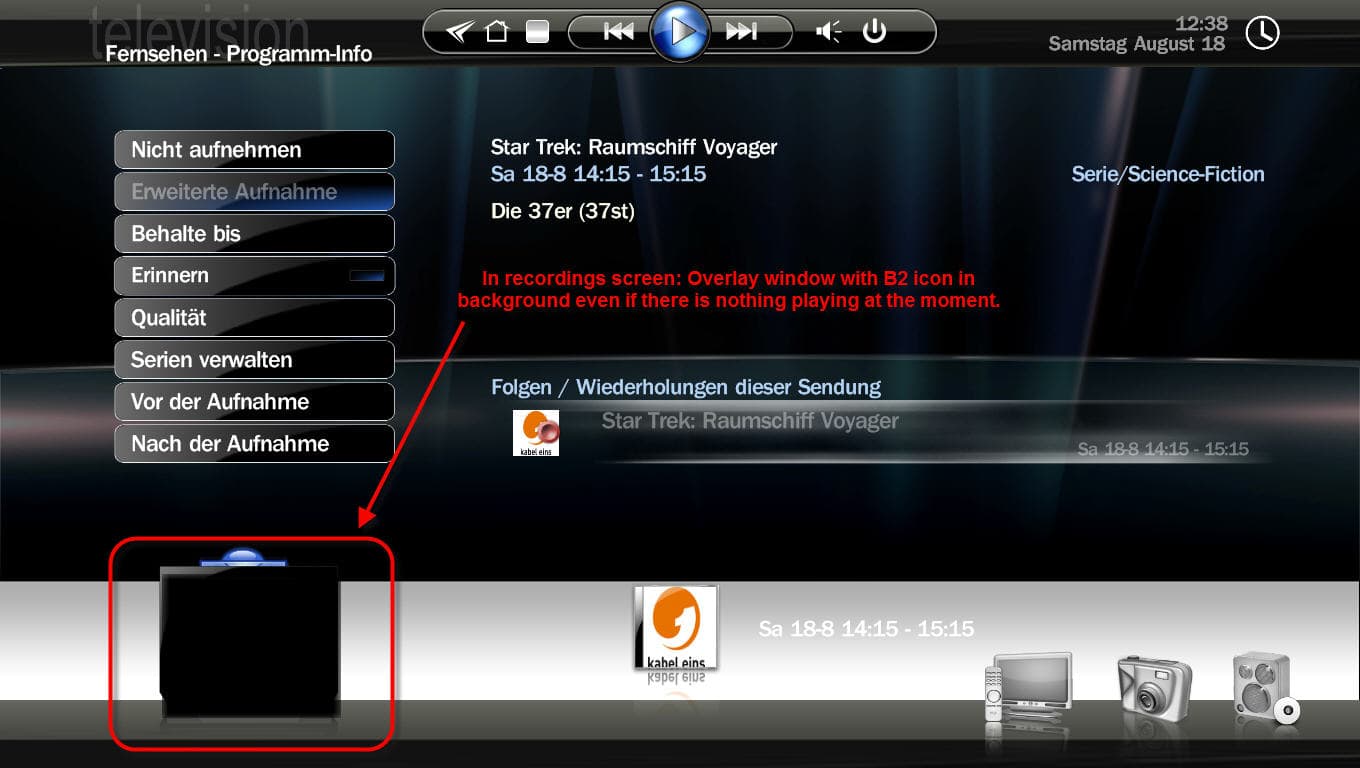
    In recording screen there is an overlay window with a B2 icon in background visable even if there is nothing playing (no TV, no video, no audio)

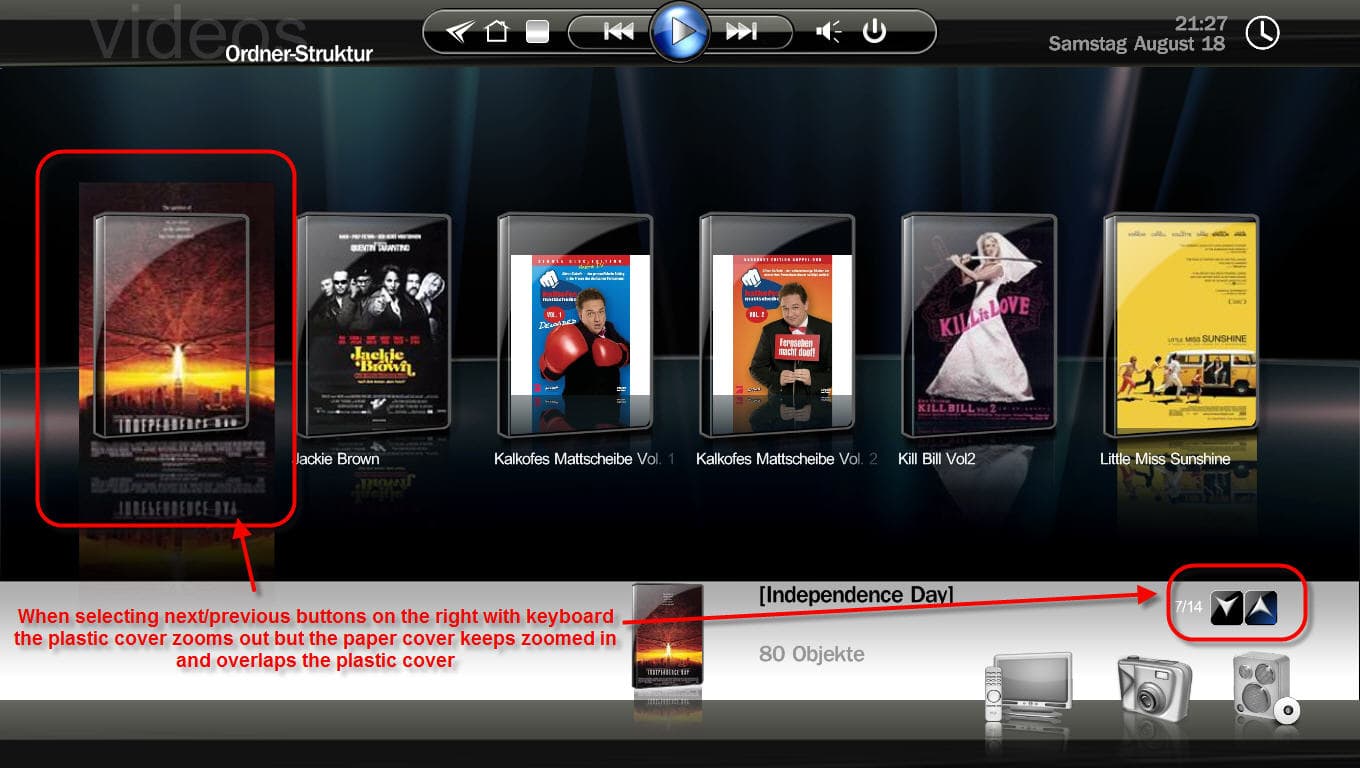
    Selecting the up or down arrow keys on the right buttom side in the cover view leeds to unzoom the plastic cover but the paper inlay keeps zoomed

    I made some screenshots which are attached....

    BTW: Each day I'm using this skin I love it more and more !!

    Cheers
    mpFrank
     

    Attachments

    • recordingscreen..jpg
      recordingscreen..jpg
      125.2 KB
    • dvdcoverflow1.jpg
      dvdcoverflow1.jpg
      157.6 KB
    • dvdcoverflow2.jpg
      dvdcoverflow2.jpg
      145.6 KB

    DarkWader

    Portal Pro
    October 3, 2006
    270
    6
    48
    Home Country
    Norway Norway
    Sorry, I have not done anything about it - I simply cant understand what's done, and how it works.
    Harley havent included any helpfull descriptions in the .xml. But, I bet he will at some time though ;)

    Anyway, I dont really like spinning menues like this, so I have made my own "static" homescreen.
    I will include it in this post, but it will not work for you unless some doing:

    1) Copy the hover icons wich are used. (look at the screenshot in this post)
    2) Change the color/brightness of these icons to your likings (these are the ones that will be visible when hightlighed)
    3) Rename each one of the changed icons to originalnamefocus.png (add focus to each one)
    Like hover_my musicfocus.png, hover_my videos1focus.png... etc..
    5) Copy your changed icons to the media folder of the skin.
    6) Delete the skins cachefolder, and start madiaportal.

    If harley say I can post the modified icons, I will. But not before :)
    (they are not final anyway :p)

    Hi DarkWader,

    I did everything as you described and its working fine :D
    :D

    Two questions about it:

    MP starts in basichome with music selected (see screenshot)
    What do I have to change in basichome.xml to start basichome always with TV selected (see 2nd screenshot)?

    As I am controlling MP with remote control (not keyboard and mouse), how can I get in basichome screen to the top bar. Before it was reachable with the arrow up key. With your static basichome.xml the arrow up key will not jump to the top bar. I use the topbar to quit MP after using. Hibernating my PC with MP open will cause problems with the graphic card :mad: so I have to close it before Powerscheduler is hibernating my PC.

    Hope you'll not get rid of my questions :oops:

    Best regards
    mpFrank

    I believe that the control that is first, in the .xml gets focus.
    so if you move the TV control section over the music one, you should get TV highlighted when entering basichome.
    I am not 100% sure, and I am on the way out the door atm. I will have a closer look at the rest later.
     

    mpfrank

    Portal Pro
    November 6, 2006
    186
    0
    Cologne
    Home Country
    Germany Germany
    I believe that the control that is first, in the .xml gets focus.
    so if you move the TV control section over the music one, you should get TV highlighted when entering basichome.
    I am not 100% sure, and I am on the way out the door atm. I will have a closer look at the rest later.

    DarkWader,

    moving the TV control section did not solve this

    I discovered the solution myself:
    In basichome.xml there is an entry <defaultcontrol>. I changed this from music-id to tv-id and now TV is selected when starting basichome.

    To enable the top bar in basichome screen is changed the entry <disabletopbar> form yes to no.

    Everything fine now :D
    :D

    Best regards
    mpFrank
     

    Tazman

    Portal Pro
    May 15, 2006
    173
    0
    Home Country
    Denmark Denmark
    Hi...

    In a second this has become my favorite skin! VERY NICE!!!


    Two small isues here:

    1. The desciption i tv-guide is written in white font color on white background. Very hard to read.

    2. The Clock is missing in tv-guide.


    Will follow this project... Keep up the good work.

    /Tazman
     

    ewiles

    Portal Member
    November 6, 2006
    44
    1
    50
    Silicon Valley
    Home Country
    United States of America United States of America
    Another suggestion for a change:

    In filmstrip view when zooming the selected album/movie - don't get rid of the text underneath. Having it just disappear looks a little odd. Perhaps the text can be enlarged, change color, or be highlighted instead.
     

    Users who are viewing this thread

    Top Bottom