Aeon Wide (1366x768) (7 Viewers)

mst3kroqs

Portal Member
August 15, 2006
43
0
Changing BasicHome Menu w/Aeon Wide Menu Generator

Hi -

Thanks again for the assistance here.

I did end up walking through the BasicHome.XML that 'ships' with Aeon Wide and discovered that the <hyperlink> tags enclosed the value which was equivalent to the WindowID, and because Aeon Wide Menu Generator lists the WindowID associated with each XML in the status bar, by stepping through them I noted the following equivalent settings for the default menu 'as shipped':

ItemName = WindowID = XMLName

MOVIES = 6 = myvideo
TV SERIES = 9811 = TVSeries
MUSIC = 501 = mymusicsongs
PICTURES = 2 = mypics
WEATHER = 2600 = myweather
DVD = 6 = myvideo
RADIO = 30 = myradio
SETTINGS = 4 = settings
TV = 1 = mytvhome
PLUGINS = 34 = myplugins

What needed to be changed to support MesFilms was to change the first menu entry:

MOVIES = 7986 = MesFilms

I also modified my menu order and content to taste, and even created some submenus and turned on Sambal's RSS ticker. Very nice utility, my compliments and appreciation to JBurnette and Sambal.

BTW - the other thing that cost me about 10 minutes of head-scratching was that when using the menu utility, the 'Folder' field under 'Background Images' was asking only for the foldername relative to the /skin/Aeon wide/Media/animations/ folder. Initially I was jamming an entire path in there, and this caused a blank background to be displayed when starting MP.

Anyway - a pretty boring post I'm sure to the experts here, but perhaps this is useful for someone else coming into this 'cold'. To be clear - I can see it would be a much cooler utility if it allowed you to select a menu XML (eg. BasicHome, Game, Extra, etc.), parse it, and then display it, this would obviously remove the need to re-enter all of the values each time you wanted to modify the menu - but I do recognize that this is a lot of additional code.

Still - on a rainy day - perhaps better than cleaning out the basement ... ;)

Best regards.

-m
 

Conflicted

Portal Member
July 8, 2008
44
2
Home Country
Sweden Sweden
Hey Guys,

Can someone help me out with this?

https://forum.team-mediaportal.com/plugins-47/rss-ticker-43603/index2.html#post292865

1. The Mini-TV in basichome is blocking the new nice weather plugin that sambal did.
2. The "Control"-buttons (exit mp, play..) are blocking the date & time in the TV screen (check the pictures in the url)

Thanks,
Viktor

I've read your post, will be looking into it.

Sambal,

Part one of my Issue was because of my VideoOverlay xml, I'm using a diffrent one that came with a version of TvSeries xmls that moves it to the top like that.

I just changed the POSY so that it didn't overlap your weather positioning and it fixed the problem (partialy)

Still have the play-icon at the bottom for some reason, and music overlay would need to be changed as well. But for now this will do.

Part 2 of my request is still up for grabs if anyone want's to take a look at it though :)

Thanks
 

roopert

Portal Pro
June 3, 2008
80
4
Home Country
Belgium Belgium
Still have the play-icon at the bottom for some reason, and music overlay would need to be changed as well. But for now this will do.

I changed it because when you select a song, the overlay is only showed in the basichomescreen.

The play icon in the overlay screen of the movies is partially showed. I tried to fix this to add some code in the videoOverlayTop.xml file but had no result, instead I have now an extra problem. When a movie is playing in the overlay screen at the bottom, I can't get the topbar being showed. A very strange and annoying problem.

So I changed the videoOverlayTop. xml file to it's original state, deleted cache folder but still having this problem.

Another problem (it's like problems seek me :)): the OSD screens in movies & tvseries aren't showed. Have this problem when using Aeon wide v1.0.
 

rmeredit

MP Donator
  • Premium Supporter
  • April 10, 2007
    164
    20
    Melbourne
    Home Country
    Basic Home DVD Goes to Movies

    Tried to play a real-life, shiny in the hand DVD today for the first time today since installing Aeon Wide, and noticed that the DVD button in BasicHome.xml takes me to the My Videos screen rather than playing the DVD. That is, the functionality of the button is exactly the same as the 'Movies' button. I could, of course, navigate to the DVD from there, and also just switch to the normal Home screen to click on Play DVD, but it would be nice if the DVD link worked in the same way as the main home Play DVD button.

    Is this by design, or a bug?

    Cheers,

    Rob.
     

    joz

    Portal Pro
    March 17, 2008
    1,353
    306
    Home Country
    Netherlands Netherlands
    First of all I really love this skin. Even though There arwe a lot of screens that still need work, but hey I'm patiently waiting (and doing some skinning myself) :)

    However I got the most setup now but can't seem to get the weather working in basichome. It just show the placeholders like #location and #temp etc.
    Anyone can help me out with this? using the latest svn weekly build atm.
     

    trevor

    Portal Pro
    October 17, 2006
    1,601
    952
    Chelmsford
    Home Country
    United Kingdom United Kingdom
    First of all I really love this skin. Even though There arwe a lot of screens that still need work, but hey I'm patiently waiting (and doing some skinning myself) :)

    However I got the most setup now but can't seem to get the weather working in basichome. It just show the placeholders like #location and #temp etc.
    Anyone can help me out with this? using the latest svn weekly build atm.

    Obivious question but have you got the current RSSTicker plugin from here. And have weather enabled and working coirrectly in MP?

    Trevor
     

    joz

    Portal Pro
    March 17, 2008
    1,353
    306
    Home Country
    Netherlands Netherlands
    Yeah got the RSSTicker working. My Weather is working from the my weather screen.

    I noticed (don't know if it's always been like that) that the RSS ticker is not showing directly after opening MP. If I switch screens and get back to basichome the ticker is loaded.
     

    trevor

    Portal Pro
    October 17, 2006
    1,601
    952
    Chelmsford
    Home Country
    United Kingdom United Kingdom
    Yeah got the RSSTicker working. My Weather is working from the my weather screen.

    I noticed (don't know if it's always been like that) that the RSS ticker is not showing directly after opening MP. If I switch screens and get back to basichome the ticker is loaded.

    I had trouble initially but I just removed the plugin, started up MP and checked the normal weather screens and installed again and it worked....It is a little slow to pull in the feed between 10-15secs from the main screen appreaing using BBC news RSS feed.
     

    joz

    Portal Pro
    March 17, 2008
    1,353
    306
    Home Country
    Netherlands Netherlands
    Got it fixed. I guess I used a wrong plugin. Downloaded the one from this post and it's all working now.
    I totally get lost sometimes in these forums.... You really have to search threads to get everything you want... There should be a better way then a forum to get you plugins. Need to look in the SVN plugins directory sometime
     

    trevor

    Portal Pro
    October 17, 2006
    1,601
    952
    Chelmsford
    Home Country
    United Kingdom United Kingdom
    Music PlayingNow screen concept

    Dear skinners/modders,

    I am enjoying this skin very much. There is one thing bothering me though. The main menus for movies, music, etc... (basic plugins) are all vertically centered in the middle of the screen, as you can see in Sambal's & trevor's screenshots. Why is this annoying? Because the backdrops are usually high quality photos/posters which have their most important information (the head/torso of a movie's hero) either in the middle or at the top, never at the bottom. Having the menu in the middle makes it hard to see the most interesting part of the backdrop.

    Is there any way for these menus to be at the bottom, like some TV-series xml files have it? If the bottom space is reserved for some overlay (like 'now playing music'), can this overlay be moved to the top? I ask you this because I am not too handy with xml myself.

    Kind regards,

    Dave

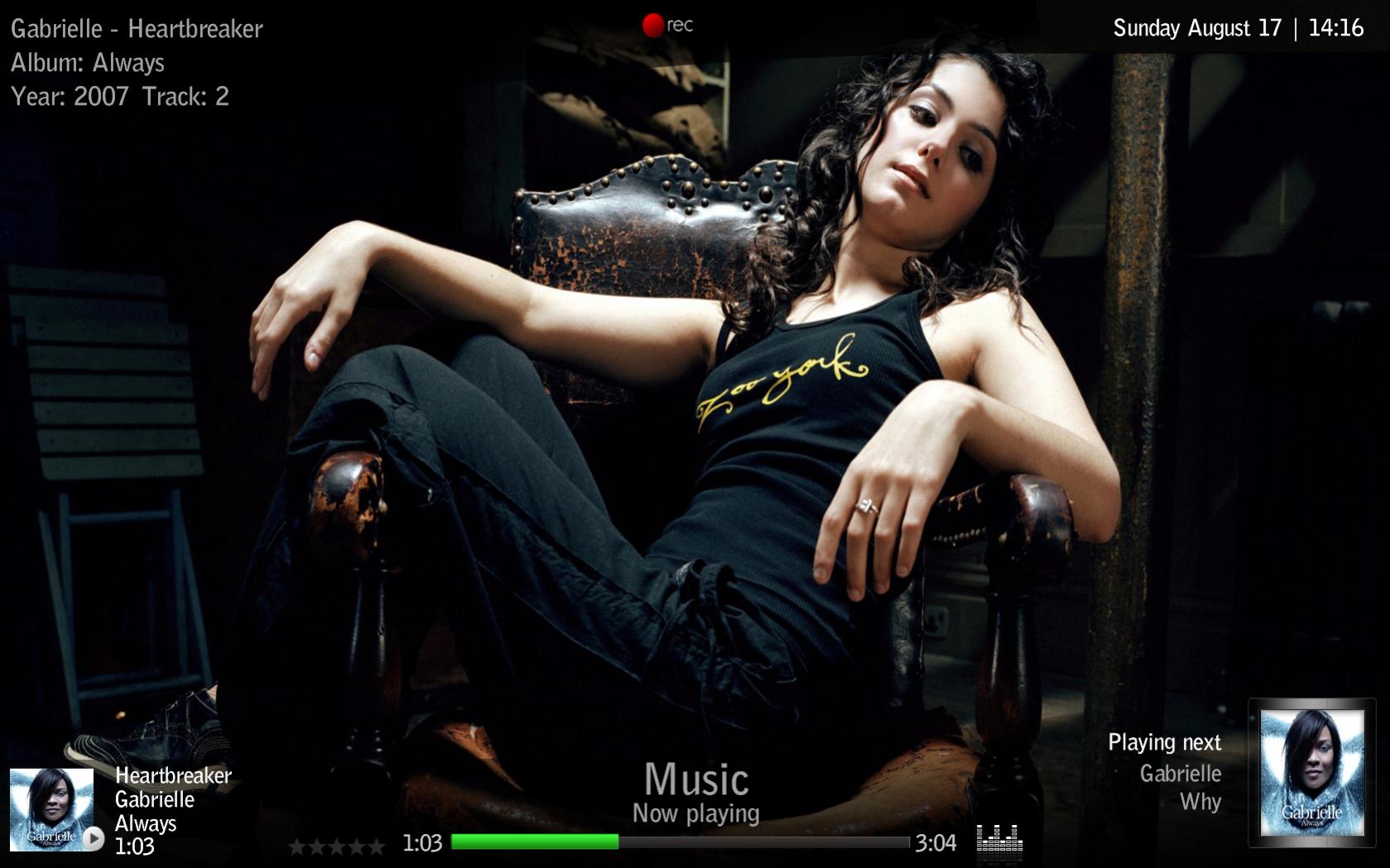
    This is something that was inspired by this post from Davio and the work I had done on music thumbnail screens, not going to look at moving stuff on all screens but some screens could be designed to show off the HQ backdrops.

    So this is a concept version of the Playing Now screen, it was one of those ideas that was less easy to implement that 1st intended as it is more that just a screen mod, seems you cant hide some controls and just removing them from skin upsets MP :)

    What I have done is create a MusicOSD plugin, this is just a port of the GUIMusicPlayingNow code from MP turning into a plugin with the controls I dont want removed - seems to work....

    The archive contains the plugin, new MusicOSD.xml file and a modified MyMusicPlayingNow.xml with an extra menu option to goto the new screen.

    I have Radio, LastFM screens doing the same thing but not 100% finished yet.....

    This is going away from the std look of the skin but some screens could benifit, Music and Radio screens seem the best fit.

    Comments/suggestions etc will be welcome.


    Trevor
     

    Attachments

    • 14-16-24.jpg
      14-16-24.jpg
      150.5 KB

    Users who are viewing this thread

    Top Bottom