Coreavc 3.0.1: no CUDA with MP 1.2.1 (1 Viewer)

jonm

Portal Pro
January 12, 2009
429
26
Wales
Home Country
Wales Wales
On my client PC which is an Acer Revo 3610, Coreavc doesn't use CUDA for live HD TV, but it does for movies.

This means I can't watch TV as it overloads the CPU.

Anyone any idea why Coreavc isn't using CUDA for TV?

This is Coreavc 3.0.1 and MP 1.2.1.

Thanks

Jon.
 

Holzi

Super Moderator
  • Team MediaPortal
  • April 21, 2010
    7,934
    2,235
    Ba-Wü
    Home Country
    Germany Germany
    AW: Coreavc 3.0.1: no CUDA with MP 1.2.1

    Probably TSReader related...
    Selecting DXVA in CoreAVC doesn't work too?
     

    jonm

    Portal Pro
    January 12, 2009
    429
    26
    Wales
    Home Country
    Wales Wales
    Hi - DXVA does work. The PC still won't display HD TV without juddering horribly though. The one upstairs which is virtually the same except it runs Vista, works fine. Odd.
     

    Owlsroost

    Retired Team Member
  • Premium Supporter
  • October 28, 2008
    5,539
    5,038
    Cambridge
    Home Country
    United Kingdom United Kingdom
    So apart from Vista versus Win7, what are the other differences ? e.g. video drivers, Aero/not Aero, display resolution ?

    My guess would be that the hardware de-interlacing load for HD TV (e.g. Freeview HD @ 1440 x 1080i ) is more than the ION can cope with at high display resolutions - remember that nVidia hardware de-interlacing uses the same stream processor hardware that CUDA would use (and there's not much of it in an ION). Movies are usually progressive scan so don't need de-interlacing.

    Tony
     

    jonm

    Portal Pro
    January 12, 2009
    429
    26
    Wales
    Home Country
    Wales Wales
    Hi Tony

    Aero enabled on both.

    On the one that works, (Vista) the driver is 8.15.11.8634.

    On the one that doesn't work (Win 7) it's 8.17.12.8562.

    Also the one that works has a newer dshowhelper.dll - I *think* it's the v92 part dwm one, but I can't be 100% certain.

    I tried swapping the same dshowhelper in on the PC that doesn't work and it made it far far worse. Weird.

    I'm going to try and downgrade the video driver if I can figure out how.

    Downgraded the nvidia graphics driver to the same version as on my Asrock nettop (which works fine) but it's still no good. I'm starting to despair. These two PCs are pretty much identical, I simply don't understand this :(
     

    Owlsroost

    Retired Team Member
  • Premium Supporter
  • October 28, 2008
    5,539
    5,038
    Cambridge
    Home Country
    United Kingdom United Kingdom
    How about attaching logs and screen caps with render stats enabled from the two clients ?

    Tony
     

    sukceso

    Portal Pro
    November 6, 2008
    181
    31
    Herrenberg
    Home Country
    Germany Germany
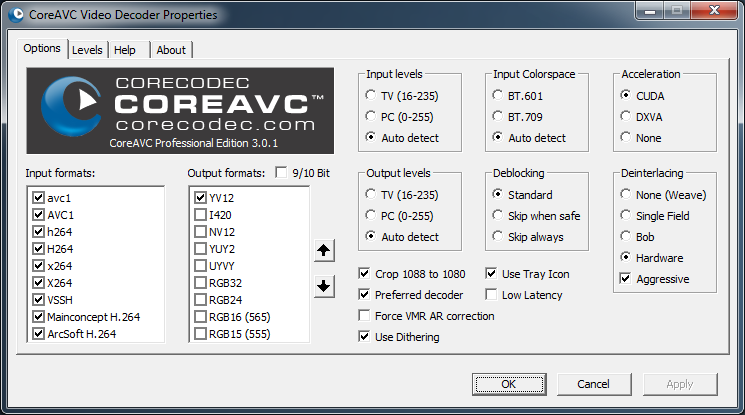
    Here are some traces from my setup (MP 1.2.2, NVIDIA GT430, CoreAVC 3.0.1) from watching LiveTV on HD channels (2 channels) and one HD recording. I hope it helps finding the problem why no CUDA is used.

    Here my CoreAVC settings:
     

    Attachments

    • CoreAVC Settings.png
      CoreAVC Settings.png
      61.8 KB

    Owlsroost

    Retired Team Member
  • Premium Supporter
  • October 28, 2008
    5,539
    5,038
    Cambridge
    Home Country
    United Kingdom United Kingdom
    Here are some traces from my setup (MP 1.2.2, NVIDIA GT430, CoreAVC 3.0.1) from watching LiveTV on HD channels (2 channels) and one HD recording. I hope it helps finding the problem why no CUDA is used.

    Here my CoreAVC settings:

    So does CUDA work on your system or not ?

    Tony
     

    logifuse

    Portal Pro
    January 19, 2011
    118
    11
    Sydney
    Home Country
    On the one that works, (Vista) the driver is 8.15.11.8634.

    On the one that doesn't work (Win 7) it's 8.17.12.8562.

    2 very different versions of CUDA there.

    I've seen the same behaviour with LAV CUVID/LAV Filters (which use CUDA & are a free alternative to CoreAVC, & do MPEG2 too, & have better PQ IMHO). The version of CUDA pre 275 seems to work better on low end Nvidia GPUs. Try rolling back to around 270 on the W7 front end & see how you go.
     

    Users who are viewing this thread

    Top Bottom