
Expressions/Rules requests (12 Viewers)

joz

Portal Pro
March 17, 2008
1,353
306
Home Country
Netherlands Netherlands
Hi all,

Wonder if someone can help me out solving this, I totally suck @ regex!
I need a parsing expresion that covers the following scenario (as an example I picked one tvserie path);

\Fawlty Towers\Season 01\1-A touch of Class.avi

That's the general naming of my filenames. The dash between episode and title (as in respectively "1" and "A touch of class") can have spaces around it. Besides that I need to cover my double episode in one file situation which I have in "01&02-title" format. Again by this example spaces around the & sign are optional as well as around the dash.
The last situation I need to handle is the lack off the title name, then the files look like "01.ext" or "1.ext" (usualy the former and 01&02.ext ofcourse).

This is my sorry try @ getting there;
\\(?<series>)\\Season (?<season>[\d]+)\\((?<episode>[\d]+)) ([\s]*&[\s]*((?<episode2>[\d]+))? ([\s]*-[\s]*))((?<title>)\.(?<ext>)$

Based upon this example
 

RoChess

Extension Developer
  • Premium Supporter
  • March 10, 2006
    4,434
    1,897
    Use:

    ^.*?\\?(?<series>[^\\]+?)\\Season\s(?<season>\d+)\\(?<episode>\d+)(?:[ &+]*(?<episode2>\d+))?[ \-]*(?<title>(?![^\\]*?(?<!the)[ .(-]sample[ .)-]).*?)\.(?<ext>[^.]*)$

    It works for:

    \Fawlty Towers\Season 01\1-A touch of Class.avi
    \Fawlty Towers\Season 01\2.avi
    \Fawlty Towers\Season 01\3&4.avi
    \Fawlty Towers\Season 01\5 & 6 - Episode Title.avi​

    If it fails for any other files, then you should have properly specified all the combinations, I was only able to distill the above ones from your chat. Instead of explaining the combinations, actually writing them out like the above speeds things up a lot more, because then I can just copy and paste them into Expresso instead of having to type them out, which I might not do next request.
     

    joz

    Portal Pro
    March 17, 2008
    1,353
    306
    Home Country
    Netherlands Netherlands
    :D a bunch RoChess, works a charm! Sorry I had put you thru the hassle extrapolating the scenario's from my chat :)
    Now I know.
     

    keith2045

    Portal Pro
    February 16, 2006
    264
    2
    Missouri
    Home Country
    United States of America United States of America
    I'm having issues with my DVD folders. I've got my shows stored like this

    X:\TVShows\Simpsons\Simpsons - 01x01 - Title\Video_TS\

    By default it finds VIDEO_TS.IFO and VTS_01_0.IFO but i only need it to find the first one. Any suggestions?
     

    RoChess

    Extension Developer
  • Premium Supporter
  • March 10, 2006
    4,434
    1,897
    I'm having issues with my DVD folders. I've got my shows stored like this

    X:\TVShows\Simpsons\Simpsons - 01x01 - Title\Video_TS\

    By default it finds VIDEO_TS.IFO and VTS_01_0.IFO but i only need it to find the first one. Any suggestions?

    Presuming X:\TVShows is your import path, try a simple expression such as:

    <series> - <season>x<episode> - <title>\VIDEO_TS\VIDEO_TS.IFO​

    And disable the others if they are generating false positives for you.
     

    keith2045

    Portal Pro
    February 16, 2006
    264
    2
    Missouri
    Home Country
    United States of America United States of America
    That's one that i had in the past but it's not working anymore. I disabled the other ones and it didnt find any of the shows.
     

    keith2045

    Portal Pro
    February 16, 2006
    264
    2
    Missouri
    Home Country
    United States of America United States of America
    So after testing i got a reg expression that works

    ^.*?\\?(?<series>[^\\$]+?)[ .-]+(?:?(?<season>\d+)[.-]?[ex](?<episode>\d+)|(?:\#|\-\s)(?<season>\d+)\.(?<episode>\d+))(?:[ex+-]*(?<episode2>\d+))?[.-]*(?<title>(?![^\\]*?sample[ .-])[^$]*?)\\VIDEO_TS\.IFO$

    when testing only one shows up (video_ts.ifo) but after importing the shows, both files show up(video_ts.ifo and VTS_01_0.IFO) and this is the only expression enabled. Thoughts?
     

    psiebe

    Portal Pro
    March 29, 2007
    93
    1
    54
    Home Country
    Netherlands Netherlands
    Hi Guys,

    Any idea how to tackle the issue keith2045 mentioned above? I want to add DVD files, but even if I only assign video_ts.ifo and choose to ignore all the other hits (VTS_01_0.IFO etc) they do show up in the GUI. With 5 ifo's per episode (midsomer murders) this is a mess.

    Any clue or alternatively, a better way to work with dvd's in MP ?? (don't like the (slow) way iso's work with daemon tools and automount, if it worked like with VLC that option would be my preference)

    thanks,
    Patrick
     

    navaras

    Portal Member
    December 20, 2008
    18
    0
    Vilnius
    Home Country
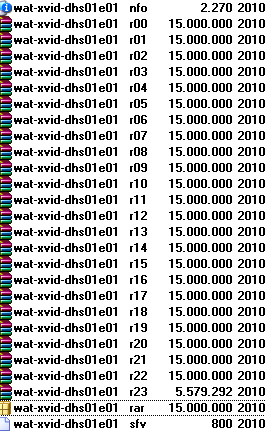
    my path:
    H:\Desperate.Housewives.S01-S04.DVDRip.XviD-MiXED\Desperate.Housewives.S01-S03.DVDRip.XviD\Desperate.Housewives.S01.DVDRip.XviD-WAT

    and there are compressed rar files. (see attached file)

    so i need write special code, but unfortunately i dont understand it.
     

    Attachments

    • rar.png
      rar.png
      14.7 KB

    nzdreamer55

    MP Donator
  • Premium Supporter
  • August 31, 2010
    465
    28
    San Luis Obispo, CA
    Home Country
    United States of America United States of America
    Hello everyone,

    I'm new to media portal and MP-TV plugin. I am looking for some help with importing TV shows that are recorded by Windows media center 2005 to a HTPC on my home LAN running Media Portal. I installed the TP Plugin however when I setup the import path, the TV shows don't parse. I'm not sure if the way they are saved by MCE if there is enough info in the title to write an expression (not that I am smart enough to write one). Here is an example of the file name:
    Futurama_COMEDYP_01_09_2010_01_00_04.dvr-ms

    Is there a way to write a rule so that this get's imported? Is so will it changed the name of the file? Lastly if it does change the name of the file will windows media center still recognize it?

    Thanks in advance
    Steve
     

    Users who are viewing this thread

    Top Bottom