First line of TV subtitles not displaying at top (10 Viewers)

CyberSimian

Test Group
  • Team MediaPortal
  • June 10, 2013
    3,847
    3,049
    Southampton
    Home Country
    United Kingdom United Kingdom
    Also try setting the subtitle default language to Eng
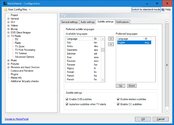
    Thank you -- setting the language has made the subtitles appear (in the first TS file that you uploaded). This is the setting:

    subtitle_lang.jpg

    Having watched the file with subtitles enabled, I don't think that there is anything wrong with the placement of the subtitles. I think that the position of each subtitle must be specified in the TV data stream -- I don't think that it is MP that decides where to place the subtitles.

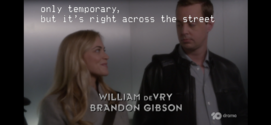
    In the test file, the subtitle authors have obviously placed the subtitles near the top of the screen because the opening credits appear at the bottom of the screen (and both are white text superimposed on the picture). Once the credits have finished, the subtitles are placed near the bottom of the screen, in their "conventional" position:


    10-04-29.jpg 10-10-03.jpg

    One of my test recordings has a series of advertisements at the beginning, and the subtitles are all over the screen -- they are placed to avoid obscuring the product branding:


    09-48-31.jpg 09-48-48.jpg
    09-49-18.jpg 09-49-53.jpg

    So I don't think that there is a problem with DVB subtitles where the subtitles are embedded in the data stream. For video files with external subtitle files (I don't have any of those to test), MP probably has more control over where the subtitles are placed.

    -- from CyberSimian in the UK
     

    RiverFilth

    Portal Member
    July 18, 2010
    16
    14
    Home Country
    You are also missing the first line of the subtitle in your first example, so thanks for confirming the problem.
    This is what it should look like (from VLC):
     

    Attachments

    • Screenshot 2026-10-29 083104.png
      Screenshot 2026-10-29 083104.png
      1.1 MB
    Last edited:

    doskabouter

    Development Group
  • Team MediaPortal
  • September 27, 2009
    5,415
    4,506
    Nuenen
    Home Country
    Netherlands Netherlands
    still having issues importing that recording... i already changed the xml to a channel that i have. from the tvserver side it looks like it imported but in MP still no ncis in my recorded tv...
    to be continued...
     

    CyberSimian

    Test Group
  • Team MediaPortal
  • June 10, 2013
    3,847
    3,049
    Southampton
    Home Country
    United Kingdom United Kingdom
    still having issues importing that recording... i already changed the xml to a channel that i have. from the tvserver side it looks like it imported but in MP still no ncis in my recorded tv...
    to be continued...
    I also created a placeholder xml file using another recording as a model, but "TV Server Config" would not list it on the "Import" tab, so not possible to add it to the database. However...

    The test file will play successfully from the "Videos" section, complete with subtitles (if you select all subtitle types and set the language to "English").

    -- from CyberSimian in the UK
     

    CyberSimian

    Test Group
  • Team MediaPortal
  • June 10, 2013
    3,847
    3,049
    Southampton
    Home Country
    United Kingdom United Kingdom
    You are also missing the first line of the subtitle in your first example, so thanks for confirming the problem.
    This is what it should look like (from VLC):
    I have now tried VLC, and agree that there are subtitle lines missing from the MP screens. :(
    Do you know whether the subtitles are DVB or Teletext?

    -- from CyberSimian in the UK
     

    doskabouter

    Development Group
  • Team MediaPortal
  • September 27, 2009
    5,415
    4,506
    Nuenen
    Home Country
    Netherlands Netherlands
    Still having issues showing subtitles (either from recorded tv or from videos)
    mp reports it has subtitles:
    [Log ] [MPMain ] [DEBUG] - Subtitles count : 1
    but when building a graph it says:
    [Log ] [MPMain ] [DEBUG] - Filter: TsReader - try to connect: Subtitle
    [Log ] [MPMain ] [DEBUG] - DirectShowUtil: build the graph for PIN : Subtitle
    [Log ] [MPMain ] [DEBUG] - DirectShowUtil: RenderUnconnectedOutputPins Pin Subtitle - failed

    what are the other settings for subtitles? (Most important one as far as i see now is the subtitle engine. mine is set to mpc-hc)
    Also messed about trying to run that in graphstudio and or connecting graphstudio to MP but got nowhere with that. Graphstudio also informs me there is nothing on my system that can connect to the subtitle outputpin of the tsreader
     

    CyberSimian

    Test Group
  • Team MediaPortal
  • June 10, 2013
    3,847
    3,049
    Southampton
    Home Country
    United Kingdom United Kingdom
    what are the other settings for subtitles? (Most important one as far as i see now is the subtitle engine. mine is set to mpc-hc)
    I have that set to Disabled, but I still see subtitles for the test file located in "Videos". I think that for certain files (TS files, but perhaps others too), the player must decide to use the settings in the TV section of "MP Config", and not the settings in the "Video" section.

    -- from CyberSimian in the UK
     

    doskabouter

    Development Group
  • Team MediaPortal
  • September 27, 2009
    5,415
    4,506
    Nuenen
    Home Country
    Netherlands Netherlands
    hm, kind of weird. enabling dvbsubtitles shows me that pin connected to MP's DVBsub3 and indeed missing lines.
    Disabling that shows me again that unconnected pin but i do see subtitles, with also those lines missing.
    As a bonus i see the subtitle texts in my logfile, so that is a good startingpoint for debugging this further!
     

    Users who are viewing this thread

    Top Bottom