Intermittent chronic stuttering on clients live tv (1 Viewer)

ben1210

MP Donator
  • Premium Supporter
  • September 2, 2012
    191
    25
    Home Country
    United Kingdom United Kingdom
    Noticed recently some very bad stuttering when changing channels, mainly on HD channels, This may last 5-10 minutes and then all is fine. its been happening on 2 clients.

    Real time protection off on all machines. No recent changes to the configuration of either server or clients to give me a clue.

    Logs attached of client made just after the problem was happening when trying to watch BBC 1 HD, BBC 2 HD and ITV HD

    Any advice or help greatly appreciated

    edit: had more of the same problems tonight, tried watching a channel called quest and no picture, no sound, then MP became very slow to respond. new logs attached
     
    Last edited:

    mm1352000

    Retired Team Member
  • Premium Supporter
  • September 1, 2008
    21,544
    8,236
    Home Country
    New Zealand New Zealand
    Hello

    We can't rule out issues on the server side or with your network given that you've only provided client side logs.

    About all that I can say is...
    1. The TsReader log files are full of continuity errors, which usually suggests either:
    • network issues
    • server side issues
      • HDD stress
      • signal reception problems
    2. You should set your codec preferences:
    http://wiki.team-mediaportal.com/1_...nfiguration/9_Codecs_and_Renderer/1_TV_Codecs

    Please provide the logs from the server side at the same time, and tell us about your network (is it wireless, wired, powerline; are there other applications running that might be downloading stuff etc.; have you checked firewall config)...

    Regards,
    mm
     

    ben1210

    MP Donator
  • Premium Supporter
  • September 2, 2012
    191
    25
    Home Country
    United Kingdom United Kingdom
    Hello

    We can't rule out issues on the server side or with your network given that you've only provided client side logs.

    About all that I can say is...
    1. The TsReader log files are full of continuity errors, which usually suggests either:
    • network issues
    • server side issues
      • HDD stress
      • signal reception problems
    2. You should set your codec preferences:
    http://wiki.team-mediaportal.com/1_...nfiguration/9_Codecs_and_Renderer/1_TV_Codecs

    Please provide the logs from the server side at the same time, and tell us about your network (is it wireless, wired, powerline; are there other applications running that might be downloading stuff etc.; have you checked firewall config)...

    Regards,
    mm
    attached are server side logs.

    Clients connected to server via wired ethernet. No other applications running. Not sure about firewall config, all I can say is that I have MSE on every machine with real time protection disabled. Any time MP suggests firewall config I do as promted. No problems with TV recordings, Films or TV shows or online videos.

    My codecs are set as per Perfect Picture 5 minute set up guide.

    I dont think its signal strength as 10 minutes later the channel plays perfectly.

    HDD stress, not sure, but I have a 500gig dedicated 7200 speed for timeshifting
     

    mm1352000

    Retired Team Member
  • Premium Supporter
  • September 1, 2008
    21,544
    8,236
    Home Country
    New Zealand New Zealand
    your TsWriter.log is full of
    [2014-08-25 09:38:07,836] [6d3ae50] [f84] - PMT Pid wasn't found on the PAT. Channel may have moved, try a new channel scan.
    have you tried to follow the suggestion?
    That could be harmless.

    I'll take a look at the server logs and get back to you...
     

    ben1210

    MP Donator
  • Premium Supporter
  • September 2, 2012
    191
    25
    Home Country
    United Kingdom United Kingdom
    your TsWriter.log is full of
    [2014-08-25 09:38:07,836] [6d3ae50] [f84] - PMT Pid wasn't found on the PAT. Channel may have moved, try a new channel scan.
    have you tried to follow the suggestion?

    Yes, re-scanned both TBS 6981 (Satellite) and TBS 6280 (Aerial) late last night then re-booted all systems. So far no further problems.

    Question, every time I re-scan I tick 'Enable Channel Movement Detection'. I assume now that this tick is for making the scan quicker and not, as I thought, a setting to track and amend if necessary channel tuning changes automatically in the background. So is there a way of auto background re-scanning channels, or will I have to do a manual channel scan every so often to A) find new channels and B) prevent errors like the above?
     

    mm1352000

    Retired Team Member
  • Premium Supporter
  • September 1, 2008
    21,544
    8,236
    Home Country
    New Zealand New Zealand
    Hello again

    I confirm those "channel may have moved" messages are caused by the DVB EPG grabber, which is pretty much continuously trying to grab EPG for the "bid", "price-drop", "Sky News Active iText Quad" and "CNN" channels. All night; all day; every 15 seconds. That's a lot of unnecessary wear and tear on your tuners and surely adds to your power bill. Those channels are either no longer broadcasting, moved, or off-air at the time. If I were you I'd untick those channels in the EPG grabber lists (as long as you haven't ticked "store data only for selected channels"). If they are still active and were just off-air, TV Server can get the EPG data for them when it grabs for other channels on the same transponder.

    My codecs are set as per Perfect Picture 5 minute set up guide.
    With the greatest respect: in the first logs you posted they're not set at all for TV. They're set for Blu-Ray and videos... but not TV or DVDs.

    MediaPortal.xml Blu-Ray (no problem):
    [collapse]
    <section name="bdplayer">
    <entry name="useInternalBDPlayer">yes</entry>
    <entry name="audiolanguage">English</entry>
    <entry name="subtitlelanguage">English</entry>
    <entry name="audiotype">AC3</entry>
    <entry name="regioncode">B</entry>
    <entry name="parentalcontrol">99</entry>
    <entry name="subtitlesenabled">yes</entry>
    <entry name="filter0">undefined</entry>
    <entry name="audiorenderer">Default DirectSound Device</entry>
    <entry name="mpeg2audiocodec">LAV Audio Decoder</entry>
    <entry name="mpeg2videocodec">LAV Video Decoder</entry>
    <entry name="h264videocodec">LAV Video Decoder</entry>
    <entry name="vc1videocodec">LAV Video Decoder</entry>
    </section>
    [/collapse]

    MediaPortal.xml TV (not set):
    [collapse]
    <section name="mytv">
    <entry name="deinterlace">0</entry>
    <entry name="autoturnontv">no</entry>
    <entry name="autofullscreen">no</entry>
    <entry name="byindex">yes</entry>
    <entry name="showchannelnumber">no</entry>
    <entry name="channelnumbermaxlength">3</entry>
    <entry name="hideAllChannelsGroup">no</entry>
    <entry name="showChannelStateIcons">yes</entry>
    <entry name="continuousScrollGuide">no</entry>
    <entry name="relaxTsReader">no</entry>
    <entry name="enableRecNotifier">no</entry>
    <entry name="notifyTVBefore">300</entry>
    <entry name="notifyTVTimeout">15</entry>
    <entry name="notifybeep">yes</entry>
    <entry name="confirmTimeshiftStop">yes</entry>
    <entry name="showEpisodeInfo">0</entry>
    <entry name="defaultar">Normal</entry>
    <entry name="allowarnormal">yes</entry>
    <entry name="allowaroriginal">yes</entry>
    <entry name="allowarzoom">yes</entry>
    <entry name="allowarzoom149">yes</entry>
    <entry name="allowarstretch">yes</entry>
    <entry name="allowarnonlinear">yes</entry>
    <entry name="allowarletterbox">yes</entry>
    <entry name="filter0">undefined</entry>
    <entry name="teletextHidden">no</entry>
    <entry name="teletextTransparent">no</entry>
    <entry name="teletextRemember">yes</entry>
    <entry name="teletextMaxFontSize">100</entry>
    <entry name="group">All Channels</entry>
    <entry name="channel">ITV HD</entry>
    </section>[/collapse]

    Easily fixed. :)

    As for the stuttering...
    There are tons of continuity errors on the server side at the same time as the ones on the client side, which means the problem is almost certainly server side.
    The problem seems to occur when you use your DVB-T/T2 tuners. I'm not sure if the frequency (618 MHz - BBC One HD, BBC TWO HD and ITV HD are all on that frequency) is correct for your region or whether it is a more general signal strength/quality/interference issue. Either way I suspect it is something to do with the incoming stream from the DVB-T/T2 tuners, and that frequency seems to be the one that is most affected.

    .
     

    mm1352000

    Retired Team Member
  • Premium Supporter
  • September 1, 2008
    21,544
    8,236
    Home Country
    New Zealand New Zealand
    Full list of channels on that frequency:
    • BBC ONE HD
    • BBC TWO HD
    • BBC THREE HD
    • CBBC HD
    • ITV HD
    • Channel 4 HD
     

    ben1210

    MP Donator
  • Premium Supporter
  • September 2, 2012
    191
    25
    Home Country
    United Kingdom United Kingdom
    Hello again

    I confirm those "channel may have moved" messages are caused by the DVB EPG grabber, which is pretty much continuously trying to grab EPG for the "bid", "price-drop", "Sky News Active iText Quad" and "CNN" channels. All night; all day; every 15 seconds. That's a lot of unnecessary wear and tear on your tuners and surely adds to your power bill. Those channels are either no longer broadcasting, moved, or off-air at the time. If I were you I'd untick those channels in the EPG grabber lists (as long as you haven't ticked "store data only for selected channels"). If they are still active and were just off-air, TV Server can get the EPG data for them when it grabs for other channels on the same transponder.

    My codecs are set as per Perfect Picture 5 minute set up guide.
    With the greatest respect: in the first logs you posted they're not set at all for TV. They're set for Blu-Ray and videos... but not TV or DVDs.

    MediaPortal.xml Blu-Ray (no problem):
    [collapse]
    <section name="bdplayer">
    <entry name="useInternalBDPlayer">yes</entry>
    <entry name="audiolanguage">English</entry>
    <entry name="subtitlelanguage">English</entry>
    <entry name="audiotype">AC3</entry>
    <entry name="regioncode">B</entry>
    <entry name="parentalcontrol">99</entry>
    <entry name="subtitlesenabled">yes</entry>
    <entry name="filter0">undefined</entry>
    <entry name="audiorenderer">Default DirectSound Device</entry>
    <entry name="mpeg2audiocodec">LAV Audio Decoder</entry>
    <entry name="mpeg2videocodec">LAV Video Decoder</entry>
    <entry name="h264videocodec">LAV Video Decoder</entry>
    <entry name="vc1videocodec">LAV Video Decoder</entry>
    </section>
    [/collapse]

    MediaPortal.xml TV (not set):
    [collapse]
    <section name="mytv">
    <entry name="deinterlace">0</entry>
    <entry name="autoturnontv">no</entry>
    <entry name="autofullscreen">no</entry>
    <entry name="byindex">yes</entry>
    <entry name="showchannelnumber">no</entry>
    <entry name="channelnumbermaxlength">3</entry>
    <entry name="hideAllChannelsGroup">no</entry>
    <entry name="showChannelStateIcons">yes</entry>
    <entry name="continuousScrollGuide">no</entry>
    <entry name="relaxTsReader">no</entry>
    <entry name="enableRecNotifier">no</entry>
    <entry name="notifyTVBefore">300</entry>
    <entry name="notifyTVTimeout">15</entry>
    <entry name="notifybeep">yes</entry>
    <entry name="confirmTimeshiftStop">yes</entry>
    <entry name="showEpisodeInfo">0</entry>
    <entry name="defaultar">Normal</entry>
    <entry name="allowarnormal">yes</entry>
    <entry name="allowaroriginal">yes</entry>
    <entry name="allowarzoom">yes</entry>
    <entry name="allowarzoom149">yes</entry>
    <entry name="allowarstretch">yes</entry>
    <entry name="allowarnonlinear">yes</entry>
    <entry name="allowarletterbox">yes</entry>
    <entry name="filter0">undefined</entry>
    <entry name="teletextHidden">no</entry>
    <entry name="teletextTransparent">no</entry>
    <entry name="teletextRemember">yes</entry>
    <entry name="teletextMaxFontSize">100</entry>
    <entry name="group">All Channels</entry>
    <entry name="channel">ITV HD</entry>
    </section>[/collapse]

    Easily fixed. :)

    As for the stuttering...
    There are tons of continuity errors on the server side at the same time as the ones on the client side, which means the problem is almost certainly server side.
    The problem seems to occur when you use your DVB-T/T2 tuners. I'm not sure if the frequency (618 MHz - BBC One HD, BBC TWO HD and ITV HD are all on that frequency) is correct for your region or whether it is a more general signal strength/quality/interference issue. Either way I suspect it is something to do with the incoming stream from the DVB-T/T2 tuners, and that frequency seems to be the one that is most affected.

    .
    As always many thanks for taking the time to post such informative replies.

    I've unticked the channels "bid", "price-drop", "Sky News Active iText Quad" and "CNN" channels to stop the continuous epg grabbing. Begs the question though, how to stop it in the future?

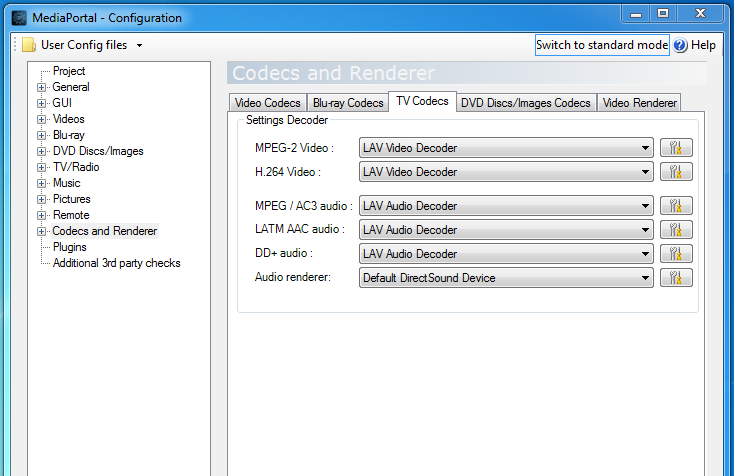
    I dont know what the problem is with the TV Codecs settings, as far as I was aware they are set as advised ( see screengrab ), what should I do?

    As for the stuttering, this was fixed I think with a re-scan. Again though, how can I prevent an unknown channel tuning change from affecting my system, can mediaportal do channel movement detection checks in the background and auto retune when a change is found?
     

    Attachments

    • Untitled.png
      Untitled.png
      61 KB
    Last edited:

    ben1210

    MP Donator
  • Premium Supporter
  • September 2, 2012
    191
    25
    Home Country
    United Kingdom United Kingdom
    This problem has occured again with the channel Quest having no picture and stuttering sound. I also havent been able to watch Quest + 1 or Yesterday at all. I have tried a new scan enabling channel movement detection but get nothing. Logs from the TV server attached. Also some channels are taking 30 seconds plus to change over

    Any advice greatly appreciated
     

    Users who are viewing this thread

    Top Bottom