iPhone interface for MediaPortal (iPiMP) - original thread (now closed) (3 Viewers)

Status
Not open for further replies.

rhartinger

Portal Pro
May 28, 2008
694
11
Is it possbile to login without login process? I have to login everyime when my PC was out

 

cheezey

Community Plugin Dev
August 26, 2004
1,559
312
58
West Yorks, UK
Home Country
United Kingdom United Kingdom
Is it possbile to login without login process? I have to login everyime when my PC was out

OK - I have added the option to save your login in a cookie which will be remembered across sessions. It will be in the next version.
 

moppe

Portal Member
December 23, 2006
36
2
Stockholm
Home Country
Sweden Sweden
installations problem 3.2.0

Hi, first of all thanx for a great app!
I have some problem whit the install of v3.2.0.
After a while (approx 90%) it start to give me an lot of error message:
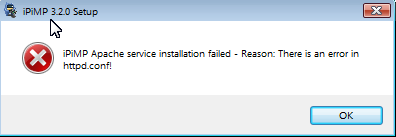
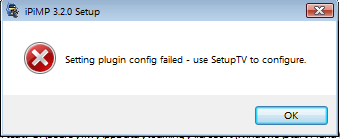
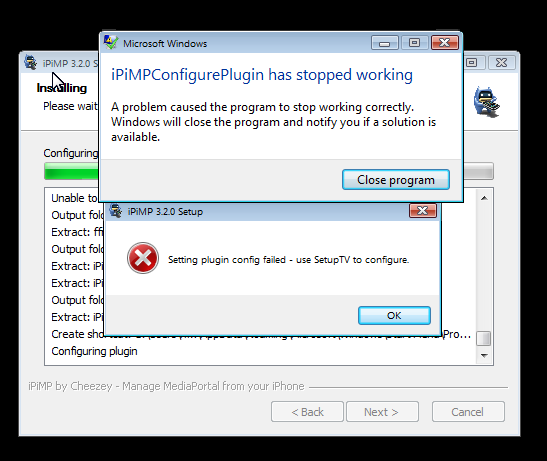
the first is that its an error in httpd.conf, then I got the prompt that says "use the setupTV" and then the install crashes..
after a click on "ok" the message is that everything is ok?!

Im running MP1.0 + svn on vista32.

any idea?

//moppe
 

Attachments

  • ipimp err1.png
    ipimp err1.png
    8.1 KB
  • ipimp err2.png
    ipimp err2.png
    7.7 KB
  • ipimp err3.png
    ipimp err3.png
    32.7 KB

cheezey

Community Plugin Dev
August 26, 2004
1,559
312
58
West Yorks, UK
Home Country
United Kingdom United Kingdom
Hi, first of all thanx for a great app!
I have some problem whit the install of v3.2.0.
After a while (approx 90%) it start to give me an lot of error message:
the first is that its an error in httpd.conf, then I got the prompt that says "use the setupTV" and then the install crashes..
after a click on "ok" the message is that everything is ok?!

Im running MP1.0 + svn on vista32.

any idea?

//moppe

Can you confirm C:\ProgramData\Team MediaPortal\MediaPortal TV Server\Gentle.Config exists and also attach the %programfiles%\ipimp\apache\conf\ipimp.conf that will have been copied to your PC.
 

moppe

Portal Member
December 23, 2006
36
2
Stockholm
Home Country
Sweden Sweden
Yes the gentle.config exists in "programdata..." and it looking good all the right stuff is in there ie db , user etc.

I paste the ipimp.conf file hope this is ok.

**
ServerRoot "C:/Program Files/iPiMP/apache"
Listen 192.168.1.111:80

LoadModule alias_module modules/mod_alias.so
LoadModule auth_basic_module modules/mod_auth_basic.so
LoadModule authz_host_module modules/mod_authz_host.so
LoadModule dir_module modules/mod_dir.so
LoadModule mime_module modules/mod_mime.so

ServerName iPiMP:80
ServerAdmin admin@iPiMP.com
DocumentRoot "C:/Program Files/iPiMP/aspx"

<Directory />
Options FollowSymLinks
AllowOverride None
Order deny,allow
Deny from all
</Directory>

<FilesMatch "^\.ht">
Order allow,deny
Deny from all
Satisfy All
</FilesMatch>

DefaultType text/plain

<IfModule mime_module>
TypesConfig conf/mime.types
AddType application/x-compress .Z
AddType application/x-gzip .gz .tgz
</IfModule>

#asp.net
LoadModule aspdotnet_module modules/mod_aspdotnet.so

AddHandler asp.net asax ascx ashx asmx aspx axd config cs csproj licx rem resources resx soap vb vbproj vsdisco webinfo

<IfModule mod_aspdotnet.cpp>
AspNetVersion v2.0.50727
AspNetMount / "C:/Program Files/iPiMP/aspx"
Alias /iPiMP "C:/Program Files/iPiMP/aspx"
Alias /TVLogos "C:/ProgramData/Team MediaPortal/MediaPortal/thumbs/tv/logos"
Alias /MP4 "M:/ipimp"

<Directory "C:/Program Files/iPiMP/aspx">
Options FollowSymlinks ExecCGI
Order allow,deny
Allow from all
DirectoryIndex Default.aspx
</Directory>

<Directory "C:/ProgramData/Team MediaPortal/MediaPortal/thumbs/tv/logos">
Options FollowSymlinks ExecCGI
Order allow,deny
Allow from all
</Directory>

<Directory "M:/ipimp">
Options FollowSymlinks ExecCGI
Order allow,deny
Allow from all
</Directory>

AliasMatch /aspnet_client/system_web/(\d+)_(\d+)_(\d+)_(\d+)/(.*) "C:/Windows/Microsoft.NET/Framework/v$1.$2.$3/ASP.NETClientFiles/$4"
<Directory "C:/Windows/Microsoft.NET/Framework/v*/ASP.NETClientFiles">
Options FollowSymlinks
Order allow,deny
Allow from all
</Directory>
</IfModule>
#asp.net

**

hope this help you to help me.

thanx
//moppe
 

cheezey

Community Plugin Dev
August 26, 2004
1,559
312
58
West Yorks, UK
Home Country
United Kingdom United Kingdom
Your iPiMP.conf is OK.

A couple of things to try - can you confirm you have a service called iPiMPweb and see if you can start it.

Also launch TV Service configuration utility and see if you can enable and configure the transcode plugin.
 

moppe

Portal Member
December 23, 2006
36
2
Stockholm
Home Country
Sweden Sweden
yes ipimpweb is started.
I cant config the ipimptranscodetoMP4 plugin its there but its not showing itself when selected.
 

cheezey

Community Plugin Dev
August 26, 2004
1,559
312
58
West Yorks, UK
Home Country
United Kingdom United Kingdom
Can you attach your tv.log and error.log from C:\ProgramData\Team MediaPortal\MediaPortal TV Server\log

There should be something in there about this.
 

testlab

Portal Member
February 5, 2007
10
0
50
Home Country
Spain Spain
Hi.

First of all (Brilliant APP !!!). Now, here is a small twist to it :) Using it on a Nokia N800. Sorry already had it and not going to buy an Iphone just yet :)

Anyway. Just loaded it up and looks great on the Nokia N800 (Will post some screenies). I have a problem though. I can Logon but after that I can not get the other links to work/go anywhere. I believe it has to do with the transition effect thing you use when changing screens.

Is it ok If I play a little bit with the templates/web pages and see if I can get it pass that point ?

----

EDIT: Some links do work without any kind of modification (Recorded Programs/Scheduled Programs/TV Server Status/Administration / About) But never gets past the 2nd screen (Basically the links that use normal html pages)
 
Status
Not open for further replies.

Users who are viewing this thread

Top Bottom