IR Server Suite - Version 1.4.2 Test Build 3158/3281 (2 Viewers)

Status
Not open for further replies.

The_General

Portal Member
July 6, 2009
11
0
Home Country
Brazil Brazil
thanks again.
1.4.2.2627 works great for me (again).
1.4.2.3015 won't.

:edit:
to make it work with mp 1.1.0.0 alpha i had to install 1.4.2.2627 and then from the latest build only the mp-control-plugin.

Exactly the same problem here, build 3015 sux
Other thing:
Before I formated the pc, the Code was the button name;
translator.jpg

Now it's a number:
translator3.jpg

Why?
 

kka

Portal Member
March 3, 2009
7
0
Averøy
Home Country
Norway Norway
Translator event

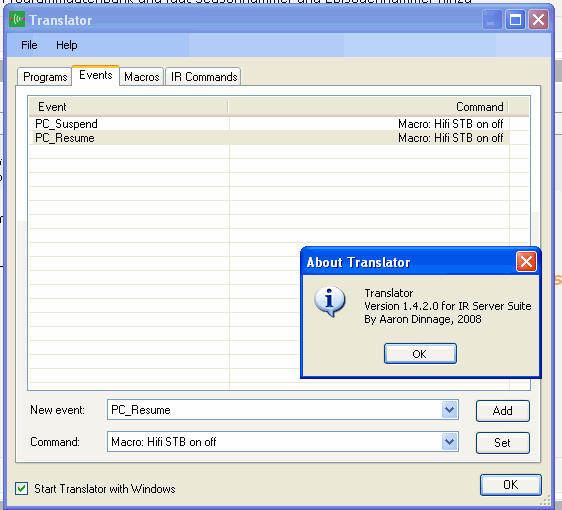
Hello, has created an macro to turn on my stb and hifi, tested ok.
Uses powerscheduler to send htpc to standby and resume for recordings or i turn it on by remote.
I`m trying to turn my stb /hifi off, when it goes to standby, and on when resume.
Is this possible, have attached screenshot of event, and logs after a standby/resume
Should this settings work? If not, is there any other solutions out there?
There is a setting under the advanced tab for powerscheduler - run command before/after stanby. Can this function blast the macro?
 

Attachments

  • translator event.gif
    translator event.gif
    17.7 KB

reeven

Portal Pro
June 8, 2009
67
2
Bucharest, greatest city in the world
Home Country
Romania Romania
For me, on Win7 32, Version 1.4.2 Test Build 3026 work ok on Xbox 360 remotes and Microsoft Mce remote with MCE IR RECEIVER.
No more double push problem, but i have an problem with standby.
My computer enter in standby, i push an remote key to wake up the computer, special key not working, only direction buttons, and the ok button.
 

The_General

Portal Member
July 6, 2009
11
0
Home Country
Brazil Brazil
For me, on Win7 32, Version 1.4.2 Test Build 3026 work ok on Xbox 360 remotes and Microsoft Mce remote with MCE IR RECEIVER.
No more double push problem, but i have an problem with standby.
My computer enter in standby, i push an remote key to wake up the computer, special key not working, only direction buttons, and the ok button.

x86 systems have no trouble with this build. But x64 make it impossible to run.
 

chemelli

Retired Team Member
  • Premium Supporter
  • September 28, 2006
    6,159
    2,264
    51
    Milano, Italy
    Home Country
    Italy Italy
    For me, on Win7 32, Version 1.4.2 Test Build 3026 work ok on Xbox 360 remotes and Microsoft Mce remote with MCE IR RECEIVER.
    No more double push problem, but i have an problem with standby.
    My computer enter in standby, i push an remote key to wake up the computer, special key not working, only direction buttons, and the ok button.

    x86 systems have no trouble with this build. But x64 make it impossible to run.

    We are working to fix the MCE receiver on x64 systems...please be patient...

    Simone
     

    The_General

    Portal Member
    July 6, 2009
    11
    0
    Home Country
    Brazil Brazil
    For me, on Win7 32, Version 1.4.2 Test Build 3026 work ok on Xbox 360 remotes and Microsoft Mce remote with MCE IR RECEIVER.
    No more double push problem, but i have an problem with standby.
    My computer enter in standby, i push an remote key to wake up the computer, special key not working, only direction buttons, and the ok button.

    x86 systems have no trouble with this build. But x64 make it impossible to run.

    We are working to fix the MCE receiver on x64 systems...please be patient...

    Simone

    I admire your work. With my message i had no intention to pressure the developers :sorry:
    But if you could answer why the program doesn't show the button's name anymore, i would be grateful :D
     

    stalkersvr

    Portal Member
    April 12, 2009
    49
    16
    After reinstalling IR Server on Windows 7 with MCE Remote I can't assign macros on "Power PC" button on remote. IR Server don't recongnise this button then it pressed. I try some version that I use before and new test version from first message, but both don't see "Power PC" button (I call it "Power PC", because in configuration it called so, but actually I have only one "Power" button on my remote).
    After some time spending on unsucceseful reconfiguring, I delete keys from registry, disabling native support for remote. After that, IR Server began recognise "Power" button, but in such configuration (using IR Server plugin in Mediaportal, not builtin MCE Remote support) there are very slow reaction on keypress in Mediaportal :(
    Please, help me to assign macros on "Power" button without disabling native support for MCE remote.
     

    Zasurus

    Portal Pro
    November 14, 2006
    79
    2
    44
    Home Country
    United Kingdom United Kingdom
    so I installed IR Server Suite 1.4.2.3018 and deleted the reg entrys to stop windows hogging the controls ...
    Zas,
    Care to explain what you mean here?
    This sounds like it might help with the chronically sluggish response to RC, which I experience in MP.
    TIA!

    There are some registry entries that I find I need to delete to get the "Start" (Green) button not to open up M$ Media Center and other remote keys that Windows keeps control of. I found the instructions on this page:
    (Obsolete) MCE Replacement Drivers

    I found the link in the footer of and-81's posts

    Hope this helps...

    Here is version 1.0.4.1 for those who requested it.


    Going to try these older drivers now! :-D I know they worked a charm last time I was using WinXP x64... Hope they work in Vista x64!

    EDIT: SHE'S ALIVE!!! :-D For me 1.0.4.1 works perfectly in Vista x64 GOOD LUCK!
    EDIT2: NO... I take it back... Still not working it was half the windows drivers and half IR Server... once I restarted I lost control inside MP


    Zas
     
    Status
    Not open for further replies.

    Users who are viewing this thread

    Top Bottom