IR Server Suite - Version 1.4.2 Test Build 3158/3281 (19 Viewers)

Status
Not open for further replies.

aggiejag

Portal Member
November 9, 2009
12
1
Okinawa, Japan
Home Country
United States of America United States of America
No that is not the issue. If your STB is not defined you can set it up yourself as mentioned in the wiki. For you set it up first you need to get your IR codes learned by IRSS.

I see that there is some problem in the MicrosoftMceTransceiver_DriverVista.log file.

2009-11-11 13:29:51.265438 - Learn()
2009-11-11 13:29:51.370438 - Received timing: -8750, +200, -100000,
2009-11-11 13:29:51.402438 - System.NullReferenceException: Object reference not set to an instance of an object.
at IRServer.Plugin.DriverVista.ReadThread() in d:\Projects\mp-plugins\trunk\plugins\IR Server Suite\IR Server Suite\IR Server Plugins\Microsoft MCE Transceiver\DriverVista.cs:line 1568
2009-11-11 13:29:51.405438 - Read Thread Ended

Just hope that someone more knowledgeable stops by to look at your issue.

In the meanwhile, you could try reinstalling IRSS or going with a different version of IRSS.

I'm reinstalling IRSS - Test Build 1.4.2.2975 right now... will see if that does the trick. Thanks again for all your help today!

Reinstalling did not solve the issue. I'll re-attack this evening to see if I can fix this.
 

Rakeesh

New Member
November 13, 2009
4
0
Great project. So far this is the only program that appears to support using non MCE remotes with an MCE receiver.

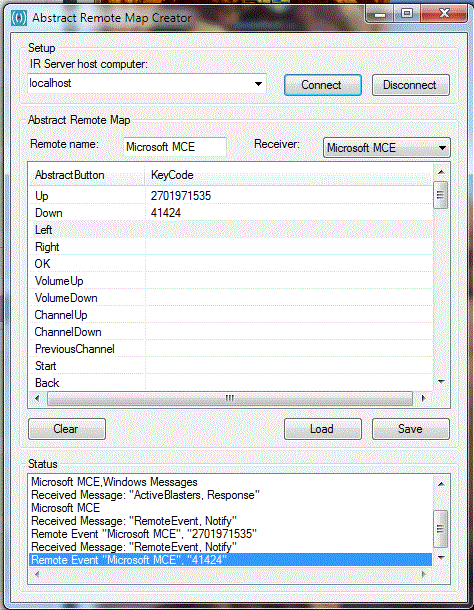
One little issue I am running into though. I am using a tivo remote with my MCE remote receiver. But, for whatever reason it seems to interpret tivo button presses as two separate events instead of one. This is otherwise fine with some parts of the suite that only accept one event at a time like the translator. However with the abstract remote map creator, everytime you press a button, it fills the currently selected AbscractButton with the first event, then the next AbstractButton with the second event.

This can be worked around by going back to the previous line and then entering that remote button. However if you make a mistake anywhere, it usually means you have to redo the entire thing from that point onwards. Given that there is a workaround, it isn't a complete showstopper, however I would like to request a feature for special remotes like these where (at your option) it will only accept one event per 300 miliseconds or something similar. I am pretty sure the tivo remote sends one button press for the specific IR command, and immediately followed with another button press so that the tivo itself can log what physical button on the remote was actually pressed - and this goes towards their lame demographic research. The second event should be ignored because it doesn't take into account which mode the remote is in (for controlling different devices as it is a universal remote,) rather the physical button that is pressed.

If that all sounds confusing, I've attached a screenshot showing an example of what happens with the remote abstractor. Basically I get both the up and down event filled in just by merely hitting the up button once on the remote.

I digged into the code and cannot find anything wrong.

Is there another MCE plugin user that is able to blast with a x64 system ?

Simone

I am actually running 64-bit Windows 7 myself with an MCE receiver. I don't have any use for the blaster but I'll see if I can get it working myself anyways to help you guys out.

EDIT: It appears to work fine for me just using the debug client. I hit "learn IR" pressed the info button on my tivo remote, attached the IR blaster to the iris on my tivo, and sure enough it toggles the info dialog box everytime I click the blast IR button.
 

Attachments

  • example.gif
    example.gif
    78 KB

Rakeesh

New Member
November 13, 2009
4
0
This might be a newbie question, but I don't suppose anybody can fill me in on how the "start" button on MCE remotes works, and how exactly I can replicate its exact function with any other arbitrary button on any other remote?
 
Status
Not open for further replies.

Users who are viewing this thread

Top Bottom