
Issue with MPTVServer no TV Server present (2 Viewers)

teros

Portal Member
April 7, 2005
38
0
Hi Guys,

Having an issue with TV server no matter how many times i de-installl and re-install completely i do not see anything listed under TV Server's...Error listed within Error.log is
at System.Threading.Thread.SleepInternal(Int32 millisecondsTimeout)
at TvService.TvServiceThread.OnStart()


Any one seen this before? I cannot use MP to watch TV :-(


MediaPortal Version: 1.2.0 Beta
MediaPortal Skin: Maya
Windows Version: Windows 7
CPU Type: AMD 1090T 3.2GHZ
HDD: 250GB Seagate
Memory: 12 GB DDR3 1033
Motherboard: ASUS M4A88TD-M
Video Card: ATI Radeon HD 5700
Video Card Driver: 8.17.12.6099
Sound Card: Realtek (onboard)
Sound Card AC3: Optical out
Sound Card Driver: 6.0.1.6151
1. TV Card: dvico fusion 4 (rev 2)
1. TV Card Type: DVB-T
1. TV Card Driver: 6.2.1.0
2. TV Card:
2. TV Card Type:
2. TV Card Driver:
3. TV Card:
3. TV Card Type:
3. TV Card Driver:
4. TV Card:
4. TV Card Type:
4. TV Card Driver:
MPEG2 Video Codec: SAF 5.0
MPEG2 Audio Codec: SAF 5.0
h.264 Video Codec: SAF 5.0
Satelite/CableTV Provider:
HTPC Case: Thermelatake DH101
Cooling: Fans internal
Power Supply: Thermaltek 650 watt
Remote: Logitech Harmony 885
TV: Samsung 58 Inch
TV - HTPC Connection: HDMI
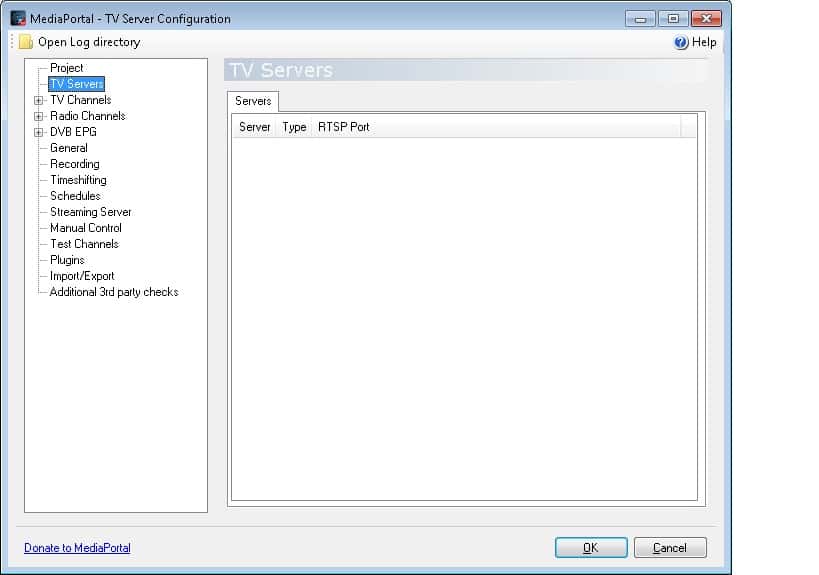
 

Attachments

  • TV Server Error.jpg
    TV Server Error.jpg
    65.4 KB

mm1352000

Retired Team Member
  • Premium Supporter
  • September 1, 2008
    21,544
    8,236
    Home Country
    New Zealand New Zealand
    Hi teros

    There is an exception being thrown as TV Server attempts to start when it tries to detect cards. Can you please do the following:

    1. Take a backup of the TVLibrary.dll in your TV Server install folder.
    2. Download and extract the attached TVLibrary.dll into your TV Server install folder.
    3. Delete your TV Server logs in C:\ProgramData\Team MediaPortal\MediaPortal TV Server\log (this is a hidden folder so you'll need to enable viewing of system and hidden files and folders - Google for instructions).
    4. Attempt to start TV Server by starting TV Server configuration.
    5. Post your TV Server logs here.

    mm
     

    Attachments

    • TVLibrary[1.2.0b_detect_cards_debug].zip
      159.6 KB

    teros

    Portal Member
    April 7, 2005
    38
    0
    Hi,

    Have done as requested no error.log but still no TV Server.

    Is this the log file your after? I've also removed the TV Cards and drivers several times without any luck....

    Thanks for your Help MM :)
     

    mm1352000

    Retired Team Member
  • Premium Supporter
  • September 1, 2008
    21,544
    8,236
    Home Country
    New Zealand New Zealand
    Hi again teros

    Yep, that is exactly what I needed. :D
    Your logs narrowed the problem down significantly. Can you please try the attached DLL using the same instructions (except don't bother backing up the test DLL).

    mm
     

    Attachments

    • TVLibrary[1.2.0b_detect_cards_debug].zip
      159.7 KB

    mm1352000

    Retired Team Member
  • Premium Supporter
  • September 1, 2008
    21,544
    8,236
    Home Country
    New Zealand New Zealand
    Right, found the problem! :D
    I've attached a DLL that will fix the problem, and I will submit a fix for 1.2.0RC. Thank you for reporting the issue and for your willingness to test.

    mm
     

    Attachments

    • TVLibrary.zip
      159.4 KB

    teros

    Portal Member
    April 7, 2005
    38
    0
    Hi I can now see the TV Server but cannot tune any channels everything comes up no signal. I've checked with DVICO Singal checker and it picks up channels tried a reboot installed DVICO software after the scan same result with our without.

    Have tried both a local Adelaide scan and an all region scan.
     

    mm1352000

    Retired Team Member
  • Premium Supporter
  • September 1, 2008
    21,544
    8,236
    Home Country
    New Zealand New Zealand
    Okay, so we're making progress...
    I think the issue now is with card configuration. Try this:

    1. Start TV Server configuration.
    2. Expand the "TV Servers" section.
    3. Select "Medusa" (which I believe is the name of your TV Server). You should now see a list of TV tuners.
    4. Select your first DVB-T tuner and click "edit".
    5. In the preferred network provider field, select "DVBT".
    6. Repeat the change for your second DVB-T tuner.
    7. Click on the "general" section to trigger TV Server to restart.
    8. Try to scan for channels again and let me know what happens.

    Note: I'm assuming that both DVB-T tuners are connected to your aerial. If that is not the case, try scanning with the other tuner if the setting change doesn't work just to be sure you've got the right tuner. If you intend to use the analog tuners, make sure you set the tuners up as hybrid cards (wiki instructions here).
     

    teros

    Portal Member
    April 7, 2005
    38
    0
    hey tried with both tuners setting to DVB-T failed also tried pre-loading the card same result
     

    mm1352000

    Retired Team Member
  • Premium Supporter
  • September 1, 2008
    21,544
    8,236
    Home Country
    New Zealand New Zealand
    Hmmm, okay.
    One more thing to try. Try increasing the time that TV Server waits for signal:

    (0. Change back to the "generic" provider for both DVB-T tuners.)
    1. Start TV Server configuration.
    2. Go to the "general" section.
    3. Go to the "scan" tab.
    4. Increase the tune timeout from 2 seconds to 10 seconds.

    If that still doesn't work then try the attached patch (same instructions as earlier).
     

    Attachments

    • TVLibrary[1.2.0b_signal_detection_debug].zip
      159.5 KB

    Users who are viewing this thread

    Top Bottom