[WiP] madVR support in MP1 (58 Viewers)

kenwonders

MP Donator
  • Premium Supporter
  • January 19, 2007
    791
    741
    Home Country
    England England
    At the moment the only problem I have is it does not put the TV and AVR to sleep via the Pulse 8 CEC HDMI adaptor and the CEC Remote plugin
    That's from USB rather than the 1050. It should still work fine (I have one too :) ). it doesn't work alongside a HDMI Doctor, but you can have 2 HDMI: one from the GPU into the AV for sound and picture and one from the Pulse8 (which doesn't need to plug into PC except via USB) to an unused port on the AV for CEC only.

    I'll give that a try if I have to, currently the HDMI is daisy chained through the USB :p HDMI CEC adaptor to AVR then TV. When the HTPC resumes from sleep it does wake the TV and AVR up if I have manually put them in standby and testing with the Libec tray app. will put them to sleep.
    Is that HDMI Doctor part of the Nvidia driver package?? I did note that it detected the HDMI CEC adaptor as an HMI switch when I looked in the HDCP status from the Nvidia Control Panel.:unsure:
    It's this: http://www.drhdmi.eu/

    It will always report a device to your PC so you don't get strange issues when AV hardware switches on and off. It conflicts with the Pulse CEC though, hence my slightly cranky solution :)
     

    GeYe

    MP Donator
  • Premium Supporter
  • January 17, 2009
    197
    132
    Home Country
    Germany Germany
    @joecrow Can you take a close look to picture quality of amd and nvidia please. The past years i would say AMD has done a better job, but maybe now is nvidia and i also need to change and i need to give nvidia a try.

    And maybe you can check 23,976. Do you see a difference from AMD and NVIDIA.
     

    Sebastiii

    Development Group
  • Team MediaPortal
  • November 12, 2007
    16,523
    10,466
    France
    Home Country
    France France
    I will link to new installer in first post :)
    It will based on master and new wip fix about @Rick164 detected issue where clicking on dialog is not always honored and also @Stéphane Lenclud about null reference when dialog notify is displayed from different thread (most of the time from plugin side).

    If upgrade ask to do a fresh installation, you need to start both installer from %temp% mp deploy folder :)

    btw, i need a proper way to reproduce the dialog notify bug, the cause is related to loadskin code where the skin is not fully loaded but MP trying to get value from it and lead to the crash.
    I have try to add code to wait until loadkin is loaded from MP main thread, not sure if it's the best way but seems to works (the new loadskin code change but wasn't able to valid that it fix the issue lol).
     

    Rick164

    MP Donator
  • Premium Supporter
  • January 7, 2006
    1,332
    1,009
    Home Country
    Netherlands Netherlands
    Dialog notify I believe we also use in AtmoLight which works without crashing with MadVR so far (during Hyperion device testing):

    https://github.com/ambilight-4-medi.../master/AtmoLight.MediaPortal1/Plugin.cs#L825

    Not sure if we call it the same way though but if you can point me to example code of dialog with issues can modify AudioSwitcher plugin to send specify dialogs when pressing certains keys for instance to allow for easy testing :)
     

    Rick164

    MP Donator
  • Premium Supporter
  • January 7, 2006
    1,332
    1,009
    Home Country
    Netherlands Netherlands
    Small question about reduce frame setting, for AtmoLight if I leave that setting off it will not delay it and send at the rate of the image right (as in not skip any frames) ?

    mep_madvr.PNG
     

    Sebastiii

    Development Group
  • Team MediaPortal
  • November 12, 2007
    16,523
    10,466
    France
    Home Country
    France France
    Dialog notify I believe we also use in AtmoLight which works without crashing with MadVR so far (during Hyperion device testing):

    https://github.com/ambilight-4-medi.../master/AtmoLight.MediaPortal1/Plugin.cs#L825

    Not sure if we call it the same way though but if you can point me to example code of dialog with issues can modify AudioSwitcher plugin to send specify dialogs when pressing certains keys for instance to allow for easy testing :)

    Thanks :)

    @Stéphane Lenclud has it (randomly) with infoservice plugin :p
    @HomeY has it also with Eventghost :p

    I don't have exactly the part of code but i think for inforservice it can be related to RSS information, on EventGhost maybe it can be reproducible when using IRC and has notification on MP (not sure).

    So for sure, those dialog notify, need to be executed from a different thread than MP Main one.

    I remember you explain that you have change something to works on single thread on plugin side otherwise we get null reference or something like, are you able to revert that part on plugin for testing ?
     

    Rick164

    MP Donator
  • Premium Supporter
  • January 7, 2006
    1,332
    1,009
    Home Country
    Netherlands Netherlands
    I remember you explain that you have change something to works on single thread on plugin side otherwise we get null reference or something like, are you able to revert that part on plugin for testing ?

    Yep had that with a yet to be released extension but can make it the same for AudioSwitcher as that one is lightweight and easy to mod, it showed the wrong dialog entirely while in thread "Select album" as header with no items for context menu items.
    Basically have to make it so that the actual dialog (yes/no | context menu etc..) is in a Thread however I just tried that again with latest MadVR release and it works now in thread as well which it definitely didn't before so might be fixed now :)

    Attached test .dll for AudioSwitcher and what is does is start the context menu in Thread as well as the "Change playback device" option upon selection, code overview for changes with explanation at top:

    https://gist.github.com/RickDB/6f590d2d841c55ffc54d35eb48d518a6
     

    Attachments

    • MP1-AudioSwitcher.zip
      126.4 KB

    Kotik

    MP Donator
  • Premium Supporter
  • March 19, 2009
    699
    485
    Athens
    Home Country
    Greece Greece
    Small question about reduce frame setting, for AtmoLight if I leave that setting off it will not delay it and send at the rate of the image right (as in not skip any frames) ?

    It is not altering the actual movie frame rate if that's what u mean.

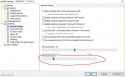
    What it does is forcing madVR to pre-buffer less video frames in advance. Essentially this setting has the same effect with this one here:

    Capture.JPG

    In other words it is affecting the number of video frames that are buffered and uploaded to the GPU VRAM prior to rendering. Lower buffer setting result in a more instant OSD actions, as a high amount of pre-buffered video frames would result in delays to user input, on the other hand higher amounts are giving u a safe fallback buffer. I hope it makes sense :)
     

    Rick164

    MP Donator
  • Premium Supporter
  • January 7, 2006
    1,332
    1,009
    Home Country
    Netherlands Netherlands
    It is not altering the actual movie frame rate if that's what u mean.

    Think this is another setting then :) for AtmoLight specific it reduced the frame sending by 1/2 before or still does not sure and that has its own hook into Mediaportal rendering.

    @Sebastiii are we still reducing those frames for AtmoLight and if so could we add an Mediaportal configuration setting for it to make it the same as with EVR where we don't skip over any frames and just send at the rate we get them?

    Reason is I started noticing some things off with Hyperion smoothing in combination with MadVR, nothing dramatic however smoothing can trip up and miss a frame in between (hard to measure).
     

    Sebastiii

    Development Group
  • Team MediaPortal
  • November 12, 2007
    16,523
    10,466
    France
    Home Country
    France France
    @Sebastiii are we still reducing those frames for AtmoLight and if so could we add an Mediaportal configuration setting for it to make it the same as with EVR where we don't skip over any frames and just send at the rate we get them?

    Reason is I started noticing some things off with Hyperion smoothing in combination with MadVR, nothing dramatic however smoothing can trip up and miss a frame in between (hard to measure).

    In current madVR version from few version back maybe V212 or even earlier, i have commented out the reduce code, so it will trigger it each time madVR use RenderOsd callback (so when video is running) :p
     

    Users who are viewing this thread

    Top Bottom