Maya: Beta release 04-04-10 (Original Thread) (3 Viewers)

Status
Not open for further replies.

tourettes

Retired Team Member
  • Premium Supporter
  • January 7, 2005
    17,301
    4,800
    1366 : 768 was only used by the tv-manufactuers because they could not build 1080p displays at that time, and they had to build something "better" than 720p displays.
    but dont be fooled. this res is no HD standard.

    Actually the real reason why such "odd" resolution was used is that same panels could be cut into smaller 1366x and full HD res pieces and there fore lowering the manufacturing costs (32", 37" used 1366 and 40+ in many cases were using full HD).
     

    Spragleknas

    Moderator
  • Team MediaPortal
  • December 21, 2005
    9,471
    1,822
    Located
    Home Country
    Norway Norway
    But if you set resolution to 1280x720 you haven't 1:1 pixelmapping, so 1366x is better.
    How many are able to do 1366 w/1:! pixelmapping? Not many, is my guess. Other users (including 1080) are better of w/720.

    Cut ''n paste from my other thread:

    -------------------------

    1280 : 720 = 1920 : 1080 = 16 : 9 = 1,77778
    1366 : 768 = 1,778646 (not 16 : 9)

    - Most TV's bought during last year and in the future is most 1920p ("FullHD)
    - Most "HD-ready (720p / 1366x768) will not accept its own native resolution.
    - Difficult to set video card to display 1366x768p

    This will happen to a 1366x768 skin on such a screen:

    (1) Skin (768) --- downscaled to 720p* ---> upscaled in TV to 768 ===> Scaling is bad :)
    *as it can not accept 768 or display adapter does not accept it

    (2) On a 1080p, the image will not scale that good because of different aspect ration (1,77778 vs 1,778646)

    With a 720p skin, the following will happen:
    HD-ready screen w/o pixelmapping:
    (3) Skin 720p ---> Input 720p ----> upscale to 768p ==> Result is better than (1)
    (5) On a 1080p: Skin 720p ----> upscale to 1080p ==> Result is better than (2)


    Only time 768 skin is beneficial is if it is used on a 768 screen and achieving 1:1 pixelmapping - has to be supported by TV (not many models do, esp. via DVI/HDMI, check link below) and videocard driver (---> good luck with that). Might be beneficial w/scanning, but notm likely).

    PS: All HD 720p IS 720p - not 768p :)

    1080p skins most likely will get a bit heavy, if not kept clean

    Further reading: pixelmapping - home
     

    infinite.loop

    Retired Team Member
  • Premium Supporter
  • December 26, 2004
    16,154
    4,133
    127.0.0.1
    Home Country
    Austria Austria
    1366 : 768 was only used by the tv-manufactuers because they could not build 1080p displays at that time, and they had to build something "better" than 720p displays.
    but dont be fooled. this res is no HD standard.

    Actually the real reason why such "odd" resolution was used is that same panels could be cut into smaller 1366x and full HD res pieces and there fore lowering the manufacturing costs (32", 37" used 1366 and 40+ in many cases were using full HD).
    I dare to say that it is/was a combination of production costs and marketing.
    The higher the resolution was, the easier you could sell a more expensive tv to the enduser.
    Simmilar to full HD, LED backlight, 200Hz, and all other new technology. First brand who has it available will sell more devices.

    Rather soon 1366x768 will vanish as well.
     

    hulkhaugen

    Portal Pro
    November 9, 2008
    450
    58
    Arendal
    Home Country
    Norway Norway
    Interesting reading. I used the 1366x768 earlier, since it was the most readable from my couch when surfing etc, but since i moved to Win7, i can use 1080p with DPI@140% which looks exactly like 1366x768 :) Unlike XP and Vista which looks like s*** when you change the DPI :p

    EDIT: Sorry for going so far offtopic, keep up the work with this skin, and consider a HD resolution ;)
     
    J

    joostzilla

    Guest
    The reason I used 1366x768 pixels is because my samsung LCD TV uses that resolution and my graphicscard supports it.
    For now it stays 1366x768. But... who knows we will go full HD in the future. :D
     

    infinite.loop

    Retired Team Member
  • Premium Supporter
  • December 26, 2004
    16,154
    4,133
    127.0.0.1
    Home Country
    Austria Austria
    since i moved to Win7, i can use 1080p with DPI@140% which looks exactly like 1366x768 :) Unlike XP and Vista which looks like s*** when you change the DPI :p
    and MP GUI + Mp Configuration should be totally unuseable now for you as well (or at least you wondered why MP and MP Configuration looks so odd now ;) ).

    Reason is that our applications are sadly not compatible with any other DPI setting than 100%.
    Thats why i had to turn it down to 100% again here as well. :mad:
     

    hulkhaugen

    Portal Pro
    November 9, 2008
    450
    58
    Arendal
    Home Country
    Norway Norway
    Nope, you're wrong infinityloop. One bug that comes with adjusting the DPI in Win7 is that for some reason, tha taskbar is always on top. One way on solving this is to change the compatibility modus for the exe file. This works for VLC, but as you probably refer to, it f***s up MP. If i rather change the settings in MP config to "always on top", it still looks perfect ;) That's because the DPI scaling settings is totally different in Win7 compared to XP and Vista :) It looks exactly the same as in 1366x768 or 1280x720 (Depending on the DPI percent).

    So i guess you think that DPI scaling in Win7 is just like Vista, but it's not, it's a real big improvement and makes EVERYTHING looks like it's on a lower resoultion, but still keeps the same resolution. I'll give you a screenshot when i'm home (in 3,5 weeks :p). In other words, you can't tell the difference between 1366x768@100%DPI and 1920x1080@140%DPI, i dare you :p
     

    pilehave

    Community Skin Designer
  • Premium Supporter
  • April 2, 2008
    2,566
    521
    Hornslet
    Home Country
    Denmark Denmark
    I run both 1366x768 and 1280x720 skins on my main HTPC which is 1024x768 (non-square pixels = 16:9) and cannot see any scaling problems. Well, of course there is the square vs rectangular pixel-problem, but it is also there with 1280x720 skins. This means that placement of text gets skewed.

    Running 720p into my TV on the other hands gives me both ugly GUI and terrible video-picture.
     

    infinite.loop

    Retired Team Member
  • Premium Supporter
  • December 26, 2004
    16,154
    4,133
    127.0.0.1
    Home Country
    Austria Austria
    Nope, you're wrong infinityloop. One bug that comes with adjusting the DPI in Win7 is that for some reason, tha taskbar is always on top. One way on solving this is to change the compatibility modus for the exe file. This works for VLC, but as you probably refer to, it f***s up MP. If i rather change the settings in MP config to "always on top", it still looks perfect ;) That's because the DPI scaling settings is totally different in Win7 compared to XP and Vista :) It looks exactly the same as in 1366x768 or 1280x720 (Depending on the DPI percent).

    So i guess you think that DPI scaling in Win7 is just like Vista, but it's not, it's a real big improvement and makes EVERYTHING looks like it's on a lower resoultion, but still keeps the same resolution. I'll give you a screenshot when i'm home (in 3,5 weeks :p). In other words, you can't tell the difference between 1366x768@100%DPI and 1920x1080@140%DPI, i dare you :p
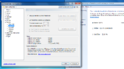
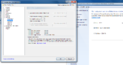
    So, i am the only one who notices the difference between these 2 screenshots? ;)

    100_DPI.png 150_DPI.png

    there are other config sections where the problems are a lot bigger. Especially in TvServer conf (or everywhere when using 150% DPI).
     
    Status
    Not open for further replies.

    Users who are viewing this thread

    Top Bottom