
Maya Bug Reports & issues (3 Viewers)

Status
Not open for further replies.

ncoH

Retired Team Member
  • Premium Supporter
  • January 27, 2007
    925
    1,569
    Hannover
    Home Country
    Germany Germany
    AW: Re: Maya Bug Reports & issues

    I am having a problem with the new large mytvrecordedtv screen. The problem is that when watching TV in fullscreen if I press the myrecordings button on my remote it seems to go to the recording screen but the TV is stuck on top. I can fix the problem by changing the following in the mytvrecordedtv.xml.

    Current: <import>common.overlay.mini.xml</import>
    Fix: <import>common.overlay.xml</import>

    Even though it is skin related it looks like a MediaPortal problem in that TV cannot be previewed as a mini with no picture.

    The problem is, when you set it to <import>common.overlay.xml</import> the description on the recordings page overlap with the preview window. Sure we can make the text lesser but then there is too much unused space without preview window.

    Because of that i use the mini overlay.

    It seems to be that the issue only occurs if you go directly from fullscreen tv to the recordings page.
     

    Wbunaarf

    Portal Pro
    December 9, 2005
    534
    103
    Sweden
    Home Country
    Sweden Sweden
    I am having a problem with the new large mytvrecordedtv screen. The problem is that when watching TV in fullscreen if I press the myrecordings button on my remote it seems to go to the recording screen but the TV is stuck on top.

    I can confirm the issue, but I haven't tried your fix. A perhaps related problem is that if you watch TV, minimise it and go the the recordings screen the small TV image overlaps both the information about the recording and the channel.

    //Johannes
     

    Attachments

    • 19-55-01.png
      19-55-01.png
      538.2 KB

    Wbunaarf

    Portal Pro
    December 9, 2005
    534
    103
    Sweden
    Home Country
    Sweden Sweden
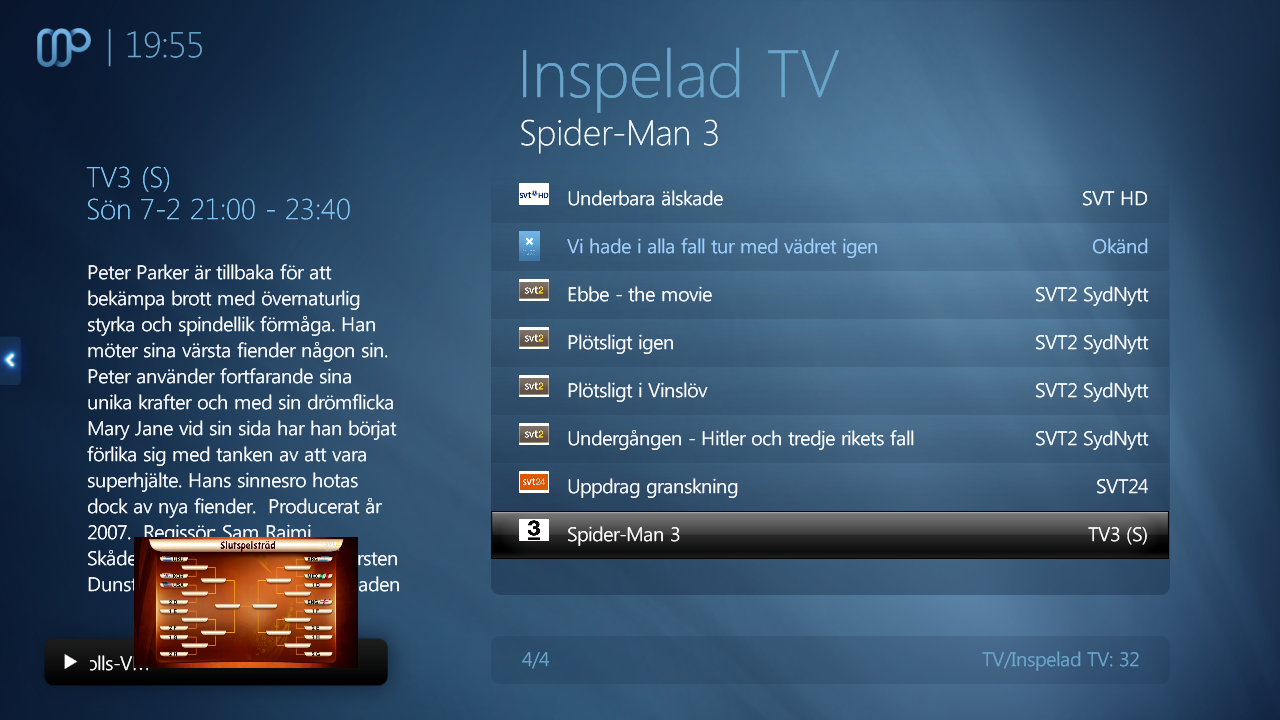
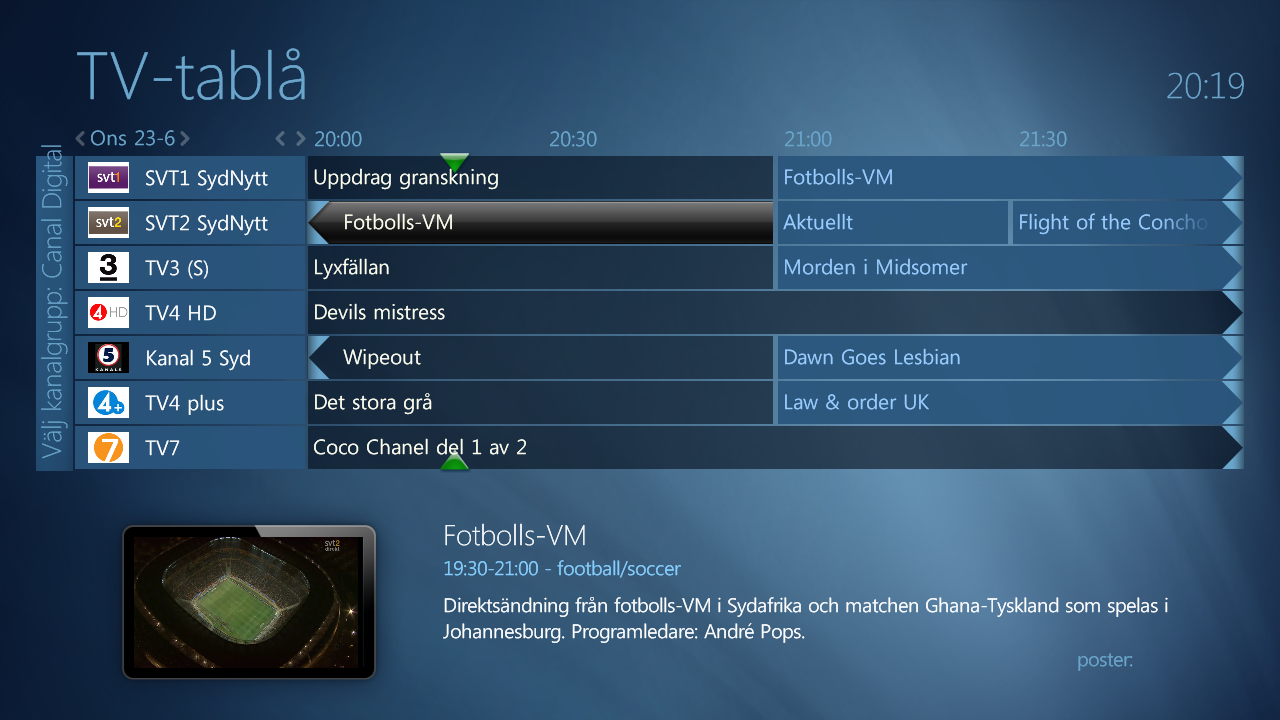
    Please have a look at the screenshot. In the lower right corner there is a '#itemtype:'. I can reproduce this by:

    Here's a similar problem, look in the lower right corner where there's a 'Poster:'.

    //Johannes
     

    Attachments

    • 20-19-33.png
      20-19-33.png
      441.6 KB

    kjd01

    MP Donator
  • Premium Supporter
  • April 24, 2009
    159
    19
    Re: AW: Re: Maya Bug Reports & issues

    I am having a problem with the new large mytvrecordedtv screen. The problem is that when watching TV in fullscreen if I press the myrecordings button on my remote it seems to go to the recording screen but the TV is stuck on top. I can fix the problem by changing the following in the mytvrecordedtv.xml.

    Current: <import>common.overlay.mini.xml</import>
    Fix: <import>common.overlay.xml</import>

    Even though it is skin related it looks like a MediaPortal problem in that TV cannot be previewed as a mini with no picture.

    The problem is, when you set it to <import>common.overlay.xml</import> the description on the recordings page overlap with the preview window. Sure we can make the text lesser but then there is too much unused space without preview window.

    Because of that i use the mini overlay.

    It seems to be that the issue only occurs if you go directly from fullscreen tv to the recordings page.

    I did have to reduce the size of the description to stop the overlap, but it is currently the only solution I have. The recordedtv button on my remote gets used a lot by various people in the house and with this problem it is annoying everyone.
     

    ncoH

    Retired Team Member
  • Premium Supporter
  • January 27, 2007
    925
    1,569
    Hannover
    Home Country
    Germany Germany
    AW: Re: AW: Re: Maya Bug Reports & issues

    I am having a problem with the new large mytvrecordedtv screen. The problem is that when watching TV in fullscreen if I press the myrecordings button on my remote it seems to go to the recording screen but the TV is stuck on top. I can fix the problem by changing the following in the mytvrecordedtv.xml.

    Current: <import>common.overlay.mini.xml</import>
    Fix: <import>common.overlay.xml</import>

    Even though it is skin related it looks like a MediaPortal problem in that TV cannot be previewed as a mini with no picture.

    The problem is, when you set it to <import>common.overlay.xml</import> the description on the recordings page overlap with the preview window. Sure we can make the text lesser but then there is too much unused space without preview window.

    Because of that i use the mini overlay.

    It seems to be that the issue only occurs if you go directly from fullscreen tv to the recordings page.


    I did have to reduce the size of the description to stop the overlap, but it is currently the only solution I have. The recordedtv button on my remote gets used a lot by various people in the house and with this problem it is annoying everyone.

    fixed in r357.
     

    kjd01

    MP Donator
  • Premium Supporter
  • April 24, 2009
    159
    19
    I have been having some issues with the zoom easing out when exiting a window with a list control. The text from the currently selected item in the list control is still visible whilst the zoom easing out function is happening. After a lot of testing and changing things I have worked out that this problem only occurs when the currently selected item's text is long and is scrolling.
    It seems to be a problem with the fade animation, all other text is faded to nothing except the scrolling text beore the zoom out function happens.
    Anyone have any ideas how to fix this.
     

    JonHancock

    Portal Member
    December 17, 2007
    33
    8
    Hi,
    Just reinstalled Mediaporta/Maya on a windows 7 system. Using latest SVN.

    When watching DVD's/TV if I hit FF/RW I just get text in the centre of the screen. If I hit Pause I get an opaque blue oval with the word pause in it and if I hit big step forward/back I just see the blue oval.

    Anyone else confirm this

    Cheers,
    Jon.
     
    J

    joostzilla

    Guest
    Hi,
    Just reinstalled Mediaporta/Maya on a windows 7 system. Using latest SVN.

    When watching DVD's/TV if I hit FF/RW I just get text in the centre of the screen. If I hit Pause I get an opaque blue oval with the word pause in it and if I hit big step forward/back I just see the blue oval.

    Anyone else confirm this

    Cheers,
    Jon.

    Confirmed! Will be fixed asap
     

    kjd01

    MP Donator
  • Premium Supporter
  • April 24, 2009
    159
    19
    I am having a problem with the latest svn with MP locking up when I stop a recording and MP crashing when I stop a video.
    I have found that removing the following three lines from common.progressbar.tv.xml, common.progressbar.xml, mytvfullscreen.xml & videofullscreen.xml fixes the problem. I have tested in this on two clients and have the same results.

    <animation effect="fade" time="300">WindowOpen</animation>
    <animation effect="fade" time="300">WindowClose</animation>
    <animation effect="fade" time="300">VisibleChange</animation>
     

    hscates

    New Member
    June 30, 2010
    4
    1
    With svn 366 on win7 at 1920x1080 the pause oval that displays during movingpictures/tvseries is not horizontally centered, it is off to the left. Also, viewing movie/file info or whatever it is called while playing the video, the time is not spaced correctly i.e. it is off of the blue background.
     
    Status
    Not open for further replies.

    Users who are viewing this thread

    Top Bottom