MediaPortal SVN-Snapshot:-10-20-2009 20-02h - Revision:23908.rar (1 Viewer)

Status
Not open for further replies.

tourettes

Retired Team Member
  • Premium Supporter
  • January 7, 2005
    17,301
    4,800
    And restart of MP doesn't resolv the audio problem. Only whole restart of the computer.

    Make sure that both tv and movies are using the same audio renderer in MP's config.

    Yes, they have. I will do some further tests this evening. (Probably audio is on the digital output instead on HDMI output, I'll check it)
    But configured it is right. When not, a whole restart of PC wouldn't bring back audio on movies.

    Unless specific audio renderer has issues with S3. Drivers could be having a bug that causes such failure for specific audio renderer.

    If restarting of MediaPortal doesn't help it is highly likely that the issue is outside MP.
     

    Plueschi

    Portal Member
    October 22, 2009
    22
    1
    Werther
    Home Country
    Germany Germany
    Make sure that both tv and movies are using the same audio renderer in MP's config.

    Yes, they have. I will do some further tests this evening. (Probably audio is on the digital output instead on HDMI output, I'll check it)
    But configured it is right. When not, a whole restart of PC wouldn't bring back audio on movies.

    Unless specific audio renderer has issues with S3. Drivers could be having a bug that causes such failure for specific audio renderer.

    If restarting of MediaPortal doesn't help it is highly likely that the issue is outside MP.

    Hmm.. That seem's to be strange, because the failure comes with this svn. When I go back on the backuped version by the installer (original stable beta), there audio works after coming up out of S3. So I can't believe it's a driver problem. I don't need to reinstall, only move the backup-folder and it works. :confused:
     

    tourettes

    Retired Team Member
  • Premium Supporter
  • January 7, 2005
    17,301
    4,800
    Yes, they have. I will do some further tests this evening. (Probably audio is on the digital output instead on HDMI output, I'll check it)
    But configured it is right. When not, a whole restart of PC wouldn't bring back audio on movies.

    Unless specific audio renderer has issues with S3. Drivers could be having a bug that causes such failure for specific audio renderer.

    If restarting of MediaPortal doesn't help it is highly likely that the issue is outside MP.

    Hmm.. That seem's to be strange, because the failure comes with this svn. When I go back on the backuped version by the installer (original stable beta), there audio works after coming up out of S3. So I can't believe it's a driver problem. I don't need to reinstall, only move the backup-folder and it works. :confused:

    Then it indeed sounds like a MP bug, but cannot figure out why restarting MP doesn't solve it. Could you post the MediaPortal.log ?
     

    Plueschi

    Portal Member
    October 22, 2009
    22
    1
    Werther
    Home Country
    Germany Germany
    Yes, sure. I will do it this evening, because I'm on work now. So I'll come back on you with the log this evening.

    Thank you very much for supporting.:)
     

    Domini0n

    Portal Pro
    July 21, 2008
    130
    7
    I did a clean install of my HTPC, including Windows 7 and installed everything again as I had some codec conflicts.

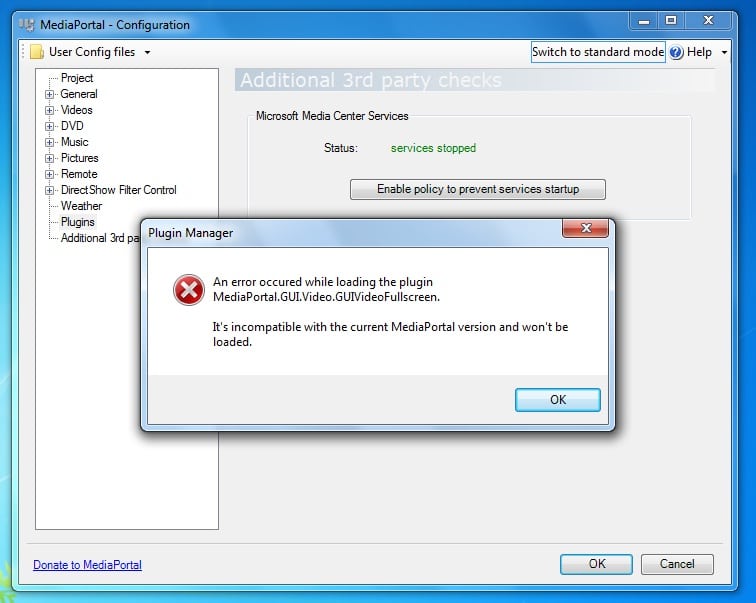
    After a clean install of Windows 7 and drivers, I installed this SVN version of MP. When I opened the configuration screen the first time and clicked on plugins I got an error message saying: GUIVideoFullscreen (full message in image that is attached)

    I got this message a few times more but not always. It also didn't stop MP config from working nor did it prevent it from saving it's settings. But I did think it was something that needed to be mentioned. As it could spell trouble in the future if it isn't fixed ;)
     

    Attachments

    • error_GUIVideoFullscreen.jpg
      error_GUIVideoFullscreen.jpg
      97.4 KB

    1stdead

    Portal Pro
    February 1, 2008
    1,089
    139
    Copenhagen
    Home Country
    Denmark Denmark
    I did a clean install of my HTPC, including Windows 7 and installed everything again as I had some codec conflicts.

    After a clean install of Windows 7 and drivers, I installed this SVN version of MP. When I opened the configuration screen the first time and clicked on plugins I got an error message saying: GUIVideoFullscreen (full message in image that is attached)

    I got this message a few times more but not always. It also didn't stop MP config from working nor did it prevent it from saving it's settings. But I did think it was something that needed to be mentioned. As it could spell trouble in the future if it isn't fixed ;)

    Please unmute your volumen. :)

    Edit. Ah well getting this again...
     

    Domini0n

    Portal Pro
    July 21, 2008
    130
    7
    Please unmute your volumen. :)

    Edit. Ah well getting this again...

    Sorry? I didn't have volume muted as I had a fresh install, didn't play around with any settings yet. Audio was set to SPDIF though, could that have caused the error?
     

    1stdead

    Portal Pro
    February 1, 2008
    1,089
    139
    Copenhagen
    Home Country
    Denmark Denmark
    Please unmute your volumen. :)

    Edit. Ah well getting this again...

    Sorry? I didn't have volume muted as I had a fresh install, didn't play around with any settings yet. Audio was set to SPDIF though, could that have caused the error?

    Mine is set to SPDIF as well. First time i fixed this with unmuting it. But now, it just keeps coming. Sorry. Waiting for an answer as well. This problem makes mediaportal work really really odd i think.

    try this: https://forum.team-mediaportal.com/...vision-23831-rar-71776/index2.html#post520896

    But mine is reverting itself back to "master volumen" all the time, even though wave is choosen and saved.

    And a bit more: https://forum.team-mediaportal.com/...vision-23831-rar-71776/index5.html#post521279


    Update:
    If you do the second link, then save. Then open configuration and change to wave again it and save. Now should it be gone.

    If don't fix this "bug"(or make the changes above) mediaportal has troubles with menus, remote doesn't work when playing movie, OSD not working, odd playing etc... until it's unreachable. :(
    Or that's what happens with my setup on 5 totally fresh installs. And I think Belcom could confirm this as well(on Teamviewer helping with imon remote)
     

    Domini0n

    Portal Pro
    July 21, 2008
    130
    7
    I haven't tried playing movies etc. as I'm still in the process of installing all the needed components. I'll try playing some movies tonight and see if the problem is the same as yours 1stdead. If i find it to be a buggy setup I'll try to play a little with the volume controls.
     

    ravenrocks

    Portal Pro
    October 11, 2007
    351
    96
    I haven't tried playing movies etc. as I'm still in the process of installing all the needed components. I'll try playing some movies tonight and see if the problem is the same as yours 1stdead. If i find it to be a buggy setup I'll try to play a little with the volume controls.

    I had this problem before. Because I used backupsettings-plugin, someone said this was the cause.
    So I uninstalled everything, reinstalled, made all changes manually again...and still get this message...

    Frustrating beyond belief.
     
    Status
    Not open for further replies.

    Users who are viewing this thread

    Top Bottom