MediaStream by pilehave - upd. 22/08/09 (1 Viewer)

jburnette

Portal Pro
August 24, 2006
758
116
Kentucky
Home Country
United States of America United States of America
Hmmm. I don't get the first added item in my MyHome.xml as default when I use the generator. I get the 4th as default. Is there an easy way to change which item is default?

Also, if possible, would it be possible to add the choice of having random background images for each item á la Aeon Wide? Like a check box next to background image selection that says "random" and a textbox for the path?
Example: "Use random images from |movies| "(located in Media/Animations/movies)?

Emph

I wanted the same thing. Just open up myhome.xml, change the background images type from image to multiimage, and replace the <texture> tag with:

<imagepath>TV</imagepath>
<timeperimage>30000</timeperimage>
<fadetime>800</fadetime>
<loop>yes</loop>
<randomize>True</randomize>

Obviously changing the imagepath to the folder you want to use. Make sure you actually put the folders in MediaStream\Media\Animations.
 

knop3se

Portal Member
September 19, 2008
17
0
Ängelholm
Home Country
Sweden Sweden
P, can i change the loading image?? right now its the Laptop whit the mouse on the side..
i want it to be the Movies one, much more nice :)

How do i change this?

I have the same question. I can't make any sense of the MyHome.xml in order to edit it manually.

I figured it out, you can change the umm "Splash screen image" in references.xml at the top where it says "default image". This (new splashscreen) only shows on newer SVN versions i think, not on RC3.
 

rolls1400

Portal Pro
August 26, 2007
132
3
Home Country
United States of America United States of America
xml bug

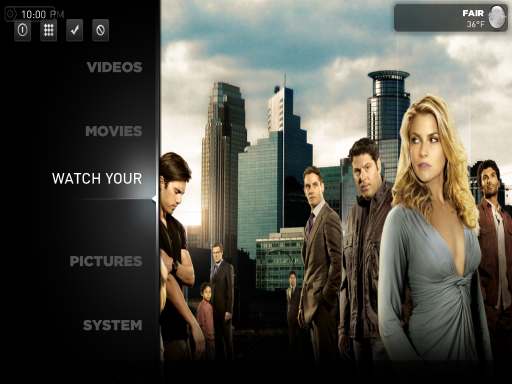
So ive edited myhome.xml a few times and even created two new ones on the site and I still get this problem.

The first picture(untitled1) shows "WATCH YOUR" without the TV SERIES PART

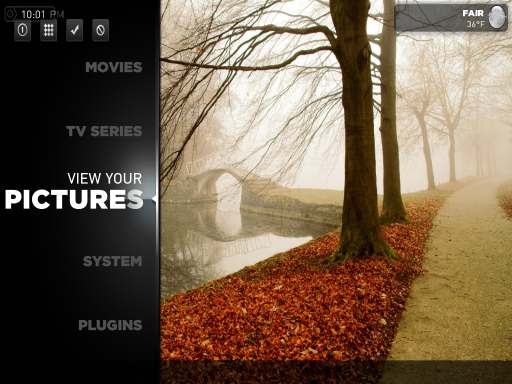
The second picture (untitled2) shows that the "TV SERIES" text is displayed only when its not highlighted.

This is also a problem with "check your weather". Has anyone else had this problem?


Also attached the xml file just in case.

Thanks
 

Attachments

  • untitled1.jpg
    untitled1.jpg
    22.8 KB
  • untitled2.jpg
    untitled2.jpg
    29.7 KB
  • myHome.xml
    30.6 KB

jburnette

Portal Pro
August 24, 2006
758
116
Kentucky
Home Country
United States of America United States of America
So ive edited myhome.xml a few times and even created two new ones on the site and I still get this problem.

The first picture(untitled1) shows "WATCH YOUR" without the TV SERIES PART

The second picture (untitled2) shows that the "TV SERIES" text is displayed only when its not highlighted.

This is also a problem with "check your weather". Has anyone else had this problem?


Also attached the xml file just in case.

Thanks


I had this problem when trying to use "MUSIC VIDEOS". I think it's caused by the label being too long so it's not shown at all. I was able to shorten the label on buttons 1 and 2 of that item. That way you still get "MUSIC VIDEOS" when it's not highlighted and then "MUSIC VIDS" when it is highlighted. The items seem to start at 90001 and go 91001, 92001, and so on. You just have to change, for example, 91001 and 91002.
 

lar1r

Portal Member
August 25, 2007
44
2
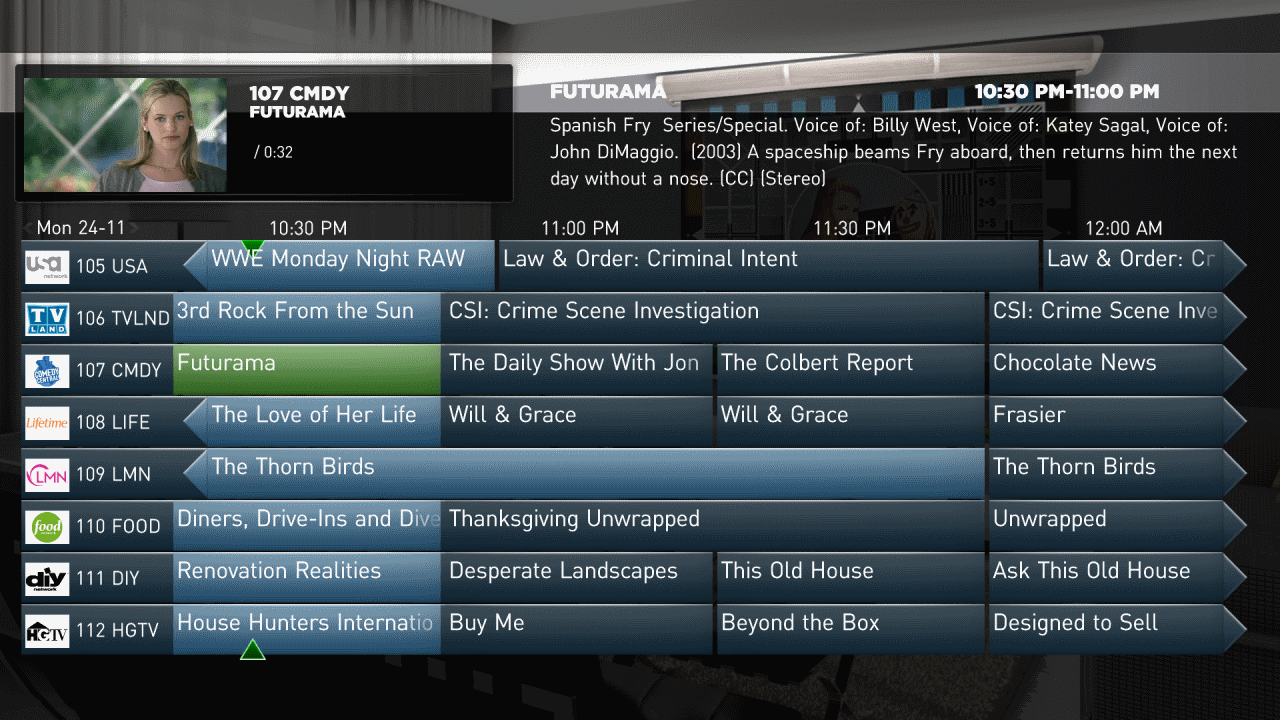
1) seems that the peview window is somewhat off. Ideas what xml file has this info?
2) I added some more rows in the guide so I can see more channels, but how can I increase font size in the guide

Thanks for a really good skin!

The preview window is where it always have been, but I guess that adding more channels to the Guide moved it up and behind the preview...

Thx - Moved around the guide to account for the preview window. I just wanted a guide with 8 entries and am happy with everything now.
Also note that the TVOSD I had wasn't showing tvlogos until I changed the ID from 10 to 102.
 

Attachments

  • tvguide2.png
    tvguide2.png
    255 KB
  • TVOSD.xml
    30.6 KB

pilehave

Community Skin Designer
  • Premium Supporter
  • April 2, 2008
    2,566
    521
    Hornslet
    Home Country
    Denmark Denmark
    I dont know if this is by design...

    But...
    fambmaabb.jpg

    This is by "design", but the ideal placement of the preview window would be as in your screenshots. This is, however, not possible due to bugs/limitations in MP. When you play back a piece of music, the "Player.HasVideo" boolean is for some reason set to true :(

    Another problem is that you cannot have 2 video-windows on the same window and make one visible and the other hidden. Again, a limitation in MediaPortal (if it was possible, you could avoid the first problem easily).

    After playing music, going to my tv, cd cover in preview window, click on, then back and then back to home... bug.
    hambhaabb.jpg

    I think I have fixed this, but will have to test it tonight on my TV-enabled HTPC :) I'm at work right now.

    @pilehave
    OK here my screenshot - i can read the dates on the screenshot but not on my 32" LCD they're too small. Another issue i have - there is no difference between folders where are recordings of one series and non folders.

    The font-size should be the same as the original MediaStream-skin, but if you edit "references.xml" and find this:

    Code:
    <font2>mediastream9</font2>

    (look for the default listcontrol, somewhere around line 260 - 265)

    Then you can change the size to whatever you like, try out with mediastream10 or mediastream11. You may also have to edit this line to fit the font (which is now higher):

    Code:
    <textYOff2>17</textYOff2>
     

    robyf

    Retired Team Member
  • Premium Supporter
  • June 20, 2005
    1,076
    278
    55
    Bolzano
    Home Country
    Italy Italy
    Just wanted to say thanks for your great work. This is so far the best skin for mediaportal. It's not only a really beautyful skin but it's also really fast and responsive.

    Great work again.
     

    pilehave

    Community Skin Designer
  • Premium Supporter
  • April 2, 2008
    2,566
    521
    Hornslet
    Home Country
    Denmark Denmark
    I have some new buttons of topmenu. What do you think?

    :D

    Great, I have taken some of them and the rest of the topbar-buttons from myHome and edited them a little, so now all buttons are the same style - even in fullscreen video.

    Look out for an updated skin tonight!

    Menu-generator updated, now works in IE and you can move elements up/down and remove them.

    P, can i change the loading image?? right now its the Laptop whit the mouse on the side..
    i want it to be the Movies one, much more nice :)

    How do i change this?

    I have the same question. I can't make any sense of the MyHome.xml in order to edit it manually.

    By loading image, do you mean the image that is the background in myHome the first time you open MediaPortal?

    1) seems that the peview window is somewhat off. Ideas what xml file has this info?
    2) I added some more rows in the guide so I can see more channels, but how can I increase font size in the guide

    Thanks for a really good skin!

    The preview window is where it always have been, but I guess that adding more channels to the Guide moved it up and behind the preview...

    Thx - Moved around the guide to account for the preview window. I just wanted a guide with 8 entries and am happy with everything now.
    Also note that the TVOSD I had wasn't showing tvlogos until I changed the ID from 10 to 102.

    Excellent TVGuide, actually I think the layout is much better than my original one, perhaps with a drop-shadow behind program-title and time. I'll adopt it ASAP :D

    EDIT: When looking at Blue3Wide TVOSD.xml, it looks as if the TV logo doesn't need to have an ID at all, so I removed it to avoid conflicts with active IDs. Don't know it it will be a problem at all with an ID thoug.

    So ive edited myhome.xml a few times and even created two new ones on the site and I still get this problem.

    The first picture(untitled1) shows "WATCH YOUR" without the TV SERIES PART

    The second picture (untitled2) shows that the "TV SERIES" text is displayed only when its not highlighted.

    This is also a problem with "check your weather". Has anyone else had this problem?


    Also attached the xml file just in case.

    Thanks

    Are you using 4:3 format? The screenshot indicates this (384px / 512px = 0,75 = 4:3).
    Unfortunately the skin is only 16:9.
     

    Nabbetuss

    New Member
    November 25, 2008
    3
    1
    Home Country
    Norway Norway
    My TV Series

    First off, thanks for the most beautiful skin ever ;)

    I have som problems with MP-TV Series: When i click it, the screen seems to load but nothing happenes - see picture 1.
    When I then click on a series, it shows as it is supposed i think (picture 2). But when i go back again, the text from the previous screen is still there, and now there are double texts (picture 3)
    I have to use the text format in MP-TV because the graphics would not show, just the same loading screen and nothing happened. Anyone know why this happenes? Also, why i can't use the graphics format?

    Also i cant get my Movies to work (picture 4), my videos is no problem. But when I click watch your movies, nothing happens. Anyone know why this is? I have the moving pictures plugin installed..

    Screens:
     

    ThaClown

    Moderator - Dutch Forums
    May 28, 2006
    807
    26
    Den Bosch
    Home Country
    Netherlands Netherlands
    In the TV Series setting you can select if you want to load covers (like you seem to have) or banners...
    I think it is a setting like "download covers instead of banners" or something in that direction.
    You probably did not check this option if you have no banners.

    Als you you need to set your view to graphical...
     

    Users who are viewing this thread

    Top Bottom