
Moving Pictures 1.0.8 Stable Available (2 Viewers)

Status
Not open for further replies.

HisDudeness

Portal Member
September 16, 2009
40
2
Home Country
Germany Germany
Re: UPDATED: Moving Pictures 1.0 RC Available

Hi there,

I'm using TMT3 as external player to view BluRays/HDDVDs out of Moving pictures.
I've ripped my files to HDD using anydvd(no ISO, just the folder structure).
Blu rays are played fine when selecting them.
When i chose a HDDVD folder , TMT3 starts(as it is supposed to) but fails with an error message:unsupported file format.
When selecting this folder from TMT3 directly, TMT3 plays the HDDVD fine.

Another user was so kind to give me a hint.
When checking the settings in Moving Pictures configuration -> movie manager-> file details for blu-ray it points to index.bdmv file,
for HD DVD it points to DiscID.dat.
When using TMT3 as stand alone and trying to open Discid.dat it provides the same error message: Unkown file format.
Maybe PDVD9 is able to handle discid.dat, i don't know.
TMT is capable to play movies just by opening folders, any suggestions how to let Moving Pictures point just to the HD DVD folder?

Best regards,

HisDudeness
 

Smash

Portal Member
November 18, 2009
22
0
Home Country
Denmark Denmark
Re: UPDATED: Moving Pictures 1.0 RC Available

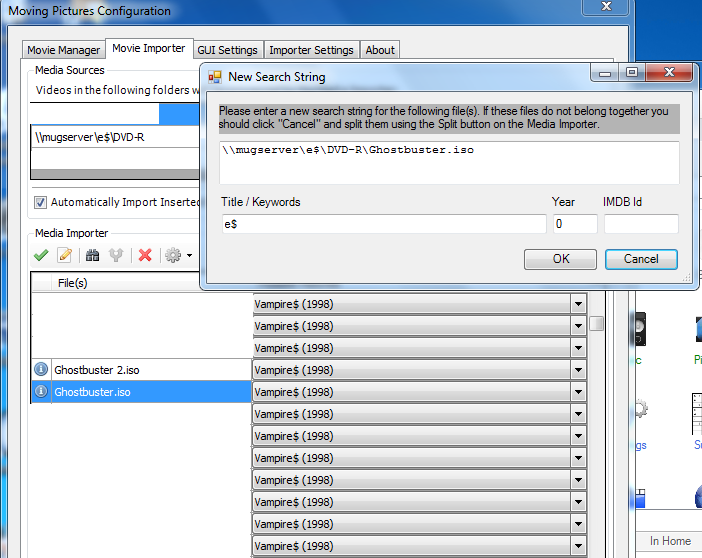
Hi - I have a small issue with the importer. When importing from a network share, like: "\\mugserver\e$\DVD-R", a file like "Ghostbuster.iso" gets results like Vampire$.
When I try to do a custom search string, it says "e$" in the Title/Keyword box.
As far as I can tell, it's only a problem with .iso files.

I'm using Mediaportal 1.1RC and Moving Pictures 1.0RC.
 

Attachments

  • mp-mp.png
    mp-mp.png
    109.3 KB

Injected

Portal Pro
October 17, 2008
205
3
Home Country
Germany Germany
AW: UPDATED: Moving Pictures 1.0 RC Available

can somebody tell me where the informations are getting saved in moving pictures?
 

Mew

Portal Pro
January 11, 2007
356
111
55
Hertfordshire
Home Country
England England
Re: UPDATED: Moving Pictures 1.0 RC Available

Hi

On Windows 7 it is in:

C:\ProgramData\Team MediaPortal\MediaPortal\database\movingpictures.db3.

You will need something like SQLite Database Browser to view the tables and data in the database.

Mew
 

grubi

Portal Pro
June 16, 2007
1,207
87
127.0.0.1
Home Country
Germany Germany
AW: Re: UPDATED: Moving Pictures 1.0 RC Available

Hi

On Windows 7 it is in:

C:\ProgramData\Team MediaPortal\MediaPortal\database\movingpictures.db3.

You will need something like SQLite Database Browser to view the tables and data in the database.

Mew

Addition:

Only metadata. Covers and backdrops are in the thumbs folder.
 

thesystemera

Portal Pro
May 26, 2008
807
22
44
Auckland
Home Country
New Zealand New Zealand
Re: UPDATED: Moving Pictures 1.0 RC Available

Hi, still having the strange issue.. When I have Moving Pictures enabled, I can no longer play DVD's from the shortcut on the main home screen.

With Moving Pictures RC1 it would show a black screen and do nothing, now it just does nothing at all... I can play DVD's that have been ripped so ISO mounting is working, just can't play from ;my drive...

I stress, this only happens when moving pictures is enabled.. Am using Moving Pictures RC2 and MP1.1RC1...
 

grubi

Portal Pro
June 16, 2007
1,207
87
127.0.0.1
Home Country
Germany Germany
AW: Re: UPDATED: Moving Pictures 1.0 RC Available

Hi, still having the strange issue.. When I have Moving Pictures enabled, I can no longer play DVD's from the shortcut on the main home screen.

With Moving Pictures RC1 it would show a black screen and do nothing, now it just does nothing at all... I can play DVD's that have been ripped so ISO mounting is working, just can't play from ;my drive...

I stress, this only happens when moving pictures is enabled.. Am using Moving Pictures RC2 and MP1.1RC1...

Can't confirm that.
It is working properly here.
Checked with MP RC1 + MovPic RC1 + StreamedMP RC1 basic homescreen.
Your system spec shows "StreamedMP Custom" as skin - so maybe skin related.
Have you tried with Blue3?
 

thesystemera

Portal Pro
May 26, 2008
807
22
44
Auckland
Home Country
New Zealand New Zealand
Re: UPDATED: Moving Pictures 1.0 RC Available

As I said it only happens when Moving Pictures is disabled.. I know other people reported a simular issue with the prior RC... Also I"m using BlackGlass, need to update my statistics.. Can't find out how to do that again though, LOL...
 

Injected

Portal Pro
October 17, 2008
205
3
Home Country
Germany Germany
AW: UPDATED: Moving Pictures 1.0 RC Available

Feature Request: New Sort Options: Blu Ray, Xvid, DVD Rip and so on :)
 

drealit

Portal Pro
March 15, 2008
190
17
Re: UPDATED: Moving Pictures 1.0 RC Available

^^^^
I'm pretty sure that request has already been sent out a few times... and I think the new filtering system allows you to set that up.
 
Status
Not open for further replies.

Users who are viewing this thread

Top Bottom