Multishortcut plugin to execute programs from home menu! (2 Viewers)

Status
Not open for further replies.

tony2k

Portal Pro
May 5, 2008
69
2
Home Country
Germany Germany
Maybe it is worth a try to reinstall this plugin following the guidelines included in the download. Mine is working fine after a fresh install.

Looking at your log, I think that the only multishortcut active is FirefoxIntegrator.dll.

I have load the actual plugin files and copied them to the right directories. That the only one is FirefoxI...dll is right. For testing purpose i have deactivate the other ones.
 

framug

Super Moderator
  • Team MediaPortal
  • January 31, 2005
    6,232
    2,386
    South of France
    Home Country
    France France
    Hi tony2k,
    Sorry for late, I have PC problems.
    Therefore, I tried few times ago with MP 1.0 and, it works.
    As rekenaar said, please, uninstall all, go with a fresh install by deleting all folders and, xml configuration files, without copying xml file and so on...
    Copy, rename and apply dllfix, explained in doc, I'm pretty sure it will work.
    Thanks. ;)
     

    PussyWagon

    Portal Pro
    August 2, 2008
    235
    7
    no one an idea?

    Have you running the DLLFix.exe after you copied all the shortcuts to the plugin/windows directory?
    Also after running the DLLFix.exe check the PluginID in configurations if you are using this ID from the menues to execute a program...


    A question to the MultiShortcut author:
    I am using Xpadder to control my MediaPortal and have a saved profile (mediaportal.xpadderprofile) file that is executed everytime i start MediaPortal (just to have the right profile configurations with my gamepad to control MP).
    In the gamemenu.xml i have made several games which is using MultiShortcut, this in turn is pointing to a ".bat" files that is executing
    #1: The game
    #2: The profile using for xpadder

    And this is working like a charm! :D

    BUT the problem im having.... when im ending the game, i dont know how to activate the "mediaportal.xpadderprofile" again! :(
    The idea I have is that maybe this is possible within the multishortcut to execute something when the game is ended?
    For example the "Hide MediaPortal While Executing" function... when the game starts, it minimize MediaPortal and when the game is ending MediaPortal is maximized again. This make me think there already is a function telling MultiShortcut if the executed program is running or not, and when it isn't it maximize MP again. This would make it possible to execute a file whenever you are ending a program, right?

    I would be really glad if this feature would be possible to implement, or if you could give me some help how to accomplish this.... :)

    Best regards!
     

    tony2k

    Portal Pro
    May 5, 2008
    69
    2
    Home Country
    Germany Germany
    i now have deinstalled MP and installed it again. the plugin works now, so the error was in the old mp config whitch i have imported before... i hate reconfigure everything new but i dont see another chance. I hope that i can import the tv settings, cause i dont want to spend hours in the reconfiguration.

    thanks to all, great plugin
     

    leviathan

    Portal Pro
    August 9, 2007
    65
    3
    46
    Pictures

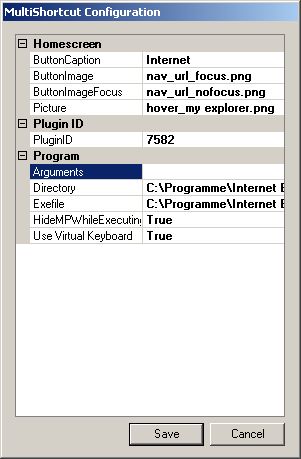
    Hi, nice plugin. But how can I add a picture to a entry? If I want to add a Path to a png file i get always the message, that "hover_" have to be the prefix of the file. But it is!

    any ideas?

    regards

    Levi
     

    rsbrux

    Documentation Group
  • Team MediaPortal
  • April 15, 2007
    1,215
    176
    Home Country
    Switzerland Switzerland
    Hi, nice plugin. But how can I add a picture to a entry? If I want to add a Path to a png file i get always the message, that "hover_" have to be the prefix of the file. But it is!

    It worked for me, using already existing "hover_*.PNG" files from Blue Two wide.
     

    Attachments

    • MSIE MultiShortcut.jpg
      MSIE MultiShortcut.jpg
      23.1 KB

    tonyscha

    Portal Pro
    May 2, 2007
    103
    2
    43
    Iowa
    Home Country
    United States of America United States of America
    I have read through this topic and I am wondering where is the multishortcut.xml file saved at you talked about? Also does the arguments field work? The program I am trying to run wont run without arguments, and I cant get it to work.

    I put the exefile as the full path of the program c:\program files\example\example.exe
    then arguments as -fullscreen

    thanks let me know :D
     

    framug

    Super Moderator
  • Team MediaPortal
  • January 31, 2005
    6,232
    2,386
    South of France
    Home Country
    France France
    BUT the problem im having.... when im ending the game, i dont know how to activate the "mediaportal.xpadderprofile" again! :(
    The idea I have is that maybe this is possible within the multishortcut to execute something when the game is ended?

    I would be really glad if this feature would be possible to implement, or if you could give me some help how to accomplish this.... :)
    It's a good idea, I will see what I can do. ;)

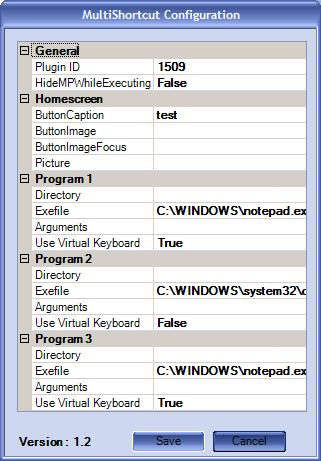
    EDIT : I uploaded MultiShortcut Version 1.2 on MP WebSite.
    It will be available if it is granted.
    Ability to launch up to 3 programs in the same shortcut then, you should not need to use a .bat file anymore. :D
    The documentation is also updated, please, read it before. :D

    I would prefer you delete your old MultiShortcut.xml file, if possible (locations explained in the doc).
    Bye.
     

    Attachments

    • MSConfig.JPG
      MSConfig.JPG
      34.2 KB

    htpcfreak

    MP Donator
  • Premium Supporter
  • January 14, 2009
    87
    2
    Home Country
    Germany Germany
    Very nice Plugin who help me to start 2 Games from MediaPortal. I use it for FIFA 09 and UltraStar Deluxe and this two games starts without problem. After ending this games MediaPortal is again on top but have a Problem when i want to watch TV again. The Screen stays black, sound is there and the MediaPortal OSD is also visible, but the TV Screen is Black. Only a restart of MediaPortal helps.

    Is there a solution with this Problem? Or is it possible after ending the game to restart MediaPortal?
     
    Status
    Not open for further replies.

    Users who are viewing this thread

    Top Bottom