
[NEW] MyFilms v4.7.9a (1 Viewer)

z3us

Portal Pro
December 4, 2007
1,047
123
46
Home Country
Spain Spain
I've got a problem with FanArt:
even though i selected the correct folder with FANARTs named as the movie file but in png format only and always the default film poster shows up.

No matter if i select or de-select the "Use default film poster as Fanart......" option.

Try naming fanart with the translated or original title.
In my case, only works with original title.
 

zebons

Portal Pro
January 2, 2006
1,484
114
I've got a problem with FanArt:
even though i selected the correct folder with FANARTs named as the movie file but in png format only and always the default film poster shows up.

No matter if i select or de-select the "Use default film poster as Fanart......" option.

Try naming fanart with the translated or original title.
In my case, only works with original title.
Actually Fanart are searched with Original Title as jpg file ...
 

z3us

Portal Pro
December 4, 2007
1,047
123
46
Home Country
Spain Spain
In my MP only is showed with the translated title :confused::confused::confused:
Perhaps it searches for the Ant Master Title defined in the config??
 

zebons

Portal Pro
January 2, 2006
1,484
114
I have a bug and some requests:
- Bug: The feature of deleting the film from the database is not working. The record still is in the amc
- it would be great if you could add 2 new operators for creating new logo rules: "exists" and "doesnt exist".
- I think you could add the possibility of selecting between several internet grabbers when updating the film inside MP
Thanks

- Bug : corrected in next release
- exist/not exist : can you explain ? What kind of test here ?
- How do you think it'd be ? Ask for choosing the right script or use automaticly the second script if no entry found in the first one ?
 

boombastic

Portal Pro
November 17, 2007
86
2
I've got a problem with FanArt:
even though i selected the correct folder with FANARTs named as the movie file but in png format only and always the default film poster shows up.

No matter if i select or de-select the "Use default film poster as Fanart......" option.

Try naming fanart with the translated or original title.
In my case, only works with original title.
Actually Fanart are searched with Original Title as jpg file ...

That was the problem!Indigo (the skin that i used before) asked for .png files....

Now if a movie doesn't have the relative fanart and i don't select the option "Use default film poster as Fanart......" the last viewed fanart remain in the background.
Is this a known effect?I'd prefer the standard background without any image.

I'm a very demanding user....i know!!:D
MAny thanks for you much appreciated work!
 

z3us

Portal Pro
December 4, 2007
1,047
123
46
Home Country
Spain Spain
I have a bug and some requests:
- Bug: The feature of deleting the film from the database is not working. The record still is in the amc
- it would be great if you could add 2 new operators for creating new logo rules: "exists" and "doesnt exist".
- I think you could add the possibility of selecting between several internet grabbers when updating the film inside MP
Thanks

- Bug : corrected in next release
- exist/not exist : can you explain ? What kind of test here ?
- How do you think it'd be ? Ask for choosing the right script or use automaticly the second script if no entry found in the first one ?

- About the new operator: It would be useful for example, with the field subtitles: AMCupdater doesnt write anything in this field if no external subtitle is found, so a rule could be "if field subtitle exists, then show subtitle.png" Also for field languages: AMCu leaves this field blank if the file only has an audio track, so I would like to use this rule: "if languages field exists and languages field doesnt contain spanish then show dual.png". The manual update of AMCu has the operator exist/doesnt exist that Im requesting.
- About the grabber selector: I was thinking about a menu to choose wich grabber do you want to use: IMDB, alpacine, etc, of a list previously created in the plugin config. This way we can also use a website for some fields and other website for another fields. Is easy to edit the grabber files and deleting the fields you dont want to be exported from that site.
Hope that you can understand what Im talking about
 

zebons

Portal Pro
January 2, 2006
1,484
114
Try naming fanart with the translated or original title.
In my case, only works with original title.
Actually Fanart are searched with Original Title as jpg file ...

That was the problem!Indigo (the skin that i used before) asked for .png files....

Now if a movie doesn't have the relative fanart and i don't select the option "Use default film poster as Fanart......" the last viewed fanart remain in the background.
Is this a known effect?I'd prefer the standard background without any image.

I'm a very demanding user....i know!!:D
MAny thanks for you much appreciated work!
Bug already corrected in future release.

I have a bug and some requests:
- Bug: The feature of deleting the film from the database is not working. The record still is in the amc
- it would be great if you could add 2 new operators for creating new logo rules: "exists" and "doesnt exist".
- I think you could add the possibility of selecting between several internet grabbers when updating the film inside MP
Thanks

- Bug : corrected in next release
- exist/not exist : can you explain ? What kind of test here ?
- How do you think it'd be ? Ask for choosing the right script or use automaticly the second script if no entry found in the first one ?

- About the new operator: It would be useful for example, with the field subtitles: AMCupdater doesnt write anything in this field if no external subtitle is found, so a rule could be "if field subtitle exists, then show subtitle.png" Also for field languages: AMCu leaves this field blank if the file only has an audio track, so I would like to use this rule: "if languages field exists and languages field doesnt contain spanish then show dual.png". The manual update of AMCu has the operator exist/doesnt exist that Im requesting.
- About the grabber selector: I was thinking about a menu to choose wich grabber do you want to use: IMDB, alpacine, etc, of a list previously created in the plugin config. This way we can also use a website for some fields and other website for another fields. Is easy to edit the grabber files and deleting the fields you dont want to be exported from that site.
Hope that you can understand what Im talking about

For the first point; I'll add a new test : Filled/Not Filled (I think it's better for comprehension than exist)
OK for the second : I'll add a new setup parameter : Directory for grabber files, if it have a value, search for all xml file in that directory and give a menu to choose the good one. If that new field has no value and grabber file give, in the actual parameter, it'll work like now.
 

zebons

Portal Pro
January 2, 2006
1,484
114
I have a bug and some requests:
- Bug: The feature of deleting the film from the database is not working. The record still is in the amc
- it would be great if you could add 2 new operators for creating new logo rules: "exists" and "doesnt exist".
- I think you could add the possibility of selecting between several internet grabbers when updating the film inside MP
Thanks

- Bug : corrected in next release
- exist/not exist : can you explain ? What kind of test here ?
- How do you think it'd be ? Ask for choosing the right script or use automaticly the second script if no entry found in the first one ?

- About the new operator: It would be useful for example, with the field subtitles: AMCupdater doesnt write anything in this field if no external subtitle is found, so a rule could be "if field subtitle exists, then show subtitle.png" Also for field languages: AMCu leaves this field blank if the file only has an audio track, so I would like to use this rule: "if languages field exists and languages field doesnt contain spanish then show dual.png". The manual update of AMCu has the operator exist/doesnt exist that Im requesting.
- About the grabber selector: I was thinking about a menu to choose wich grabber do you want to use: IMDB, alpacine, etc, of a list previously created in the plugin config. This way we can also use a website for some fields and other website for another fields. Is easy to edit the grabber files and deleting the fields you dont want to be exported from that site.
Hope that you can understand what Im talking about


New Version v4.7.9 released... see first post. ;)
 

z3us

Portal Pro
December 4, 2007
1,047
123
46
Home Country
Spain Spain
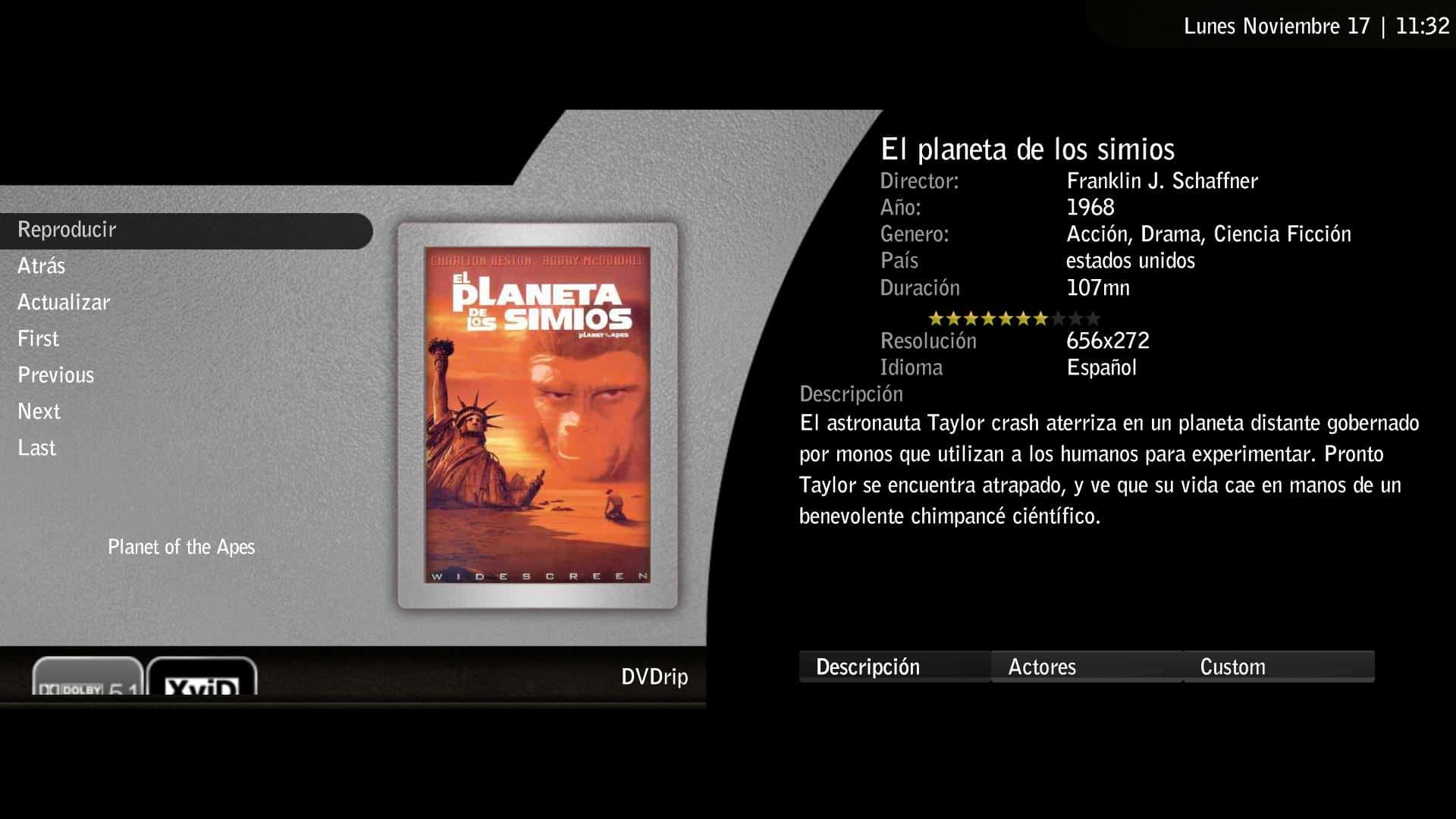
I have found a bug: the logos at detailed screen are huge, and the bottom half of them is out of the screen. I think its because they are showed at their original dimensions and arent being resized, but Im not sure.
My skin is aeon wide, with a resolution of 1920 1080
 

Attachments

  • mf.JPG
    mf.JPG
    183.2 KB

jazzi67

New Member
January 5, 2007
2
0
56
Gungwiller
Home Country
France France
I have found a bug: the logos at detailed screen are huge, and the bottom half of them is out of the screen. I think its because they are showed at their original dimensions and arent being resized, but Im not sure.
My skin is aeon wide, with a resolution of 1920 1080

Same problem here with a resolution of 1360 768
 

Users who are viewing this thread

Top Bottom