- September 1, 2008
- 21,544
- 8,236
- Home Country
-
 New Zealand
Okay.It is OTA ATSC. Playback in stereo, either out the Motherboard sound card or HDMI to the monitor/TV build in speakers.
Other files have good volume to these outputs.
Windows Media Center recorded OTA ATSC videos play with good volume.

MediaPortal can't inherently record with low volume.Only recordings made by MediaPortal have the low (otherwise fine) audio volume.
If you record two short test recordings from the same program on the same channel - one with WMC and one with MP - do they play with different volumes if you play them in the same software?
MediaPortal doesn't have default codecs, so I can't directly answer this question. I can only say that some codecs (eg. LAV, AC3Filter) have configuration options (eg. mixing, dynamic range compression) that may help to improve the situation for you... but I don't know what codecs you're using, so it is difficult to advise further.Is there some way I can adjust the default MediaPortal CODECs to increase the volume?
As above: MediaPortal can't record with higher or lower volume... and nor can WMC. Both just record what is received, and the playback volume is determined by playback settings.Is there somewhere I can change the MediaPortal CODEC to one that will record with higher volume?
You can change playback codec settings:
http://wiki.team-mediaportal.com/1_...nfiguration/9_Codecs_and_Renderer/1_TV_Codecs
That will affect all live TV and all recordings.
WMC will record what is available, exactly like MP. The difference between MP and WMC volumes is simply due to codec choice and configuration.I don't know if WMC is recording stereo only, that might be the difference.
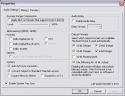
Here's an example in the LAV codec settings:I'll look for audio mixing options.
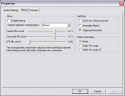
If you're using LAV audio, you can get here by selecting LAV in the TV codec settings linked above, then clicking on the wrench/spanner.
The other setting that may help is dynamic range compression, which is on the first tab: