New user moving from Windows Media Centre (1 Viewer)

mm1352000

Retired Team Member
  • Premium Supporter
  • September 1, 2008
    21,544
    8,236
    Home Country
    New Zealand New Zealand
    It is OTA ATSC. Playback in stereo, either out the Motherboard sound card or HDMI to the monitor/TV build in speakers.
    Other files have good volume to these outputs.
    Windows Media Center recorded OTA ATSC videos play with good volume.
    Okay. :)

    Only recordings made by MediaPortal have the low (otherwise fine) audio volume.
    MediaPortal can't inherently record with low volume.
    If you record two short test recordings from the same program on the same channel - one with WMC and one with MP - do they play with different volumes if you play them in the same software?

    Is there some way I can adjust the default MediaPortal CODECs to increase the volume?
    MediaPortal doesn't have default codecs, so I can't directly answer this question. I can only say that some codecs (eg. LAV, AC3Filter) have configuration options (eg. mixing, dynamic range compression) that may help to improve the situation for you... but I don't know what codecs you're using, so it is difficult to advise further.

    Is there somewhere I can change the MediaPortal CODEC to one that will record with higher volume?
    As above: MediaPortal can't record with higher or lower volume... and nor can WMC. Both just record what is received, and the playback volume is determined by playback settings.
    You can change playback codec settings:
    http://wiki.team-mediaportal.com/1_...nfiguration/9_Codecs_and_Renderer/1_TV_Codecs

    That will affect all live TV and all recordings.

    I don't know if WMC is recording stereo only, that might be the difference.
    WMC will record what is available, exactly like MP. The difference between MP and WMC volumes is simply due to codec choice and configuration.

    I'll look for audio mixing options.
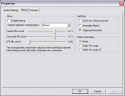
    Here's an example in the LAV codec settings:
    upload_2015-7-27_14-24-48.png

    If you're using LAV audio, you can get here by selecting LAV in the TV codec settings linked above, then clicking on the wrench/spanner.

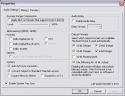
    The other setting that may help is dynamic range compression, which is on the first tab:
    upload_2015-7-27_14-26-32.png
     

    Hugh Gamble

    New Member
    July 25, 2015
    7
    2
    62
    Home Country
    Canada Canada
    Before I start changing settings, one at a time, and documenting what I do, some more data:

    A WMC recorded TV file plays normally in WMC or WMP. Good volume, Volume goes up and down with PC volume control.
    The same WMC recording plays back in MediaPortal with significantly reduced volume. Volume goes up and down with PC volume control.
    (presumably a playback CODEC difference)

    MediaPortal recorded TV plays in MP with reduced volume. Volume goes up and down with PC volume control.
    The same MP recording plays in WMC with reduced volume. Volume is constant as PC volume control goes between 1 and 50.
    (playback CODEC difference, and the CODEC WMC picks for MP .TS files doesn't understand the audio?

    I may not bother trying to fix playing MP TS files in WMC and WMP (though WMP has some nice features MP is lacking)
    I should try to look up what audio and video formats are in the MP TS file.

    What I will do next is look through the MP audio codec settings you pointed me to, and see if I can get increased audio volume playing MP TS files in MP.

    Thanks for the help so far.
    (this isn't super important, but I'm curious now, and getting obsessed).

    It is OTA ATSC. Playback in stereo, either out the Motherboard sound card or HDMI to the monitor/TV build in speakers.
    Other files have good volume to these outputs.
    Windows Media Center recorded OTA ATSC videos play with good volume.
    Okay. :)

    Only recordings made by MediaPortal have the low (otherwise fine) audio volume.
    MediaPortal can't inherently record with low volume.
    If you record two short test recordings from the same program on the same channel - one with WMC and one with MP - do they play with different volumes if you play them in the same software?

    Is there some way I can adjust the default MediaPortal CODECs to increase the volume?
    MediaPortal doesn't have default codecs, so I can't directly answer this question. I can only say that some codecs (eg. LAV, AC3Filter) have configuration options (eg. mixing, dynamic range compression) that may help to improve the situation for you... but I don't know what codecs you're using, so it is difficult to advise further.

    Is there somewhere I can change the MediaPortal CODEC to one that will record with higher volume?
    As above: MediaPortal can't record with higher or lower volume... and nor can WMC. Both just record what is received, and the playback volume is determined by playback settings.
    You can change playback codec settings:
    http://wiki.team-mediaportal.com/1_...nfiguration/9_Codecs_and_Renderer/1_TV_Codecs

    That will affect all live TV and all recordings.

    I don't know if WMC is recording stereo only, that might be the difference.
    WMC will record what is available, exactly like MP. The difference between MP and WMC volumes is simply due to codec choice and configuration.

    I'll look for audio mixing options.
    Here's an example in the LAV codec settings:
    View attachment 167328

    If you're using LAV audio, you can get here by selecting LAV in the TV codec settings linked above, then clicking on the wrench/spanner.

    The other setting that may help is dynamic range compression, which is on the first tab:
    View attachment 167329
     

    Hugh Gamble

    New Member
    July 25, 2015
    7
    2
    62
    Home Country
    Canada Canada
    mm1352000 doesn't lie.
    Out of the box MP 1.12 was using LAV video and audio decoders, and Default DirectSound rendering device.
    Enabling Stereo Mixing with the default settings made the stereo output significantly louder.

    WMC and WMP still give low, and not volume controllable audio for MP TS recordings, but I know where to look if I want to tweak or change the CODEC they use for that.

    I think I can end this sub-thread here, before it gets (any more) off topic.

    This issue may not be common to most other people switching from WMC to MP. I can't remember how non-standard CODEC settings are on my media PC. I will get to compare when I install MP client on another PC and see if my WiFi is up to streaming HD from the MP TV server.
     

    CyberSimian

    Test Group
  • Team MediaPortal
  • June 10, 2013
    3,611
    2,639
    Southampton
    Home Country
    United Kingdom United Kingdom
    Playback in stereo, either out the Motherboard sound card or HDMI to the monitor/TV build in speakers.
    I have seen occasional posts in a WMC forum about not being able to control the audio level in WMC. I may have misunderstood the problem, but I think that the situation is this:

    (1) If you use analogue audio output from the HTPC to an analogue audio amplifier, you can control the audio level in WMC (and MP!).

    (2) If you use digital audio output from the HTPC (such as SPDIF, or audio over HDMI), WMC can enable or disable the digital datastream, but cannot re-encode the digital datastream. In other words, the MUTE button works, but the VOLUME buttons do not. The expectation is that you will use the volume control on the target device to control the audio level, i.e. the volume control on the TV or a digital AV amplifier.

    MP can use the LAV filters, and so can support re-encoding of the digital audio datastream (such as performing a mix-down from 5-channel to 2 channel). Hence MP is able to control the volume level both for analogue audio output and digital audio output.

    Well, I hope that I have got that right! :)

    -- from CyberSimian in the UK
     

    Hugh Gamble

    New Member
    July 25, 2015
    7
    2
    62
    Home Country
    Canada Canada
    That may be part of the answer.
    WMC is not using the LAV CODEC. WMC is probably using a different CODEC for the AC3 in the MP TS than it is for the WMC files. Whatever AC3 CODEC WMC is using does have trouble controlling audio volume over HDMI. I have not tried controlling the volume out an analogue connector. Thanks.

    Playback in stereo, either out the Motherboard sound card or HDMI to the monitor/TV build in speakers.
    I have seen occasional posts in a WMC forum about not being able to control the audio level in WMC. I may have misunderstood the problem, but I think that the situation is this:

    (1) If you use analogue audio output from the HTPC to an analogue audio amplifier, you can control the audio level in WMC (and MP!).

    (2) If you use digital audio output from the HTPC (such as SPDIF, or audio over HDMI), WMC can enable or disable the digital datastream, but cannot re-encode the digital datastream. In other words, the MUTE button works, but the VOLUME buttons do not. The expectation is that you will use the volume control on the target device to control the audio level, i.e. the volume control on the TV or a digital AV amplifier.

    MP can use the LAV filters, and so can support re-encoding of the digital audio datastream (such as performing a mix-down from 5-channel to 2 channel). Hence MP is able to control the volume level both for analogue audio output and digital audio output.

    Well, I hope that I have got that right! :)

    -- from CyberSimian in the UK
     

    Users who are viewing this thread

    Top Bottom