Problem full screen mp2 (1 Viewer)

wietze

Portal Pro
July 5, 2005
61
16
55
Damwoude
Home Country
Netherlands Netherlands
Hello,mp2 has on my system a problem with fullscreen after turning off and on of the screen.my hardware is a samsung flatscreen tv and ati radeon graphics. This problem was for a long time on mp1 but is now ok.
 

MJGraf

Retired Team Member
  • Premium Supporter
  • January 13, 2006
    2,478
    1,385
    Hi wietze,
    in any case we need a full set of logs to be able to help you.
    Thanks, Michael
     

    johnzered

    Retired Team Member
  • Premium Supporter
  • April 20, 2008
    358
    80
    Home Country
    Finland Finland
    Hi,

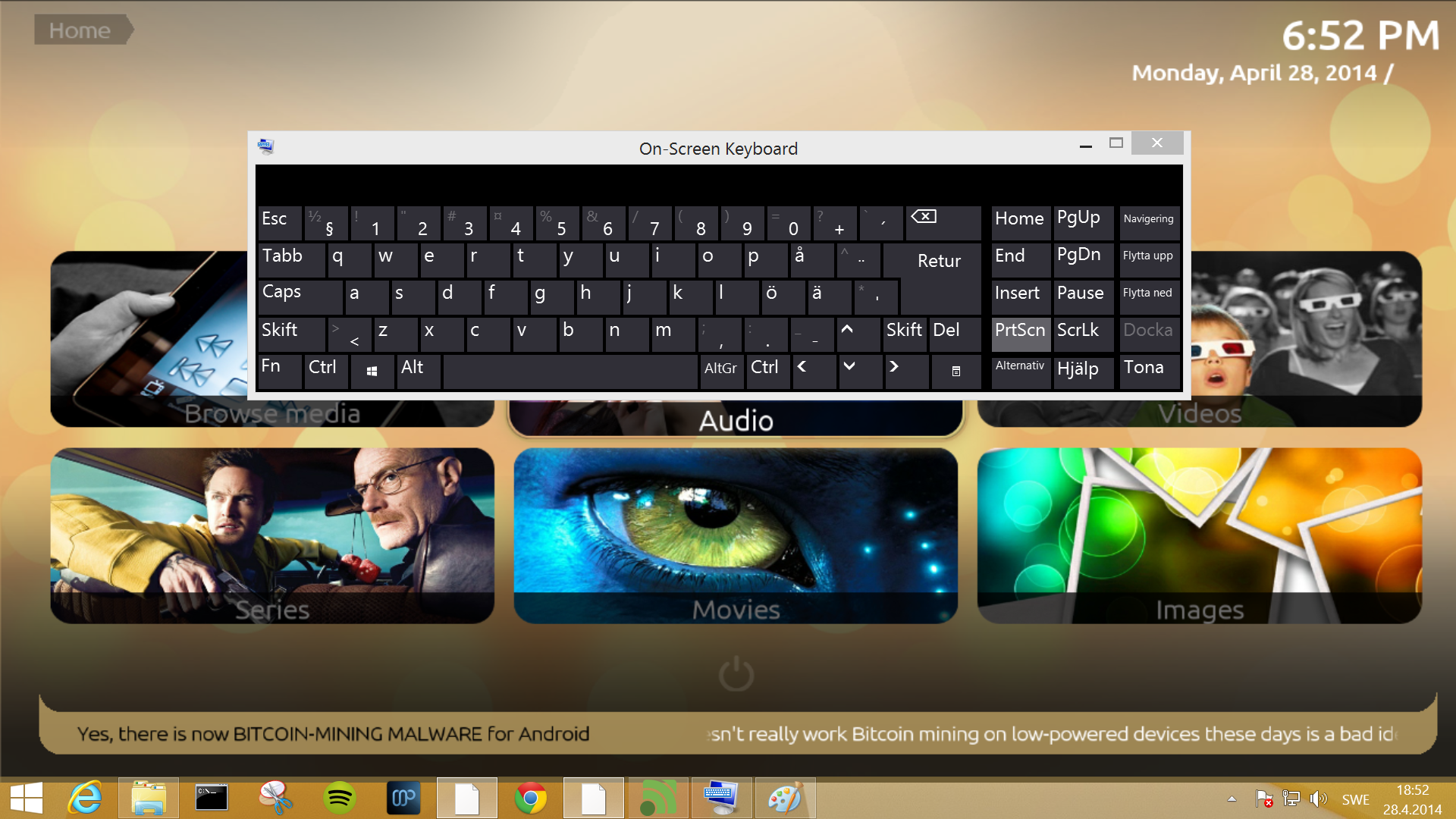
    I'm experiencing something similar. When I turn my TV off and then back on, MP2 is no longer covering the whole screen instead Windows activity bar is visible. This works as it should in MP1.
    I can see in the logs that is says something about 1280x720, why not 1920x1080?
     

    Attachments

    • screenshot.png
      screenshot.png
      1.4 MB

    morpheus_xx

    Retired Team Member
  • Team MediaPortal
  • March 24, 2007
    12,070
    7,459
    Home Country
    Germany Germany
    Hmm I think those are 2 different issues:
    @johnzered your MP2 window is still fullscreen, but has lost focus, because the explorer bar and / or on-screen-keyboard was brought to foreground.
    Edit:
    I can see in the logs that is says something about 1280x720, why not 1920x1080?
    --> can you double check your desktop settings? MP2 only asks for current desktop resolution

    Hello,mp2 has on my system a problem with fullscreen after turning off and on of the screen.my hardware is a samsung flatscreen tv and ati radeon graphics. This problem was for a long time on mp1 but is now ok.
    @wietze if I understood you correctly, the window size is no longer fullscreen? Please post your client.log, size changes can only occure during DX device resets.
     

    johnzered

    Retired Team Member
  • Premium Supporter
  • April 20, 2008
    358
    80
    Home Country
    Finland Finland
    My desktop setting is 1920x1080. I'm using Windows 8.1 and have "font size" set to "Larger".
    Here's an output from MP1 log:
    Code:
    [2014-04-27 19:54:04,825] [Log    ] [SplashScreen] [INFO ] - SplashScreen: Splash screen is using screen: \\.\DISPLAY1 (Position: 0,0 Dimensions: 1920x1080)
    [2014-04-27 19:54:04,856] [Log    ] [MPMain   ] [INFO ] - Main: MP is using screen: \\.\DISPLAY1 (Position: 0,0 Dimensions: 1920x1080)
    [2014-04-27 19:54:04,856] [Log    ] [MPMain   ] [INFO ] - Main: Checking for running MediaPortal instance
    [2014-04-27 19:54:04,856] [Log    ] [MPMain   ] [INFO ] - Main: Deleting old log\capture.log
    [2014-04-27 19:54:04,856] [Log    ] [MPMain   ] [INFO ] - Main: Checking skin version
    [2014-04-27 19:54:04,872] [Log    ] [MPMain   ] [INFO ] - Main: Init playlist player
    [2014-04-27 19:54:04,872] [Log    ] [SplashScreen] [INFO ] - Version: Application 1.7.1 HotFix
    [2014-04-27 19:54:04,872] [Log    ] [MPMain   ] [INFO ] - Main: Init players
    [2014-04-27 19:54:04,903] [Log    ] [MPMain   ] [INFO ] - Thumbs: MediaPortal is using high quality thumbnails
    [2014-04-27 19:54:08,575] [Log    ] [MPMain   ] [INFO ] - D3D: Starting in full screen
    [2014-04-27 19:54:08,575] [Log    ] [MPMain   ] [INFO ] - D3D: Client size: 1920x1080 - Screen: 1920x1080
    [2014-04-27 19:54:08,575] [Log    ] [MPMain   ] [INFO ] - D3D: GPU 'Intel(R) HD Graphics 4000' is using driver version '10.18.10.3379'
    [2014-04-27 19:54:08,591] [Log    ] [MPMain   ] [INFO ] - D3D: Vertex shader version: 3.0
    [2014-04-27 19:54:08,591] [Log    ] [MPMain   ] [INFO ] - D3D: Pixel shader version: 3.0
    [2014-04-27 19:54:08,591] [Log    ] [MPMain   ] [INFO ] - D3D: GPU supports rasterization in hardware
    [2014-04-27 19:54:08,591] [Log    ] [MPMain   ] [INFO ] - D3D: GPU supports rasterization, transformation, lighting in hardware
    [2014-04-27 19:54:08,591] [Log    ] [MPMain   ] [INFO ] - D3D: GPU supports rasterization, transformations, lighting, and shading in hardware
    [2014-04-27 19:54:08,591] [Log    ] [MPMain   ] [INFO ] - D3D: GPU unconditionally supports textures with dimensions that are not powers of two
    [2014-04-27 19:54:08,606] [Log    ] [MPMain   ] [INFO ] - Loading references from: C:\ProgramData\Team MediaPortal\MediaPortal\Skin\Titan\references.xml
    [2014-04-27 19:54:08,606] [Log    ] [MPMain   ] [INFO ] - Original skin size: 1920x1080
    [2014-04-27 19:54:08,622] [Log    ] [MPMain   ] [INFO ] - D3D: Back Buffer Size set to: 1920x1080
    [2014-04-27 19:54:08,622] [Log    ] [MPMain   ] [INFO ] - D3D: Creating DirectX9Ex device
    [2014-04-27 19:54:08,665] [Log    ] [MPMain   ] [INFO ] - GraphicContext: MP will render at 59 FPS, use animations = False

    If I set font size back to normal, I get this in the logs:
    Code:
    BuildPresentParamsFromSettings: Windowed = True,  1536 x 864

    Why does it allways say Windowed = True allthough I have it in fullscreen?
    There was some changes made in MP1 last year to fix Windows 8.1 screen resulution changes. Maybe something similar should be done in MP2?
    MP2 loses focus and the activitybar becomes visible even if I don't have any other programs open. I had to have the onscreen keyboard open just to be able to get the screenshot.
     

    Users who are viewing this thread

    Similar threads

    Nevermind, I think. I found them in the forum. I had only checked the main webiste for MP2 plugins. https://www.team-mediaportal.com/extensions/mp2-plugins I hope these work: Featured Plugins
    Nevermind, I think. I found them in the forum. I had only checked the main webiste for MP2 plugins...
    I've been an MP1 user for a long time. I'm interested in switching to MP2. However, I rely heavily on the features provided by...
    Replies
    1
    Views
    2K
    I haven't tested it. I use MP1, but sometimes I try to help with MP2 :).
    I haven't tested it. I use MP1, but sometimes I try to help with MP2 :).
    This happened immediately after my Windows 11 x64 monthly update for November. The update included also cumulative update to .NET...
    Replies
    9
    Views
    1K
    If you use a VPN connection to your home network, you should be able to use the MP client to connect to your server natively instead of using MPExtended.
    If you use a VPN connection to your home network, you should be able to use the MP client to connect to your server natively...
    I am another (almost) new user with a problem. About 18 months ago I managed to instal client and server of MP2 on my 32bit PC in...
    Replies
    5
    Views
    2K
    Update: Problem solved! The electronic program guides (tvguide.xml) have been successfully transferred to MediaPortal. The issue stemmed from the corruption of one or both of the mc2xml.dat and/or mc2xml.exe files, for an unknown reason. Consequently, even though the tvguide.xml file appeared to be updated, its content kept being an...
    Update: Problem solved! The electronic program guides (tvguide.xml) have been successfully transferred to MediaPortal. The issue...
    I was having a problem with the EPG on MP2 1.4.1 (although it used to run without any issues for a while). So I installed MP2 1.5...
    Replies
    8
    Views
    775
    Hello, Name need to be the same as computer name. Also, logs could be useful.
    Hello, Name need to be the same as computer name. Also, logs could be useful.
    It is a bit of a long story! I successfully installed MP2 on my old PC as client/server with client on my laptop to confirm my...
    Replies
    2
    Views
    868
    Top Bottom