Problem with CoreAVC (2 Viewers)

chrispi

Portal Pro
May 3, 2006
64
1
Home Country
Germany Germany
Hello,

I tried to use CoreAVC as my primary h264 codec but it only shows the upper left corner of the HDTV picture. PowerDVD and WinDVD codes are working fine.

I posted a message in the CoreAVC forum and they investigated this problem. They say that this problem is caused by MediaPortal. I tried the most current version of MP TV-Server and CoreAVC with the new tsfilter. H264 movies played with CoreAVC outside ModeiPortal work fine.

I know that CoreAVC is working for many MediaPortal users but unfortunately not for me. How can I solve the problem?

I also got a PM by another user who has the same problem.

Regards,
Christoph
 

Spragleknas

Moderator
  • Team MediaPortal
  • December 21, 2005
    9,471
    1,822
    Located
    Home Country
    Norway Norway
    TIP: Posing template and logs are recommended even if it MIGHT seem pointless.

    CoreAVC working fine here (as part of K-lite pack)
     

    chrispi

    Portal Pro
    May 3, 2006
    64
    1
    Home Country
    Germany Germany
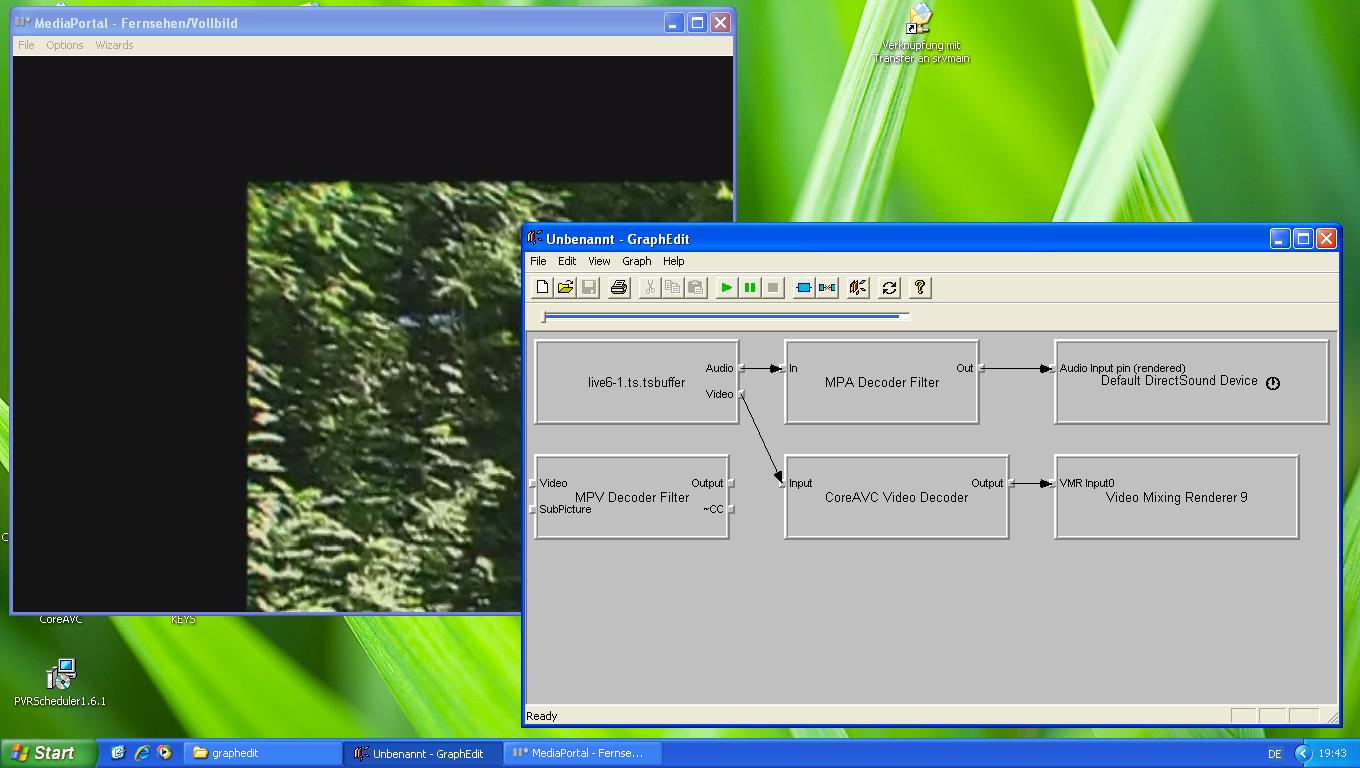
    Please find my configuration below. This PC is configured as a single-seat system and it has the described problem. I also tried my Apple MacPro (Quad Core) with NVidia graphic card and WinXP SP2 as a client and it also shows this problem. In both cases I used the new tsfilter.

    I ave also attached a scrrenshot showing GraphEdit and MediaPortal wir the problem in the background.

    MediaPortal Version: MediaPortal Version: Tvengine3, yesterday's SVN
    MediaPortal Skin: None
    Windows Version: Windows XP SP with all Fixes from the WiKi
    CPU Type: Core 2 Duo
    HDD: WD Raptor
    Memory: 2 GB
    Motherboard: Asus P5W
    Motherboard Chipset: Intel
    Motherboard Bios: ?
    Video Card: ATI
    Video Card Driver: ATI, most current Non-Beta
    Sound Card: None
    Sound Card AC3:
    Sound Card Driver:
    1. TV Card: FireDTV
    1. TV Card Type: DVB-S
    1. TV Card Driver: Most current (downloaded yesterday)
    MPEG2 Video Codec: None
    MPEG2 Audio Codec: None
    Satelite/CableTV Provider: Astra
    HTPC Case: None
    Cooling: 5 Fans
    Power Supply: ?
    Remote: None
    Instasllation type: Network - single TV-Server
     

    Attachments

    • CoreAVC2.JPG
      CoreAVC2.JPG
      113.6 KB

    infinite.loop

    Retired Team Member
  • Premium Supporter
  • December 26, 2004
    16,154
    4,133
    127.0.0.1
    Home Country
    Austria Austria
    i can confirm that issue. also occurs here on all Astra 19.2°E dvb-s2 channels.

    it is a bug inside coreavc since it also occurs when you build a plain graph in graphedit and use VMR9 as video-renderer.

    if you use overlay as video-renderer, all is fine.

    ::more here::


    seems that it doesnt like something inside the broadcasted dvb-s2 stream. downloaded h.264 files are played without any issues.
     

    chrispi

    Portal Pro
    May 3, 2006
    64
    1
    Home Country
    Germany Germany
    How can I enable overlay? I thought it was removed a long time ago?

    I was not able to find a hint in the forum.

    I am using today's SVN.

    . Christoph
     

    Futter73

    Portal Pro
    September 23, 2007
    64
    0
    Home Country
    Germany Germany
    Hello!

    Are there any solutions in this case or do we have to wait for upcoming fixes?
    I would like to use CoreAVC instead of the Cyberlink Codec because of its lower CPU-Usage.
    THX
     

    infinite.loop

    Retired Team Member
  • Premium Supporter
  • December 26, 2004
    16,154
    4,133
    127.0.0.1
    Home Country
    Austria Austria
    Are there any solutions in this case or do we have to wait for upcoming fixes?
    I would like to use CoreAVC instead of the Cyberlink Codec because of its lower CPU-Usage.
    we all have to wait until they release their next version.
    until then we are stuck with cyberlink which actualy works ;)
     

    Users who are viewing this thread

    Top Bottom