

You are using an out of date browser. It may not display this or other websites correctly.
You should upgrade or use an alternative browser.
You should upgrade or use an alternative browser.
PureVisionHD 1080 (46 Viewers)
- Thread starter catavolt
- Start date
 Germany
In this case please open common.rss.xml, look for the respective entries and copy those to the myvideo.xml. Hopefully this should work then
I did this but got the same problem. If I put original file - all works fine.
Could you please give me the specific recommendations?
Thanks a lot.
The problem is fixed.
Thanks again!
Catavolt,
Can you please explain me how can I expand width of the filename borders in My Videos?
Hi whit27,
And here we go (hope you are a bit familiar with editors):
Open BasicHome.xml.
Goto line 397. At this position the definition of the buttons start.
Below of <description>TV normal push button</description> you´ll find the tag <hyperlink>. For Moving Pictures you have to change this to <hyperlink>96742</hyperlink> and the label to <label>Moving Pictures</label>.
Look for the button you want to assign TVSeries (e.g. <description>videos normal push button</description>)
Change the <hyperlink> tag to <hyperlink>9811</hyperlink> and the <label> tag to <label>1300</label>.
Save the file.
Restart MP.
If you all made correct as described above, you should see the changed buttons which now will call directly Moving Pictures and TVSeries.
Ok I was able to do all of the above and it now says Moving Pictures and TV Series on the buttons and they work properly. Thanks for this help....
Now onto acouple other things... Sorry for all the questions...
1. Can I have the Moving Pictures Button Say something else? Like Movies? or HD Movies? As Moving Pictures seems odd and is alittle big for the button.
2. Can I remove some of the other buttons?? Like I said I don't Use anything else other then TV Series, Moving Pictures and Weather.
I tried the Disable part in the plugins section but they are still there. Is this much more difficult? I am trying for less clutter.
3. Should all the top bar buttons work? When I click on the HTPC Info button it does nothing.
Currently this is what the home screen looks like:
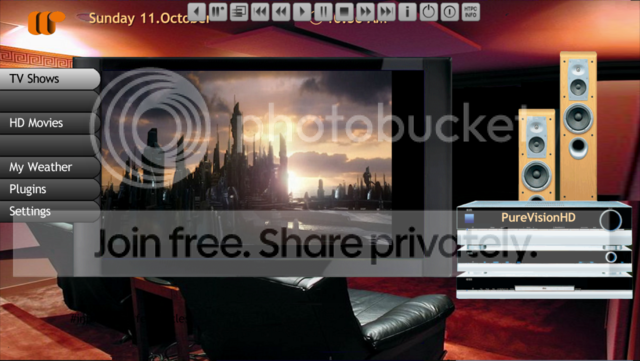
Thanks
Whit
- Thread starter
- Moderator
- #514
Hi whit27,
1.) Obviously you solved it by yourself
2.) Yes, you have to disable them as you did with the last two buttons. In this case copy the desired hyperlinks/labels (as described before) to the first buttons.
3.) Yes, but you have to enable and configure the HTPCInfo plugin in MP Config -> plugins.
1.) Obviously you solved it by yourself
2.) Yes, you have to disable them as you did with the last two buttons. In this case copy the desired hyperlinks/labels (as described before) to the first buttons.
3.) Yes, but you have to enable and configure the HTPCInfo plugin in MP Config -> plugins.
Hi whit27,
1.) Obviously you solved it by yourself
2.) Yes, you have to disable them as you did with the last two buttons. In this case copy the desired hyperlinks/labels (as described before) to the first buttons.
3.) Yes, but you have to enable and configure the HTPCInfo plugin in MP Config -> plugins.
Ok so I have acouple more issues.... and thanks for all the help with this...
So in the picture I posted above it showed that I was able to remove the wording for the buttons I don't use... but when the cursor hoovers over it still shows the image that would have gone with that button.... Like Music still shows the music pictures you have built into the skin.
Also is there anyway we can change this pictures? possibly have it scroll thru movies or shows we have already in the libray?
and second issue is for HTPCInfo when I click on the topbar for it I get a black screen and it says Missing File or invalid file:
Cheers
Whit
- Thread starter
- Moderator
- #516
whit27: The DLLs for HTPCInfo are delivered with the PureVision skins. If you followed the instructions you should have it in your plugins.
The other problem with the redesign of basichome is as follows: In basichome.xml you find sections titled "multiimage". For every multiimage there is a reference to a button (<visible>control.hasfocus(value)</visible). You have to change the "value" to the ID of the corresponding button.
The respective multiimages are in the folder ...\skin\PureVisionHD(Blue)\Media\Animations.
There you can replace the images.
BTW: I think you are not using the latest SVN of MP, so the size of the multiimages is not correct displayed (which is/was a bug in MP itself).
The other problem with the redesign of basichome is as follows: In basichome.xml you find sections titled "multiimage". For every multiimage there is a reference to a button (<visible>control.hasfocus(value)</visible). You have to change the "value" to the ID of the corresponding button.
The respective multiimages are in the folder ...\skin\PureVisionHD(Blue)\Media\Animations.
There you can replace the images.
BTW: I think you are not using the latest SVN of MP, so the size of the multiimages is not correct displayed (which is/was a bug in MP itself).
@whit27: The DLLs for HTPCInfo are delivered with the PureVision skins. If you followed the instructions you should have it in your plugins.
The other problem with the redesign of basichome is as follows: In basichome.xml you find sections titled "multiimage". For every multiimage there is a reference to a button (<visible>control.hasfocus(value)</visible). You have to change the "value" to the ID of the corresponding button.
The respective multiimages are in the folder ...\skin\PureVisionHD(Blue)\Media\Animations.
There you can replace the images.
BTW: I think you are not using the latest SVN of MP, so the size of the multiimages is not correct displayed (which is/was a bug in MP itself).
I will update to the latest SVN... I think I am using 1.1.0 but not 100% sure.
As for the HTPCInfo I followed all the instructions and have all the dll files in the proper folder according to your instructions and when I click on the button I get a black screen that says Missing File
I will try a new install tonight and see if that resolves the issue.
Cheers
Whit
oh sorry and I am running the 1.1 Beta that is on the site. If there is a newer version that i should install please tell me where to find it and I will get that done ASAP.
Cheers and Thanks
Whit
InfoService Plugin - Is there anyway to speed up the ticker at the bottom?? It seems to move very slowly...
Cheers
Whit
Cheers and Thanks
Whit
InfoService Plugin - Is there anyway to speed up the ticker at the bottom?? It seems to move very slowly...
Cheers
Whit
- Thread starter
- Moderator
- #519
You can adjust the scrollspeed within MP under settings.
You can adjust the scrollspeed within MP under settings.
I still can't get the HTPCInfo button to work.
I get the black screen that states invalid file
Just installed the latest download from the Download page. Should I install something else?