RTSP - test with VLC on same box, correct syntax? (3 Viewers)

pnag

New Member
February 25, 2026
4
0
Home Country
Ireland Ireland
Hi everyone,

I've set up Mediaportal TV Server on a Windows 11 box, tuner deteced okay, scanned channels, can preview, all seems well - but when I try to use VLC to test RTSP, I'm hitting a wall. (Even with firewall turned off, even with on the same box - VLC returns an error.)

What's the correct syntax for VLC? I've tried (and note that yes, the .x.x is obfuscated, but I am using the correct IP for real :))

rtsp://192.168.x.x:554/stream/channelid=57
rtsp://192.168.1.144:554/stream57
rtsp://192.168.1.144:554/stream/

Note that I assigned channel number 57 to BBC Scotland as a test, as I know that works.

All with (for example)

Your input can't be opened:

VLC is unable to open the MRL 'rtsp://192.168.x.x:554/stream/channelid=57'. Check the log for details.

Feels like I'm very close, but can't get the correct syntax for the RTSP link.

I've tested the port number too - all looks good.

PS C:\WINDOWS\system32> Test-NetConnection -computername 192.168.x.x -port 554


ComputerName : 192.168.x.x
RemoteAddress : 192.168.x.x
RemotePort : 554
InterfaceAlias : Ethernet
SourceAddress : 192.168.x.x
TcpTestSucceeded : True

Any ideas? I'm sure I'm doing something very, very silly...
 

CyberSimian

Test Group
  • Team MediaPortal
  • June 10, 2013
    3,473
    2,428
    Southampton
    Home Country
    United Kingdom United Kingdom
    What's the correct syntax for VLC?
    I have never used VLC to view video streams from TV Server, but this page in the MP Wiki would be the place to find relevant information. It does actually mention VLC, but the information seems quite sparse, so I am not sure that it will be of any help. :(

    Why not use the MP client to view the video streams from TV Server? :)

    -- from CyberSimian in the UK
     

    pnag

    New Member
    February 25, 2026
    4
    0
    Home Country
    Ireland Ireland
    ...but this page in the MP Wiki would be the place to find relevant information...
    That's the trouble - no syntax for how to view RTSP streams at all, sadly. I want to use the TV Server capability to shoe horn it into something else, but need to be able to test if it's working at all, really.

    The wiki page is so self referential - "example - rtsp://mytvserverip/stream2.0 could be used in the url of VLC to display the current active stream pictured in the above image" - but that's for something very specific, and doesn't mention tv channel RTSP streaming, which apparently can be done!

    I feel like I'm so close :(
     

    el Filou

    MP Donator
  • Premium Supporter
  • July 2, 2008
    141
    114
    Home Country
    Belgium Belgium
    I feel like what the wiki is saying is that while you are actively streaming from a TV Server to an MP client, you could use VLC to view the stream at the same time to make sure it is working in case you have issues.
    I don't think MP is designed for a 3rd-party client to be able to ask for a specific TV channel to stream, but I may be wrong and confirmation from a developer of the TV Engine would be ideal but I'm afraid they are all inactive now?
    I remember a long time ago there was a "light" TV-only app for Windows (I don't remember its exact name) that could choose and stream TV channels outside MP1 client but it's outdated now.

    Did you try enabling debug log level and see in the log files if there is any information about URLs or such?

    Edit: if you have two different Windows computers, maybe an option would be to install an official MP TV client on the second computer and then use something like Wireshark and capture network traffic when MP client selects a TV channel to stream, and then see what is exchanged with the TV server.
    I don't think TV Engine streaming is encrypted so you should be able to see the communication.
     

    pnag

    New Member
    February 25, 2026
    4
    0
    Home Country
    Ireland Ireland
    Edit: if you have two different Windows computers, maybe an option would be to install an official MP TV client on the second computer and then use something like Wireshark and capture network traffic when MP client selects a TV channel to stream, and then see what is exchanged with the TV server.
    I don't think TV Engine streaming is encrypted so you should be able to see the communication.
    So use an MP client to engage the stream? Maybe, but it kinda defeats the whole purpose, no?
     

    Gcarr

    MP Donator
  • Premium Supporter
  • August 17, 2014
    243
    88
    Home Country
    United States of America United States of America
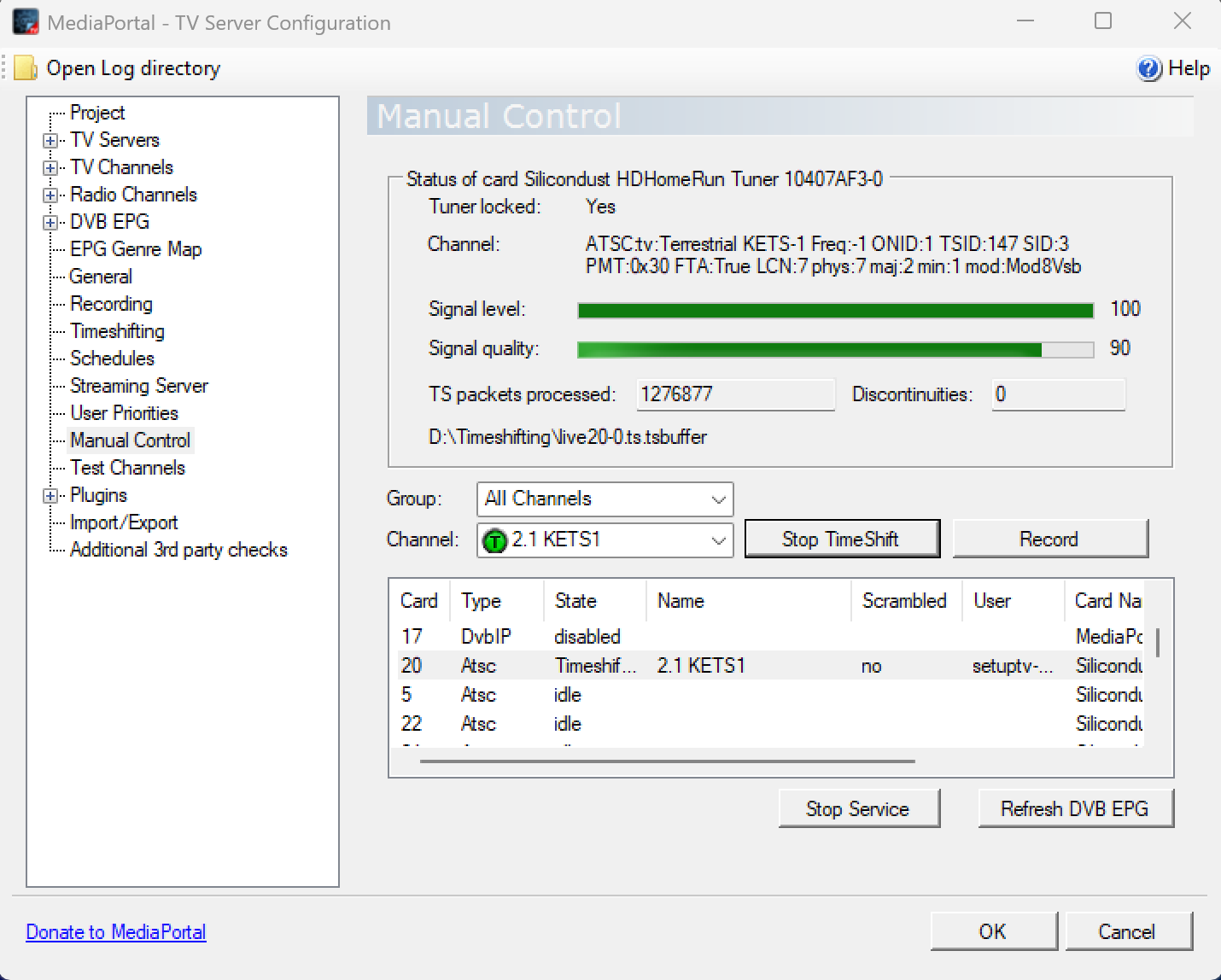
    I might not be understanding the question correctly but, I just put rtsp://pluto/stream2.0 into VLC (pluto is my tv server, it also worked with IP) and it is streaming the current channel I am watching on my tv. It appears that it picks up what's in the time shift buffer and streams that, I was able to scroll back and forth in time.
     

    pnag

    New Member
    February 25, 2026
    4
    0
    Home Country
    Ireland Ireland
    I might not be understanding the question correctly but, I just put rtsp://pluto/stream2.0 into VLC (pluto is my tv server, it also worked with IP) and it is streaming the current channel I am watching on my tv. It appears that it picks up what's in the time shift buffer and streams that, I was able to scroll back and forth in time.
    I want to use VLC to effectively act as a client to test TV channel streaming (DVB-S card, satellite channels, say.)

    The docs indicate it's possible, but the URL syntax doesn't seem to be indicated anywhere.
     

    Gcarr

    MP Donator
  • Premium Supporter
  • August 17, 2014
    243
    88
    Home Country
    United States of America United States of America
    You can pick a stream in TV server setup but you have to use the corresponding Card # for your StreamID# as in the screenshot. For this setup I had to use the url rtsp://192.168.1.77/stream20.0

    This post has some pretty good detail on RTSP, it's from 2018 but seems to be ok from what I see.
    RTSP Streaming Not Working

    Edit: There's also a note in that thread that mentions permission problems if the timeshift buffer is in the ProgramData folder.
     

    Attachments

    • Screenshot 2026-03-04 071241.png
      Screenshot 2026-03-04 071241.png
      86.1 KB
    Last edited:

    Users who are viewing this thread

    Top Bottom