SAF v4.00 ''stable'' (StandAlone Filters) - DXVA ready (H.264 and VC-1). (7 Viewers)

Should i integrate FFDshow in to SAF?

  • Yes

    Votes: 406 85.5%
  • No

    Votes: 69 14.5%

  • Total voters
    475

hoborg

Portal Pro
June 13, 2008
4,413
1,644
Nový Jičín
Home Country
Czech Republic Czech Republic
Can you also post the IGP version of Catalyst 8.5 for Windows XP please? I couldn't find it on the net.

Thanks in advance!

backslash

Hello.

You can find link in begin of this thread :)

You posted only the generic CCC 8.5 but i need the CCC 8.5 for integrated/motherboard GPU (X1250/690G Chipset).

backslash

Well, i do not have any personal experience with X1250/690G Chipset. So, this Catalyst doesn't work for you? I think it should be the same...
 

jo16v

Portal Pro
August 23, 2008
263
8
Home Country
United Kingdom United Kingdom
You posted only the generic CCC 8.5 but i need the CCC 8.5 for integrated/motherboard GPU (X1250/690G Chipset).

backslash
There is a whole list of past drivers here.

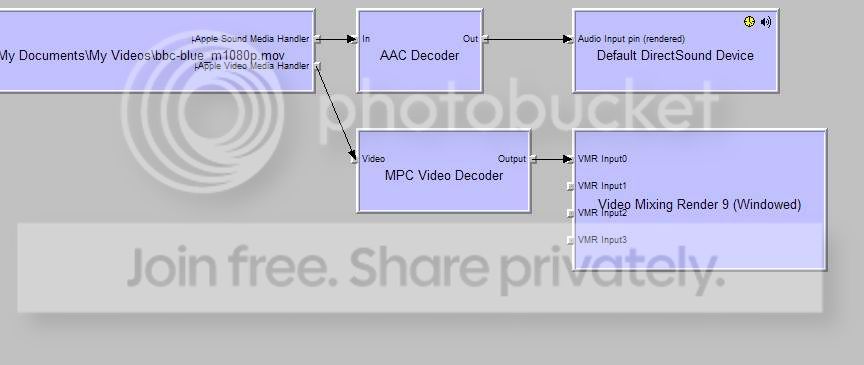
OK, here are two graphs I ran using graphstudio testing a 1080p h.264 quicktime file (this) using mpc-hc standalone player svn 845 and mediaportal using the mpc-hc video decoder svn 845. The file worked perfectly in MPC-HC player with hardware acceleration (DXVA) but in MediaPortal I just get a blank screen with no sound.:(

MPC-HC standalone player graph using DXVA
mpchcusingmpchcgraph.jpg


MediaPortal graph using MPC-HC video decoder
mediaportalmpchcgraph.jpg
 

hoborg

Portal Pro
June 13, 2008
4,413
1,644
Nový Jičín
Home Country
Czech Republic Czech Republic
You posted only the generic CCC 8.5 but i need the CCC 8.5 for integrated/motherboard GPU (X1250/690G Chipset).

backslash
There is a whole list of past drivers here.

OK, here are two graphs I ran using graphstudio testing a 1080p h.264 quicktime file (this) using mpc-hc standalone player svn 845 and mediaportal using the mpc-hc video decoder svn 845. The file worked perfectly in MPC-HC player with hardware acceleration (DXVA) but in MediaPortal I just get a blank screen with no sound.:(

MPC-HC standalone player graph using DXVA
mpchcusingmpchcgraph.jpg


MediaPortal graph using MPC-HC video decoder
mediaportalmpchcgraph.jpg

Yes, i see it. It is becouse your video is in *.MOV format instead of MKV. so it isn't handled by Haali media splitter.
I am again asking for short example of this video, so i can find solution for this.
 

jo16v

Portal Pro
August 23, 2008
263
8
Home Country
United Kingdom United Kingdom
Yes, i see it. It is becouse your video is in *.MOV format instead of MKV. so it isn't handled by Haali media splitter.
I am again asking for short example of this video, so i can find solution for this.
I gave a link in my post;) Most of the clips here are in the same format (h.264, quicktime, AAC).
 

hoborg

Portal Pro
June 13, 2008
4,413
1,644
Nový Jičín
Home Country
Czech Republic Czech Republic
Yes, i see it. It is becouse your video is in *.MOV format instead of MKV. so it isn't handled by Haali media splitter.
I am again asking for short example of this video, so i can find solution for this.
I gave a link in my post;) Most of the clips here are in the same format (h.264, quicktime, AAC).

Oh, sorry for that, i see it now :)
260MB, too bad, thats ~2Hour downloading on my internet :(
 

jo16v

Portal Pro
August 23, 2008
263
8
Home Country
United Kingdom United Kingdom
Oh, sorry for that, i see it now :)
260MB, too bad, thats ~2Hour downloading on my internet :(

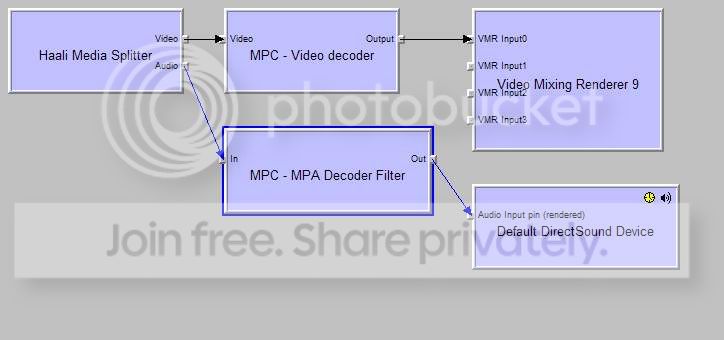
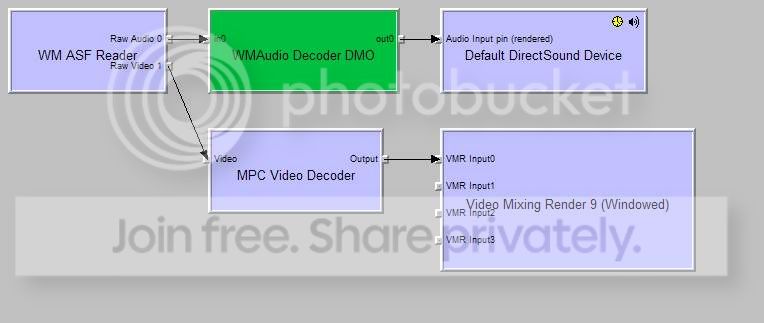
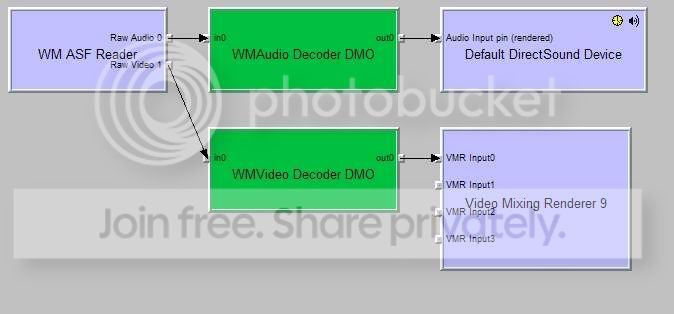
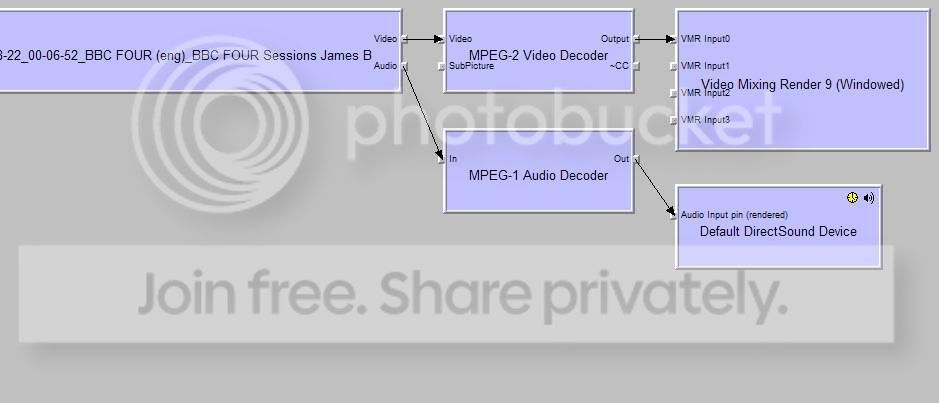
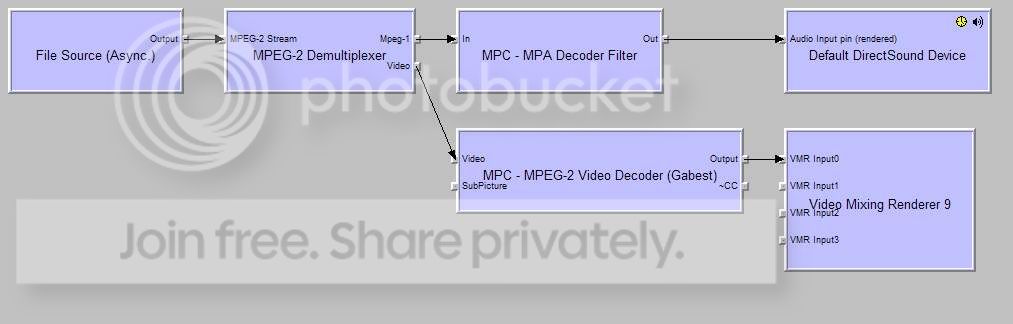
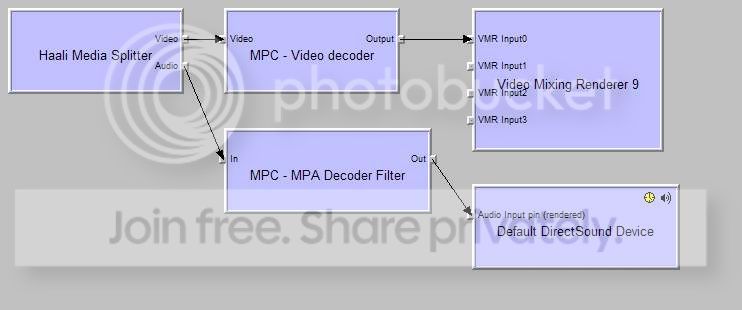
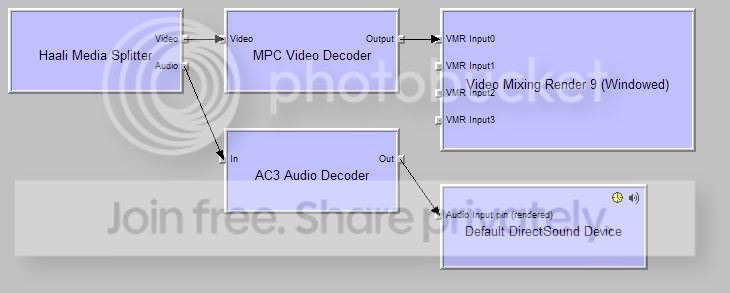
There are two smaller 1080p quicktime files here or here maybe you could try? But anyway I don't think it's a specifically quicktime problem I have. On the quicktime file (graphs above) I get no sound or picture but it seems to open. Below are graphs for a VC1 file that is accelerated with DXVA in MPC-HC, but in MediaPortal I just get sound no video. Also graphs for an mpg recording of BBC4- plays fine in MPC-HC, but in MediaPortal no picture, just sound.

MPC-HC standalone player graph Dark Knight VC-1 trailer using DXVA
mpchcgraphdkknight.jpg


MediaPortal graph using MPC-HC video decoder DarkKnight VC-1 trailer
medportgraphdkknight.jpg


MPC-HC standalone player graph BBC 4 MPG recording
mpchcgraphbbc4mpg.jpg


MediaPortal graph using MPC-HC video decoder BBC 4 MPG recording
medportgraphbbc4mpg.jpg
 

hoborg

Portal Pro
June 13, 2008
4,413
1,644
Nový Jičín
Home Country
Czech Republic Czech Republic
Oh, sorry for that, i see it now :)
260MB, too bad, thats ~2Hour downloading on my internet :(

There are two smaller 1080p quicktime files here or here maybe you could try? But anyway I don't think it's a specifically quicktime problem I have. On the quicktime file (graphs above) I get no sound or picture but it seems to open. Below are graphs for a VC1 file that is accelerated with DXVA in MPC-HC, but in MediaPortal I just get sound no video. Also graphs for an mpg recording of BBC4- plays fine in MPC-HC, but in MediaPortal no picture, just sound.

MPC-HC standalone player graph Dark Knight VC-1 trailer using DXVA
mpchcgraphdkknight.jpg


MediaPortal graph using MPC-HC video decoder DarkKnight VC-1 trailer
medportgraphdkknight.jpg


MPC-HC standalone player graph BBC 4 MPG recording
mpchcgraphbbc4mpg.jpg


MediaPortal graph using MPC-HC video decoder BBC 4 MPG recording
medportgraphbbc4mpg.jpg

Too bad, that none of your files are in standart MKV. On top of this threat you can read, that SAF is designed for MKV and files handled by Haali media spliter. MOV and ASF formats are different story, they arent open source.
But i will try all of your files. Just give me a litle time for this, it is not an easy task...

I just try your first video in MOV format.
You need use MKVmerge and convert MOV to MKV (takes just few seconds). This only change container type, video & audio remain the same. Now it is working perfectly for me under MP :)
You can try it with other non MKV files too, but Windows ASF is not supported becouse of licence...
Try to understand - i am trying to create standart, and i choose MKV format.

Hoborg,

:D:Dso much for this pack, it really works fine, even with my old configuration and my old nvidia card! I can now watch HD mkv movies fine!

Just one thing: in the configuration for DVD you wrote to put Cyberlink DVD navigator, and it doen't work (DVD don't play and if DVD ripped on the HD work, it is not possible to change language and sub titles. So that I changed the option and put DVD navigator (the one includes with MP). Everything is fine now.

There are 2 kinds of files that I cannot read: flv (used for podcasts) and dvr-ms (I cannot read anymore my registred TV). HOw is it possible to solve that?

Thanks again,

Hello.
If i understand you - if you click on PlayDVD in MP nothing happend?
And if you rip this DVD to your harddisk it start to work?

Again, i need a file example. I dont have any flv files. The same with dvr-ms recordings...
 

jo16v

Portal Pro
August 23, 2008
263
8
Home Country
United Kingdom United Kingdom
Too bad, that none of your files are in standart MKV. On top of this threat you can read, that SAF is designed for MKV and files handled by Haali media spliter. MOV and ASF formats are different story, they arent open source.
But i will try all of your files. Just give me a litle time for this, it is not an easy task...

I just try your first video in MOV format.
You need use MKVmerge and convert MOV to MKV (takes just few seconds). This only change container type, video & audio remain the same. Now it is working perfectly for me under MP :)
You can try it with other non MKV files too, but Windows ASF is not supported becouse of licence...
Try to understand - i am trying to create standart, and i choose MKV format.
I don't think it is a format specific problem in my case as mkv files don't work either- see graphs below. MPC decoder does work with WM-ASF Reader as you can see on the graph for Dark Knight trailer in MPC-HC. In MediaPortal for some reason it doesn't use MPC decoder and uses WM Video decoder instead and I don't get any picture (I get sound though).

MediaPortal Smallville mkv graph (no picture or sound)
medportsmallvillemkvgraph.jpg


MPC-HC Smallville mkv graph using DXVA
mpchcsmallvillemkvgraph.jpg
 

hoborg

Portal Pro
June 13, 2008
4,413
1,644
Nový Jičín
Home Country
Czech Republic Czech Republic
Too bad, that none of your files are in standart MKV. On top of this threat you can read, that SAF is designed for MKV and files handled by Haali media spliter. MOV and ASF formats are different story, they arent open source.
But i will try all of your files. Just give me a litle time for this, it is not an easy task...

I just try your first video in MOV format.
You need use MKVmerge and convert MOV to MKV (takes just few seconds). This only change container type, video & audio remain the same. Now it is working perfectly for me under MP :)
You can try it with other non MKV files too, but Windows ASF is not supported becouse of licence...
Try to understand - i am trying to create standart, and i choose MKV format.
I don't think it is a format specific problem in my case as mkv files don't work either- see graphs below. MPC decoder does work with WM-ASF Reader as you can see on the graph for Dark Knight trailer in MPC-HC. In MediaPortal for some reason it doesn't use MPC decoder and uses WM Video decoder instead and I don't get any picture (I get sound though).

MediaPortal Smallville mkv graph (no picture or sound)
medportsmallvillemkvgraph.jpg


MPC-HC Smallville mkv graph using DXVA
mpchcsmallvillemkvgraph.jpg

Ok, lets try to find solution for MKV files now...
Can you start Smallville mkv in MP, connect graph and display information about every filter used, so i can see informations about version of each filter? Just right click on filter.
 

Jean-Marc

Portal Pro
February 28, 2007
382
32
Home Country
France France
If i understand you - if you click on PlayDVD in MP nothing happend?
Yes, with "cyberlink DVD navigator"

And if you rip this DVD to your harddisk it start to work?
Yes BUT impossible to change audio channel and subtitles

So, instead of "cyberlink DVD navigator" I put "DVD navigator" and everything is working perfectly so don't worry, everything is fine for me!!

The only thing: just tell me how to read .flv and .dvr-ms files with your pack??

:D
 

Users who are viewing this thread

Top Bottom