SAF v4.00 ''stable'' (StandAlone Filters) - DXVA ready (H.264 and VC-1). (29 Viewers)

Should i integrate FFDshow in to SAF?

  • Yes

    Votes: 406 85.5%
  • No

    Votes: 69 14.5%

  • Total voters
    475

Seeco

Portal Pro
October 15, 2007
241
7
Linköping
Home Country
Sweden Sweden
I have just made the move to Windows 7, getting mixed results. Here's a bunch of reflections and questions.

- Image smoothness is definitely improved over XP/VMR9

- The Windows 7 codecs were being used as standard for all media, I had to use that Doom9 tool to set the SAF codecs to standard. Bit invasive there, Win 7!

- The success of playing video files is pretty random. So far this only concerns HD material, i.e. the MPC codec. Sometimes when I start a h/x.264 video everything is fine, but when I fast forward I get severe stuttering of either of two kinds. One is a brutal stuttering (like 2fps) that can only be cured by ffwding to another spot in the video. Sometimes that has to be done a couple of times for it to work. The other case is a more mild stutter, which goes away by itself after maybe 4-5 seconds.

- I can't see any tray icons for my codecs when playing back video which I know is triggering the codecs I want. Is this a Win 7 thing?

- I can't get TV to use the PowerDVD codec, despite setting MPEG-2 to PowerDVD in the standard codec tool mentioned above. Also, every time I extract the PDVD codec SAF tells me that the codecs isn't the newest one, despite the fact that I downloaded it from PDVD's site. Why i that?

I will provide logs of eveything if there's a need for it! :)
 

Helios61

Retired Team Member
  • Premium Supporter
  • January 30, 2008
    4,586
    875
    64
    NRW
    Home Country
    Germany Germany
    Hi Helios

    Can you check following:
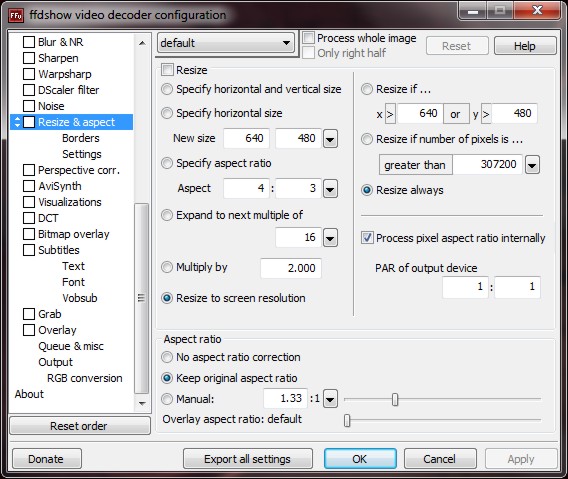
    Start Menu, Programs, SAF, ffdshow configure video
    Then select in left panel select Resize & Aspect
    Is RESIZE checked in right panel? If so remove and test again.

    Hi rekenaar!

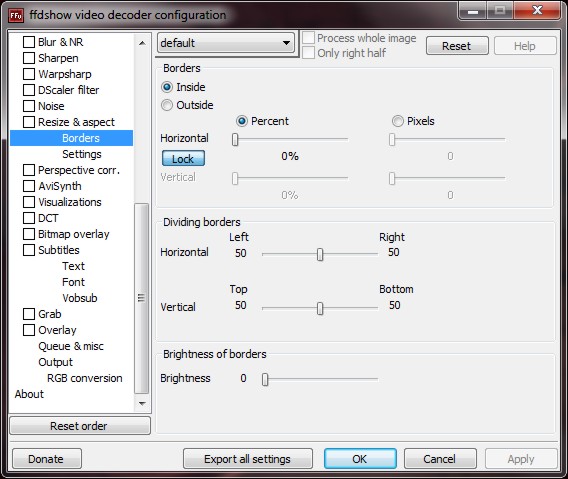
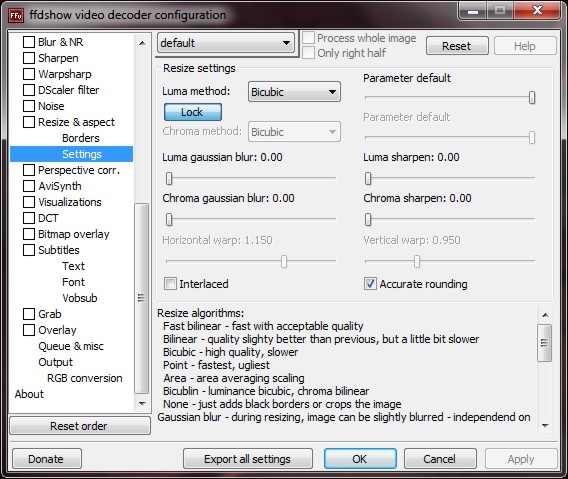
    Thanks for your reply! But ffdshow is not my video codec! It is PDVD9! I attach screenshots of my ffdshow settings!

    best regards

    Helios
     

    Attachments

    • Bild041.jpg
      Bild041.jpg
      81.4 KB
    • Bild042.jpg
      Bild042.jpg
      62.1 KB
    • Bild043.jpg
      Bild043.jpg
      85 KB

    zappomax

    Portal Pro
    April 24, 2008
    87
    9
    Home Country
    Italy Italy
    I've just installed Saf RC1 but I've the same problems with GameTrailers on Onlinevideos: all trailers in "New Trailers" folders doesen't work (video crash). The other trailers works good.
    Only to me???
     

    rekenaar

    Retired Team Member
  • Premium Supporter
  • December 17, 2006
    4,421
    805
    Home Country
    South Africa South Africa
    Hi rekenaar!

    Thanks for your reply! But ffdshow is not my video codec! It is PDVD9! I attach screenshots of my ffdshow settings!

    best regards

    Helios

    OK, sorry. It just seemed a bit like a previous issue I struggled with.
     

    Mr.Wifi

    Portal Pro
    August 26, 2008
    181
    2
    Düsseldorf
    Home Country
    Germany Germany
    Can everybody please stop posting unlock messages, realy anoying on the mail. @Hoborg: Can you make unlock instructions font size 60 on first post :)

    And what´s up with the clvsd update Message you get installing SAF rc1 ? Huh ?

    I got a Blackscreen entering TV, so i decided to install the Power DVD 9 Codec from the latest clvd Pack from here DVB Support Download Center » Codecs » CLVD Pack

    I think with that no update is needed anymore. Unfortunately 720p HDTV ( i have no 1080i ) didn´t work with the MPC Decoder and 1080i .ts files either, so i added the Power DVD9 h.264 Codec from here DVB Support Download Center » Codecs » HD Pack 2.2

    1080p and other HD Files play fine on my ION Sys and the refreshrate changer seem to work in sync with mpc. No Core AVC and cuda needed anymore by now, for that :D
     

    hoborg

    Portal Pro
    June 13, 2008
    4,413
    1,644
    Nový Jičín
    Home Country
    Czech Republic Czech Republic
    Hi hoburg under win 7 still MS DTV-DVD Audio Codec is used for LiveTV, Record playback even when i select ffdshow audio.

    Please, post me small recording sample.

    Hi hoborg!

    I have black bars on the left and the right side, if i play a 4:3 DVD! Blue Botton only stretches vertical! Logs and Screenshots are attached!

    Could you please help!

    Thank you

    Helios

    Must be on MP side, FFDShow video decoder is not in use...

    I have just made the move to Windows 7, getting mixed results. Here's a bunch of reflections and questions.

    - Image smoothness is definitely improved over XP/VMR9

    - The Windows 7 codecs were being used as standard for all media, I had to use that Doom9 tool to set the SAF codecs to standard. Bit invasive there, Win 7!

    - The success of playing video files is pretty random. So far this only concerns HD material, i.e. the MPC codec. Sometimes when I start a h/x.264 video everything is fine, but when I fast forward I get severe stuttering of either of two kinds. One is a brutal stuttering (like 2fps) that can only be cured by ffwding to another spot in the video. Sometimes that has to be done a couple of times for it to work. The other case is a more mild stutter, which goes away by itself after maybe 4-5 seconds.

    - I can't see any tray icons for my codecs when playing back video which I know is triggering the codecs I want. Is this a Win 7 thing?

    - I can't get TV to use the PowerDVD codec, despite setting MPEG-2 to PowerDVD in the standard codec tool mentioned above. Also, every time I extract the PDVD codec SAF tells me that the codecs isn't the newest one, despite the fact that I downloaded it from PDVD's site. Why i that?

    I will provide logs of eveything if there's a need for it! :)
    Win7 x86 or x64?
     

    Users who are viewing this thread

    Top Bottom