
You are using an out of date browser. It may not display this or other websites correctly.
You should upgrade or use an alternative browser.
You should upgrade or use an alternative browser.
SAF v4.00 ''stable'' (StandAlone Filters) - DXVA ready (H.264 and VC-1). (32 Viewers)
- Thread starter hoborg
- Start date
I am having stuttering problems with one specific HD TV channel. Its the new "Servus TV" here in germany... Does anyone know anything about that? ARD HD and ZDF HD showcases are fine!
My graph looks fine, doesnt it?
PS: Using SAF beta 19 and MP 1.0.2 on WinXP SP3
My graph looks fine, doesnt it?
PS: Using SAF beta 19 and MP 1.0.2 on WinXP SP3
Attachments
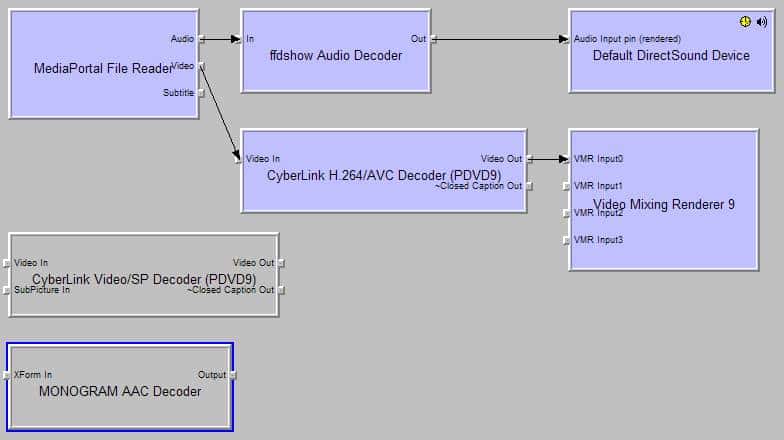
I am having stuttering problems with one specific HD TV channel. Its the new "Servus TV" here in germany... Does anyone know anything about that? ARD HD and ZDF HD showcases are fine!3
ATI Radeon HD 5800, 5700 and 5600 Series Thread: Supporting HD Audio Bitstreaming! - Page 41 - AVS Forum
I am having stuttering problems with one specific HD TV channel. Its the new "Servus TV" here in germany... Does anyone know anything about that? ARD HD and ZDF HD showcases are fine!3
ATI Radeon HD 5800, 5700 and 5600 Series Thread: Supporting HD Audio Bitstreaming! - Page 41 - AVS Forum
Thanks for the link. But for me its the opposite. ZDF HD and ARD HD work just fine, cpu usage at 10% to 20%. But i just started MediaPortal on my second gfx card (GF 8600GT) and there every HD channel works flawless (anixe hd doesnt work properly on the ati neither). But... unfortunately there is always a but: BD Rip has cpu usage of 60% and on the ati just 15%-20%. 720p mkv are both times just 10% to 20%.
Also it uses of course a lot more energy i guess. NVIDIA manager also tells me that my system is not HDCP ready, even though this gfx card with this tv and this cable was already HDCP ready in my old computer. Maybe becasue i have both gfx cards running together...
So thats why i would like to use my ATI card... Is there any solution to this? Running something else then CCC 9.5? Lots of people talk about CCC 9.4... any hints?
Thanks a lot!
Hi S_Behn,
Servus TV has very strong stuttering with my system as well. I think it is the poor bandwidth they are broadcasting with.
Anixe HD and ASTRA HD I also have problems with. But they are 1080i. However I still have the same problem with full HD mkv's and the light stuttering problem as you know.
greetings
bart
Servus TV has very strong stuttering with my system as well. I think it is the poor bandwidth they are broadcasting with.
Anixe HD and ASTRA HD I also have problems with. But they are 1080i. However I still have the same problem with full HD mkv's and the light stuttering problem as you know.
greetings
bart

- November 21, 2006
- 456
- 18
- Home Country
-
 Germany
A small warning about the ffdshow as audio codec. Seems that it is not compatible with all AAC streams that are broadcasted. So, in case that you have issues with live.tv or recordings and the audio type is AAC please try Windows 7 audio decoder or the Monogram's AAC decoder (that ships with MP).
0002528: Changing dvb-t mux from mpeg2->h264 fails. - MediaPortal Bugtracker
0002528: Changing dvb-t mux from mpeg2->h264 fails. - MediaPortal Bugtracker
After reading thru the first post (quickly) at least following points needs some clearing
Use Windows XP SP3 instead of VISTA/Win7 becouse:
Not true. Especially when Windows 7 and Vista are both waking up much faster from the S3/S4 states (pretty important for a HTPC). In general Vista is slower, but even it can be tweaked to reach the XP speeds by disabling extra
Both Vista & Windows 7 have many media playback improvements (more accurate times, much more glitch resistant frame scheduling, no need for complicated exclusive DirectX usage that causes issues with MP and 3rd party programs. Possibility to use DirectX 9Ex, allowing much fine grained control over the D3D and device loss, even allowing to change refresh rate during video playback ) that are far more important that few percent performance hit that Vista has when compared to XP.
Works as well with Windows Vista & Windows 7.
Works as well with Windows 7 and Windows Vista. Might be a issue with Cyberlink's codec? But not a general issue in any way.
Users need to use EVR as well in MP config.
Not all GPUs that are DXVA capable are offloading all the decoding. For example Nvidia 8800 has only minimal offloading possibilities with H.264 content (mainly causing almost as high CPU usage as in software mode).
Doesn't support VC-1 interlaced encodings.
Not true on all AMD systems, at least with Windows 7 nor Windows Vista. XP might be different as it has buggy implementation when it comes to speed stepping. Should be recommended only as an troubleshooting step when users are experiencing suttering video playback (and if disabling C&Q doesn't solve the issue then it shouldn't be disabled).
Use Windows XP SP3 instead of VISTA/Win7 becouse:
- XP are much, much faster then Vista
Not true. Especially when Windows 7 and Vista are both waking up much faster from the S3/S4 states (pretty important for a HTPC). In general Vista is slower, but even it can be tweaked to reach the XP speeds by disabling extra
Both Vista & Windows 7 have many media playback improvements (more accurate times, much more glitch resistant frame scheduling, no need for complicated exclusive DirectX usage that causes issues with MP and 3rd party programs. Possibility to use DirectX 9Ex, allowing much fine grained control over the D3D and device loss, even allowing to change refresh rate during video playback ) that are far more important that few percent performance hit that Vista has when compared to XP.
- DXVA working great under XP
Works as well with Windows Vista & Windows 7.
- DXVA + DVD navigation (highlighted buttons) works only under XP (does not work on Vista or Win7) - by other words XP is best OS for DVD playback. (EVR problem related i think)
Works as well with Windows 7 and Windows Vista. Might be a issue with Cyberlink's codec? But not a general issue in any way.
Under Vista, you need to enable AERO + vSync to fix tearing.
Users need to use EVR as well in MP config.
DXVA - Using DXVA is most efficiet way how to decode video. If video are decoded by DXVA, your GPU do all the work instead of CPU.
Not all GPUs that are DXVA capable are offloading all the decoding. For example Nvidia 8800 has only minimal offloading possibilities with H.264 content (mainly causing almost as high CPU usage as in software mode).
*MPC-HC (Gabest) "Mpeg2DecFilter.ax"
Doesn't support VC-1 interlaced encodings.
-AMD users - make sure you disable Cool & quiet function in BIOS
Not true on all AMD systems, at least with Windows 7 nor Windows Vista. XP might be different as it has buggy implementation when it comes to speed stepping. Should be recommended only as an troubleshooting step when users are experiencing suttering video playback (and if disabling C&Q doesn't solve the issue then it shouldn't be disabled).
@s_behn,
it's a known problem. 1080i channels need either a dedicated graphics card starting from ATI4350 or maybe in your case the better alternative a athlon II with hyperthread 3 or 4. Then it'll work.
Then i prefer to finally deactivate my ATI card and exclusively use my GF 8600GT even though that was never the point of buying this board...

Not all GPUs that are DXVA capable are offloading all the decoding. For example Nvidia 8800 has only minimal offloading possibilities with H.264 content (mainly causing almost as high CPU usage as in software mode).
Great... which actually means this is the reason why i have 60% CPU usage using my GT8600 with activated DXVA to view some 1080p material.
This hardware mess really is what bothers me most regarding HTPCs...
Great... which actually means this is the reason why i have 60% CPU usage using my GT8600 with activated DXVA to view some 1080p material.
Actually it shouldn't be caused by that as 8600/8500 have full H.264 acceleration support:
AnandTech: NVIDIA GeForce 8600: Full H.264 Decode Acceleration
Users who are viewing this thread
Online now: 33 (members: 0, guests: 33)