
SAF v4.00 ''stable'' (StandAlone Filters) - DXVA ready (H.264 and VC-1). (12 Viewers)

Should i integrate FFDshow in to SAF?

  • Yes

    Votes: 406 85.5%
  • No

    Votes: 69 14.5%

  • Total voters
    475

tourettes

Retired Team Member
  • Premium Supporter
  • January 7, 2005
    17,301
    4,800
    I read today in one of the SVN threads, that DXVA MPEG playback under Win7 is still broken. I did not know it was broken in the first place..

    For live tv it will be broken as well in Windows XP. It is a TsReader and Cyberlink codec related issue. I'll fix that after I'll receive the new GT220 GPU.
     

    hoborg

    Portal Pro
    June 13, 2008
    4,413
    1,644
    Nový Jičín
    Home Country
    Czech Republic Czech Republic
    Well, I can sure say that navigation works with Windows 7 and Windows Vista with EVR and Cyberlink or MS MPEG2 decoder combinations. I personaly have been using that combination for 1,5 years without issues (same goes again for many other users). Again, we shouldn't make any generalizations based on personal experiences. MP's DVD navigation is known to work in Windows 7 & Vista with HW acceleration.

    Tourettes, are you sure you have DXVA on durning DVD playpack? On Cyberlink side it needs to be enabled in registry to enable DXVA for MP - it is defined by application executable name. I bet you are runing in software mode and that is reson why it is working for you.

    It is not problem of MP, it is problem of EVR + DXVA, same problem have MPC-HC player and GBPVR (using same Graph durning DVD playback).

    It is defined here:

    Code:
    [HKEY_CURRENT_USER\Software\Cyberlink\Common\CLVSD\MediaPortal]
    "UIUseHVA"=dword:00000001

    DVD playback was primary designet for overlay renderer - and yes, it is working fine on all system using overlay, but overlay nobody using in these days, it is too outdated.
     

    kiwijunglist

    Super Moderator
  • Team MediaPortal
  • June 10, 2008
    6,743
    1,754
    New Zealand
    Home Country
    New Zealand New Zealand
    "Just think of those users who have issues with HDMI connected TV turned of causing MP to stop audio playback as D3D device is lost It is only XP related issue, cured (actually working around the bad MP design / architechture) by DirectX 9 Ex."

    - For me this was Vista issue, XP had no problems.
     

    disaster123

    MP Donator
  • Premium Supporter
  • May 14, 2008
    3,558
    434
    Home Country
    Germany Germany
    kiwijunglist
    have the same problem with win 7 - only if i use HDMI 3 Input on my Panasonic it works. When i use HDMI Input 1+2 my audio device also get's lost after standby.
     

    tourettes

    Retired Team Member
  • Premium Supporter
  • January 7, 2005
    17,301
    4,800
    Well, I can sure say that navigation works with Windows 7 and Windows Vista with EVR and Cyberlink or MS MPEG2 decoder combinations. I personaly have been using that combination for 1,5 years without issues (same goes again for many other users). Again, we shouldn't make any generalizations based on personal experiences. MP's DVD navigation is known to work in Windows 7 & Vista with HW acceleration.

    Tourettes, are you sure you have DXVA on durning DVD playpack? On Cyberlink side it needs to be enabled in registry to enable DXVA for MP - it is defined by application executable name. I bet you are runing in software mode and that is reson why it is working for you.

    Yes, was working fine before I moved from Cyberlink codec to MS MPEG2 decoder (deinterlace and CPU usage was both used to verify this). The reason for this change was that Cyberlink's DVD navigator did have a buggy implementation and it caused constant seeking for DVD drive during the playback (sounded like reading from the beginning and current playback position switching.).

    It is not problem of MP, it is problem of EVR + DXVA, same problem have MPC-HC player and GBPVR (using same Graph durning DVD playback).

    Same graph doesn't mean the code is same. The "visible part" of graph is only a minor a part in the playback process, as the player application can set multiple different parameters for decoder and renderer. Also the renderer implementation is always different on application basis (unless GBPVR is using copy paste code from MP, which I really doubt).

    So, it could be a bug in both applications, instead of a platform limitation.

    DVD playback was primary designet for overlay renderer - and yes, it is working fine on all system using overlay, but overlay nobody using in these days, it is too outdated.

    True, as overlay cannot be mixed properly with the DirectX. Not true that DVD playback is designed for overlay only. For MPEG2 decoder it doesn't make any difference if the MPEG2 encoded video is sourced from a DVD, MPEG file or live tv. All are treated as equals (content protection has few small differences but it is not affecting the HW decoding). Also menus are rendered as overlay (but this overlay doesn't have anything to do with the video overlay technology) but instead the overlay means here that video decoder receives extra bitmap for the menus (and subtitles) that it must mix on top of the decoded video (and this is why using corresponding video decoder and DVD navigator filter is highly recommended).
     

    tourettes

    Retired Team Member
  • Premium Supporter
  • January 7, 2005
    17,301
    4,800
    "Just think of those users who have issues with HDMI connected TV turned of causing MP to stop audio playback as D3D device is lost It is only XP related issue, cured (actually working around the bad MP design / architechture) by DirectX 9 Ex."

    - For me this was Vista issue, XP had no problems.

    As you see, no OS is perfect for all users :) But in general if the GPU drivers are bug free on the input detection side then the issue is not happening on Windows 7 (or Vista). On XP D3D will be lost every time when device connection is removed (some drivers might not cause the device removal event, looks like you are using such version). For example ATI did have issues for the HDMI detection in Vista drivers for almost a year, but now they should be solved.
     

    hoborg

    Portal Pro
    June 13, 2008
    4,413
    1,644
    Nový Jičín
    Home Country
    Czech Republic Czech Republic
    Yes, was working fine before I moved from Cyberlink codec to MS MPEG2 decoder (deinterlace and CPU usage was both used to verify this). The reason for this change was that Cyberlink's DVD navigator did have a buggy implementation and it caused constant seeking for DVD drive during the playback (sounded like reading from the beginning and current playback position switching.).

    I still doubt DXVA was on. Deinterlace is done by CPU in DXVA off (and you will didnt notice) and CPU usage is always wery low on current hardware. I am (SAF) not using Cyberlink DVD navigator, MS one is used.

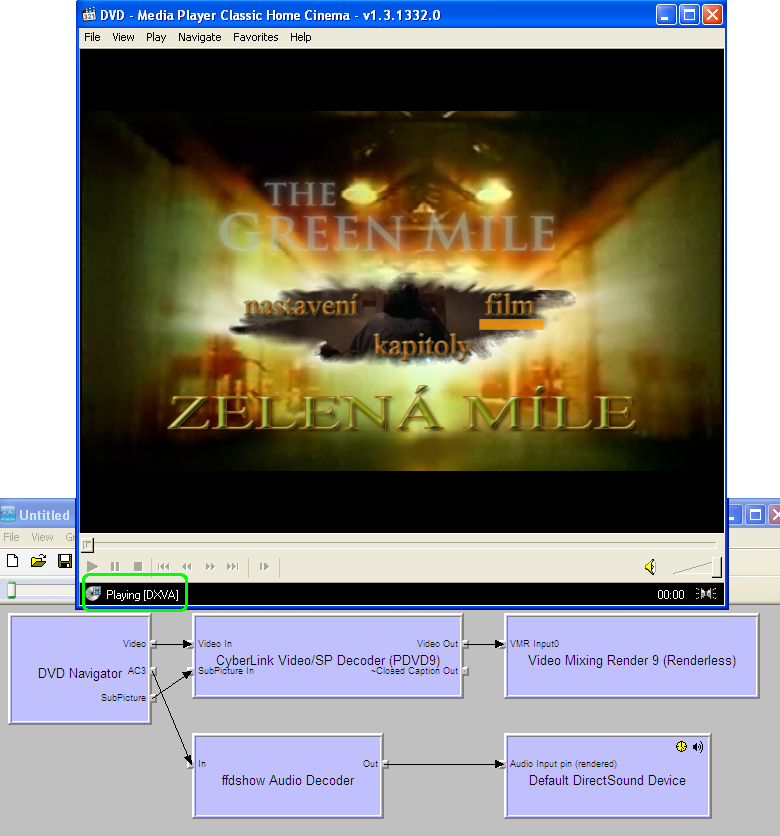
    To check if DXVA is trully on you need to do flowing:
    - Get MPC-HC player
    - in MPC-HC, View - Options - External Filters and add here Cyberlink or MS DVD decoder and setup as prefered.
    - Play DVD/MPEG file in MPC-HC
    - Check if DXVA is on:
    dvd+dxva.png
     

    tourettes

    Retired Team Member
  • Premium Supporter
  • January 7, 2005
    17,301
    4,800
    I still doubt DXVA was on. Deinterlace is is done by CPU and CPU usage is always wery low on current hardware. I am (SAF) not using Cyberlink DVD navigator, MS one is used.

    Enable software decoding to use some deinterlace mode that produces only 25fps from 50i source video and set HW deinterlace to use vector adaptive (produces 50p form 50i source). In that case if you see 50fps in MP the deinterlace has been done on HW.

    btw. some of the possible navigation issues (only in HW mode) with SAF are going to be sourced from the DVD navigator not matching the MPEG2 decoder.

    To check if DXVA is trully on you need to do flowing:
    - Get MPC-HC player
    - in MPC-HC, View - Options - External Filters and add here Cyberlink or MS DVD decoder and setup as prefered.
    - Play DVD/MPEG file in MPC-HC
    - Check if DXVA is on:

    Unfortunately you cannot compare two program results as you aren't able to rule out the different implementation for renderer etc.
     

    kiwijunglist

    Super Moderator
  • Team MediaPortal
  • June 10, 2008
    6,743
    1,754
    New Zealand
    Home Country
    New Zealand New Zealand
    is there a point to argueing which OS is best? .... (i would argue XP or W7)

    i think the most important thing to sort out is to get consistent RGB levels ie 16-235 vs 0-255. preferably expand all video to 0-255, that way pictures look good too.
     

    Users who are viewing this thread

    Top Bottom