
SAF v4.00 ''stable'' (StandAlone Filters) - DXVA ready (H.264 and VC-1). (4 Viewers)

Should i integrate FFDshow in to SAF?

  • Yes

    Votes: 406 85.5%
  • No

    Votes: 69 14.5%

  • Total voters
    475

Spragleknas

Moderator
  • Team MediaPortal
  • December 21, 2005
    9,471
    1,822
    Located
    Home Country
    Norway Norway
    BTW - don't you have any idea why PDVD8 decoder don't apear in MP DirectShow filters configuration?
    Yup... It's removed due to issues with that navigator in particularly. It is possible to to use it, if you know your way through the source code, I think :)

    You could probably get more and better info if you tried to contact devs @ IRC.
     

    MrOrsh

    Portal Member
    November 3, 2008
    45
    0
    Hello.
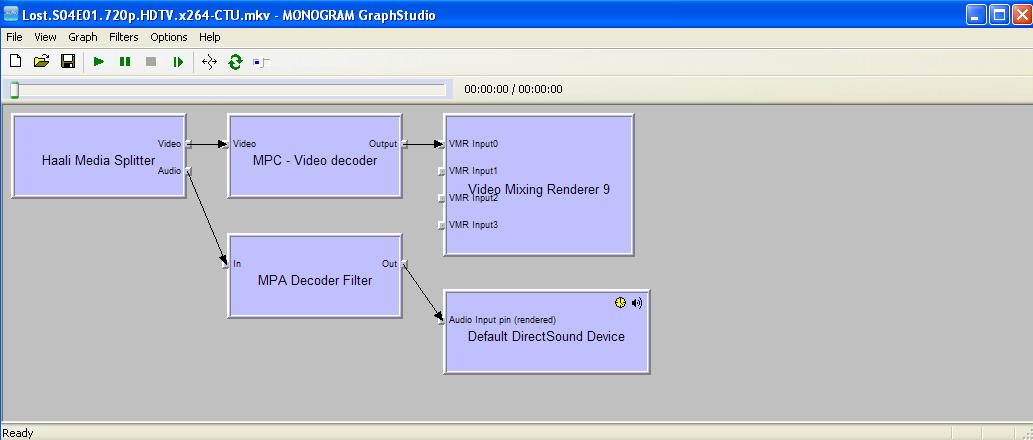
    To use graphstudio correctly, you need to start MP in window mode, start some of your video in MP, then start graphstudio and connect to remote graph (not open video file in graphstudio).
    Please, do it this way and post another screenshot (you can post it directly here, no need to use imageshack.
    To assing memory in BIOS - restart your PC and hold "DEL" key until BIOS screen apear - check your BIOS manual (maybe on manufacturer pages if you dont have manual book) where you can assign memory for iGPU.

    Sorry about that. Here´s the screenshot for playing the file i MP.
    I did however discoverd that the file actually does play along nicley when having MP in windowed mode. When going to fullscreen it then continues to play nicley. But when the file is started in fullscreen the issue appears.
     

    Attachments

    • lost gf windoews.JPG
      lost gf windoews.JPG
      48 KB

    hoborg

    Portal Pro
    June 13, 2008
    4,413
    1,644
    Nový Jičín
    Home Country
    Czech Republic Czech Republic
    Hello.
    To use graphstudio correctly, you need to start MP in window mode, start some of your video in MP, then start graphstudio and connect to remote graph (not open video file in graphstudio).
    Please, do it this way and post another screenshot (you can post it directly here, no need to use imageshack.
    To assing memory in BIOS - restart your PC and hold "DEL" key until BIOS screen apear - check your BIOS manual (maybe on manufacturer pages if you dont have manual book) where you can assign memory for iGPU.

    Sorry about that. Here´s the screenshot for playing the file i MP.
    I did however discoverd that the file actually does play along nicley when having MP in windowed mode. When going to fullscreen it then continues to play nicley. But when the file is started in fullscreen the issue appears.

    Graph is correct.
    Try assign memory to iGPU in BIOS and catalyst 8.5.

    BTW - this killer sample - 22s;100MB UGH! I understand now why it is named "killer" :)
    I need to try it on my HTPC :)
     

    MrOrsh

    Portal Member
    November 3, 2008
    45
    0
    Graph is correct.
    Try assign memory to iGPU in BIOS and catalyst 8.5.

    BTW - this killer sample - 22s;100MB UGH! I understand now why it is named "killer" :)
    I need to try it on my HTPC :)

    I tried assigning max (512MB) memory in BIOS = no change.
    Then I swhitched to the catalyst 8.5 drivers (instead of 8.11) and problem was solved :D
    Althou, these drivers can´t display 1280x720p correctly on my TV (getting black borders around the picture), but I guess I could fix this with Powerstrip. The TV (Video7 LTV40D) really has a max resolution of 1366x768 but in 66Hz with somehow is causing tearing so I have to run at 1280x768 for now untill I by a new TV. Guess this is what you get from bying the cheapest TV there is (was three years ago) :/

    Well anyway, finaly DXVA is working. And I guess I´d just have to reencode those files that are not beeing played properly (like the LOTR-sample). But I can live with that :)

    Now I just need to get subtitles working :)
    And I also think I want to install ffdshow to use for upscaling of .avi-files and such, since I find that feature really nice.

    There will probably be some more problems in the nearest hour when setting everything up, so I´ll surely return soon :) Many thanks for all the help! Much appreciated!

    And the killer_sample, yes, it´s quite heavy :) I don´t think any movies today has that kind of bitrate, but for testing I guess it´s good. Works like a charm here now :) Thanks to all of you
     

    hoborg

    Portal Pro
    June 13, 2008
    4,413
    1,644
    Nový Jičín
    Home Country
    Czech Republic Czech Republic
    Now I just need to get subtitles working :)
    And I also think I want to install ffdshow to use for upscaling of .avi-files and such, since I find that feature really nice.

    What problem do you have with subtitles? MKV and avi+subtitles are supported by SAF.
    Combining SAF&FFDshow is not very good idea, can cause troubles/conflicts...

    256MB memory in BIOS should be enought.

    BTW, nice to hear it is working for you, and we have another proof, that catalyst 8.5 are last DXVA 100% working version under XP.
     

    NikeNeGerek

    Portal Pro
    October 21, 2008
    58
    4
    Istanbul
    Home Country
    Turkey Turkey
    And I also think I want to install ffdshow to use for upscaling of .avi-files and such, since I find that feature really nice.

    I think you may not be able to use DXVA HW support if you use ffdshow to upscale.

    And subtitle problem may be a little more challenging than you expect :D

    hoborg will be more specific though ;)
     

    MrOrsh

    Portal Member
    November 3, 2008
    45
    0
    I´m getting subtitles to work with .avi-files. But with mkv VobSub isn´t even being loaded (not showing tray icon). What could cause this?

    And well, I´m of course not going to use ffdshow for h264, only as mpeg decoder.
    I´m staying positive that I will make it work... somehow :)

    Edit: I did it! Added Direct Vob Sub (autoloading) as post processing on movies and "allways load" in VS-filter settings.
    No I´ve got subtitles both on MKVs and AVI:s.

    Now for ffdshow :)
    Back in a while :)
     

    hoborg

    Portal Pro
    June 13, 2008
    4,413
    1,644
    Nový Jičín
    Home Country
    Czech Republic Czech Republic
    I´m getting subtitles to work with .avi-files. But with mkv VobSub isn´t even being loaded (not showing tray icon). What could cause this?

    And well, I´m of course not going to use ffdshow for h264, only as mpeg decoder.
    I´m staying positive that I will make it work... somehow :)

    Edit: I did it! Added Direct Vob Sub (autoloading) as post processing on movies and "allways load" in VS-filter settings.
    No I´ve got subtitles both on MKVs and AVI:s.

    Now for ffdshow :)
    Back in a while :)

    By adding Direct Vob Sub as postprocesing, you killed DXVA for all videos.
    You need to put MKV subtitles inside MKV to make them work (but DXVA+subtitles are not possible).
    Why you need FFDshow Mpeg decoder? SAF have MPC-HC MPEG decoder and support PowerDVD Mpeg decoder too.
     

    MrOrsh

    Portal Member
    November 3, 2008
    45
    0
    By adding Direct Vob Sub as postprocesing, you killed DXVA for all videos.
    You need to put MKV subtitles inside MKV to make them work (but DXVA+subtitles are not possible).
    Why you need FFDshow Mpeg decoder? SAF have MPC-HC MPEG decoder and support PowerDVD Mpeg decoder too.

    Damn :/

    Hm. I uninstalled ffdshow, and now DXVA won´t even work in MPC. Having all the settings as they should be I´m still getting 80-90% load when playing the killer_sample.

    Maybe I should start over with a clean XP install again. Will try some first thou.

    Why I like ffdshow is because it has great upscaling for lowres avi-files.
    It also playback DVD:s with corret colors (16-253) which I didn´t get SAF to do.
    Also it´s very easy to make all my 4:3 serie-episodes into 16:9, something that mediaportal cannot do.
     

    hoborg

    Portal Pro
    June 13, 2008
    4,413
    1,644
    Nový Jičín
    Home Country
    Czech Republic Czech Republic
    Hey i just found that, this "killer_sample" is not DXVA compatible!

    It also playback DVD:s with corret colors (16-253) which I didn´t get SAF to do.

    Did you try to configure colours inside MP - DS filters configuration (for MPC-HC Mpeg2 decoder)?
     

    Users who are viewing this thread

    Top Bottom