SAF v4.00 ''stable'' (StandAlone Filters) - DXVA ready (H.264 and VC-1). (8 Viewers)

Should i integrate FFDshow in to SAF?

  • Yes

    Votes: 406 85.5%
  • No

    Votes: 69 14.5%

  • Total voters
    475

hoborg

Portal Pro
June 13, 2008
4,413
1,644
Nový Jičín
Home Country
Czech Republic Czech Republic
:D


Can I use MPCHC codecs that you publish as my main system codecs? I mean, except MP, like if I use them plating in Media Player or just checking it in GraphEdit?

If you want software to play media on PC, choose MPC-HC player - small, fast, powerfull, free... What do you want more? :)
 

dragster

New Member
March 23, 2009
2
0
Im just having my first experiences with MediaPortal and i REALLY like the configurability, but i'm having a small problem.

After i installed the SAF Codec to achieve hardware encoding, hardware encoding works like a charm, but the black has become very gray in h264/x264 material.
I am using an ATI HD4350 and have of course executed the .reg file to solve this issue for ATI cards, but it just hasn't helped.

Before finding the SAF codec, i registered the MPCvideodecoder.ax codec manually and was able to choose it in PM configuration, but my mkv files just woudn't play, so i searched for another solution and found SAF. Could it be this initial tampering that is preventing the grey to black .reg file from working?

Any help would be greatly appriciated.
 

Sh4nn0w

MP Donator
  • Premium Supporter
  • September 14, 2006
    321
    23
    Home Country
    United Kingdom United Kingdom
    What Pixel Format do you have in the catalyst drivers?

    Switching to Pixel Format: RGB 4:4:4 (Full RGB) fixed it for me
     

    luksmann

    Portal Pro
    November 10, 2005
    91
    2
    37
    Home Country
    Austria Austria
    Is there any easy way to check if the mkv file I want to play supports hw-acc? Most of my files play fine but a few of the full-hd rips still raise my cpu-usage to 90% and do not play fine (stuttering, sound async)?

    And shouldn't SAF also play xvid? I've installed newest SVN + Haali Media Splitter + SAF 3.45 and playing a xvid file always give me the error message "Codec not supported - video: xvid audio: mpeg layer 3" - any ideas on that one?

    thanks :)
     

    hoborg

    Portal Pro
    June 13, 2008
    4,413
    1,644
    Nový Jičín
    Home Country
    Czech Republic Czech Republic
    Is there any easy way to check if the mkv file I want to play supports hw-acc? Most of my files play fine but a few of the full-hd rips still raise my cpu-usage to 90% and do not play fine (stuttering, sound async)?

    And shouldn't SAF also play xvid? I've installed newest SVN + Haali Media Splitter + SAF 3.45 and playing a xvid file always give me the error message "Codec not supported - video: xvid audio: mpeg layer 3" - any ideas on that one?

    thanks :)

    You can check DXVA "in use" in MPC-HC player.

    I am not sure if MPC-HC audio decoder support xvid audio codec, please post small video example.
     

    akajester

    Portal Pro
    October 13, 2008
    318
    17
    Home Country
    United States of America United States of America
    Is there any easy way to check if the mkv file I want to play supports hw-acc? Most of my files play fine but a few of the full-hd rips still raise my cpu-usage to 90% and do not play fine (stuttering, sound async)?

    And shouldn't SAF also play xvid? I've installed newest SVN + Haali Media Splitter + SAF 3.45 and playing a xvid file always give me the error message "Codec not supported - video: xvid audio: mpeg layer 3" - any ideas on that one?

    thanks :)

    You can check DXVA "in use" in MPC-HC player.

    I am not sure if MPC-HC audio decoder support xvid audio codec, please post small video example.

    Open the video in MPC-HC, then right click on the video, choose filters, then MPC and it should list the hw accel. I have a secondary cpu that I use for downloading, re-encoding and testing videos for dxva compliance and I've found this to be the easiest thing to do. Before I load the videos in MediaPortal.
     

    Yabba

    Portal Pro
    July 13, 2007
    131
    4
    Home Country
    Spain Spain
    Hi... I solved my previous problems with 1080i files by installing Vista (painful as it is) and using Aero and EVR : smooth playback and no other issues.

    But now I have also problems with Xvid : all my Xvid movies at any resolutions (from 552x414 to 1080p) play video slower than audio, so it gradually asyncs until a visible "jump" is seen and then gradually asyncs again until new jump and so on...

    I've also seen sometimes that audio related error message but at the moment I can't remember in which movie and can't find it for an example :(

    BTW, I tried to install Xvid or Divx codec and more or less the same happened in Media Portal, and WMP always played correctly all files, with any codecs I tried.

    So now I can smoothly play hw-acc 1080p files and suffer stuttering and sound async on plain Xvid SD files... isn't it funny? :)

    I tried Graphstudio but it doesn't work for me, maybe a Vista issue... I can choose the filter to connect but it doesn't connect at all, it does nothing :(
     

    skirtum

    Portal Member
    March 3, 2009
    32
    0
    Vilnius
    Home Country
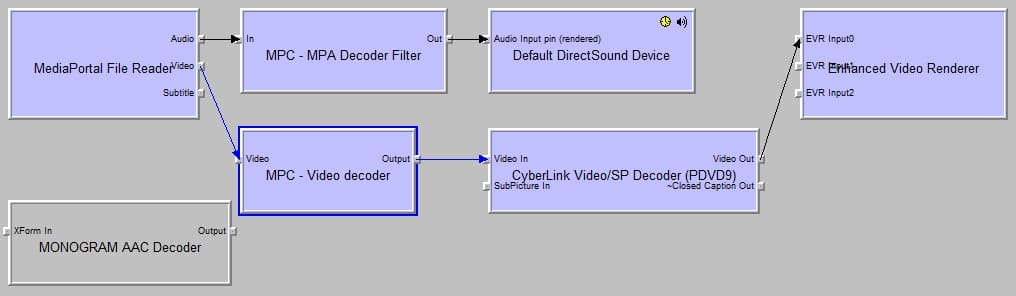
    Double Video rendering?

    Hi again :)

    It's me again... I've tried to install everything one more time from the scratch. I've even succeeded to get the latest CLVsd.ax file from PDVD according to Hobborg's recommendations.

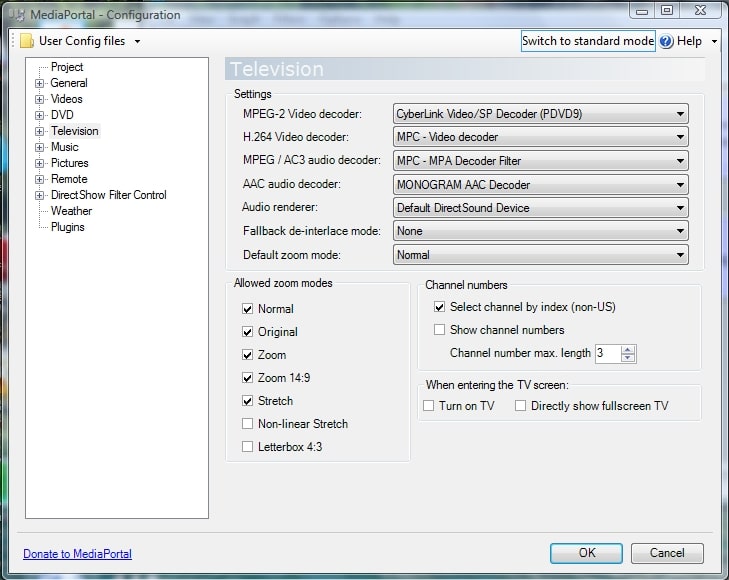
    Anyway I still have sound - no picture... I think I did everything according to Hobborg's recommendations (see configuration.jpg). But I go this "double rendering" (see graph.jpg)... What I did wrong??? :mad:

    Here is my system information:

    OS: Windows Vista Home Premium
    VGA: Nvidia 9600M GT
    RAM: 4 GB
     

    Attachments

    • configuration.jpg
      configuration.jpg
      167.3 KB
    • graph.jpg
      graph.jpg
      68.6 KB

    skirtum

    Portal Member
    March 3, 2009
    32
    0
    Vilnius
    Home Country
    Hi... I solved my previous problems with 1080i files by installing Vista (painful as it is) and using Aero and EVR : smooth playback and no other issues.

    But now I have also problems with Xvid : all my Xvid movies at any resolutions (from 552x414 to 1080p) play video slower than audio, so it gradually asyncs until a visible "jump" is seen and then gradually asyncs again until new jump and so on...

    I've also seen sometimes that audio related error message but at the moment I can't remember in which movie and can't find it for an example :(

    BTW, I tried to install Xvid or Divx codec and more or less the same happened in Media Portal, and WMP always played correctly all files, with any codecs I tried.

    So now I can smoothly play hw-acc 1080p files and suffer stuttering and sound async on plain Xvid SD files... isn't it funny? :)

    I tried Graphstudio but it doesn't work for me, maybe a Vista issue... I can choose the filter to connect but it doesn't connect at all, it does nothing :(


    Download this dll: https://forum.team-mediaportal.com/370357-post5.html and register it (open command prompt "as administrator" locate downloaded dll and then use command regsvr32). Or do it as Paranoid suggested: https://forum.team-mediaportal.com/...e-filters-mediaportal-saf-44614/index116.html

    Graphstudio works after these actions ;)
     

    Users who are viewing this thread

    Top Bottom