SAF v4.00 ''stable'' (StandAlone Filters) - DXVA ready (H.264 and VC-1). (8 Viewers)

Should i integrate FFDshow in to SAF?

  • Yes

    Votes: 406 85.5%
  • No

    Votes: 69 14.5%

  • Total voters
    475

deraaij

MP Donator
  • Premium Supporter
  • October 7, 2009
    4
    0
    Hoborg,

    Mediaportal has never been as stable a now using SAF, many thanks for that!

    I am having only one problem which is causing all my spare time and I can’t figure it out……

    I am using:

    Windows XP
    ATI HD 4670
    Latest SAF dirver + Haali
    Mediaportal 1.1 ( I had the exact same problem with 1.0.2)

    There are movies (both avi’s as MKS’s) which I can play using MPC-HC but not using mediaportal.

    When I switch in mediaportal from VMR9 to EVR everything works fine with movies but now my TV fails……

    Do you have a clue?

    Thanks in advance!
     

    hoborg

    Portal Pro
    June 13, 2008
    4,413
    1,644
    Nový Jičín
    Home Country
    Czech Republic Czech Republic
    Hoborg,

    Mediaportal has never been as stable a now using SAF, many thanks for that!

    I am having only one problem which is causing all my spare time and I can’t figure it out……

    I am using:

    Windows XP
    ATI HD 4670
    Latest SAF dirver + Haali
    Mediaportal 1.1 ( I had the exact same problem with 1.0.2)

    There are movies (both avi’s as MKS’s) which I can play using MPC-HC but not using mediaportal.

    When I switch in mediaportal from VMR9 to EVR everything works fine with movies but now my TV fails……

    Do you have a clue?

    Thanks in advance!

    Try to mux AVI to MKV using GDSmux (look in to Haali install).
     

    tourettes

    Retired Team Member
  • Premium Supporter
  • January 7, 2005
    17,301
    4,800
    is there a point to argueing which OS is best? .... (i would argue XP or W7)

    No, as it is most likely going to be result from what HW and what driver (GPU / audio) bugs. Thats why my initial posting about this topic was made. To make sure that SAF is not having a biased information for users.

    Unfortunately currently HTPCs are just a compromise when it comes to OS, HW and driver bugs. Maybe that changes in few coming years

    i think the most important thing to sort out is to get consistent RGB levels ie 16-235 vs 0-255. preferably expand all video to 0-255, that way pictures look good too.

    Just another personal preference. Some might want bit streamed audio, some will value more the completely stutter free video and others OS loading screen customization.

    btw. video levels shouldn't be always expanded, as some of the material is already 0-255.
     

    tourettes

    Retired Team Member
  • Premium Supporter
  • January 7, 2005
    17,301
    4,800
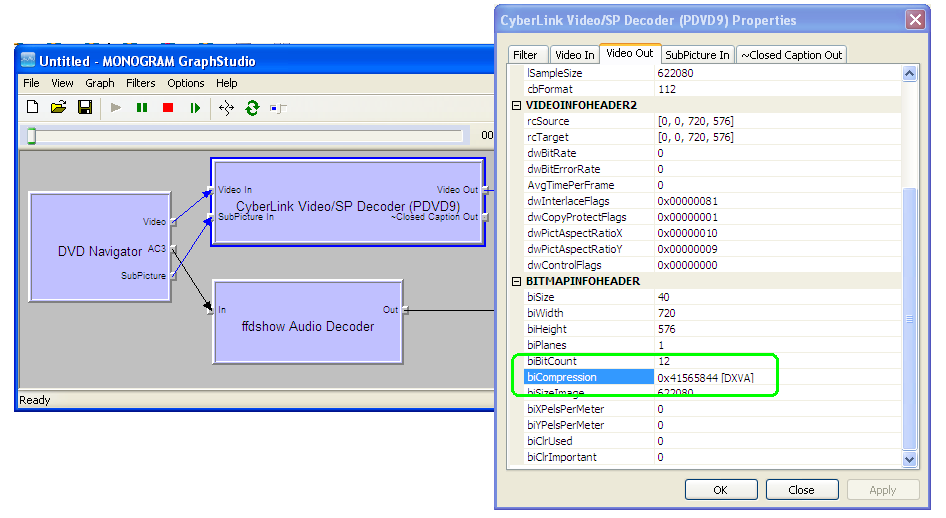
    Run MP in a window and connect to graph. Rightclick Cyberlink codec and check if DXVA is on :)

    Oh, true indeed. It has been so long time when I have had Cyberlink's codec last time installed (or actually have had to check it's properties) that I didn't even remember.
     

    hoborg

    Portal Pro
    June 13, 2008
    4,413
    1,644
    Nový Jičín
    Home Country
    Czech Republic Czech Republic
    I still doubt DXVA was on. Deinterlace is is done by CPU and CPU usage is always wery low on current hardware. I am (SAF) not using Cyberlink DVD navigator, MS one is used.

    Enable software decoding to use some deinterlace mode that produces only 25fps from 50i source video and set HW deinterlace to use vector adaptive (produces 50p form 50i source). In that case if you see 50fps in MP the deinterlace has been done on HW.

    btw. some of the possible navigation issues (only in HW mode) with SAF are going to be sourced from the DVD navigator not matching the MPEG2 decoder.

    To check if DXVA is trully on you need to do flowing:
    - Get MPC-HC player
    - in MPC-HC, View - Options - External Filters and add here Cyberlink or MS DVD decoder and setup as prefered.
    - Play DVD/MPEG file in MPC-HC
    - Check if DXVA is on:

    Unfortunately you cannot compare two program results as you aren't able to rule out the different implementation for renderer etc.

    tourettes, you have your truth and i have my. I know you have negative stance for WinXP, ATI, MPC-HC and SAF from begining. I am really not a flamer man, so lets this end here.
    Fix bugs in MP and i will do the same on SAF side.
    I will share here my best experience i had with HTPC. You do not like it? Then maybe it is time for me to leave.

    Run MP in a window and connect to graph. Rightclick Cyberlink codec and check if DXVA is on :)

    It is not that easy, but it can be obtained here:
    dvd+dxva_graph.png
     

    tourettes

    Retired Team Member
  • Premium Supporter
  • January 7, 2005
    17,301
    4,800
    tourettes, you have your truth and i have my. I know you have negative stance for WinXP, ATI, MPC-HC and SAF from begining. I am really not a flamer man, so lets this end here.
    Fix bugs in MP and i will do the same on SAF side.
    I will share here my best experience i had with HTPC. You do not like it? Then maybe it is time for me to leave.

    There is no such thing as a personal truth when it comes to technology, only different people's biased view on the truth :)


    I'm not against XP, I will even recommend it for any ATI user as MP + Windows Vista / 7 + ATI is a bad combination when it comes to DXVA and GUI rendering (the famous flickering issue, that is still not even sure if it is MP or ATI bug).

    From technology point of view Windows 7 and Vista are both more advanced when it comes to media playback. But as the reality check XP has better working drivers for lot of hardware. Both Nvidia and ATi had huge issues (and seems to still have some) when Vista came out.


    I might be a bit negative towards ATI after debugging the flickering issue for few months (with a broken 3450 that had driver crashes on daily basis with Vista. now that card is in server, were it is used few times a year :)). Also not ATI's missing support for L5.1 is steering away from the recommended GPU.

    But I still recommend ATI for people who want to have


    I don't know where that came from? But to make sure that everyone understands that I'm not agains MPC-HC (nor their codecs in any way) I'll tell that I was the one who was building a bridge between MPC-HC and MP teams, for a possibility to use MPC-HC as video playback engine in MPII. Unfortunately currently it looks like technical details are coming to block this).


    In general I don't like codec packs (nor neither does our team members) as they have been causing huge amount of issues for media playback. SAF is much better behaving when it comes to this, but still I'm not recommending it to anyone who has the knowledge on directshow filters (it's good for the beginners, much better than other codec packs that usually just cause more troubles that they are solving).

    Fix bugs in MP and i will do the same on SAF side.

    I don't like when someone tells me what to do with my personal time :) Heck, I did even have to pay that GT220 for Cyberlink testing from my own pocket as the monitor that supports 48Hz refresh rate eats all the donation money that I can use for HW purchases (so, more donations are welcome for the team, so we don't have to pay for our development :D)
     

    deraaij

    MP Donator
  • Premium Supporter
  • October 7, 2009
    4
    0
    Try to mux AVI to MKV using GDSmux (look in to Haali install).

    Thanks I will test it for the avi's, btw MKVmerge did not have any result.

    To be more specific when I use VMR9 the audio plays (also the subtitles), but the video is just a series of colored blocks that never changes. When I use EVR, everything seems to be good, and in MPC-HC everything works fine.
     

    hoborg

    Portal Pro
    June 13, 2008
    4,413
    1,644
    Nový Jičín
    Home Country
    Czech Republic Czech Republic
    Try to mux AVI to MKV using GDSmux (look in to Haali install).

    Thanks I will test it for the avi's, btw MKVmerge did not have any result.

    To be more specific when I use VMR9 the audio plays (also the subtitles), but the video is just a series of colored blocks that never changes. When I use EVR, everything seems to be good, and in MPC-HC everything works fine.

    Try to update DirectX + GPU drivers.
    Check what decoder is in use (connect graphstudio)

    There is no such thing as a personal truth when it comes to technology, only different people's biased view on the truth :)

    WinXP

    DVD + EVR + DXVA

    tourettes, last think i am thinking about is GPU. Maybe navigation is working on nVidia and not on ATI?.
    It is not codec issue for sure. One of first tests i did on my Win7x64 was DVD + EVR + DXVA test using MS navigator + MS audio/video decoder under MP. Result? No DVD navigation. MPC-HC, GB-PVR and MP - same issue. Still no problem on XP.

    BTW, you wrote ATI didnt support L5.1 - not true, it support it, but it is limited to 5ref. frames.

    SAF 4.00 beta20 (final)

    changelog

    - halli was integrated (so no need to be installed any longer)
    - MPC-HC player is now part of SAF (one file - MPC-HC.exe) - good to diagnose, media info, and video playback of course :)
     

    hoborg

    Portal Pro
    June 13, 2008
    4,413
    1,644
    Nový Jičín
    Home Country
    Czech Republic Czech Republic

    Users who are viewing this thread

    Top Bottom