Codecs SAF v5.02 *final* (based on FFDShow DXVA decoder) (31 Viewers)

ToXIc

MP Donator
  • Premium Supporter
  • April 3, 2009
    161
    1
    Home Country
    Re: SAF v5.00 experimental (based on FFDShow DXVA decoder)

    Reproduce the problem and post MePo and SAF logs.


    did you find anything? i looked at the MP log and saw where it stopped and reloaded the previous window but do understand the reason why...
     

    mail_dkmaste

    MP Donator
  • Premium Supporter
  • February 25, 2007
    45
    0
    46
    Home Country
    Denmark Denmark
    Re: SAF v5.00 experimental (based on FFDShow DXVA decoder)

    Does any have the Unlocked version?
     

    jacc1234

    Portal Pro
    April 11, 2008
    167
    7
    Re: SAF v5.00 experimental (based on FFDShow DXVA decoder)

    ATI users, you wont beliewe this - there is preview version of ATI Catalyst 10.5 availabe. With this drivers, you should be able to play all h.264 videos using DXVA2.0 (Vista/Win7) including profile 5.1 and 16ref. frames on all ATI GPUs 4xxx and 5xxxx - tested on "Samsung.Demo_Oceanic.Life.x264.1080p.40Mbps.mkv" sample.

    Look here: Deep in IT - Akcelerace p?ehrávání videa na ATI Radeonech HD kone?n? funguje - Informace ze sv?ta po?íta?? o hardware, software, Internetu atd.
    ...it is in czech, but play video and you will see yourself :)


    Moved here

    About time! They have had so many DXVA issue lately its pathetic. The nice 480p DXVA bug waited a few hours of my life for sure. Thanks for the update, I cant wait to give them a try.
     

    hoborg

    Portal Pro
    June 13, 2008
    4,413
    1,644
    Nový Jičín
    Home Country
    Czech Republic Czech Republic
    Re: SAF v5.00 experimental (based on FFDShow DXVA decoder)

    ATI users, you wont beliewe this - there is preview version of ATI Catalyst 10.5 availabe. With this drivers, you should be able to play all h.264 videos using DXVA2.0 (Vista/Win7) including profile 5.1 and 16ref. frames on all ATI GPUs 4xxx and 5xxxx - tested on "Samsung.Demo_Oceanic.Life.x264.1080p.40Mbps.mkv" sample.

    Look here: Deep in IT - Akcelerace p?ehrávání videa na ATI Radeonech HD kone?n? funguje - Informace ze sv?ta po?íta?? o hardware, software, Internetu atd.
    ...it is in czech, but play video and you will see yourself :)


    Moved here

    About time! They have had so many DXVA issue lately its pathetic. The nice 480p DXVA bug waited a few hours of my life for sure. Thanks for the update, I cant wait to give them a try.

    Do you have any small 480p sample to test? I didnt noticed any problems yet.
     

    Truri

    MP Donator
  • Premium Supporter
  • November 9, 2008
    192
    9
    Home Country
    Germany Germany
    AW: Re: SAF v5.00 experimental (based on FFDShow DXVA decoder)

    ATI users, you wont beliewe this - there is preview version of ATI Catalyst 10.5 availabe. With this drivers, you should be able to play all h.264 videos using DXVA2.0 (Vista/Win7) including profile 5.1 and 16ref. frames on all ATI GPUs 4xxx and 5xxxx - tested on "Samsung.Demo_Oceanic.Life.x264.1080p.40Mbps.mkv" sample.

    Look here: Deep in IT - Akcelerace p?ehrávání videa na ATI Radeonech HD kone?n? funguje - Informace ze sv?ta po?íta?? o hardware, software, Internetu atd.
    ...it is in czech, but play video and you will see yourself :)


    Moved here

    About time! They have had so many DXVA issue lately its pathetic. The nice 480p DXVA bug waited a few hours of my life for sure. Thanks for the update, I cant wait to give them a try.

    Do you have any small 480p sample to test? I didnt noticed any problems yet.

    I can confirm this Bug. In the ATI support Forum is a thread about that problem.AMD Game Forums - 10.2 Driver breaks 480p DXVA
    The problem exists till Cat 10.2 I think.
    I made a post in the german forum:
    https://forum.team-mediaportal.com/grafikkarten-468/catalyst-10-3-a-80021/#post601862
    There I posted some MediaInfos.

    But your news to Cat 10.5 are really nice. :)
     

    edterbak

    Portal Pro
    March 4, 2008
    2,114
    1,176
    Home Country
    Netherlands Netherlands
    Re: SAF v5.00 experimental (based on FFDShow DXVA decoder)

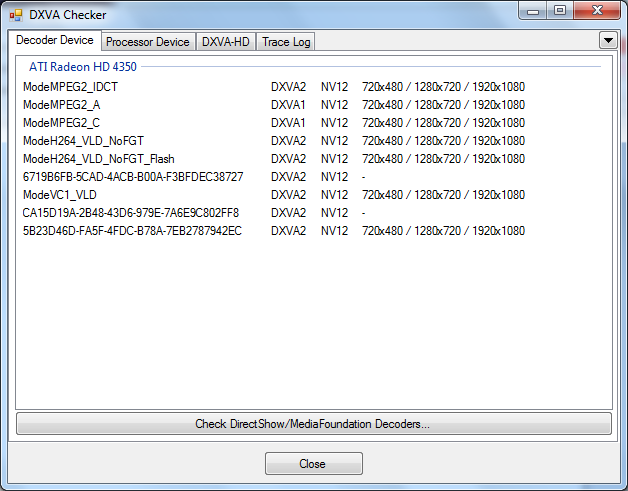
    I downloaded and tested 10.5 beta.
    I can play all my higher refframe movies now. :D

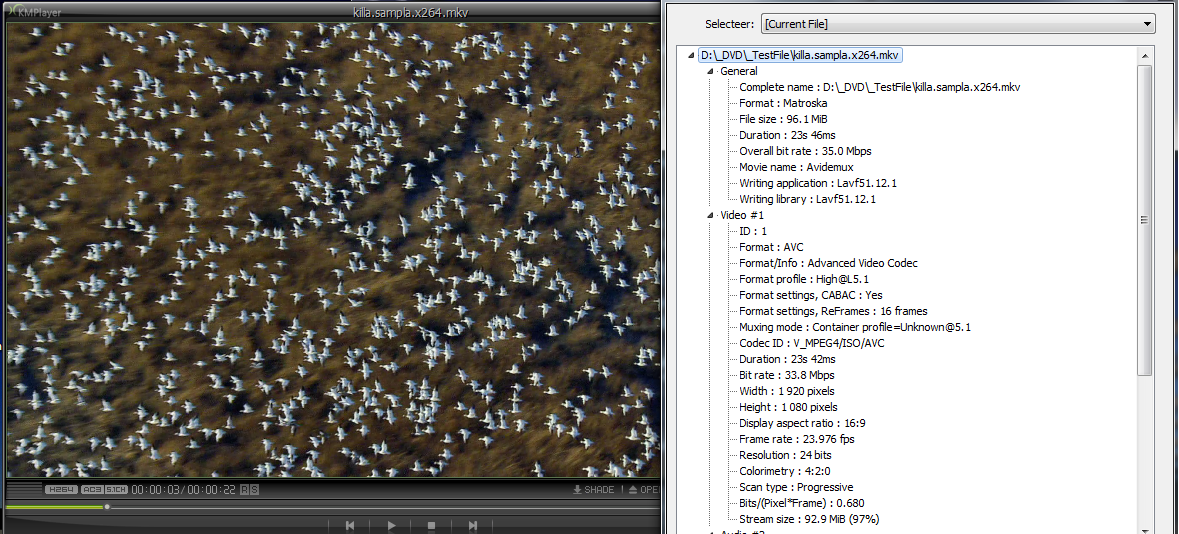
    Im going to try a 1080p with 16 ref frames once its done dl. See how high ATI has put the bar.
    iv attached a screenshot of dxva checker

    [edit]
    I tested the famous birdscene. Flawless playback from within MP :D
     

    Attachments

    • cat10.5beta.png
      cat10.5beta.png
      51.3 KB
    • killasample.png
      killasample.png
      827.3 KB

    edsche

    Community Plugin Dev
    January 7, 2007
    606
    360
    39
    Ulm
    Home Country
    Germany Germany
    Re: SAF v5.00 experimental (based on FFDShow DXVA decoder)

    Hey hoborg,

    firstly you've done a great job :D

    But i have some problems with the 5.0 version. Yesterday i did a clean install of Win7 and MP RC2 with the latest SAF. Everything worked flawlessly but some movies cannot be played now (Exactly: It starts, screen gets black, my receiver gets a notification about changing audio, 1-2 seconds later my receiver switches back to normal audio and then I'm at the point where i started the movie in mp). I want to stay with SAF5 because my tv switching times are so fast now, so hopefully you can find out my issue. My logs are attached and btw no error.log is created.

    Movie Info:
    [COLLAPSE]
    Allgemein
    Complete name : Z:\Filme\Brügge sehen... und sterben\hd1080.in brgge.bd9.mkv
    Format : Matroska
    File size : 7,94 GiB
    Duration : 1h 46min
    Overall bit rate : 10,6 Mbps
    Encoded date : UTC 2009-06-16 10:48:54
    Writing application : mkvmerge v2.4.1 ('Use Me') built on Dec 5 2008 18:30:05
    Writing library : libebml v0.7.7 + libmatroska v0.8.1

    Video
    ID : 1
    Format : AVC
    Format/Info : Advanced Video Codec
    Format profile : High@L4.1
    Format settings, CABAC : Ja
    Format settings, ReFrames : 3 frames
    Muxing mode : Container profile=Unknown@4.1
    Codec ID : V_MPEG4/ISO/AVC
    Duration : 1h 46min
    Bit rate : 8 284 Kbps
    Nominal bit rate : 8 493 Kbps
    Width : 1 920 Pixel
    Height : 1 080 Pixel
    Display aspect ratio : 16:9
    Frame rate : 24,000 FPS
    Resolution : 8 bits
    Colorimetry : 4:2:0
    Scan type : progressiv
    Bits/(Pixel*Frame) : 0.166
    Stream size : 6,18 GiB (78%)
    Writing library : x264 core 65 r1032 e3171ea
    Encoding settings : cabac=1 / ref=3 / deblock=1:0:0 / analyse=0x3:0x113 / me=umh / subme=7 / psy_rd=1.0:0.0 / mixed_ref=1 / me_range=16 / chroma_me=1 / trellis=1 / 8x8dct=1 / cqm=0 / deadzone=21,11 / chroma_qp_offset=-2 / threads=6 / nr=0 / decimate=1 / mbaff=0 / bframes=3 / b_pyramid=1 / b_adapt=1 / b_bias=0 / direct=3 / wpredb=1 / keyint=240 / keyint_min=24 / scenecut=40(pre) / rc=2pass / bitrate=8493 / ratetol=1.0 / qcomp=0.60 / qpmin=10 / qpmax=51 / qpstep=4 / cplxblur=20.0 / qblur=0.5 / vbv_maxrate=30000 / vbv_bufsize=30000 / ip_ratio=1.40 / pb_ratio=1.30 / aq=1:1.00

    Audio #1
    ID : 2
    Format : DTS
    Format/Info : Digital Theater Systems
    Codec ID : A_DTS
    Duration : 1h 46min
    Bit rate mode : konstant
    Bit rate : 1 510 Kbps
    Channel(s) : 6 Kanäle
    Channel positions : Front: L C R, Side: L R, LFE
    Sampling rate : 48,0 KHz
    Resolution : 24 bits
    Stream size : 1,13 GiB (14%)

    Audio #2
    ID : 3
    Format : AC-3
    Format/Info : Audio Coding 3
    Format_Settings_ModeExtension : CM (complete main)
    Codec ID : A_AC3
    Duration : 1h 46min
    Bit rate mode : konstant
    Bit rate : 640 Kbps
    Channel(s) : 6 Kanäle
    Channel positions : Front: L C R, Side: L R, LFE
    Sampling rate : 48,0 KHz
    Stream size : 489 MiB (6%)
    Title : German AC3 640kbps
    Language : Deutsch
    [/COLLAPSE]

    Part of mediaportal.log
    [COLLAPSE]
    2010-04-16 20:43:40.138353 [Debug][MPMain(1)]: Loading AR modes from "movies" section...
    2010-04-16 20:43:40.342364 [Info.][MPMain(1)]: MediaInfoWrapper.MediaInfoWrapper: Inspecting media : D:\Filme\Brügge sehen... und sterben\hd1080.in brgge.bd9.mkv
    2010-04-16 20:43:40.342364 [Info.][MPMain(1)]: MediaInfoWrapper.MediaInfoWrapper: FrameRate : 24
    2010-04-16 20:43:40.342364 [Info.][MPMain(1)]: MediaInfoWrapper.MediaInfoWrapper: Width : 1920
    2010-04-16 20:43:40.343364 [Info.][MPMain(1)]: MediaInfoWrapper.MediaInfoWrapper: Height : 1080
    2010-04-16 20:43:40.343364 [Info.][MPMain(1)]: MediaInfoWrapper.MediaInfoWrapper: AspectRatio : widescreen
    2010-04-16 20:43:40.343364 [Info.][MPMain(1)]: MediaInfoWrapper.MediaInfoWrapper: VideoCodec : AVC [ "avc.png" ]
    2010-04-16 20:43:40.343364 [Info.][MPMain(1)]: MediaInfoWrapper.MediaInfoWrapper: Scan type : progressive
    2010-04-16 20:43:40.343364 [Info.][MPMain(1)]: MediaInfoWrapper.MediaInfoWrapper: IsInterlaced : False
    2010-04-16 20:43:40.344364 [Info.][MPMain(1)]: MediaInfoWrapper.MediaInfoWrapper: VideoResolution : 1080P
    2010-04-16 20:43:40.344364 [Info.][MPMain(1)]: MediaInfoWrapper.MediaInfoWrapper: VideoDuration : 6409167
    2010-04-16 20:43:40.344364 [Info.][MPMain(1)]: MediaInfoWrapper.MediaInfoWrapper: AudioRate : 48000
    2010-04-16 20:43:40.344364 [Info.][MPMain(1)]: MediaInfoWrapper.MediaInfoWrapper: AudioChannels : 6 [ "5.1.png" ]
    2010-04-16 20:43:40.344364 [Info.][MPMain(1)]: MediaInfoWrapper.MediaInfoWrapper: AudioCodec : DTS [ "dts.png" ]
    2010-04-16 20:43:40.345364 [Info.][MPMain(1)]: MediaInfoWrapper.MediaInfoWrapper: HasSubtitles : False
    2010-04-16 20:43:40.345364 [Info.][MPMain(1)]: MediaInfoWrapper.MediaInfoWrapper: NumSubtitles : 0
    2010-04-16 20:43:40.373366 [Info.][MPMain(1)]: RefreshRateChanger.AdaptRefreshRate: framerate on file D:\Filme\Brügge sehen... und sterben\hd1080.in brgge.bd9.mkv is 24
    2010-04-16 20:43:40.379366 [Info.][MPMain(1)]: RefreshRateChanger.SetRefreshRateBasedOnFPS: current refreshrate is 50hz - changing it to 24hz
    2010-04-16 20:43:40.379366 [Info.][MPMain(1)]: RefreshRateChanger.SetRefreshRateBasedOnFPS: using internal win32 method for changing refreshrate. current is 50hz, desired is 24
    2010-04-16 20:43:40.391367 [Debug][MPMain(1)]: W7RefreshRateHelper.SetDisplayConfig(...): SDC_VALIDATE of 24000/1000 succesful
    2010-04-16 20:43:40.633381 [Debug][MPMain(1)]: W7RefreshRateHelper.GetRefreshRate: QueryDisplayConfig returned 74250000/3093750
    2010-04-16 20:43:40.633381 [Debug][MPMain(1)]: CycleRefreshRate: successfully changed refresh rate to 24Hz (24Hz requested)
    2010-04-16 20:43:40.634381 [Debug][MPMain(1)]: CycleRefresh: DWM Detected, performing shenanigans
    2010-04-16 20:43:40.643381 [Info.][MPMain(1)]: g_Player.Play(D:\Filme\Brügge sehen... und sterben\hd1080.in brgge.bd9.mkv Video)
    2010-04-16 20:43:40.663383 [Info.][MPMain(1)]: BASS: Freeing BASS. Non-audio media playback requested.
    2010-04-16 20:43:40.862394 [Debug][MPMain(1)]: PlayerFactory: Successfully created player instance for file - D:\Filme\Brügge sehen... und sterben\hd1080.in brgge.bd9.mkv
    2010-04-16 20:43:40.874395 [Info.][MPMain(1)]: VideoPlayer:play D:\Filme\Brügge sehen... und sterben\hd1080.in brgge.bd9.mkv
    2010-04-16 20:43:40.905396 [Info.][MPMain(1)]: VideoPlayerVMR9: Enabling DX9 exclusive mode
    2010-04-16 20:43:40.925398 [Info.][MPMain(1)]: VMR9: added EVR Renderer to graph
    2010-04-16 20:43:41.098408 [Debug][MPMain(1)]: VMR9: Now active
    2010-04-16 20:43:41.098408 [Debug][MPMain(1)]: VMR9: Renderer successfully added
    2010-04-16 20:43:41.287418 [Info.][MPMain(1)]: Added filter: ffdshow DXVA Video Decoder to graph
    2010-04-16 20:43:41.292419 [Info.][MPMain(1)]: Added filter: ffdshow Audio Decoder to graph
    2010-04-16 20:43:41.300419 [Info.][MPMain(1)]: DirectShowUtils: First try to insert new audio renderer DirectSound: Realtek Digital Output (Realtek High Definition Audio)
    2010-04-16 20:43:41.300419 [Info.][MPMain(1)]: DirectShowUtils: Found audio renderer
    2010-04-16 20:43:41.302419 [Debug][MPMain(1)]: DirectShowUtils: added filter:DirectSound: Realtek Digital Output (Realtek High Definition Audio) to graph
    2010-04-16 20:43:41.307419 [Info.][MPMain(1)]: Added filter: ffdshow Audio Decoder to graph
    2010-04-16 20:43:41.309420 [Debug][MPMain(1)]: Filter: D:\Filme\Brügge sehen... und sterben\hd1080.in brgge.bd9.mkv - try to connect: Undetermined (Video 1)
    2010-04-16 20:43:41.403425 [Debug][MPMain(1)]: PlaneScene: PresentImage() dispose surfaces
    2010-04-16 20:43:41.647439 [Debug][MPMain(1)]: Filter: D:\Filme\Brügge sehen... und sterben\hd1080.in brgge.bd9.mkv - try to connect: Undetermined (Audio 1)
    2010-04-16 20:43:41.679441 [Debug][MPMain(1)]: Filter: D:\Filme\Brügge sehen... und sterben\hd1080.in brgge.bd9.mkv - try to connect: German, German AC3 640kbps (Audio 2)
    2010-04-16 20:43:41.747445 [Debug][MPMain(1)]: Check graph connections for: Default DirectSound Device
    2010-04-16 20:43:41.748445 [Debug][MPMain(1)]: Check graph connections for: DirectSound: Realtek Digital Output (Realtek High Definition Audio)
    2010-04-16 20:43:41.748445 [Debug][MPMain(1)]: Check graph connections for: Enhanced Video Renderer
    2010-04-16 20:43:41.748445 [Debug][MPMain(1)]: Check graph connections for: ffdshow Audio Decoder
    2010-04-16 20:43:41.748445 [Debug][MPMain(1)]: Check graph connections for: ffdshow Audio Decoder 0001
    2010-04-16 20:43:41.749445 [Debug][MPMain(1)]: Check graph connections for: ffdshow DXVA Video Decoder
    2010-04-16 20:43:41.749445 [Debug][MPMain(1)]: Check graph connections for: D:\Filme\Brügge sehen... und sterben\hd1080.in brgge.bd9.mkv
    2010-04-16 20:43:41.758445 [Debug][MPMain(1)]: MpcEngine: using texture size of 1280x720
    2010-04-16 20:43:42.156468 [Info.][MPMain(1)]: VideoPlayer:Duration:6409,173828125
    2010-04-16 20:43:42.161468 [Debug][MPMain(1)]: VideoPlayer: FoundStreams: Type=Audio; Name=German, German AC3 640kbps (Audio 2) - 48000 Hz, 6 channels ac3 (libavcodec), Filter=ffdshow Audio Decoder, Id=0, PDWGroup=1
    2010-04-16 20:43:42.162468 [Debug][MPMain(1)]: VideoPlayer: FoundStreams: Type=Audio; Name=Undetermined (Audio 1) - 48000 Hz, 6 channels dts (libavcodec), Filter=ffdshow Audio Decoder 0001, Id=0, PDWGroup=1
    2010-04-16 20:43:42.169469 [Info.][MPMain(1)]: g_Player.OnStarted() D:\Filme\Brügge sehen... und sterben\hd1080.in brgge.bd9.mkv media:Video
    2010-04-16 20:43:42.352479 [Debug][MPMain(1)]: VMR9Helper: Playing -> Repainting, Frames 50
    2010-04-16 20:43:42.378481 [Debug][MPMain(1)]: VMR9: Repainting -> Playing, Frames: 50
    2010-04-16 20:43:42.556491 [Debug][(59)]: PlaneScene: crop T, B : 0, 0
    2010-04-16 20:43:42.556491 [Debug][(59)]: PlaneScene: crop L, R : 0, 0
    2010-04-16 20:43:42.556491 [Info.][(59)]: PlaneScene: video WxH : 1920x1080
    2010-04-16 20:43:42.556491 [Debug][(59)]: PlaneScene: video AR : 16:9
    2010-04-16 20:43:42.557491 [Info.][(59)]: PlaneScene: screen WxH : 1920x1080
    2010-04-16 20:43:42.557491 [Debug][(59)]: PlaneScene: AR type : NonLinearStretch
    2010-04-16 20:43:42.557491 [Debug][(59)]: PlaneScene: PixelRatio : 1
    2010-04-16 20:43:42.557491 [Debug][(59)]: PlaneScene: src : (0,44)-(1920,1034)
    2010-04-16 20:43:42.557491 [Debug][(59)]: PlaneScene: dst : (0,0)-(1920,1080)
    2010-04-16 20:43:42.558491 [Info.][MPMain(1)]: VideoPlayer9: Cleanup DShow graph
    2010-04-16 20:43:42.648496 [Debug][MPMain(1)]: VMR9: Dispose
    2010-04-16 20:43:42.652496 [Debug][MPMain(1)]: SubtitleRenderer: starting cleanup
    2010-04-16 20:43:42.656497 [Debug][MPMain(1)]: SubtitleRenderer: cleanup done
    2010-04-16 20:43:42.657497 [Debug][MPMain(1)]: VMR9: Inactive
    2010-04-16 20:43:42.659497 [Debug][MPMain(1)]: Remove filter from graph: Default DirectSound Device 0
    2010-04-16 20:43:42.659497 [Debug][MPMain(1)]: Remove filter from graph: DirectSound: Realtek Digital Output (Realtek High Definition Audio) 1
    2010-04-16 20:43:42.660497 [Debug][MPMain(1)]: Remove filter from graph: Enhanced Video Renderer 1
    2010-04-16 20:43:42.661497 [Debug][MPMain(1)]: Remove filter from graph: ffdshow Audio Decoder 1
    2010-04-16 20:43:42.663497 [Debug][MPMain(1)]: Remove filter from graph: ffdshow Audio Decoder 0001 1
    2010-04-16 20:43:42.753502 [Debug][MPMain(1)]: Remove filter from graph: ffdshow DXVA Video Decoder 1
    2010-04-16 20:43:42.753502 [Debug][MPMain(1)]: Remove filter from graph: D:\Filme\Brügge sehen... und sterben\hd1080.in brgge.bd9.mkv 0
    2010-04-16 20:43:42.754502 [Info.][MPMain(1)]: VideoPlayerVMR9: Disabling DX9 exclusive mode
    2010-04-16 20:43:42.755502 [Info.][MPMain(1)]: g_Player.Process() player stopped...
    2010-04-16 20:43:42.756502 [Info.][MPMain(1)]: g_Player.OnEnded()
    2010-04-16 20:43:42.768503 [Debug][MPMain(1)]: GUIVideoFiles: No LoadDirectory needed OnPlaybackEnded
    2010-04-16 20:43:42.796505 [Info.][MPMain(1)]: RefreshRateChanger.SetRefreshRateBasedOnFPS: current refreshrate is 24hz - changing it to 50hz
    2010-04-16 20:43:42.796505 [Info.][MPMain(1)]: RefreshRateChanger.SetRefreshRateBasedOnFPS: using internal win32 method for changing refreshrate. current is 24hz, desired is 50
    2010-04-16 20:43:42.805505 [Debug][MPMain(1)]: W7RefreshRateHelper.SetDisplayConfig(...): SDC_VALIDATE of 50000/1000 succesful
    2010-04-16 20:43:43.090521 [Debug][MPMain(1)]: W7RefreshRateHelper.GetRefreshRate: QueryDisplayConfig returned 148500000/2970000
    2010-04-16 20:43:43.090521 [Debug][MPMain(1)]: CycleRefreshRate: successfully changed refresh rate to 50Hz (50Hz requested)
    2010-04-16 20:43:43.090521 [Debug][MPMain(1)]: CycleRefresh: DWM Detected, performing shenanigans
    2010-04-16 20:43:43.146525 [Info.][MPMain(1)]: VideoPlayer:ended
    2010-04-16 20:43:43.148525 [Debug][MPMain(1)]: Windowmanager: Goto previous window
    [/COLLAPSE]

    Edit: Forgot SAF Logs, attached now :D
     

    Attachments

    • SAF-Downloaded.txt
      30.6 KB
    • SAF-FiltersExport.reg.txt
      30.7 KB
    • SAF-RunExport.reg.txt
      30.6 KB
    • SAF-Spliters.reg.txt
      30.6 KB
    • SAF-Spliters_CLSID.reg.txt
      30.7 KB

    Nagarjuna

    Portal Pro
    July 27, 2009
    62
    7
    Home Country
    Germany Germany
    Re: SAF v5.00 experimental (based on FFDShow DXVA decoder)

    I already posted this in ToXIc's thread: ffdshow DXVA codec gives me massive problems. You use it, too. Try changing the .264 codec to PowerDVD 9 and see if that solves the problem. Do we have anyone here who uses the ffdshow DXVA codec without ANY issues at all? I was actually pretty surprised about this, since the MPC-HC codec was my favorite one and worked flawlessly. Ffdshow DXVA sounds really good, too, but now lots of people seem to be running into trouble. I just switched codecs and thought it was my system causing the problems. Maybe not.
     

    Users who are viewing this thread

    Top Bottom