
Codecs SAF v5.02 *final* (based on FFDShow DXVA decoder) (11 Viewers)

hoborg

Portal Pro
June 13, 2008
4,413
1,644
Nový Jičín
Home Country
Czech Republic Czech Republic
Re: AW: Re: AW: Re: SAF v5.00 experimental (based on FFDShow DXVA decoder)

Anyway, I reinstalled the package with now chosen yes.. Problem is still the same :)

I checked both of your samples.

One have no subtitles at all, second (Discovery HD.rar) yes but it seems they are not supported by FFDshow subtitles engine (MePo should support them - not sure).
 

Furetto

Moderator - Dutch Forums
April 11, 2005
664
61
52
Brussels
Home Country
Belgium Belgium
Re: AW: Re: AW: Re: SAF v5.00 experimental (based on FFDShow DXVA decoder)

Anyway, I reinstalled the package with now chosen yes.. Problem is still the same :)

I checked both of your samples.

One have no subtitles at all, second (Discovery HD.rar) yes but it seems they are not supported by FFDshow subtitles engine (MePo should support them - not sure).

Speaking about subtitles, even if you click no, FFDSHOW subtitles are enabled. At least on my 3 machines.
 

grubi

Portal Pro
June 16, 2007
1,207
87
127.0.0.1
Home Country
Germany Germany
AW: Re: AW: Re: AW: Re: SAF v5.00 experimental (based on FFDShow DXVA decoder)

Anyway, I reinstalled the package with now chosen yes.. Problem is still the same :)

I checked both of your samples.

One have no subtitles at all, second (Discovery HD.rar) yes but it seems they are not supported by FFDshow subtitles engine (MePo should support them - not sure).
Speaking about subtitles, even if you click no, FFDSHOW subtitles are enabled. At least on my 3 machines.

Same here.
 

Elimination

Portal Member
August 12, 2009
6
0
Re: AW: Re: AW: Re: SAF v5.00 experimental (based on FFDShow DXVA decoder)

Anyway, I reinstalled the package with now chosen yes.. Problem is still the same :)

I checked both of your samples.

One have no subtitles at all, second (Discovery HD.rar) yes but it seems they are not supported by FFDshow subtitles engine (MePo should support them - not sure).

That's strange... For me the NGC HD works (check the attached Graphstudio.png in my post one page back) and Discovery doensn't!
It appears that with the NGC sample MPC HC uses it's own subtitle engine (see the MPC menu in the same .png) and with the Discovery sample it doesn't...

So, anything I can do about it?

Anyway, I reinstalled the package with now chosen yes.. Problem is still the same :)

I checked both of your samples.

One have no subtitles at all, second (Discovery HD.rar) yes but it seems they are not supported by FFDshow subtitles engine (MePo should support them - not sure).

Speaking about subtitles, even if you click no, FFDSHOW subtitles are enabled. At least on my 3 machines.

For me as well..
 

max_g

Portal Member
February 13, 2009
5
2
Re: AW: Re: AW: Re: SAF v5.00 experimental (based on FFDShow DXVA decoder)

Hoborg,

Thanks so much for the creation of Saf v5 ( it is incredibly appealing as an engineer to achieve the most effective playback of our mixed media formats with the minimal bloat or codecs.)

Your answer to JoJo1411 implied that 3d is not possible in mepo as the renderer would be required to mix/interleave 2 separate video frames.
I agree that if someone was inclined to try to create a compounded 3d mix of a seperate left and right eye video feed from a suitable file or multiple containers that would be unlikeley to render appropriatly.

However majority of the TV's can accept a number of 3d formats including checkerboard, under/over and a common and standardised format called Side by side.
I beleive this just looks like 2 standard frames next to each other ( for 720p content it may be something like 1560x720 ) and is played back no differently to any other video file, The TV takes the input stream and splits it in 2 and then interleaves the output in sync with the active shutter glasses.

for this reason I would like to understand where the limitation is within Mepo and if this could be addressed by settings or preerenc options in ffdshow or your codec pack.
From experience if I playback video full screen I can play video of many differnt sizes, aspect ratios etc and can either scale them to the native rate of the display or play them directly.

Info at 3D Vision Blog

Would this not also be possible to play a side by side SbS formated video clip using mepo and allowing the TV to decode it and produce the frame interleaved 3d ?

many thanks for your advice.
 

hoborg

Portal Pro
June 13, 2008
4,413
1,644
Nový Jičín
Home Country
Czech Republic Czech Republic
Re: AW: Re: AW: Re: SAF v5.00 experimental (based on FFDShow DXVA decoder)

Speaking about subtitles, even if you click no, FFDSHOW subtitles are enabled. At least on my 3 machines.

Fixed in "saf500svn100730b.exe", thanks for this info :)

Hoborg,

Thanks so much for the creation of Saf v5 ( it is incredibly appealing as an engineer to achieve the most effective playback of our mixed media formats with the minimal bloat or codecs.)

Your answer to JoJo1411 implied that 3d is not possible in mepo as the renderer would be required to mix/interleave 2 separate video frames.
I agree that if someone was inclined to try to create a compounded 3d mix of a seperate left and right eye video feed from a suitable file or multiple containers that would be unlikeley to render appropriatly.

However majority of the TV's can accept a number of 3d formats including checkerboard, under/over and a common and standardised format called Side by side.
I beleive this just looks like 2 standard frames next to each other ( for 720p content it may be something like 1560x720 ) and is played back no differently to any other video file, The TV takes the input stream and splits it in 2 and then interleaves the output in sync with the active shutter glasses.

for this reason I would like to understand where the limitation is within Mepo and if this could be addressed by settings or preerenc options in ffdshow or your codec pack.
From experience if I playback video full screen I can play video of many differnt sizes, aspect ratios etc and can either scale them to the native rate of the display or play them directly.

Info at 3D Vision Blog

Would this not also be possible to play a side by side SbS formated video clip using mepo and allowing the TV to decode it and produce the frame interleaved 3d ?

many thanks for your advice.

Hi.
Honestly i have no idea how this 3D effect should work.
For "true 3D", video needs to be created from 2 recordings (right and left - like stereo). Right now MKV support 2 or more video streams in one file, that is not problem. ATI (no idea about nVidia) can decode 2 fullHD streams using DXVA, so that is not problem. But player (renderer) needs to be able to mux two video source and create True3D picture.

I think PDVD simply use some postprocessing filter to create "Fake 3D" effect. If that is enought, i believe such filter can be created for FFDshow too and send video with "3D effect" to renderer - so it can be supported by any player. But becouse this is postprocessing, it will disable DXVA for sure.
 

BigDoom

Portal Pro
April 15, 2009
78
8
Home Country
Netherlands Netherlands
Re: SAF v5.00 experimental (based on FFDShow DXVA decoder)

If I use PowerDVD as audio renderer, can I select 5.1 sound there somewhere?

Yes you can select that in ffdshow, powerdvd will only be used for rendering not for decoding
FFDshow decodes sound -> sends it to a renderer (normally Default Audio Renderer) and that is the sound you hear. But XP can't somehow render some audio streams like LPCM (at least in my case).
 

Larzon

MP Donator
  • Premium Supporter
  • January 16, 2010
    79
    9
    Phoenix, Arizona
    Home Country
    United States of America United States of America
    Re: SAF v5.00 experimental (based on FFDShow DXVA decoder)

    SAF V5 fixed my DVD playback problem by using the FFDSHOW codecs. However, now I'm struggling to get FFDSHOW to handle live or recorded TV. Codecs in MediaPortal are setup according to post #1.

    The problem is playing .ts files. Programs broadcast in 1080 are very choppy and the picture lags behind the sound substantially. Playback of 720 content seems to be OK.

    I know that Hoborg discourages the use of MPC-MPEG-2 (Gabest) due to certain problems, so much so that the SAF installer actually unregisters MPC-MPEG-2. If I manually re-register the codec, MPC-MPEG-2 provides very good playback of .ts files on my system, and I've not run into problems (yet?). (Codec file = Mpeg2DecFilter.ax in MediaPortal folder.)

    So after re-registering MPC-MPEG-2 and telling MePo to use it for TV, I have a system that (finally!) plays DVDs (via FFDSHOW) and .ts files (via MPC-MPEG-2). Yes, a sane person would simply stop there, but the very fact that I continue to use MediaPortal after two years should be evidence enough to put me in a padded cell. ;)

    For troubleshooting FFDSHOW I'm testing only in GraphStudio. Rendering .ts in GraphStudio gives the identical problem. I've tried changing various settings in FFDSHOW Video, but the solution eludes me. I've just installed svn 100730 (still hot from the oven) and the problem persists.

    Setup is:
    1. Windows XP Pro (up to date)
    2. NVIDIA GeForce 9400 (integrated)
    - driver 182.50 (AKA version 6.14.11.8250 date 3-27-2009)
    3. Realtek HD Audio (integrated)
    - driver R2.48 (AKA version 5.10.0.6101 date 4-30-2010)
    - using analog line out
    4. MediaPortal 1.1.0 final
    5. SAF V5 unlocked svn 100730
    - default settings
    6. HDMI connection to LCD monitor.

    A .ts file rendered in GraphStudio gives the expected graph,

    Filename.ts....video --> ffdshow Video Decoder --> Video Mixing Renderer 9
    .....................audio --> ffdshow Audio Decoder --> Default Direct Sound Device

    Looking at processes in the Task Manager, GraphStudio.exe uses 35-45% CPU during playback of a 1080 file. No other processes are taking up the CPU.

    Now, if I simply edit the graph by replacing the FFDSHOW Video with MPC-MPEG-2 (Gabest), the file plays just fine, and GraphStudio.exe uses 20-30% CPU.

    How do I get FFDSHOW to play .ts files?
     

    max_g

    Portal Member
    February 13, 2009
    5
    2
    Re: AW: Re: AW: Re: SAF v5.00 experimental (based on FFDShow DXVA decoder)

    Speaking about subtitles, even if you click no, FFDSHOW subtitles are enabled. At least on my 3 machines.

    Fixed in "saf500svn100730b.exe", thanks for this info :)

    Hoborg,

    Thanks so much for the creation of Saf v5 ( it is incredibly appealing as an engineer to achieve the most effective playback of our mixed media formats with the minimal bloat or codecs.)

    Your answer to JoJo1411 implied that 3d is not possible in mepo as the renderer would be required to mix/interleave 2 separate video frames.
    I agree that if someone was inclined to try to create a compounded 3d mix of a seperate left and right eye video feed from a suitable file or multiple containers that would be unlikeley to render appropriatly.

    However majority of the TV's can accept a number of 3d formats including checkerboard, under/over and a common and standardised format called Side by side.
    I beleive this just looks like 2 standard frames next to each other ( for 720p content it may be something like 1560x720 ) and is played back no differently to any other video file, The TV takes the input stream and splits it in 2 and then interleaves the output in sync with the active shutter glasses.

    for this reason I would like to understand where the limitation is within Mepo and if this could be addressed by settings or preerenc options in ffdshow or your codec pack.
    From experience if I playback video full screen I can play video of many differnt sizes, aspect ratios etc and can either scale them to the native rate of the display or play them directly.

    Info at 3D Vision Blog

    Would this not also be possible to play a side by side SbS formated video clip using mepo and allowing the TV to decode it and produce the frame interleaved 3d ?

    many thanks for your advice.

    Hi.
    Honestly i have no idea how this 3D effect should work.
    For "true 3D", video needs to be created from 2 recordings (right and left - like stereo). Right now MKV support 2 or more video streams in one file, that is not problem. ATI (no idea about nVidia) can decode 2 fullHD streams using DXVA, so that is not problem. But player (renderer) needs to be able to mux two video source and create True3D picture.

    I think PDVD simply use some postprocessing filter to create "Fake 3D" effect. If that is enought, i believe such filter can be created for FFDshow too and send video with "3D effect" to renderer - so it can be supported by any player. But becouse this is postprocessing, it will disable DXVA for sure.
    Hoberg, thanks for your reply, your absolultely right that 3d requires two seperate signals ( one for each eye ) this allows the differences in perspective shown as the "delta" in points of view in the displayed image to "convince" the eye into percieving depth from the composited image.
    The source could be 2 files if it was created by a pair of synced camcorder sources or from 2 seperate rendors on somthing like a pizar animation.
    th
    Most 3d content though is now most commonly available from blueray ( at least until the sky 3d channel launches ) and the format for blueray one standard view plus a seperate channel showing the deltas which when added to the main stream creates the second eyes view.

    Pdvd ot TMT3 is not creating any "effect" or something that is not there but is combining the deltas with the main video to recreate this second eyes view.
    In fact many of the TV's themselves can actually create a pseudo 3d as they use motion compensation algorythems to detect revative motion vectors against absolute motion and perspective based movement and add "Z" depth reference tags to the picture elements which emulates depth

    For the case of the latest Trailers (Avatar, toystory3 or monsters vs aliens etc ) available legally online from sites like biohemmet, both source views (left and right eye ) are displayed as a single composeted frame containing 1/2 of the frame for the left view and the other 1/2 for the right frame

    so all that needs to be done is for the contect to be displayed unscaled or altered ( best if the content fits exactly ) in the native rate of the TV ( no borders )

    As Mpc-hc or even zoom player can play this contect, i see no reason why Saf and Meepo cant.

    I can send you links to some samples if you are interested, though without a 3d TV you are unlikely to be able to do much with it......

    best regards and thansk so much for all your work for the community.
     

    andraves

    MP Donator
  • Premium Supporter
  • January 9, 2007
    84
    10
    Home Country
    Norway Norway
    Re: SAF v5.00 experimental (based on FFDShow DXVA decoder)

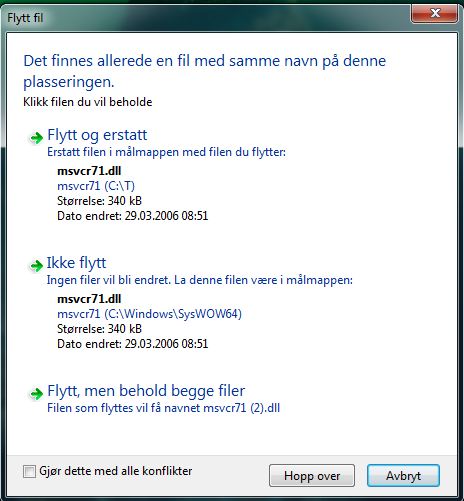
    I've got a problem when I upgrade SAF 5. I have one file that windows not will overwrite. It is a file named "msvcr71.dll". It is in C:\Windows\SysWOW64.

    I've tried several times with the same outcome: Not able to overwrite this file.

    I'm using a Norwegian Win 7 Home Premium 64bit.

    Enclosed is SAF log file and a screen shot in Norwegian. If you need it to be translated please give me a notify.

    I've bought and installed PowerDVD 10 Ultra. And that is the only codec I've got on the computer. It's the same after re install and when I do an upgrade.

    A
     

    Attachments

    • Skjermbilde2.JPG
      Skjermbilde2.JPG
      46.1 KB

    Users who are viewing this thread

    Top Bottom