Codecs SAF v6 (based on LAVF) (4 Viewers)

hoborg

Portal Pro
June 13, 2008
4,413
1,644
Nový Jičín
Home Country
Czech Republic Czech Republic
Hoborg,
I think I found a problem/threat for saf.
I see during install I am asked to remove LAV filters extention. When I press Yes.. go ahead.. etc. it is all deleted and it works ok...
BUT.. It does seem to stay in the extension installer list. SO MP still thinkgs the LAV filter is installed. The danger here is if a user opens the MP extention installer and tells it to update everything.. LAV filter is updated as well, while it should not be installed because of SAF. I think this might be an issue.

Well, SAF does not do anything in MePo setting. I am not sure what i can do with that.
I think MePo updater should check if LAV is trully installed or not before updating.
 

hoborg

Portal Pro
June 13, 2008
4,413
1,644
Nový Jičín
Home Country
Czech Republic Czech Republic
Re: SAF v6.00 (based on LAVF)

Which means MONOGRAM is no longer an option in config.

This might be good - for some (UK DVB-T2 users, I guess), but for others I think dropping this in unlocked is not a good idea. I found DivX AAC to be less capable than Monogram using DVB-T from Norway.

And what about LAV audio decoder?
I hope one day there will LAV only audio decoder needed :)
Sorry, using LAV corrupts image for me. DivX AAC works OK. Why not just keep the Monogram?
You mean LAV audio decoder corrupt image???
 

bazfletch3

Portal Member
March 14, 2011
16
0
Home Country
Hi all

Please bear with me as I dont realy know how to describe my problem correctly!

I have SAF 6 installed on my HTPC (intel IGPU), which I use to playback basicaly everything via MP. I also have TMT5 installed as a MP plugin to allow for "regular" Blu Ray disk playback.

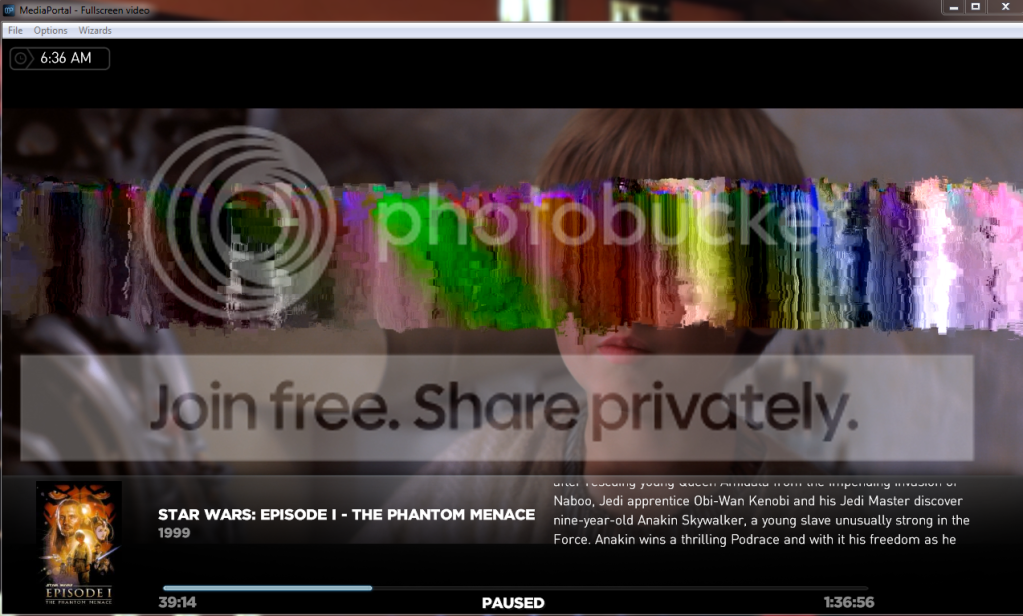
If I rip a Blu Ray to my HTPC I use MakeMKV and have always had faultless playback using MP and SAF 6. I recently ripped the Star Wars Blu Ray disks, and whilst watching the MKV rips I see "colour flashes" across the screen at different times.

If I use TMT5 to play back the rips, i get faultless playback.

Any ideas or tweaks i should try within the SAF setup to try and correct this?

I presume that there is a better description of "colour flash" but I hope it makes sense!

Thanks

Barry

Try to disable DXVA.


Hi Hoborg

Just to update on my issue, I tried disabling DXVA without sucess.

I've dont some more testing and I actualy have this problem on more Blu Ray rips than I first thought, but still not all of them.

Playback using MP (and effectivily using LAV splitter, LAV Audio Decoder & FFDShow Video Decoder - I double checked with Graphedit to be sure), I have the fault.

Playback using MPC HC, with the same codecs in use, I still have the same fault.

Playback using Arcsoft TMT5 I have no issues.....

Below is a screen snapshot during playback to better show what Im seeing.....

Capture.png


Any ideas??.....

Cheers

Barry
 

hoborg

Portal Pro
June 13, 2008
4,413
1,644
Nový Jičín
Home Country
Czech Republic Czech Republic
bazfletch3:

Please try this:
Check if you have SAF tools installed - if no, reinstall SAF and enable tools durning install.
After SAF install, restart your system.
START-SAF-Tools-Graphstudio, then drag and drop your video inside graphstudio.
Then hit play.
If you have the corruption, take screenshot again including graph and post it here (with SAF LOGs too).
 

EddiePropane

Portal Member
February 26, 2012
16
2
45
Home Country
England England
Hi all,

This thread is quite long and I found it searching in here and on google and there are threads I found for the other HTPC software where thishas been implemented or is about to be (http://forum.xbmc.org/showthread.php?tid=96916&page=13) for a way to set AV delays in MP per refresh rate due to AV Sync issues introduced by TV processing - I have tried MPAR beta which helps a bit on 24hz but still way out on 50z.

I have an LG TV which has a different AV delay depending on refresh rate 24hz (~100ms) and 50hz (#250-280ms) respectively due to processing the image.

My Sony AMP has an AV Delay feature but it a general options for all inputs which is not suitable as 60hz gaming etc is in sync and not needed to be used on my Panasonic BluRay player as that get's it in sync ( I hoped LAV would but the AV/Sync option there has makes no difference when I thought it would work like the BluRay player).

There were mentions of this in the early pages of the thread, around page 28-30 about the problem but scanning through for specific info is quite hard and the only fix I found was someone advising they set it in their amp which is not acceptable.

So basically I'm asking is there a way to set delay based on refresh rate?

Cheers, Bob.
 

bazfletch3

Portal Member
March 14, 2011
16
0
Home Country
bazfletch3:

Please try this:
Check if you have SAF tools installed - if no, reinstall SAF and enable tools durning install.
After SAF install, restart your system.
START-SAF-Tools-Graphstudio, then drag and drop your video inside graphstudio.
Then hit play.
If you have the corruption, take screenshot again including graph and post it here (with SAF LOGs too).

Apologies Hoborg - Im a moron!

Not fully understanding DXVA, I hadnt disabled it at all.

I swapped my MP config to have H.264 video files set to the standard ffdshow codec, not the DXVA version; and all not plays fine. So im presuming that this is what you meant in the first place!

Cheers

Barry
 

andydixon

Portal Member
July 11, 2005
37
1
Christchurch, New Zealand
Home Country
New Zealand New Zealand
I've recently reinstalled Windows (upgraded from XP to 7 64 bit) and started using SAF 6.0.9 with Mediaportal 1.2.2, set up to use "FFDShow DXVA video decoder" as the H.264 decoder under "Videos codecs". Video Zoom in MP has the default set to normal.

I have a number of MKV files where the pixel aspect ratio is different from the playback aspect ratio. I'm not sure of the correct terminology here, but for example in Mediainfo it shows the video details as 540x570 (4:3) for one of these files. I want to video to playback in MP at 4:3 but it plays as 540:570. These files played at the correct aspect ratio with my old Win XP install, so I'm guessing there is a setting somewhere that I haven't got right. I've looked in the setting for FFDShow and LAV splitter, but can't find anything that seems to be related to aspect ratio.

I have the same problem when playing back these files using the MPC-HC as installed by SAF. MPC-HC properties shows the video as 540x570 (4:3). If I go View -> Video Frame -> Override aspect ratio and change the setting from "Default" to "4:3" then the video is played correctly.

Can anyone give me an ideas for what might be wrong?

Thanks a lot
Andy
 

hoborg

Portal Pro
June 13, 2008
4,413
1,644
Nový Jičín
Home Country
Czech Republic Czech Republic
I've recently reinstalled Windows (upgraded from XP to 7 64 bit) and started using SAF 6.0.9 with Mediaportal 1.2.2, set up to use "FFDShow DXVA video decoder" as the H.264 decoder under "Videos codecs". Video Zoom in MP has the default set to normal.

I have a number of MKV files where the pixel aspect ratio is different from the playback aspect ratio. I'm not sure of the correct terminology here, but for example in Mediainfo it shows the video details as 540x570 (4:3) for one of these files. I want to video to playback in MP at 4:3 but it plays as 540:570. These files played at the correct aspect ratio with my old Win XP install, so I'm guessing there is a setting somewhere that I haven't got right. I've looked in the setting for FFDShow and LAV splitter, but can't find anything that seems to be related to aspect ratio.

I have the same problem when playing back these files using the MPC-HC as installed by SAF. MPC-HC properties shows the video as 540x570 (4:3). If I go View -> Video Frame -> Override aspect ratio and change the setting from "Default" to "4:3" then the video is played correctly.

Can anyone give me an ideas for what might be wrong?

Thanks a lot
Andy
Hi.
Can you please cut small sample and post it here ? Use MKVMerge to do it.
 

AndrePrins

Portal Member
February 21, 2012
40
3
54
Almere-Stad, Flevoland, Netherlands
Home Country
Netherlands Netherlands
I have an issue with SAF/LAV/ffdshow. I use an Onkyo 609 receiver (which is broken at the moment) and I have some TV series with DD 2.0 sound. First I thought the Onkyo was the issue, but now I have the same issue when directly connected to my TV. The problem is the audio. When it's really loud it started crackling a lot. I tried switching between ffdshow audio and LAV audio, but there is not change. I'm suing MediaPortal 2.2.3. Audio is through hdmi. I hope anyone has an idea how to fix this. I don't have any sound issue with 5.1 DD or DTS.

Thanks.
Andre
 

Users who are viewing this thread

Top Bottom