Ongoing Samsung Series 6 52 inch and Catylist Control Centre Optimum Settings (4 Viewers)

Spragleknas

Moderator
  • Team MediaPortal
  • December 21, 2005
    9,471
    1,822
    Located
    Home Country
    Norway Norway
    I just saw that you allready had the "Just scan" feature figured out:oops:

    Anyway: What kind of graphic card are you uindg?
    (Please fill in the "My system" to show systemspecs)
    How to show System Specs

    I just had similar problems using ATi's HDMI, and found that if I used it in "DVI mode", all was good!
     

    gperkinson

    Portal Pro
    October 28, 2008
    470
    3
    Auckland
    Home Country
    New Zealand New Zealand
    Hi,

    I have a Gigabyte RX385512H Radeon HD Graphics card. I had my spec's loaded into MP, but not visible - I now have it visible to all users - thanks.

    Not sure about the "DVI mode", but I changed all the settings in the DVI folder, but still blury on a 1080i (interlaced) channel.

    Anyhow, look forward to any suggestions you may have.

    Regards

    Graham
     

    gperkinson

    Portal Pro
    October 28, 2008
    470
    3
    Auckland
    Home Country
    New Zealand New Zealand
    Hi,

    What version of catalyst control center are you on? I do not see a TV sharening option?

    Graham

    Hi,

    Found out that the CoreAVC configuration did not update properly for "Hardware De-Interlacing - I clicked OK instead of Apply. Still have motion blur however on TV3 and C4, so keen to get this sorted - I'm wondering whether there are any other tweaks?

    Graham

    Hi,

    Any thoughts now that you have my card details?

    I searched for driver updates and noticed on the ATI site there was an update released this month. This included catalyst control center and the driver. The latest catalyst control center version is 9.3 and looking at the one I have now, it mentions 2007.10 etc etc. Always a bit nervous doing version updates like this incase it screws up everything. Any thoughts on the above?

    Regards

    Graham

    Hi Again,

    Another issue I noticed with the underscan at almost 0 - I seem to have my picture slightly cutoff at the top and bottom. Might be my version of catalyst control center? I have a comment about this added on this forum.

    Any thoughts appreciated.

    Graham
     

    gperkinson

    Portal Pro
    October 28, 2008
    470
    3
    Auckland
    Home Country
    New Zealand New Zealand
    Hi Spragleknas,

    The only issue I have now with my display setup is that the underscan setting cuts off some of the picture at the top and bottom of the screen. I cannot see any other settings in the ATI Catalyst Control Center or on my Samsung TV to solve this.

    As mentioned, I have a Gigabyte RX385512H Radeon HD Graphics card.

    I'm wondering whether a newer version of ATI Catalyst Control Center might give the setting I need? I'm on Version 2007.1016.2138.36845 of CCC and Version 2.0.50727.3074 of Microsoft NET Framework which came with the machine. I see on the ATI website there appears to be a much later version - only about a few weeks old. Since we can live with what we have now, I'm a little reluctant to update the version, so it would be good to know any risk around updating this if anyone has any experiances.

    Any help appreciated.

    Regards

    Graham
     

    SitheSly

    Portal Member
    August 12, 2008
    46
    2
    Home Country
    England England
    I have a series 6 40" with my HDPC plugged in via HDMI.

    If you look in the tv manual it says pc's should be plugged into HDMI 2.

    I update the ATI software / drivers as i see new ones without many problems, there were problems with the last few out last year, but so far everything's been ok this year.

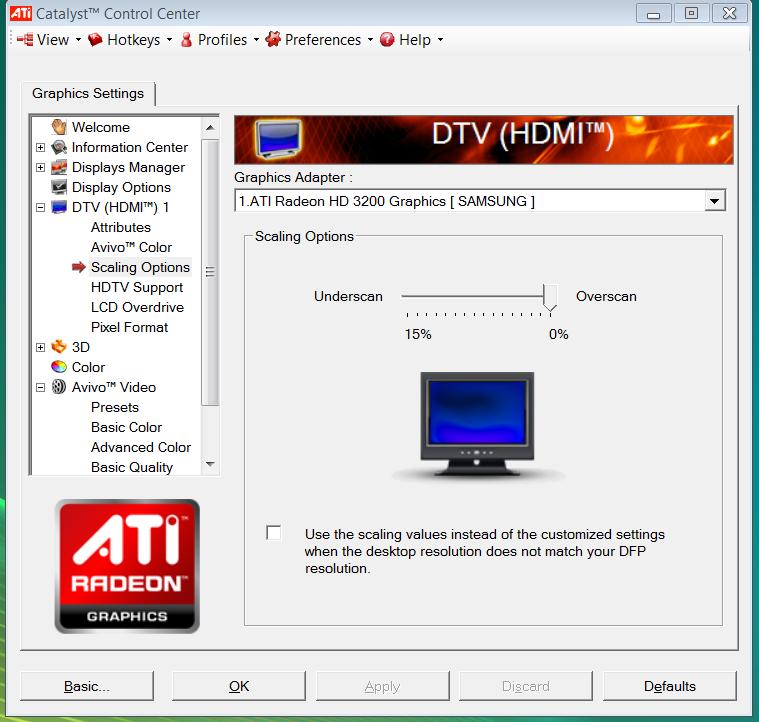
    ATI scaling to 0 & 1:1 pixel mapping. Or whats the point of having 1920 x 1080 screen :)

    Hope this helps

    Si
     

    gperkinson

    Portal Pro
    October 28, 2008
    470
    3
    Auckland
    Home Country
    New Zealand New Zealand
    :)Hi Sithesly,

    I appreciate the reply - thanks.

    I'm using HDMI 2 (as you have pointed out) however, my card only has DVI out and not HDMI out. I therefore run the sound into the TV separately via the soundcard output and it all works fine. I wonder whether having the video output from DVI matters?? ... I wouldn't have thought so?

    You mention you update the ATI software drivers. Have you had any issues doing this? How do you do this i.e. through the properties and select the "update driver" box or download them? I'm really nervious about doing this!! Any pointers or helping with my confidence appreciated. Interesting you mention some had issues, although mine seem to be older than the machine??

    Totally agree with your 1:1 pixal mapping comment :)

    Could I please ask you to drop a screen shot of your settings. As mentioned, to change the scaling to fill the screen, I have issues with the picture being cutoff at the top and bottom. Surely I should just be able to keep the defaults and the picture SHOULD fill the screen - very frustrating!!

    Would appreciate any additional help and screenshots. Also keen to understand what version you are currently on and how you updated the drivers.

    Regards

    Graham
     

    SitheSly

    Portal Member
    August 12, 2008
    46
    2
    Home Country
    England England
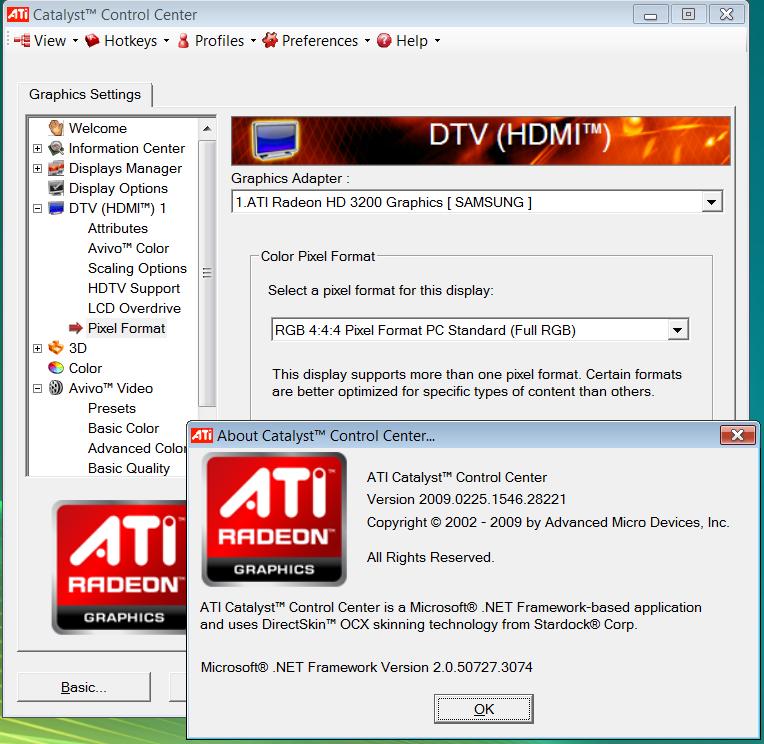
    i have attached 2 images of my ccc settings. To get new drivers you can either click on the 'go to ati' option under help or go to the website directly: Graphics Drivers & Software.

    Then follow the guide to get the correct version. You can always uninstall and reuse the cd that came with your card if everything goes wrong, i know there are two train of thoughts with drivers, 1 if it aint broke dont fix it and 2 if it was not better than the last version why did they make it. I always go with option 2

    i am not an expert on ati drivers but i belive that there are better interlaced options with the later versions ( i have an intergrated graphic on my mobo, so do not get all the options)

    try to get the basics set up first, if all setting are correct then there will be no scaling, no boarders and no blurring on a desktop screen, then try setting up a progresive picture again with the same requierments and finally on to interlaced. 1080p is less intensive than 1080i.

    There is a guide over on avforums which i found really helpful for setting up my htpc and mediaportal, under computer --> home cinema pc, follow the sticky at the top, theydon's work is really good and probably of more help than me.

    Stick with it, it is worth while in the end.

    cheers
    Si
     

    Attachments

    • ccc scaling.jpg
      ccc scaling.jpg
      77.8 KB
    • Driver version.jpg
      Driver version.jpg
      103.2 KB

    gperkinson

    Portal Pro
    October 28, 2008
    470
    3
    Auckland
    Home Country
    New Zealand New Zealand
    Hi Again,

    Many thanks for the note - much appreciated.

    I definately do not have the "Pixal Format" option in my version, so that's interesting. Also interesting about your comment around dealing with the interlacing better in later versions. I certainly get blurring at times.

    Sounds like it's worth giving it a shot as you say. Will let you know the outcome once I get a chance to look at it.

    Thanks again.

    Regards

    Graham
     

    kiwijunglist

    Super Moderator
  • Team MediaPortal
  • June 10, 2008
    6,743
    1,754
    New Zealand
    Home Country
    New Zealand New Zealand
    Don't worry about interlacing etc, just get 1:1 pixel mapping going first. I recommend doing what is stated above then running a 1920x1080.gif pixel map to see if you have 1:1.

    I assume you run DVI->HDMI adaptor
    Use HDMI Port #2 on TV
    Set resolution to 1920x1080x 60Hz(P) aka 1920p60 (or use 50hz if u are european)
    Set overscan to zero
    Change Pic mode to "Just scan"
    Load this image file -> http://tigerdave.com/images/testpatterns/1920x1080_overscan.gif
    View image as fullscreen slide show

    ...

    NB I assume your Samsung LCDTV is 1920p HD and not HD Ready, if it's "HD Ready" it can't do 1:1 mapping of 1920x1080 bc it doesn't have that many pixels.
     

    Users who are viewing this thread

    Top Bottom