SPDIF and analog stereo at the same time (1 Viewer)

riadmelb

Portal Pro
July 9, 2006
218
7
Melbourne
Home Country
Outputting to spdif and analogue simultaneously works only as L+R stereo.

You cannot output 5.1 channels through spdif and down-mix it to L+R to analogue simultaneously, it's hardware limitation I think.

ok, but can I change the setting for spdif or analog output within MediaPortal?
Otherwise I would have to hop into windows and change it there.

I am looking for a solution inside mediaportal that i can do it just with the IR-remote.

Thx,
duffy6

Not possible within MP because it's a codec thing. Maybe you can call a batch file from MP, and this batch file changes the codec setting (in the registry?).

I went through same limitation last year and then I gave up. Now I listen through receiver all the time.
 

duffy6

Portal Pro
November 15, 2007
56
1
Not possible within MP because it's a codec thing. Maybe you can call a batch file from MP, and this batch file changes the codec setting (in the registry?).

I went through same limitation last year and then I gave up. Now I listen through receiver all the time.

:(

Hey developers - what about this feature in a future release?


Does anyone know if this is possible in Linux (e.g. MythTV)?
I mean the codec-change-thing not the downmix issue (which seems to be a hardware problem)

duffy6
 

1stdead

Portal Pro
February 1, 2008
1,089
139
Copenhagen
Home Country
Denmark Denmark
how do you do that? do you use a script/batch or are you changing these settings manually via the mp-configuration?

a script/batch which changes the default directsound device in windows would be an ease.
or changing the selected audio renderer/decoder within he mp configuration...

How do i make that script/batch -thing.. I want to change between spdif/hmdi output and I am looking for a solution
 

yahoodee

MP Donator
  • Premium Supporter
  • July 17, 2006
    64
    6
    Frankfurt am Main
    Home Country
    Germany Germany
    atm my system-default is set to spdif; i've configured two sets of renderer/decoder inside mp. i use the cyberlink decoder (set to spdif-output) with my spdif soundcard renderer and the mpa decoder (set to downmix stereo) for use with ati-hdmi renderer (for use with my tv).

    so i have two things to do when i want switch between spdif and hdmi: inside mp i navigate to the configuration menu -> tv/movies etc and change the sound device + renderer.
     

    1stdead

    Portal Pro
    February 1, 2008
    1,089
    139
    Copenhagen
    Home Country
    Denmark Denmark
    atm my system-default is set to spdif; i've configured two sets of renderer/decoder inside mp. i use the cyberlink decoder (set to spdif-output) with my spdif soundcard renderer and the mpa decoder (set to downmix stereo) for use with ati-hdmi renderer (for use with my tv).

    so i have two things to do when i want switch between spdif and hdmi: inside mp i navigate to the configuration menu -> tv/movies etc and change the sound device + renderer.

    Thank you, will try that, hope that feature also is present i my skin :)
    Testing in a bit..


    Update:
    1) Movie --> DTS/AC3 --> ffdshow --> Stereo --> HDMI --> TV <-------------- WORKS
    2) Movie --> DTS/AC3 --> AC3filter --> Sorrund <-------------- WORKS
    By changing setting i MP:
    1) Audio codec "ffdshow" ; Audio Render "Realtek HDMI OUTPUT (ATI HDMI Audio)
    2) Audio codec "AC3Filter" ; Audio Render "Realtek Digital OUTPUT (ATI high defintion Audio)


    Music:
    It uses the default soudn device and isn't affected by the changes above. How do I make it accect this aswell?
     

    hansdegit

    Portal Pro
    May 18, 2005
    200
    0
    53
    Schagen, The Netherlands
    Home Country
    Netherlands Netherlands
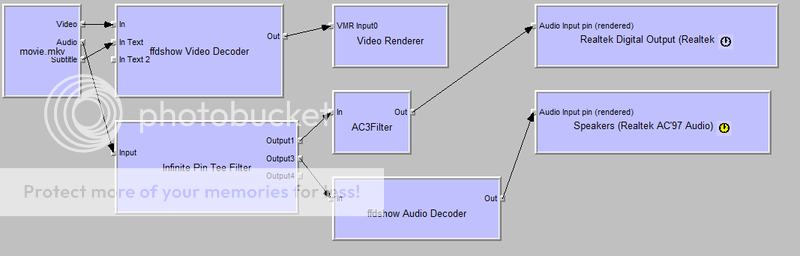
    I would vote for something like this:
    382194464_cc0381387b_o.png


    Is technically feasible to make this happen?
     

    Users who are viewing this thread

    Top Bottom