Streamed MP: Community Mods & Bug Fixes (15 Viewers)

Status
Not open for further replies.

o0X0o

Portal Pro
August 19, 2007
76
0
Brisbane
Home Country
jamest26 - does MovingPictures do what you want now? You started by querying MyFilms, so thought I would chime in with why I still prefer it over MovingPictures at this point:

  1. I can more easily control/edit the content of the movie listing (with AMC).
  2. As well as synopsis, you can have reviews (and there are a huge range of scripts for importing info)
  3. I have multiple HTPC's, and can ensure they all display the same info and behave the same way, because they can share the same movie database and images/fanart
  4. It supports a 'date' view which means I can view the newest movies added at the top fo the list - which is a GREAT feature when you have hundreds of movies! (I do believe something similar is on the roadmap for MovingPictures though)
  5. There is the 'AMCupdater' to enable the auto-import of movies (much like MovingPictures) if this feature is important to you.
  6. MyFilms supports Fanart, as well as additional images you can access if desired.
  7. The movie list for MyFilms displays more results at one time (within StreamedMP anway...), so easier/faster to locate a movie from a long list.
  8. MyFilms has been around for years, and I find it very stable
  9. MyFilms supports playlists which is great for multi-file movies, or for tying extra's or alternative endings to the main feature

Having said that, MovingPictures is being heavily developed and I haven't used it lately. Just my 2 cents on what works for me.

If you need help with setting up MyFilms, let us know.
 

jamest26

Portal Member
February 14, 2008
12
0
Home Country
United States of America United States of America
Hi.. I saw the pictures of the Batman movie posted so I was curious how to get that working with Streamed MP. Moving Pictures is currently working fine now. The one problem I had was font sizes and overlapping of text. Since I'm using 1920 x 1080 resolution, I'm wondering if that could be the problem. I installed the same skin on my laptop set to 1280 x 720 and that seems to be fine.

Does anyone know how to move the total move page text a bit more to the right? I've been struggling to figure out how to do that. Went through most of the xml files and can't seem to find it.

I will definitely try MyFilms if I have more time. Currently, I want to enjoy it first. I've been spending way too much time tweaking the interface.
 

Koschel

Retired Team Member
  • Premium Supporter
  • April 6, 2005
    1,044
    68
    Stuttgart
    Home Country
    Germany Germany
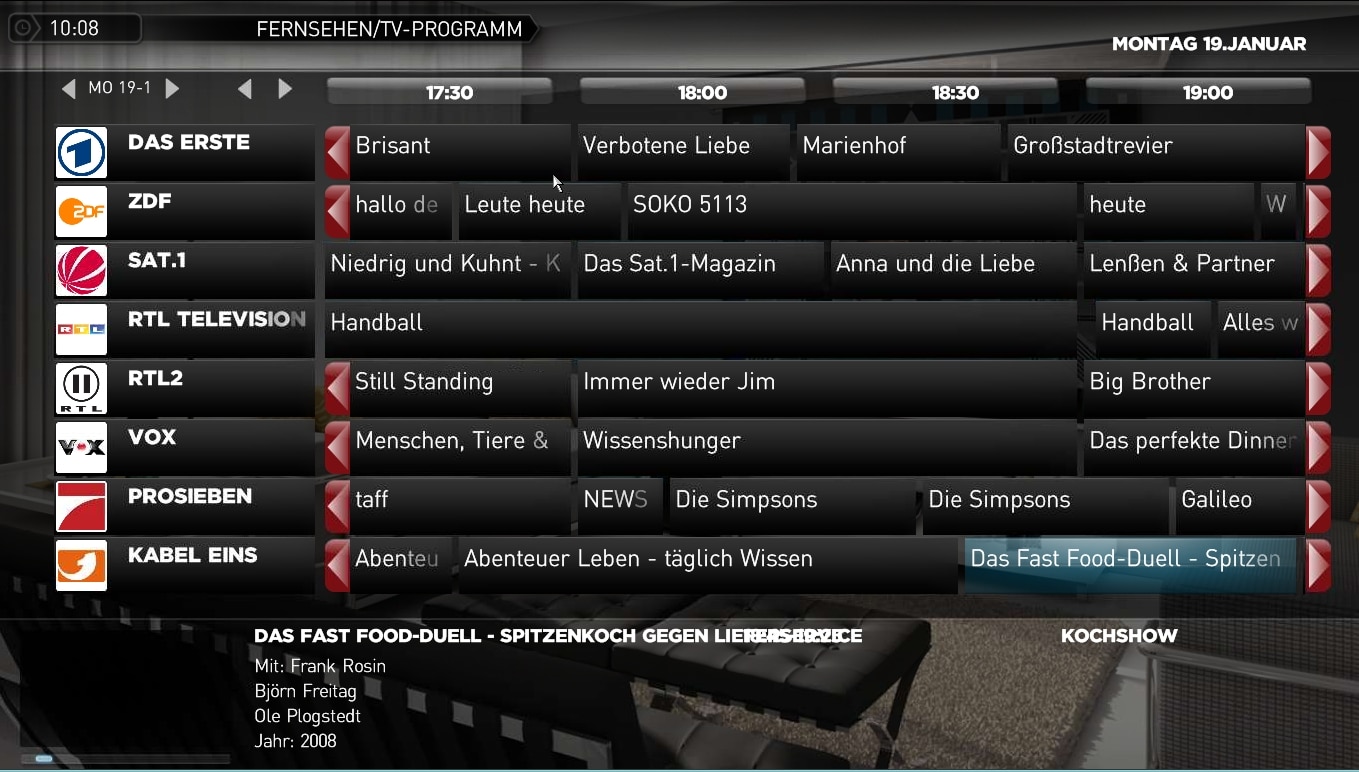
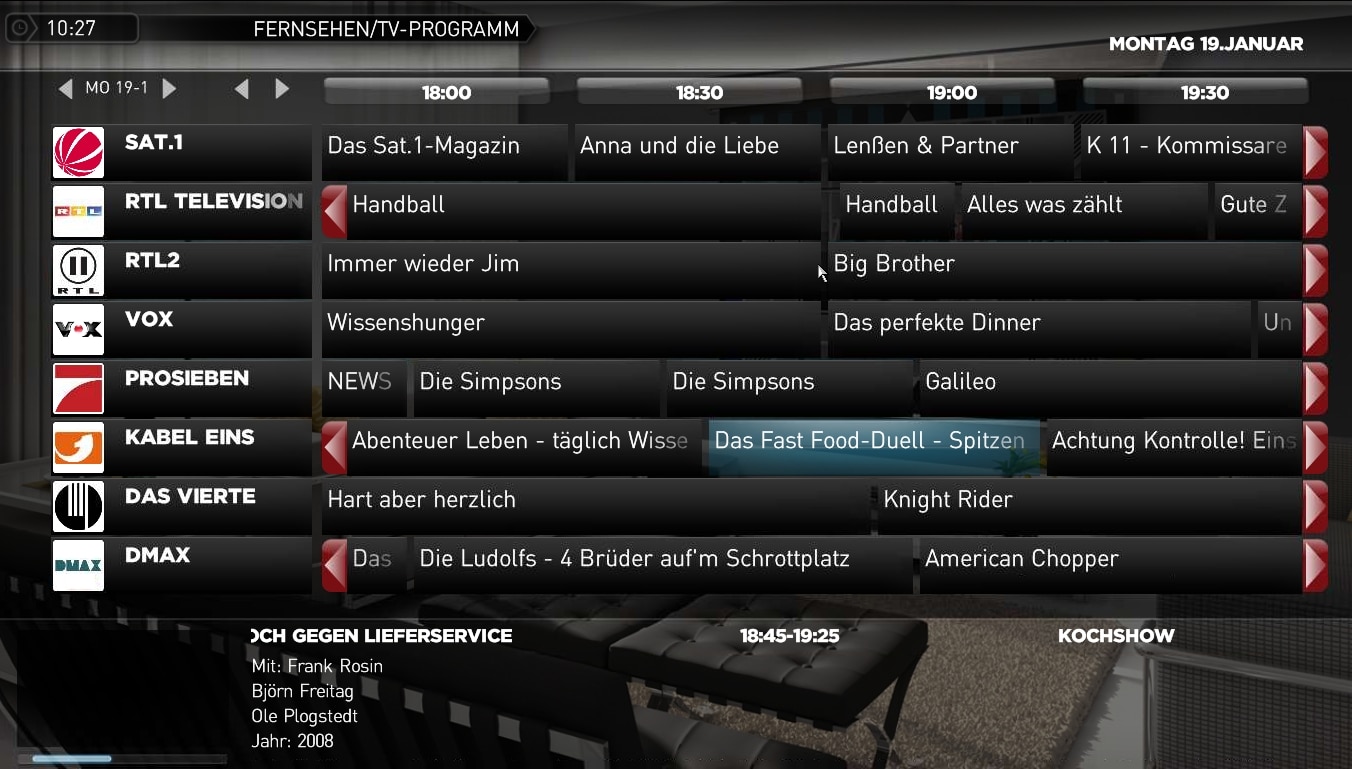
    Fix for tvguide.xml and tvprogram.xml

    Attached are two fixes. One for mytvguide.xml, now with scrolling program title (see pic) and for mytvprogram, overlay was overlapping EPG-info
     

    Attachments

    • tvguide-1.jpg
      tvguide-1.jpg
      535.4 KB
    • tvguide-2.jpg
      tvguide-2.jpg
      517.8 KB
    • mytvprogram.xml
      30.6 KB

    tobcro

    Portal Member
    September 4, 2007
    16
    2
    Home Country
    Sweden Sweden
    Not meaning to be unpolite, but at least I would be happy if this thread could stick to community mods & bug fixes :D
     

    igormaiden

    Portal Member
    February 24, 2008
    43
    14
    Home Country
    Italy Italy
    i can't show the fanart in TVSeries.......i enable it
    that name should I give the backgorund images?
    where are the background images of tvseries, in that folder?
    thanks
     

    explodedk

    Portal Pro
    December 27, 2008
    265
    20
    Copenhagen
    Home Country
    Denmark Denmark
    igormaiden. the backdrops should be placed in thumbs/fan art/ they should have a name with the series id (e.g. 73255_house.png)
    i don't know if all skins have the posibility to download fanart within mediaportal, but in streamedmp and mediastream you can right click the mouse and choose fanart, and it gives you some to choose from.
     

    whiskaz

    Portal Member
    February 1, 2008
    39
    1
    I'm a little confused as to why TVSeries has an option to config the fanart file but only seems to work when you name the file <seriesid>.jpg?

    For example, MTV shows don't seem to have any fanart so I grabbed a generic MTV logo to use. I tried saving it as mtv.jpg and changing the fanart information on each of the shows but that doesn't work. Copying it and naming it after every seriesid worked.

    There's some other flakiness w/ fanart that I'm not sure is related to TVSeries or the SMP skin.
     

    explodedk

    Portal Pro
    December 27, 2008
    265
    20
    Copenhagen
    Home Country
    Denmark Denmark
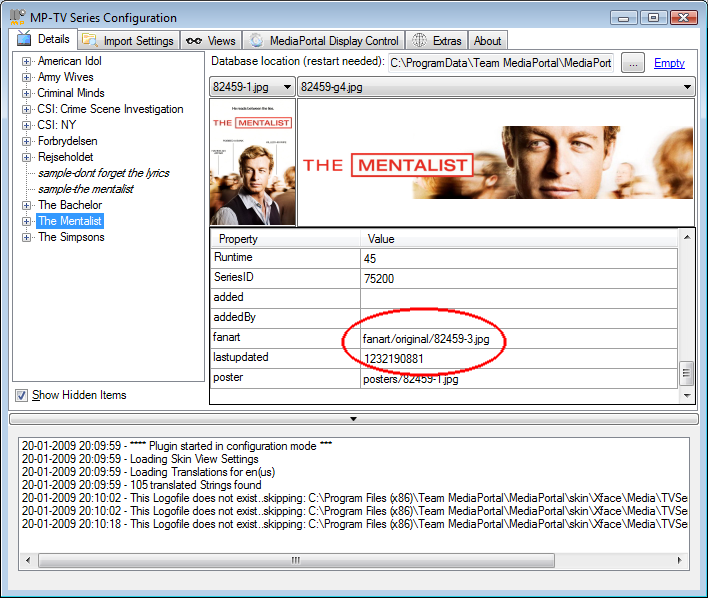
    if the show doesn't have an id you can manually add a fanart, but you have to set it in the mptv-series configuration. see attached pic.


    edit: hmmm that didn't work... im in on this for a listen :)
     

    Attachments

    • fanart.png
      fanart.png
      95.2 KB

    whiskaz

    Portal Member
    February 1, 2008
    39
    1
    if the show doesn't have an id you can manually add a fanart, but you have to set it in the mptv-series configuration. see attached pic.


    edit: hmmm that didn't work... im in on this for a listen :)

    Yea, it only seems to work if the fanart file is named after the series id... not something like "mtv.jpg"

    As far as I know, fanart doesn't autod/l either, right? One other bug I noticed (and again, it may be with TVSeries, so I apoligize if that's the case, I haven't tested other skins): if you download fanart via the context menu, it doesn't show up until you restart MP. Sometimes exiting the menu after d/ling fanart, you'll get fanart from another series.
     

    mortstar

    MP Donator
  • Premium Supporter
  • January 30, 2008
    414
    41
    Home Country
    England England
    After finally getting Artist image retrieval from LastFM working, I've been using the My Music section a lot more. Because of this I've come up with a couple of mods which I thought I'd share.

    Firstly, LastFM has artist images in all different shapes and sizes, so I've added the keepaspectratio and centered tags to make sure the pictures look how they are supposed to. The image area was a bit too small for images that were landscape style, so I increased the width of image area. You'll need the mymusicgenres.xml to get this update....so you get views like this:
    yc7niqdzbmmiuf6h9qe_224410.png

    WARNING: I've changed the 'Radio' link in the hidden menu to jump to LastFM not DVB-Radio section

    Secondly, in the Now Playing section, I really dislike the random equaliser so I have removed that. I've also added the keepaspectration and centered tags to ensure that the images that display (album art and artist image) are displayed in the correct aspect. You'll need the MyMusicPlayingNow.xml to get this update....so that the Now Playing section looks like this:
    m6whpsajnn2n7gtatpe_225306.png

    WARNING: As mentioned above - the random EQ thingy is removed from this xml
     

    Attachments

    • mymusicgenres.xml
      30.6 KB
    • MyMusicPlayingNow.xml
      30.6 KB
    Status
    Not open for further replies.

    Users who are viewing this thread

    Top Bottom