
Stutter problem with YADIF deinterlacing in LAV filters (1 Viewer)

somy

Portal Pro
March 7, 2010
156
4
Denmark
Home Country
Denmark Denmark
Hi Tony,
My settings look the same as yours except I don't mark 10bit and 16bit output which shouldn't matter I guess.
I never understand the need for noStopMod TsReader, what are the benefits comparing to the TsReader in standard installation?
Thank again!
 

somy

Portal Pro
March 7, 2010
156
4
Denmark
Home Country
Denmark Denmark
LAV's YADIF implementation is single thread only. Your CPU has multiple cores so it will already hit the performace limit on somewhere near the 25 to 30% CPU usage (depending how much the other threads than the other threads than where the YADIF processing gets done are using CPU.
Hi tourettes,
I'm not so sure about it for two reasons:
1) The recorded 1080i TS file played smoothly in MPC-HC with LAV decoders and Gabest splitter.
2) As my log indicates, for some non-HD channels I also got a lot of dropped frames.
 

tourettes

Retired Team Member
  • Premium Supporter
  • January 7, 2005
    17,301
    4,800
    Hi tourettes,
    I'm not so sure about it for two reasons:
    1) The recorded 1080i TS file played smoothly in MPC-HC with LAV decoders and Gabest splitter.
    2) As my log indicates, for some non-HD channels I also got a lot of dropped frames.

    If changing only the deinterlace method causes the dropped frames to appear then it is pretty clear sign that the CPU usage is just too high.
     

    Owlsroost

    Retired Team Member
  • Premium Supporter
  • October 28, 2008
    5,539
    5,038
    Cambridge
    Home Country
    United Kingdom United Kingdom
    Hi Tony,
    My settings look the same as yours except I don't mark 10bit and 16bit output which shouldn't matter I guess.
    I never understand the need for noStopMod TsReader, what are the benefits comparing to the TsReader in standard installation?
    Thank again!

    I don't know if it will make a difference, but 'noStopMod48' TsReader is more multi-threaded internally (and it buffers a bit more data) so it might help in situations like yours where one CPU core is heavily loaded.

    I agree with Tourettes - you are probably just running into single core performance issues - the evr.log shows that decoded & deinterlaced video frames are not arriving quickly enough at the renderer - that's what the 'Scheduling sample from the past' messages mean.

    Tony
     

    somy

    Portal Pro
    March 7, 2010
    156
    4
    Denmark
    Home Country
    Denmark Denmark
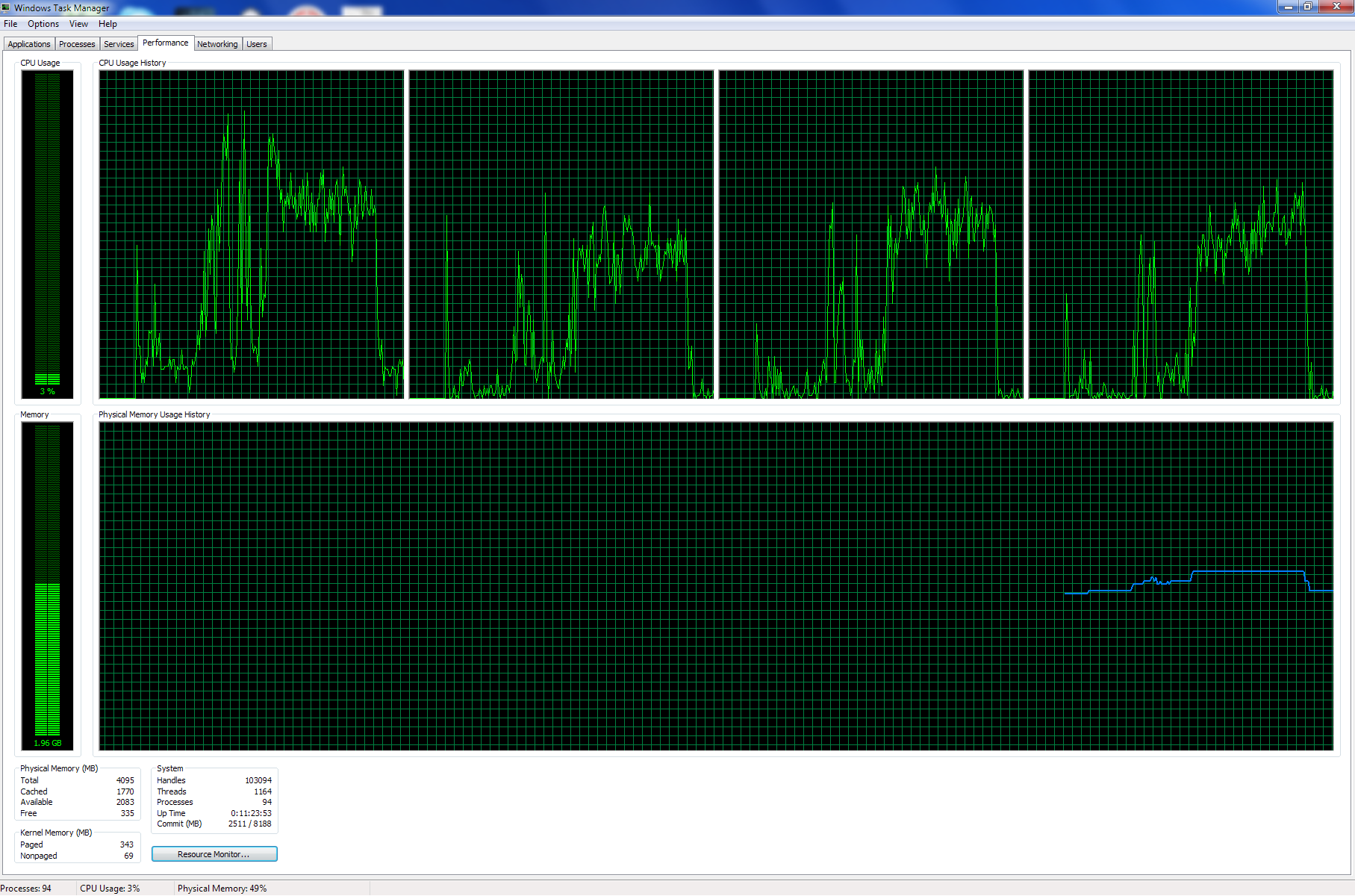
    I took a screenshot of my CPU usage during playback of the recorded TS file, there is no sign that CPU usage is too high, although one core is slightly higher than others.
     

    Attachments

    • cpu usage.png
      cpu usage.png
      89.2 KB

    tourettes

    Retired Team Member
  • Premium Supporter
  • January 7, 2005
    17,301
    4,800
    I took a screenshot of my CPU usage during playback of the recorded TS file, there is no sign that CPU usage is too high, although one core is slightly higher than others.

    Windows / OS scheduler will alter the thread execution between different CPU cores. So if there are 4 cores in CPU and only a single thread that is doing a lot of work you would still see multiple active CPU cores. From such CPU graphs it is really hard to tell what has been going on. One scenario could be that there has been two CPU hungry threads that have been both keeping one core 100% busy and the OS scheduler has been altering the load between 4 CPU cores. Of course it could have been something else as well, but if changing deinterlace mode to more CPU hungry one starts to drop frames then it is ore than 90% likely that the issue you are seeing is just simply lack of CPU resources.
     

    Owlsroost

    Retired Team Member
  • Premium Supporter
  • October 28, 2008
    5,539
    5,038
    Cambridge
    Home Country
    United Kingdom United Kingdom
    Well, I just did some interesting experiments using GraphStudio with TsReader.ax and LAV splitter (with LAV video decoder etc in both cases) playing an H.264 HD TV file. The PC is a quad-core Xeon X3430 (2.4GHz) running Win7 64 bit.

    With TsReader as the source filter, the CPU usage is heavily concentrated on one core - and it starts dropping frames, stuttering etc after 10 seconds or so.....

    With LAV splitter as the source filter, the CPU usage is fairly evenly spread across all four cores, and it plays smoothly.....

    So why is TsReader causing such a big change in how threads are scheduled across the CPU cores :confused: ??

    Tony
     

    somy

    Portal Pro
    March 7, 2010
    156
    4
    Denmark
    Home Country
    Denmark Denmark
    Well, I just did some interesting experiments using GraphStudio with TsReader.ax and LAV splitter (with LAV video decoder etc in both cases) playing an H.264 HD TV file. The PC is a quad-core Xeon X3430 (2.4GHz) running Win7 64 bit.

    With TsReader as the source filter, the CPU usage is heavily concentrated on one core - and it starts dropping frames, stuttering etc after 10 seconds or so.....

    With LAV splitter as the source filter, the CPU usage is fairly evenly spread across all four cores, and it plays smoothly.....

    So why is TsReader causing such a big change in how threads are scheduled across the CPU cores :confused: ??

    Tony
    That explains why the same TS file played fine in MPC-HC with LAV soft decoder+YADIF and Gabest splitter.
    Yesterday I tried the nonStopMod TsReader, and I found it was even worse than the original TsReader - more dropped frames during playback at all times. The most wired thing to me is, it didn't stress my CPU at all! My CPU fan runs quite during the playback of the TS file (with the original TsReader it at least raise my CPU freq to 2.5GHz). Anyway, I still think the bottleneck is not my CPU simply because it was never under stress with both TsReader.
     

    Owlsroost

    Retired Team Member
  • Premium Supporter
  • October 28, 2008
    5,539
    5,038
    Cambridge
    Home Country
    United Kingdom United Kingdom
    Did some more experiments etc......

    LAV video YADIF is single threaded.

    According to this - http://ffdshow-tryout.sourceforge.net/wiki/faq:multithreading - FFDShow YADIF is multi-threaded.

    You need to give FFDShow enough threads to play with (“Decoder options” → “Number of decoding threads”) e.g. 8 threads, and enable “Queue & misc” → “Queue output samples”, then it seems to load balance across the CPU cores quite well.

    Tried it with FFDShow r4371, RGB out, YADIF with frame doubling enabled and a 1440 x 1080i @ 50Hz recording (a football match, so plenty of movement) - it plays back smoothly on my i5-460M (dual-core with HT, so 4 pseudo cores) although it peaks at 70-80% CPU usage occasionally. Same recording using LAV video is hopeless - lots of jerkiness/freezing.

    Tony
     

    Users who are viewing this thread

    Top Bottom