Stuttering video after every TV power cycle; changing refresh rate fixes it until next TV power cycle (1 Viewer)

mrceolla

Portal Pro
December 11, 2010
167
24
Home Country
United States of America United States of America
I'm running MP1 as a client only on this:


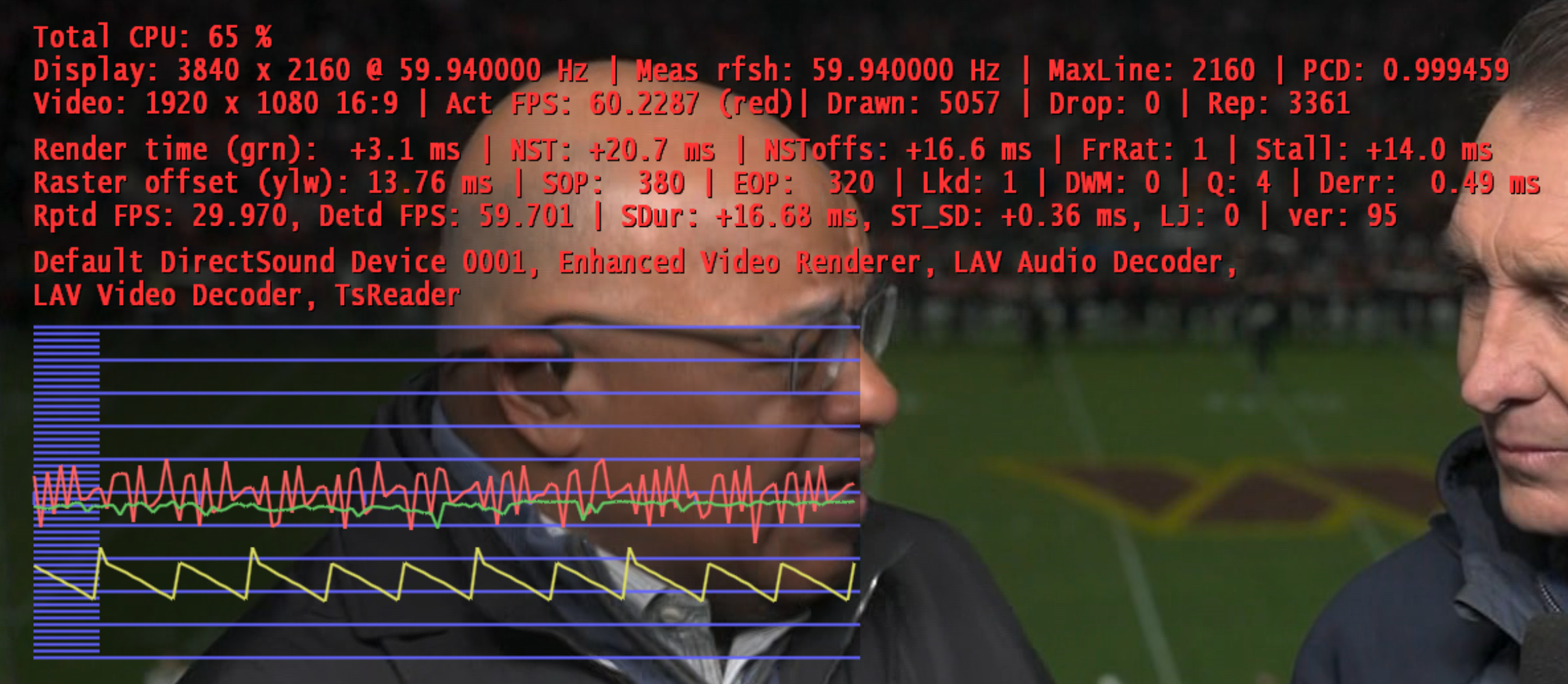
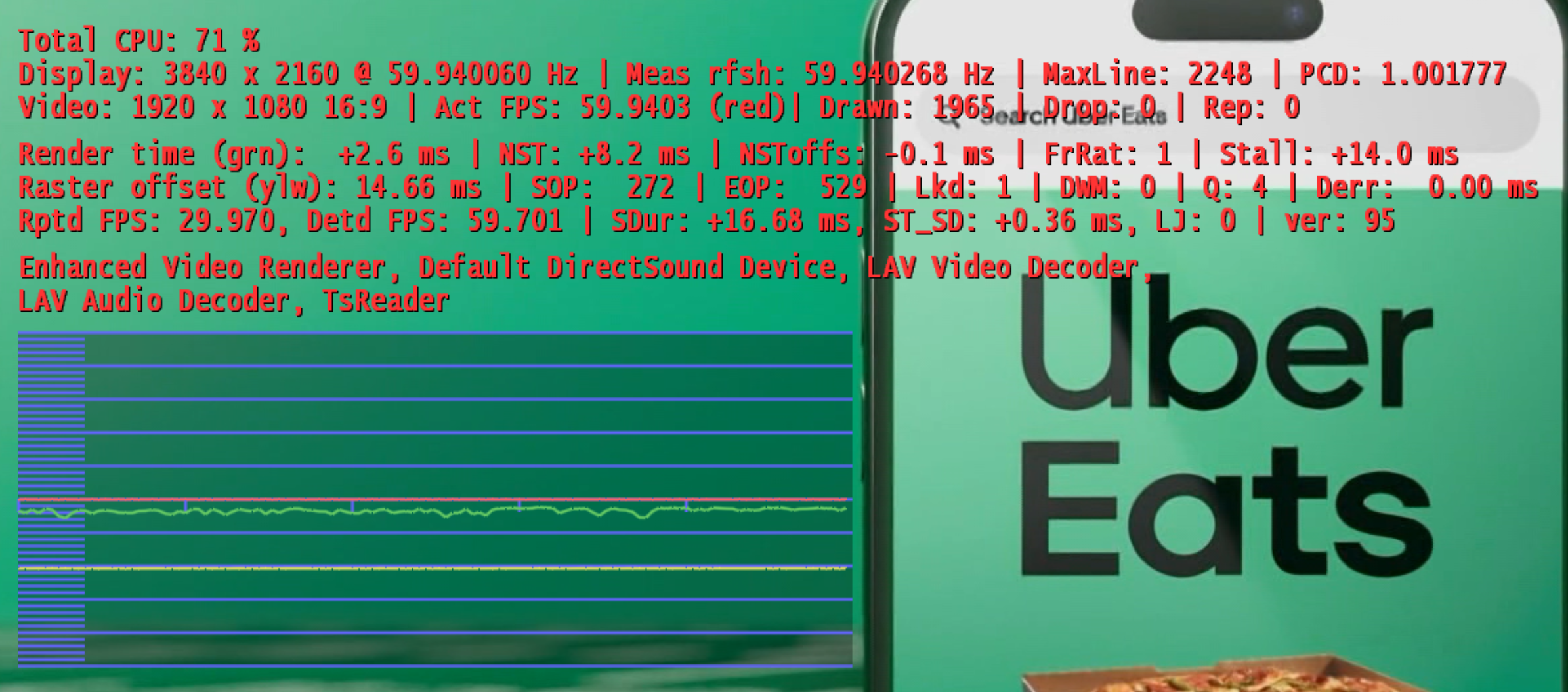
Every single time I power cycle the TV and start playing live or recorded TV from MP1 I get jittery video. Simply changing the refresh rate via Windows to 60Hz then back to 59.94 fixes the problem, even though the Shift-1 display doesn't show any change of the display refresh rate.

I can't for the life of me figure out what is going wrong here.

MP1 Dynamic Refresh Rated doesn't work for me for some reason, so that is of no help. It'll either incorrectly select 50 Hz or display no video at all when it is enabled.

I just now noticed a difference in the name and order of the renderers and decoders at the bottom of the attached Shift-1 screen grabs. Is that a clue?
 

Attachments
  • Screenshot 2025-11-30 191856.png
    Screenshot 2025-11-30 191856.png
    1.7 MB
  • Screenshot 2025-11-30 191712.png
    Screenshot 2025-11-30 191712.png
    2.1 MB
Last edited:

CyberSimian

Test Group
  • Team MediaPortal
  • June 10, 2013
    3,356
    2,278
    Southampton
    Home Country
    United Kingdom United Kingdom
    Every single time I power cycle the TV and start playing live or recorded TV from MP1 I get jittery video. Simply changing the refresh rate via Windows to 60Hz then back to 59.94 fixes the problem,
    I don't know what the problem might be, but I would suggest that you search the internet for:
    edid override inf
    The idea is that you create a custom INF file for your display that forces the particular set of properties that you want. I have never done this myself, so I don't know whether it works.

    The alternative might be to use a Gefen HDMI Detective. This is a small piece of hardware that is external to your PC, and so does not depend on Windows features, drivers, or software settings. In the UK it can be purchased for a very reasonable £214 (no doubt it is also available in the USA). Details here.

    -- from CyberSimian in the UK
     

    mrceolla

    Portal Pro
    December 11, 2010
    167
    24
    Home Country
    United States of America United States of America
    Thank you very much for your reply. I actually already have a Gefen HDMI Detective Plus but stopped using it because it doesn't support 4K. No, my live and recorded TV is not 4K but I do sometimes play 4K videos via MP. And I once created a custom inf file for an old monitor that stopped reporting EDID information, but I don't think that's the problem here. Windows seems to get that information correctly. Both Windows and MP report the display is still at 59.94, and Windows shows all of the supported resolutions and refresh rates correctly.

    I run MP server and client on a different, Windows 10 machine and don't have this problem. And I also did not have this problem on the same TV when using my older Minix NGC-1 mini PC which was also running Windows 10. The location having the problem has an LG B2 TV.

    I've attached a zip of a bunch of MP logs. Are there any clues in there? And what exactly is my screenshot with the sawtooth lines telling us?

    Do you have any recommended methods of testing if this is an MP problem or an OS/hardware problem? Any lightweight media player I can try? And any video files that would help me see this issue easily since the other player won't have the Shift-1 OSD?
     

    Attachments

    • mediaportal-logs.zip
      157.8 KB

    CyberSimian

    Test Group
  • Team MediaPortal
  • June 10, 2013
    3,356
    2,278
    Southampton
    Home Country
    United Kingdom United Kingdom
    I've attached a zip of a bunch of MP logs. Are there any clues in there?
    The file "MediaPortal-Error.log" shows that your MP server system and MP client system use different versions of MP. This is not explicitly supported. It may sometimes work, but in a situation where you are having problems, the first thing to do is update one or other system so that they are both running the same version of MP.

    There is also a preceding "GuiRssFeed" error, whose significance I don't understand. However, it immediately follows the load of the RSS Feed plugin, so I would suggest temporarily disabling that plugin just in case it is contributing to the problem.

    There is also a subsequent "Direct3D9" error D3DERR_DEVICELOST, whose significance I also don't understand, but may be a result of manually changing the refresh rate (so possibly expected).

    I am not an expert with the internals of MP, so I don't think that I can suggest any more things to try.

    -- from CyberSimian in the UK
     

    el Filou

    MP Donator
  • Premium Supporter
  • July 2, 2008
    130
    112
    Home Country
    Belgium Belgium
    So, you're power cycling the TV, but not putting the PC to sleep ?
    In General => Startup/Resume settings, try checking "Ignore Windows resolution/size changes"
    In Codecs and Render, try selecting the specific audio device rather than "Default DirectSound device"

    Just ideas, no guarantee this will do anything.
    If this doesn't work, I would try reporting to the Intel Graphics support, this looks like a GPU bug. If you notice, "MaxLine" also changes from 2248 to 2160, and the "Actual FPS" is all wrong (60.22)
     

    Users who are viewing this thread

    Top Bottom