Unhandled Exception when finishing installation without browser (1 Viewer)

Hi.
I only unchecked "Internet Explorer" in the Windows control panel and did not install any third party browser.
This did not remove IE, only the link in startmenu...

After updating my second client to MePo V1.7.1 the same error occurred
It did loot to me a bit as if this error is thrown while deploy tool is trying to download LAVF as it's not set to "installed".
 
Hi.
I only unchecked "Internet Explorer" in the Windows control panel and did not install any third party browser.
This did not remove IE, only the link in startmenu...
Actually this removes some of the binaries and links from the hard disk but keeps the installation files in the sxs folder. So every IE update will update the installation binaries to keep them up to date should the user decide to reinstall the tool.

Anyway, as this does not seem to be a browser related issue let's forget about this ;-)
Yes I set LAV to be updated, but according to the Mediaportal setup summary screen no LAV update was needed.
 
Hi HomeY,

thanks for looking into this.
But yes, I have the full .NET package (as .NET 4.5 replaces .NET 4). See my screen capture.
 

Attachments

  • Capture.PNG
    Capture.PNG
    8 KB
But yes, I have the full .NET package (as .NET 4.5 replaces .NET 4). See my screen capture.
MediaPortal is compiled against .NET 4.0 so that's what you need on a Windows 7 install, unless you upgraded your OS to Windows 8+ and didn't update your System Specs :D

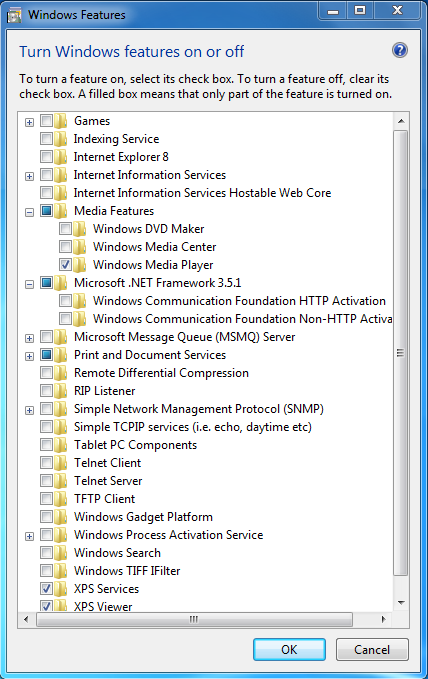
Can you post a screenshot of the installed Windows Features?
 
My system specs are up to date ;-)
.NET 4 will be updated to 4.5.x by Windows Update so there's nothing you can do about that.
As requested, the screen capture of the installed Windows Features
 

Attachments

  • Capture4.PNG
    Capture4.PNG
    58.6 KB
.NET 4 will be updated to 4.5.x by Windows Update
Have you tried installing the full .NET 4 package linked from the Release News?
Somehow all dlls have an assembly version from .NET 2.0
************** Loaded Assemblies **************
mscorlib
Assembly Version: 2.0.0.0
Win32 Version: 2.0.50727.5477 (Win7SP1GDR.050727-5400)
CodeBase: file:///C:/Windows/Microsoft.NET/Framework/v2.0.50727/mscorlib.dll
 
Hello HomeY,

yes, that's what I did - install .NET 4 and then let Windows update everything.
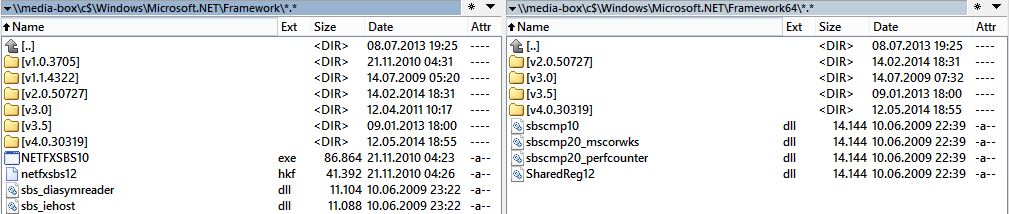
As you can see in the screenshot attached, I have every version available. So the installer/deploy tool is free to choose, whatever version it needs.
 

Attachments

  • NET_Files.JPG
    NET_Files.JPG
    60.8 KB

Users who are viewing this thread

Back
Top Bottom